
Skip to content
new ogbongeblog logo
  • Advertise
  • Blog
  • Contact

Simple Trick For Saving YouTube Video To Phones

March 29, 2012

·

how to
jidetheblogger Avatar
jidetheblogger

Few days back, I created a video on how to use 2go chat application on computer , uploaded it to YouTube and shared it on the wall of the BloggersLab Facebook group . Interestingly, Damilare Bakare commented that he downloaded the video to his phone using a simple trick he posted to his blog . I tried the trick and I was able to download the Youtube video to my Blackberry phone, hence decided to share with you. The trick will work for you in as much as you can access the internet with your mobile phone.

The simple trick is to use www.vuclip.com , a website where you can get all series of videos as far as it on the internet . You must know the exact title of the video you want to download for you to be able to easily download it to your phone via m.vuclip.com .

If you have the title of the video handy, just paste it in the search box on www.vuclip.com and hit the enter button. If the title of the video you entered is unique, you will see the exact video but if it is a common title, you might see lots of related videos which you will have to scan through till you see the exact video you are looking for.

Let’s assume you want to download “ How To Use 2go on Computer ” which I already uploaded to Youtube.com

==> Go to m.vuclip.com on your phone

==> Enter “ How To Use 2go on Computer ” into the search box and click enter.

==> Click on the video in the search results as seen below
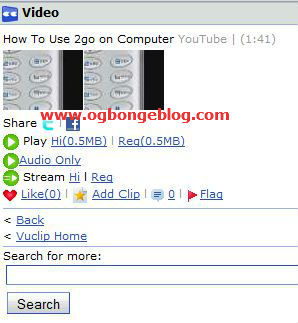
Vuclip

( click here for the direct link of the video on Vuclip.com )

==> Click either of the links beside the “Play” button

==> You will be prompted to save it to your phone.

==> Save and allow it to download.

==> Once downloaded, you can open it to watch the video.

That’s all.

I recommend ucweb browser for downloading on mobile phones .

Kindly let me know if the trick works for you.

Cheers.

Please Share :
YouTube

Like What You Read?

Sign Up to get similar articles delivered to your email inbox.

Leave a Reply Cancel reply

Your email address will not be published. Required fields are marked *

2 responses to “Simple Trick For Saving YouTube Video To Phones”

  1. Francis Avatar
    Francis
    March 29, 2012

    yes, the trick works, though have been using it for a while now. I have downloaded the 2go video too. Nice one there.

    Loading…
    Reply
    1. Jide Oguns Avatar
      Jide Oguns
      March 29, 2012

      Thanks Francis.

      Loading…
      Reply

WANT TO ADVERTISE?

Chat on WhatsApp

RELATED POSTS

  • How I Watch Nigerian Movies Online At YouTube.com
  • Latest Your-Freedom MTN Trick For Free Browsing On Computers(April,2010)
  • Latest OPERA MINI 5.2 Free Browsing Trick: January,2010 UPDATE

FEATURED


  • CREDICORP launches C.L.I.C.K.D. Scheme with FG’s 3MTT Programme, expanding affordable consumer credit for locally-assembled laptops and devices for digital workers

    CREDICORP launches C.L.I.C.K.D. Scheme with FG’s 3MTT Programme, expanding affordable consumer credit for locally-assembled laptops and devices for digital workers

  • What Happens to Your Online Accounts When You Die?

    What Happens to Your Online Accounts When You Die?

JOIN AI WEB DESIGN GROUP


  • AI Website Design Training Whatsapp Group by Jidetheblogger

    AI Website Design Training Whatsapp Group by Jidetheblogger

← Download 2go for Blackberry(version 3): Free 2go Chat with BIS
How To Add Privacy Policy to Blogger’s Attribution →

Join 25,000+ subscribers

Receive our latest blog posts in your inbox.

Search

Social

Facebook

Instagram

Twitter

new ogbongeblog logo

Copyright © 2026 | About | Advertise | Featured | Sitemap | Privacy Policy | Powered by WordPress

Your cart (items: 0)

Products in cart

Product
Details
Total
Subtotal ₦0.00
Shipping and discounts calculated at checkout.
View my cart
Go to checkout

Your cart is currently empty!

Start shopping

Notifications

%d

    LIKE My Fan Page

    Privacy Policy | Copyright © 2012,OgbongeBlog.All Rights Reserved. Powered by Blogger .
    Create a Mobile Site
    View Site in Mobile | Classic
    Share by:


