
Skip to content
new ogbongeblog logo
  • Advertise
  • Blog
  • Contact

Steps To Take After Unlocking Fastlink Modem, Glo Modem,Zain Modem,Etisalat Modem With IMEI Number

January 18, 2011

·

Uncategorized
jidetheblogger Avatar
jidetheblogger

It is no more News that you can unlock your 3G Faslink Modem, Unlock Glo Modem, Unlock Zain Modem, Unlock Etisalat Modem and turn them to Universal Modems with which you can use any SIM card of any network of your choice. This is been possible with the help of Unlocking Softwares which require mainly the IMEI number of your Modem for them to calculate the unlocking code for you within a click of a button.

Some smart guys have been making money for themselves offering this unlocking service in return for cash, while some are offering the service free of charge. I have been unlocking for some people free of charge while some also do send me recharge vouchers just to help them do it and text it to their phone. This way, I keep receiving a lot of recharge vouchers, enough for me to be paying for my internet subscription. Imagine, thats just the new way I now browse for free…….

What To Do After Receiving The Unlock Code

Once you have your unlock code handy, insert a SIM CARD different from the network that originally owns the modem i.e if you have MTN Fastlink modem, remove the MTN SIM and replace it with maybe Glo, Zain or Etisalat SIM. Thereafter, plug your modem back into your computer. After some seconds, you should then see a small window in which you can input the Unlock code. The picture below is what the small window normally looks like. unlockfastlinkmodem

Type in the unlock code correctly inside the small window and click enter. If the unlocking is successfull, the small window will disappear meaning that your 3G modem has been successfully unlocked

NOTE : If any small window DID NOT pop up, then it simply means your modem is not locked. To confirm this, you should also see the name of the new network, lets say Glo, appearing next to the network bars at the lower left corner of the modem’s dashboard.

You ONLY have 10 attempts to unlock your modem
. This simply means if you input the WRONG code 10 times, then your modem will be locked FOREVER. Hance, don’t think you  can use “Try & Error” or Permutation to get the unlock code. This is not “Further Mathematics”…lol

The Unlocking software will always calculate the right Unlocking code for you. So, let people that have the software unlock for you.

How To Create Profiles For MTN, Glo, Zain and Etisalat

After unlocking your modem, you will need to create new profiles for other networks you want to connect to via the unlocked modem..

To do this, click on “ Tools ” then “ Options ” under which you will now select “ Profile Management “.

Under Profile Management , click on New and fill in the following for each network you want to setup as shown in the picture below..
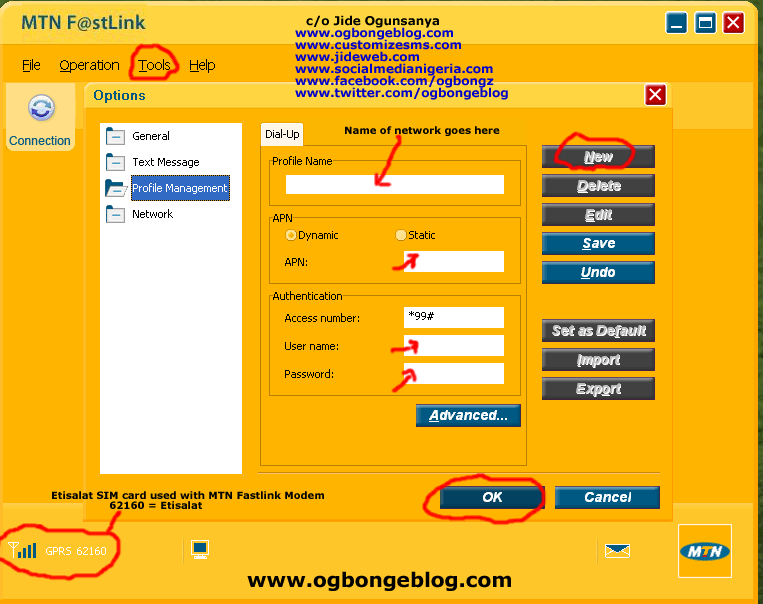
UnlockFastlink 1

For MTN

Profile Name: MTN
APN:  web.gprs.mtnnigeria.netUsername : web
Password : web

For Globacom

Profile Name: Glo
APN:  gloflatUsername : :flat
Password : flat

For Zain

Profile Name: Zain
APN:  internet.ng.zain.comUsername : internet
Password : internet

For Etisalat

Profile Name: Etisalat
APN:  etisalatUsername :web (you can also leave it blank)
Password : web (you can also leave it blank)

Once you’re done creating the profile, click Save to save the settings, then New if you want to set up another network.

When you’re through setting up the networks, go back to the Connection page, select the network you want to browse with, from the drop down box, then click connect .

If everything was setup properly without any mistake, you should be able to get connected to the Internet unless the network is messing up at that point in time .

Note:   As at the time of writing this, it has been observed that some MTN fastlink modems do not work with GLO SIM even after unlocking.

Presently, I am using a Glo Modem and I have used ALL the networks with it. The Glo Modem has interface for making calls, checking account balance and for loading vouchers. More so, the Glo Modem has a special support for Windows 7, hence, works perfectly with it.

That’s all for now.

I hope this helps…


Go here to unlock your Modem

Feel Free to share this blog post with your friends using the share buttons below this post.

If you have anything to say or ask, Kindly make use of the comment form below.

Please, do not forget to SUBSCRIBE to this blog, so that you can be receiving future 3G Modem tricks/tips , articles, freebies DIRECTLY into your email inbox, even when you are not online.

CLICK HERE TO SUBSCRIBE NOW!

CLICK HERE TO DOWNLOAD MY 20 FREE EBOOKS

NOTE : If the LINKS are NOT clickable, it simple means you are not reading this at www.ogbongeblog.com. So, visit WWW.OGBONGEBLOG.COM now to read the original article.

Cheers!

Please Share :
3G Modem Tips Mobile Internet

Like What You Read?

Sign Up to get similar articles delivered to your email inbox.

Leave a Reply Cancel reply

Your email address will not be published. Required fields are marked *

31 responses to “Steps To Take After Unlocking Fastlink Modem, Glo Modem,Zain Modem,Etisalat Modem With IMEI Number”

  1. Frank Avatar
    Frank
    October 17, 2010

    Oga Jide, you are just too much ooooooo. Your blog is too gbaski. I love your infos mehnnn…at least, I can now be helping my guys to configure their modem and also be making some bucks from it. Thanks for been there for us. One love.

    Loading…
    Reply
  2. Diddy Avatar
    Diddy
    October 20, 2010

    i have an ETISALAT HAIER WM200 modem with IMEI: 3572600300750399.
    How do i unlock it? When i insert another sim in it. It says invalid usim inserted and goes off. It doesnt bring out anyplace for me to put the unlock code. Kindly assist.
    ma email: musabitrus111@yahoo.com
    Thanks

    Loading…
    Reply
  3. Anonymous Avatar
    Anonymous
    April 5, 2011

    pls, help me unlock this Glo 3G modem. IMEI:359479032100284

    Loading…
    Reply
  4. benja73 Avatar
    benja73
    April 19, 2011

    Master Jide,
    Thanks for your unrelenting effort to help us out of our predicaments as far as Internet connection is concerned.May God help you in all your endeavor.
    Please,i need your help on how to load MTN voucher using GLO modem for browsing without first off all insert the MTN sim on phone before returning it to the GLO modem for connection.

    Thanks a million.

    Gideon

    Loading…
    Reply
  5. Jide Ogunsanya Avatar
    Jide Ogunsanya
    April 20, 2011

    @ben73…. its better you load with phone before inserting inside the glo modem. You can only load directly with the modem if it is glo SIM card that is in it.

    Loading…
    Reply
  6. richestnigerian Avatar
    richestnigerian
    April 22, 2011

    thanks very much for your good work,i have unlock my modem through you.thanks

    Loading…
    Reply
  7. Haroon Avatar
    Haroon
    April 22, 2011

    Mr. Jide, thanks 4 your great effort to help the needy, may God Almighty reward you with whatever thing that would make your life better. Pls help me unlock my modem with IMEI no:359390029864115.

    Loading…
    Reply
  8. Anonymous Avatar
    Anonymous
    April 22, 2011

    Pls Jide, help me with my modem IMEI:359390029864115. Thanks.

    Loading…
    Reply
  9. Anonymous Avatar
    Anonymous
    April 24, 2011

    Please help unlock my Airtel IMEI:352375049193998 Huawei E153. Thanks fot the help

    Loading…
    Reply
  10. Jide Ogunsanya Avatar
    Jide Ogunsanya
    April 25, 2011

    @Haroon… Unlock Code : 36475348@Anonymous (april 24) ..Unlock Code : 63949379

    Loading…
    Reply
  11. Haroon Avatar
    Haroon
    April 25, 2011

    Pheaw!!! @Jide it worked, u r really a GENUIS, thanks.

    Loading…
    Reply
  12. Anonymous Avatar
    Anonymous
    May 4, 2011

    From: Baba Alee
    Mr. Jide,
    Thank You for your great effort, may Almighty God reward you & Bless you. Pls help me unlock my modem.
    IMEI: 354638044600046
    Thanks once more God Bless You.

    Loading…
    Reply
  13. Baba Alee Avatar
    Baba Alee
    May 10, 2011

    From: Baba Alee
    Mr. Jide,
    Thank You for your great effort, may Almighty God reward you & Bless you. Pls help me unlock my modem.
    IMEI: 354638044600046
    Thanks once more God Bless You.

    Loading…
    Reply
  14. Ceekay Avatar
    Ceekay
    July 28, 2011

    Thanks,Please could u please unlock my mtn e156g fastlink- Emei no 357133038855738. and what type of network can i use it for, and which type will I not be able to use it for and why?

    Loading…
    Reply
  15. Anonymous Avatar
    Anonymous
    August 8, 2011

    I av generated the unlock code but when i put another SIM, it does not prompt for password. instead is saying invalid SIM?what else should i do?

    Loading…
    Reply
  16. Jide Ogunsanya Avatar
    Jide Ogunsanya
    August 8, 2011

    You cannot unlock such with a code. Maybe you have used all the 10 attempts. Anyway, you will have to do a direct unlocking

    Loading…
    Reply
  17. Anonymous Avatar
    Anonymous
    October 27, 2011

    Greetings to you JideI got the key to unlock my glo netpro modem. the unlocking windows comes up but freezes after few seconds, hence does not allow me to inpu the key. my os is windows7. please help

    Thank you

    Loading…
    Reply
  18. Jide Ogunsanya Avatar
    Jide Ogunsanya
    October 28, 2011

    I guess you might have to do a direct unlocking

    Loading…
    Reply
  19. Anonymous Avatar
    Anonymous
    December 30, 2011

    HOW DO I MAKE MY STARCOMMS MODEM UNIVERSAL? jvcpaul@yahoo.com

    Loading…
    Reply
  20. oheneberry Avatar
    oheneberry
    December 30, 2011

    Jide i have great testimonies from you and i hope you keep the wonderful work going.I will be much grateful if you can unlock my mtn modem for me.IMEI:861976003317509

    Loading…
    Reply
  21. Anonymous Avatar
    Anonymous
    February 28, 2012

    Hello Jide can you pls help me Unlock my glo net pro??

    Loading…
    Reply
  22. Victor Willie Avatar
    Victor Willie
    March 8, 2012

    Thanks Man, i really need ur help my IMEI is:357133037161781

    Loading…
    Reply
  23. yahk73 Avatar
    yahk73
    June 6, 2012

    your real man my questions is coming thanks.

    Loading…
    Reply
  24. Daniel Ajah Avatar
    Daniel Ajah
    July 23, 2012

    tanks for your talented gifted ideas it really helped me.

    Loading…
    Reply
  25. Anonymous Avatar
    Anonymous
    August 8, 2012

    Pls help send the unlock code of zain model IMEI 353474023295728 to royclitton@gmail.com God bless you.

    Loading…
    Reply
  26. Anonymous Avatar
    Anonymous
    December 20, 2012

    hey dude, please unlock my airtel moderm my IMEI is 6934933007512

    Loading…
    Reply
  27. Anonymous Avatar
    Anonymous
    December 21, 2013

    Pls unlock my zain modem. Imei no:353474022443857

    Loading…
    Reply
  28. Tony Stark Avatar
    Tony Stark
    July 18, 2014

    ok ok

    Loading…
    Reply
  29. enlighten Avatar
    enlighten
    November 6, 2014

    nice

    Loading…
    Reply
  30. Unknown Avatar
    Unknown
    May 12, 2017

    mine it not coming up what should i do

    Loading…
    Reply
  31. Ismail Adamu Avatar
    Ismail Adamu
    June 9, 2021

    Please how can I unlock this modem wm200 imei 357260030003585.Thank you please

    Loading…
    Reply

WANT TO ADVERTISE?

Chat on WhatsApp

RELATED POSTS

  • Unlock 3G Huawei Modem of MTN Fastlink To Make it Works With Any Network
  • dccrap (DC Unlocker): unlock MTN ZTE Modems, unlock Etisalat ZTE Modems FREE
  • Unlock ZTE and Huawei MTN Fastlink Modem

FEATURED


  • CREDICORP launches C.L.I.C.K.D. Scheme with FG’s 3MTT Programme, expanding affordable consumer credit for locally-assembled laptops and devices for digital workers

    CREDICORP launches C.L.I.C.K.D. Scheme with FG’s 3MTT Programme, expanding affordable consumer credit for locally-assembled laptops and devices for digital workers

  • What Happens to Your Online Accounts When You Die?

    What Happens to Your Online Accounts When You Die?

JOIN AI WEB DESIGN GROUP


  • AI Website Design Training Whatsapp Group by Jidetheblogger

    AI Website Design Training Whatsapp Group by Jidetheblogger

← MTN Free browsing on Nokia C3 Promo Facts
Stopwatch: Measure a site/blog’s loading time →

Join 25,000+ subscribers

Receive our latest blog posts in your inbox.

Search

Social

Facebook

Instagram

Twitter

new ogbongeblog logo

Copyright © 2026 | About | Advertise | Featured | Sitemap | Privacy Policy | Powered by WordPress

Your cart (items: 0)

Products in cart

Product
Details
Total
Subtotal ₦0.00
Shipping and discounts calculated at checkout.
View my cart
Go to checkout

Your cart is currently empty!

Start shopping

Notifications

%d

    LIKE My Fan Page

    Privacy Policy | Copyright © 2012,OgbongeBlog.All Rights Reserved. Powered by Blogger .
    Create a Mobile Site
    View Site in Mobile | Classic
    Share by:


