

Quick links:
Overview
Children under the age of 14 are unable to create their own user account.
The parent/guardian should register with their own details and then apply for the Parent role of their child(ren).
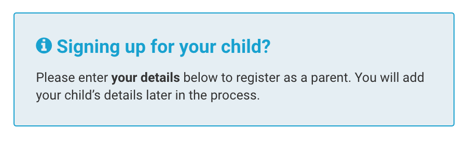
A parent/guardian should not register an account with their child's details. See a screenshot below of the registration page for further clarification.
The application can then be moderated by a Webmaster or Team Admin at the club.
This process allows the parent/guardian to manage their child(ren)'s account (including their information, schedule, and payments) until the child is old enough to manage their own account.
Once a child is 14 or above, they are eligible to register their own account at the discretion of the parent and the club.
If a member is unsure of the details they use when registering with Pitchero, the member can contact the club for direct assistance.
Adding a child to your Membership Database
Step-by-step guide:
- Go to your club control panel
- Click ' Membership' from the left-hand menu
- Click ' Membership Database' from the sub-menu
- Click ' Add a member' from the top right
- Select the child's roles (including the team if necessary)
- Enter the child's name and gender
- Tick the consent box to agree the club has already gathered the member's consent
- Click ' Add Member'
The child will be added to the club's Membership Database so they can be linked to their parent/guardian and added to games and training session lists.
Link a parent to their child
Step-by-step guide:
- Go to your club control panel
- Click ' Membership' from the left-hand menu
- Click ' Membership Database' from the sub-menu
- Locate the parent's member record and click on their name
- Click ' Roles'
- Tick the ' Parent' role
- Enter the child's name and select their name
- Click ' Save'
Alternatively, the member could access the club's homepage or Pitchero Club app and apply for the Parent role of their child(ren).
The member's application can then be moderated by a Webmaster or Team Admin at the club.
Related articles
Thanks for taking a look at this article, we hope that you found it useful.
You may also find these related articles useful too:
