



October 24, 2021

カテゴリ: minecraft
先日の記事
でOracle Cloudに構築したJava版 Minecraftサーバーになぜかアクセスができなくなってまして、Oracle Cloudにログインしてインスタンスのステータスを確認したところ、なぜかインスタンスが「停止済」になってました。
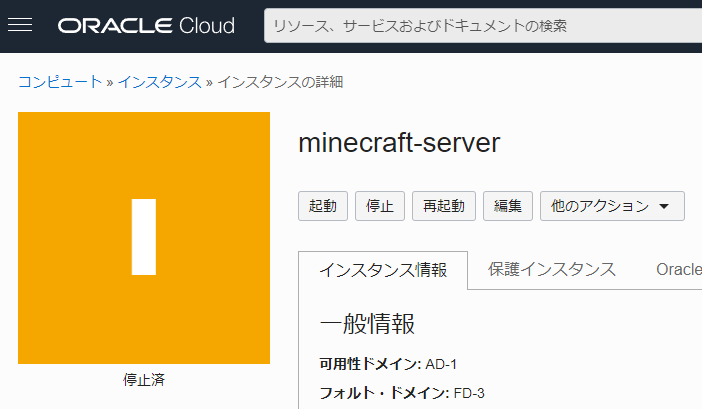
わざわざ停止なんてしないのにおかしいなぁ…と思って「起動」を押すと
「インスタンスを起動できません:instance ocid1.instance.oc1.ap-osaka-1 なんちゃら is disabled and will not accept any action requests. Please contact customer support to reenable.」と表示され、起動できず。

カスタマーサポートにコンタクトしろってことなので、チャットで問い合わせをすると
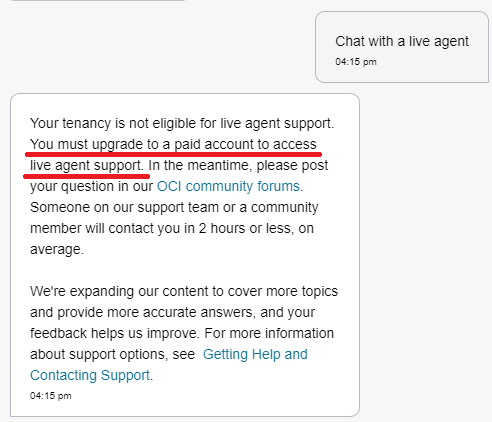
金払え (要約)。
ま、確かにフリーユーザーアカウントですから、そういう回答になりますね。
仕方がないのでエラーメッセージでぐぐったところ、該当しそうな Oracle Cloud Communityの記事 がひっかかりまして、
新しくインスタンス作り直して、作り直したところに停止したインスタンスがアタッチしていたブート・ボリュームを割り当てれば、起動するよ。ただしIPアドレスは変わっちゃうけどね。と書いてある。
次に他の方が
さて、手順は何となく理解したので実施することに。
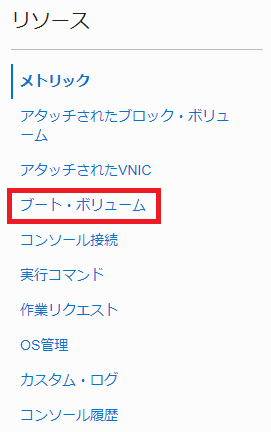
まず、「停止済」になってしまったインスタンスの中段ぐらいにある「ブート・ボリューム」を選択します。
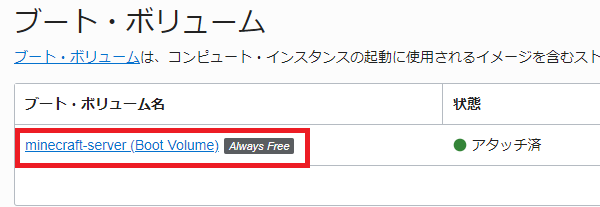
次に表示されたアタッチ済のブート・ボリュームを選択します。
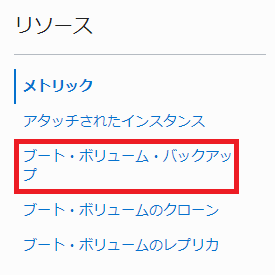
次に念のためブート・ボリュームのバックアップを取得しとけよと記載があったので、中段ぐらいにある「ブート・ボリューム・バックアップ」を選択します。
次に「ブート・ボリュームのバックアップの作成」を選択してバックアップを取得します。
名前は任意でOKで、バックアップ・タイプは「完全」を選択してください。
※デフォルトでバックアップ・タイプは「完全」になっていると思います。

さほど時間もかからずにバックアップが完了し、状態が「使用可能」になったら、「停止済」のインスタンスに戻って、「他のアクション」→「終了」を選択します。
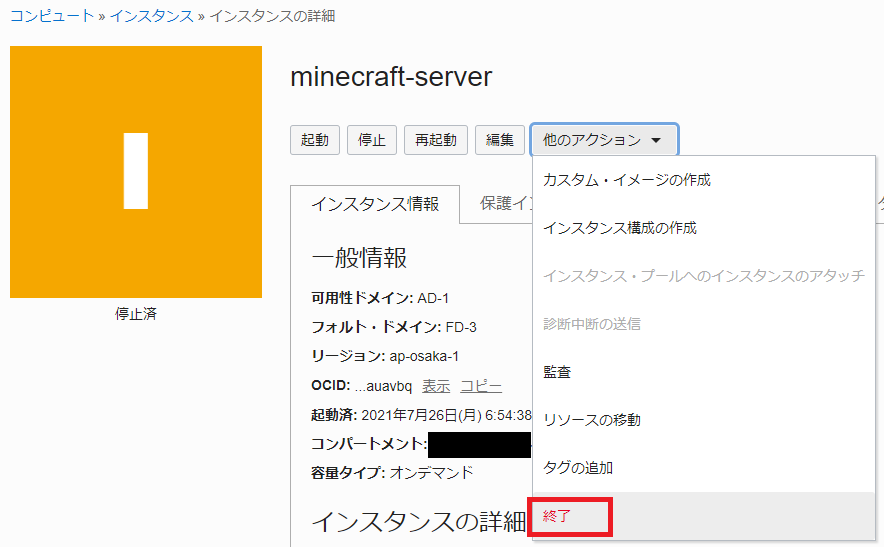
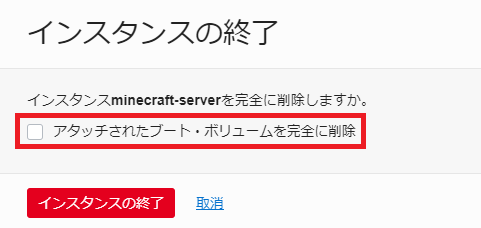
なお、終了選択後に表示される「アタッチされたブート・ボリュームを完全に削除」の チェックボックスは入れずに 、「インスタンスの終了」を選択します。
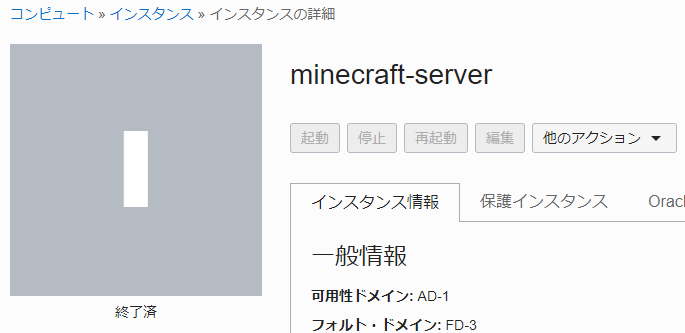
さほど時間もかからずインスタンスが「終了済」ステータスになるので
次に中段ぐらいにある「ブート・ボリューム」を選択します。
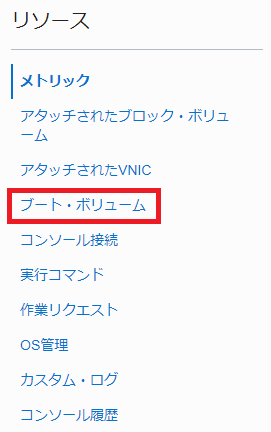
次にアタッチしていたインスタンスが終了することで、もとのブート・ボリュームがデタッチ済ステータスに切り替わるので、デタッチ済のブート・ボリュームを選択します。

次に「インスタンスの作成」を選択します。

インスタンスは初期作成した内容の通りに作成すればOKです。
注意点は、公開キーは以前のは使えませんので今回作成時にダウンロードするのを忘れないでください。
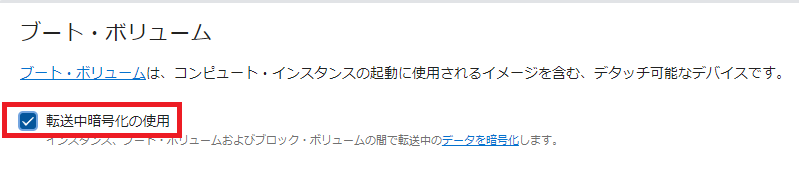
また、最後の方にあるブート・ボリューム欄の「転送中暗号化の使用」のチェックボックスが外れていると思いますので、チェックを忘れないように注意してください。
プロビジョニング後にインスタンスは自動で起動していますので、Teraterm等でインスタンスにログインをして、マインクラフトを起動すれば以前の環境のままログインできる・・・はずです。
※ Oracle側で停止処理した際にマインクラフトサーバーのサーバー状態がどこまで保存されているのか未知数なためです。
なお、マルチサーバーでログインする際にIPアドレスが変更されていますので、初回ログイン時にIPアドレスを変更するのも忘れないでくださいね。
にしても、こういう処置をするところがとても オラクル社っぽい ですね(嫌味)。
わざわざ停止なんてしないのにおかしいなぁ…と思って「起動」を押すと
「インスタンスを起動できません:instance ocid1.instance.oc1.ap-osaka-1 なんちゃら is disabled and will not accept any action requests. Please contact customer support to reenable.」と表示され、起動できず。
カスタマーサポートにコンタクトしろってことなので、チャットで問い合わせをすると
金払え (要約)。
ま、確かにフリーユーザーアカウントですから、そういう回答になりますね。
仕方がないのでエラーメッセージでぐぐったところ、該当しそうな Oracle Cloud Communityの記事 がひっかかりまして、
Here is how I solved the problem:
- First make a manual backup of the bootvolume of the disabled VM to be on the safe side.
- Terminate the VM, but don't check the "delete bootvolume permanently" box.
- Go to the boot volume of the now terminated VM and there choose "Create Instance".
- Start VM
Please note that the IP of the new VM is different from the old. Therefore, you may have to change some configurations.
As an alternative or after step 2, you can also attach the boot volume to another VM (e.g., AMD free vm) as data volume to extract important data.
Always do regular backups of the boot volume.
Best regards,
新しくインスタンス作り直して、作り直したところに停止したインスタンスがアタッチしていたブート・ボリュームを割り当てれば、起動するよ。ただしIPアドレスは変わっちゃうけどね。と書いてある。
次に他の方が
毎週ぐらいの単位で作り直しになるなら、他のサービスに移動するよと。おっしゃる通りで。の返答が
I needed to do this only once when the evaluation period ended. After that, I had no further problems so far. This is the only negative thing I encountered yet.無償へ切り替わった後の1回だけで済んでいるってことなので、一応安心してよさそう。ただ私も昨日(2021年10月23日)に初実施なので、いつまで利用できるのかは不安。利用できなくなったら追記します。
さて、手順は何となく理解したので実施することに。
まず、「停止済」になってしまったインスタンスの中段ぐらいにある「ブート・ボリューム」を選択します。
次に表示されたアタッチ済のブート・ボリュームを選択します。
次に念のためブート・ボリュームのバックアップを取得しとけよと記載があったので、中段ぐらいにある「ブート・ボリューム・バックアップ」を選択します。
次に「ブート・ボリュームのバックアップの作成」を選択してバックアップを取得します。
名前は任意でOKで、バックアップ・タイプは「完全」を選択してください。
※デフォルトでバックアップ・タイプは「完全」になっていると思います。
さほど時間もかからずにバックアップが完了し、状態が「使用可能」になったら、「停止済」のインスタンスに戻って、「他のアクション」→「終了」を選択します。
なお、終了選択後に表示される「アタッチされたブート・ボリュームを完全に削除」の チェックボックスは入れずに 、「インスタンスの終了」を選択します。
さほど時間もかからずインスタンスが「終了済」ステータスになるので
次に中段ぐらいにある「ブート・ボリューム」を選択します。
次にアタッチしていたインスタンスが終了することで、もとのブート・ボリュームがデタッチ済ステータスに切り替わるので、デタッチ済のブート・ボリュームを選択します。
次に「インスタンスの作成」を選択します。
インスタンスは初期作成した内容の通りに作成すればOKです。
注意点は、公開キーは以前のは使えませんので今回作成時にダウンロードするのを忘れないでください。
また、最後の方にあるブート・ボリューム欄の「転送中暗号化の使用」のチェックボックスが外れていると思いますので、チェックを忘れないように注意してください。
プロビジョニング後にインスタンスは自動で起動していますので、Teraterm等でインスタンスにログインをして、マインクラフトを起動すれば以前の環境のままログインできる・・・はずです。
※ Oracle側で停止処理した際にマインクラフトサーバーのサーバー状態がどこまで保存されているのか未知数なためです。
なお、マルチサーバーでログインする際にIPアドレスが変更されていますので、初回ログイン時にIPアドレスを変更するのも忘れないでくださいね。
にしても、こういう処置をするところがとても オラクル社っぽい ですね(嫌味)。
お気に入りの記事を「いいね!」で応援しよう

[minecraft] カテゴリの最新記事
-
Java版 Minecraftサーバーのメジャーバー… March 6, 2022
-
Java版 Minecraftサーバーのメジャーバー… March 5, 2022
-
Java版 Minecraftサーバーのメジャーバー… March 3, 2022


【毎日開催】
15記事にいいね!で1ポイント


PR
Calendar
Category
Comments
© Rakuten Group, Inc.
