



PR
キーワードサーチ
▼キーワード検索
カレンダー
コメント新着
2020.10.16

テーマ: ソフトウェア開発(54)
カテゴリ: powershell
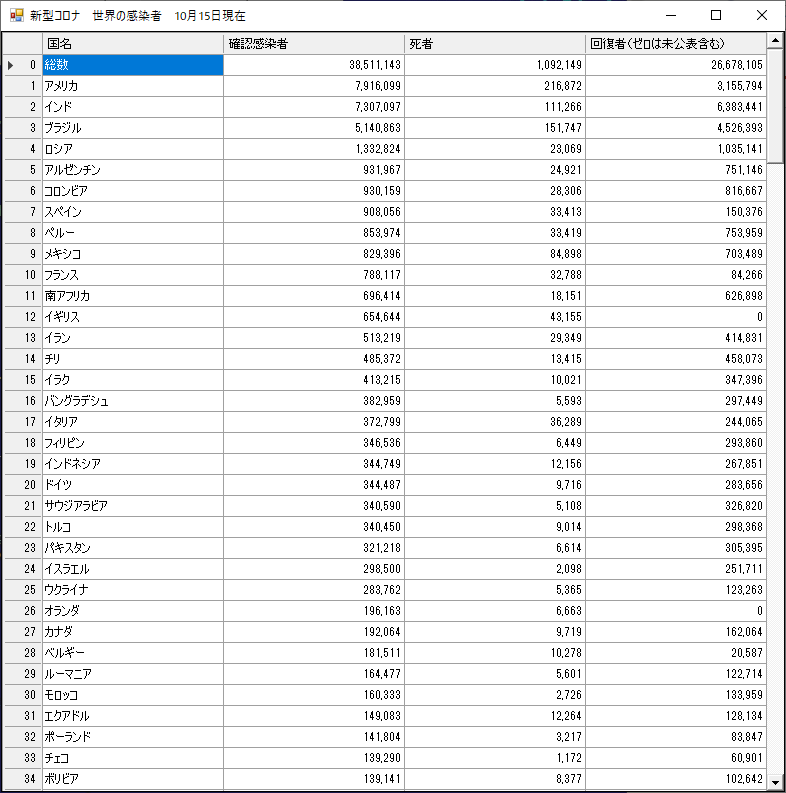
世界の感染状況を一覧するデスクトップアプリをつくってみました。
NHKのサイトからデータを取ってくるんで、もし怒られたら削除します。
powershellで作っていますが、起動の簡便のため、バッチ化しています。
バッチでpowershellを書く時の参考になればいいな。
感染者、死者、回復者の各欄をクリックするとそれぞれの項目にしたがって並び替えます。
covid19.cmd
@SET self=%0
@SET args=%* &powershell -command "$lines=gc %Self%;$lines[2..($lines.length-1)],'',''" |powershell -windowstyle hidden -executionpolicy bypass -sta -command -& goto:EOF
#######################################################################################################
#バッチの引数がpowershellの$arguments配列に入る。
#二重引用符中の空白を除き、連続空白を1個のセパレータとして引数配列に分割する。
#######################################################################################################
$argstr =$env:args
$arguments =@()
$space ="<space>"
while( $argstr -match $space ){
$space +="_"
}
$spacers =@()
$regex =[regex]"`"[^`"]+`""#"エディタの文字列色別表示を満足させるための引用符。外してOK
$matches|%{
$from =$_.value
$to =$from -replace " ", $space
$spacers +=,@{
from =$from
}
}
$spacers|%{
if (!$_){return}
$argstr =$argstr.replace( $_.from, $_.to )
}
$argstr -replace " +", " " -split " "|%{
if ( !$_ ){return}
$arg =$_
$spacers|%{
$arg =$arg.replace( $_.to, $_.from )
}
$arguments +=,$arg
}
#############################################################################################################
#以下、powershellスクリプト領域
#############################################################################################################
add-type -assembly system.windows.forms
add-type -assembly system.drawing
function new-winform( $name, $parent=$null, $attribute=$null ){
$res = iex "new-object System.Windows.Forms.$name"
if ( $attribute ){
$attribute.Keys|%{
$res.$_=$attribute.$_
}
}
if ( $parent ){
$res.parent=$parent
}
return $res
}
$resp=(Invoke-WebRequest "https://www3.nhk.or.jp/n-data/dn/covid19-world-data.json").content
$Json=ConvertFrom-Json ([System.Text.Encoding]::UTF8.GetString( [System.Text.Encoding]::GetEncoding("ISO-8859-1").GetBytes($resp) ))
$WorldList=$Json.WorldList
$jresp=(Invoke-WebRequest "https://www3.nhk.or.jp/news/special/coronavirus/data/summary.json").content
$jjson=ConvertFrom-Json ([System.Text.Encoding]::UTF8.GetString( [System.Text.Encoding]::GetEncoding("ISO-8859-1").GetBytes($jresp) ))
$Csv=@()
$Json.worldList|%{
$name=$_.name
$infected=[int]$_.confirmed
$deaths=[int]$_.deaths
try{
$recovered=[int]$_.recovered
}catch{
$recovered=$null
}
$line=new-object PsObject
foreach( $key in ("name,infected,deaths,recovered"-split",")){
$line|Add-Member -MemberType NoteProperty -Name $key -Value ( iex ("$"+$key ) )
}
$Csv+=,$line
}
$line=new-object PsObject
$line|Add-Member -MemberType NoteProperty -Name name -Value "日本"
$line|Add-Member -MemberType NoteProperty -Name infected -Value ([int]($jjson.infection[0]))
$line|Add-Member -MemberType NoteProperty -Name deaths -Value ([int]($jjson.death[0]))
$line|Add-Member -MemberType NoteProperty -Name recovered -Value ([int]($jjson.recovered[0]))
$Csv+=,$line
$Csv=$Csv|Sort-Object -Property "infected" -Descending
$UpdateDate=$jjson.date
$dlg = new-winform form -attrib @{
text="新型コロナ 世界の感染者 ${UpdateDate}現在";
width=800;
height=800
}
$gv = new-winform datagridview -parent $dlg -attrib @{
columnCount=4;
RowCount=$WorldList.length + 2
dock="fill";
AutoSizeColumnsMode="fill";
}
$headers="国名、確認感染者、死者、回復者(ゼロは未公表含む)"-split"、"
for( $i=0; $i -lt $headers.length; $i++ ){
$gv.columns[$i].name=$headers[$i]
}
$gv.Rows[0].Cells[0].Value="総数"
$gv.Rows[0].Cells[1].Value=[int]$Json.total.confirmed
$gv.Rows[0].Cells[2].Value=[int]$Json.total.deaths
$gv.Rows[0].Cells[3].Value=[int]$Json.total.recovered
$gv.Rows[0].Frozen=$true
for( $i=0; $i -lt $Csv.length; $i++ ){
$country=$Csv[$i].name
$infected=$Csv[$i].infected
$deaths=$Csv[$i].deaths
$recovered=$Csv[$i].recovered
$gv.Rows[$i+1].Cells[0].Value="$country"
$gv.Rows[$i+1].Cells[1].Value=[int]$infected
$gv.Rows[$i+1].Cells[2].Value=[int]$deaths
try{
$gv.Rows[$i+1].Cells[3].Value=[int]$recovered
}catch{}
if ( $country -eq "日本" ){
0..3|%{$gv.Rows[$i+1].Cells[$_].Style.BackColor="yellow"}
}
}
1..3|%{
$gv.Columns[$_].DefaultCellStyle.alignment="middleright"
$gv.Columns[$_].DefaultCellStyle.format="#,0"
}
$gv.add_RowPostPaint({
#$_.Rowindex|write-host
$rectangle=New-Object System.Drawing.Rectangle(
$_.RowBounds.Location.X,
$_.RowBounds.Location.Y,
($gv.RowHeadersWidth - 4),
$_.RowBounds.Height
)
[windows.forms.TextRenderer]::DrawText(
$_.Graphics,
($_.RowIndex).ToString(),
$gv.RowHeadersDefaultCellStyle.Font,
$rectangle,
$gv.RowHeadersDefaultCellStyle.ForeColor,
([Windows.Forms.TextFormatFlags]::VerticalCenter -bor [Windows.Forms.TextFormatFlags]::Right)
)
})
$dlg.showdialog()
NHKのサイトからデータを取ってくるんで、もし怒られたら削除します。
powershellで作っていますが、起動の簡便のため、バッチ化しています。
バッチでpowershellを書く時の参考になればいいな。
感染者、死者、回復者の各欄をクリックするとそれぞれの項目にしたがって並び替えます。
covid19.cmd
@SET self=%0
@SET args=%* &powershell -command "$lines=gc %Self%;$lines[2..($lines.length-1)],'',''" |powershell -windowstyle hidden -executionpolicy bypass -sta -command -& goto:EOF
#######################################################################################################
#バッチの引数がpowershellの$arguments配列に入る。
#二重引用符中の空白を除き、連続空白を1個のセパレータとして引数配列に分割する。
#######################################################################################################
$argstr =$env:args
$arguments =@()
$space ="<space>"
while( $argstr -match $space ){
$space +="_"
}
$spacers =@()
$regex =[regex]"`"[^`"]+`""#"エディタの文字列色別表示を満足させるための引用符。外してOK
$matches|%{
$from =$_.value
$to =$from -replace " ", $space
$spacers +=,@{
from =$from
}
}
$spacers|%{
if (!$_){return}
$argstr =$argstr.replace( $_.from, $_.to )
}
$argstr -replace " +", " " -split " "|%{
if ( !$_ ){return}
$arg =$_
$spacers|%{
$arg =$arg.replace( $_.to, $_.from )
}
$arguments +=,$arg
}
#############################################################################################################
#以下、powershellスクリプト領域
#############################################################################################################
add-type -assembly system.windows.forms
add-type -assembly system.drawing
function new-winform( $name, $parent=$null, $attribute=$null ){
$res = iex "new-object System.Windows.Forms.$name"
if ( $attribute ){
$attribute.Keys|%{
$res.$_=$attribute.$_
}
}
if ( $parent ){
$res.parent=$parent
}
return $res
}
$resp=(Invoke-WebRequest "https://www3.nhk.or.jp/n-data/dn/covid19-world-data.json").content
$Json=ConvertFrom-Json ([System.Text.Encoding]::UTF8.GetString( [System.Text.Encoding]::GetEncoding("ISO-8859-1").GetBytes($resp) ))
$WorldList=$Json.WorldList
$jresp=(Invoke-WebRequest "https://www3.nhk.or.jp/news/special/coronavirus/data/summary.json").content
$jjson=ConvertFrom-Json ([System.Text.Encoding]::UTF8.GetString( [System.Text.Encoding]::GetEncoding("ISO-8859-1").GetBytes($jresp) ))
$Csv=@()
$Json.worldList|%{
$name=$_.name
$infected=[int]$_.confirmed
$deaths=[int]$_.deaths
try{
$recovered=[int]$_.recovered
}catch{
$recovered=$null
}
$line=new-object PsObject
foreach( $key in ("name,infected,deaths,recovered"-split",")){
$line|Add-Member -MemberType NoteProperty -Name $key -Value ( iex ("$"+$key ) )
}
$Csv+=,$line
}
$line=new-object PsObject
$line|Add-Member -MemberType NoteProperty -Name name -Value "日本"
$line|Add-Member -MemberType NoteProperty -Name infected -Value ([int]($jjson.infection[0]))
$line|Add-Member -MemberType NoteProperty -Name deaths -Value ([int]($jjson.death[0]))
$line|Add-Member -MemberType NoteProperty -Name recovered -Value ([int]($jjson.recovered[0]))
$Csv+=,$line
$Csv=$Csv|Sort-Object -Property "infected" -Descending
$UpdateDate=$jjson.date
$dlg = new-winform form -attrib @{
text="新型コロナ 世界の感染者 ${UpdateDate}現在";
width=800;
height=800
}
$gv = new-winform datagridview -parent $dlg -attrib @{
columnCount=4;
RowCount=$WorldList.length + 2
dock="fill";
AutoSizeColumnsMode="fill";
}
$headers="国名、確認感染者、死者、回復者(ゼロは未公表含む)"-split"、"
for( $i=0; $i -lt $headers.length; $i++ ){
$gv.columns[$i].name=$headers[$i]
}
$gv.Rows[0].Cells[0].Value="総数"
$gv.Rows[0].Cells[1].Value=[int]$Json.total.confirmed
$gv.Rows[0].Cells[2].Value=[int]$Json.total.deaths
$gv.Rows[0].Cells[3].Value=[int]$Json.total.recovered
$gv.Rows[0].Frozen=$true
for( $i=0; $i -lt $Csv.length; $i++ ){
$country=$Csv[$i].name
$infected=$Csv[$i].infected
$deaths=$Csv[$i].deaths
$recovered=$Csv[$i].recovered
$gv.Rows[$i+1].Cells[0].Value="$country"
$gv.Rows[$i+1].Cells[1].Value=[int]$infected
$gv.Rows[$i+1].Cells[2].Value=[int]$deaths
try{
$gv.Rows[$i+1].Cells[3].Value=[int]$recovered
}catch{}
if ( $country -eq "日本" ){
0..3|%{$gv.Rows[$i+1].Cells[$_].Style.BackColor="yellow"}
}
}
1..3|%{
$gv.Columns[$_].DefaultCellStyle.alignment="middleright"
$gv.Columns[$_].DefaultCellStyle.format="#,0"
}
$gv.add_RowPostPaint({
#$_.Rowindex|write-host
$rectangle=New-Object System.Drawing.Rectangle(
$_.RowBounds.Location.X,
$_.RowBounds.Location.Y,
($gv.RowHeadersWidth - 4),
$_.RowBounds.Height
)
[windows.forms.TextRenderer]::DrawText(
$_.Graphics,
($_.RowIndex).ToString(),
$gv.RowHeadersDefaultCellStyle.Font,
$rectangle,
$gv.RowHeadersDefaultCellStyle.ForeColor,
([Windows.Forms.TextFormatFlags]::VerticalCenter -bor [Windows.Forms.TextFormatFlags]::Right)
)
})
$dlg.showdialog()
お気に入りの記事を「いいね!」で応援しよう

[powershell] カテゴリの最新記事
-
ヌルの謎、解けた?! 7年越し 2026.03.09
-
関数を作る関数 2021.12.20
-
powershellでpdfsharpをいじってみる(2… 2021.10.29


【毎日開催】
15記事にいいね!で1ポイント


© Rakuten Group, Inc.
