
UPDATE (5/20/26 @ 7:30am AZ time):
The GCU Library's updated version of LopeCat, the library’s online catalog, is live! For more details on what has changed, visit the What's New Guide .
HLT-520 Legal & Ethical Principles in Health Care
Creating PowerPoints
- GCU Technical Support Microsoft Office FAQ This link opens in a new windowHow to install Office 365 and basics for getting started.
- PrepStep Microsoft Office Basics This link opens in a new windowFrom PrepStep, tutorials on using MS Office software. You will need to make a PrepStep account to view tutorials.
- PowerPoint for Windows Training This link opens in a new windowThe official training site from Microsoft.
- PowerPoint Quick Start Guide This link opens in a new windowFrom Microsoft, everything you need in one place to get started making your first presentation.
- Creating Effective PowerPoints for APA & MLAThe GCU template for PowerPoints in APA or MLA.
Formatting PowerPoint References
Reference Lists Using PowerPoint:
There is no set of rules for creating a PowerPoint Presentation for most citation styles. If you are creating a reference list in PowerPoint, you will follow all the same rules for your citation style, and most of the options to add special formatting to your citations are still available in PowerPoint.
But, here are a few pointers if you are creating a PowerPoint presentation that requires the use of sources that you have to cite:
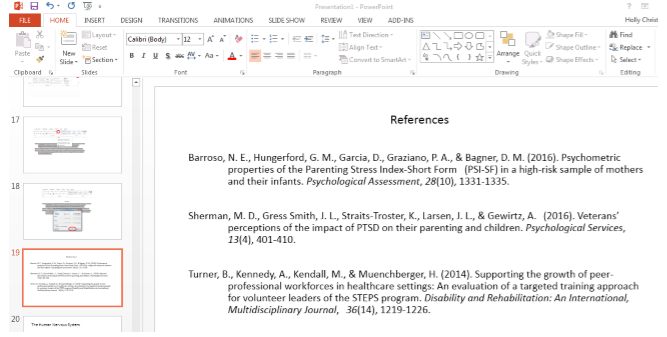
Creating a Reference Slide
For your reference list, insert a new slide at the end of your presentation and then add your references according to the rules of the style you are following:
Adding References to Speaker's Notes:
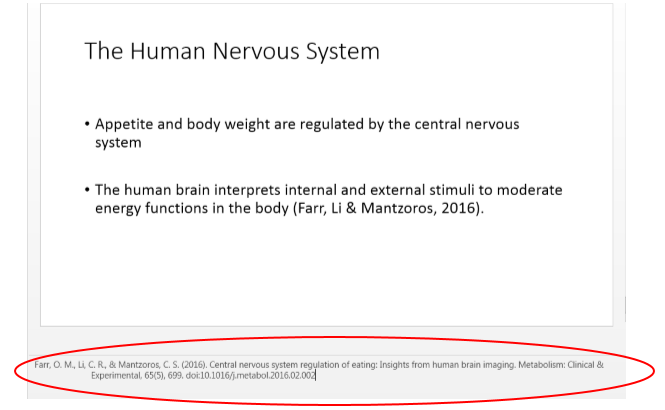
Depending on the requirements of the assignment, citation style or the instructor, you may be required to include the full reference citation or a footnote at the bottom of the slide in the Speaker’s Notes section.
To do this, click on View then click on the Notes Icon in the Show section.

This will make the Speaker’s Notes section visible so you can place your references there as shown below.
In-Text Citations
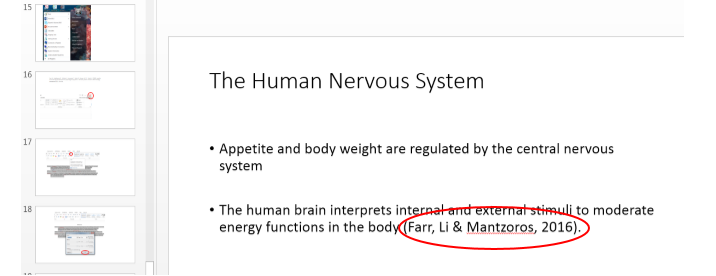
In-text citations in a PowerPoint presentation can be included at the end of bullet points that include direct quotes or paraphrased information.
- Creating Effective PowerPoints for APA & MLAThe GCU template for PowerPoints in APA or MLA.
