Notification

Due to the latest device launch, we expect to receive higher contact volume than normal. To check if your question is already answered, go to the Pixel Phone Help Center .

Regulatory full user information (Pixel & Pixel XL 2016)

1  Introduction

2  FCC regulatory compliance

3  Industry Canada Notices

4  Declaration of Conformity

5  Human exposure to radio frequency

6  Hearing aid compatible devices

7  Accessibility features

1  Introduction

This guide lists all information of interest to Pixel and Pixel XL users:

  • Safety, environmental and regulatory information: g.co/pixelphonesafety OR SettingsAnd then About phoneAnd then Safety & regulatory manual
  • Warranty details for your country of purchase, including instructions for making a claim: g.co/pixelphonewarranty
  • Electronic regulatory labels and specific absorption rate (SAR) values for your phone: SettingsAnd then About phoneAnd then Regulatory labels
  • Comprehensive online help:  g.co/pixelcare

Device information

Manufacturer: Google Inc.

Country of origin: Taiwan

2  FCC regulatory compliance

Note: This equipment has been tested and found to comply with the limits for a Class B digital device, pursuant to part 15 of the FCC Rules. These limits are designed to provide reasonable protection against harmful interference in a residential installation. This equipment generates, uses and can radiate radio frequency energy and, if not installed and used in accordance with the instructions, may cause harmful interference to radio communications. However, there is no guarantee that interference will not occur in a particular installation.

If this equipment does cause harmful interference to radio or television reception, which can be determined by turning the equipment off and on, the user is encouraged to try to correct the interference by one or more of the following measures:

  • Reorient or relocate the receiving antenna.
  • Increase the separation between the equipment and receiver.
  • Connect the equipment into an outlet on a circuit different from that to which the receiver is connected.
  • Consult the dealer or an experienced radio/TV technician for help.

Changes or modifications not expressly approved by Google could void your authority to operate the equipment.

Pixel and Pixel XL comply with Part 15 of the FCC Rules. Operation is subject to the following 2 conditions:

  1. These devices may not cause harmful interference.
  2. These devices must accept any interference received, including interference that may cause undesired operation.

3  Industry Canada Notices

Industry Canada, Class B

This Class B digital apparatus complies with Canadian ICES-003.

Notice:The Industry Canada regulations provide that changes or modifications not expressly approved by Google could void your authority to operate this equipment.

Industry Canada (IC) Notices

These devices comply with Industry Canada license-exempt RSS standard(s). Operation is subject to the following two conditions:

  1. These devices may not cause interference.
  2. These devices must accept any interference, including interference that may cause undesired operation of the device.

Warning:

(i) The device for operation in the band 5150–5250 MHz is only for indoor use to reduce the potential for harmful interference to co-channel mobile satellite systems;

(ii) The maximum antenna gain permitted for devices in the bands 5250–5350 MHz and 5470–5725 MHz shall comply with the e.i.r.p. limit; and

(iii) The maximum antenna gain permitted for devices in the band 5725–5825 MHz shall comply with the e.i.r.p. limits specified for point-to-point and non point-to-point operation as appropriate.

(iv) Users should also be advised that high-power radars are allocated as primary users (i.e. priority users) of the bands 5250–5350 MHz and 5650–5850 MHz and that these radars could cause interference and/or damage to LE-LAN devices.

4  Declaration of Conformity

Declaration of Conformity (English)

Declaration of Conformity (page 1 of 3)

Declaration of Conformity 2016 page 1

Declaration of Conformity (page 2 of 3)

Declaration of Conformity 2016 page 2

Declaration of Conformity (page 3 of 3)

Declaration of Conformity 2016 page 3

Declaration of Conformity (German)

Declaration of Conformity (page 1 of 3)

Declaration of Conformity 2016 page 1

Declaration of Conformity (page 2 of 3)
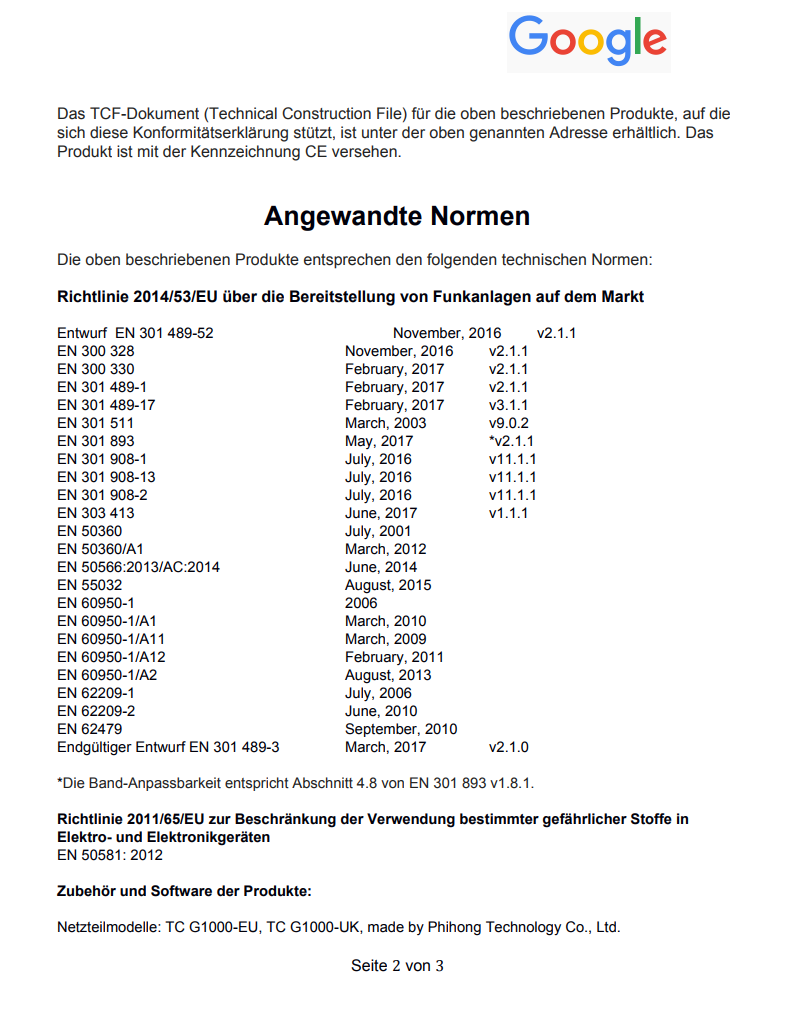
Declaration of Conformity 2016 page 2

Declaration of Conformity (page 3 of 3)
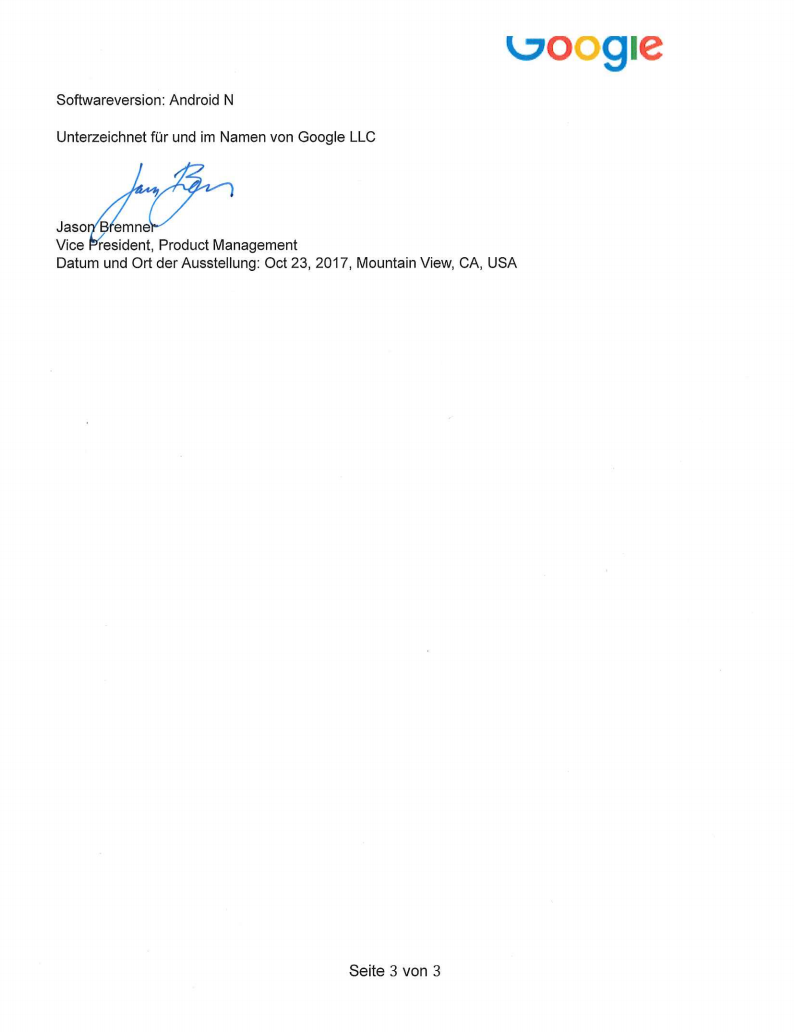
Declaration of Conformity 2016 page 3

5  Human exposure to radio frequency

Like any other phone, your wireless device emits radio frequency energy (RF) during use. According to the International Commission on Non-Ionizing Radiation Protection (ICNIRP), the critical effect of RF exposure relevant to human health and safety is heating of exposed tissue. 

According to the Federal Communications Commission (FCC), “Some health and safety interest groups have interpreted certain reports to suggest that wireless device use may be linked to cancer and other illnesses, posing potentially greater risks for children than adults. While these assertions have gained increased public attention, currently no scientific evidence establishes a causal link between wireless device use and cancer or other illnesses.”

However, above a certain level (referred to as the threshold) depending on the duration of exposure, RF exposure and the accompanying temperature rise can provoke serious health effects, such as heatstroke and tissue damage (burns). To avoid hazards to health deriving from high RF exposure, limits are set in relation to the threshold known to show adverse effects, with an additional reduction factor to take care of scientific uncertainties. These limits are generally expressed in terms of the specific absorption rate (SAR). SAR is a measure of the rate of absorption of RF energy in the body. Tests for SAR are conducted with the phone transmitting at its highest power level in all tested frequency bands. SAR were first established in 1996 by the FCC in the USA and they were then adopted elsewhere.

You can find additional information about SAR at the following pages:

Pixel and Pixel XL were tested and certified to not exceed SAR in the U.S., Canada, European Union, Australia, or India. You can find the SAR values applicable in each those jurisdiction on your phone: SettingsAnd then SystemAnd then About phoneAnd then Regulatory labels

6  Hearing aid compatible devices

Google’s devices meet the hearing aid compatibility (HAC) requirements set by the Federal Communications Commission (FCC).

Hearing aid compatible devices offered by Google:

Device HAC rating
Pixel M4/T4
Pixel XL M4/T4

You can learn more about Pixel and Pixel XL hearing aid compatibility  at  g.co/pixelphonesafety .

7  Accessibility features

Accessibility features for Pixel and Pixel XL:

Pixel

ACCESSIBILITY FEATURE
REQUIREMENTS - DESCRIPTION
VALUE

Handset/Hardware information

Touch screen 
Does the device have a touch screen
Yes
If the device has a touchscreen, is it capacitive (sometimes referred to as heat activated)
Yes
Key identification
Are individual keys easily discernible to the user
NA – touch screen keyboard/keypad
How are the keys discernible - separate keys, use of ridges to define
N/A
Key centre point distance
What is the distance from the centre point of one number key to another
NA
Keyboard layout
The keypad is laid out like a QWERTY typewriter keyboard
Yes
Lanyard pin for key ring or lanyard strap
Has a small bar allowing a key ring or neck strap (lanyard) to be attached
No
Differentiation of function keys
The number keys have a different color or shape from the other keys, making them easier to tell apart by touch or by sight
NA
Shape of device
A. Clam Shell / Flip Phone
B. Candy Bar / Stick
C. Slide
D. Swivel
E. Touchscreen
F. Other
B, E,
Operating system
The operating system and version used by this phone
Android 7.1
Anti-slip features
Has a non-slip coating or ridges to prevent it slipping out of your hand
No

Mobility/Dexterity features

Handset weight
Handset weight including battery
147.5 grams
Easy Battery Placement
Is battery clearly marked for proper orientation and placement
NA
Speaker-phone capable
Hands free operation during dialing and after call initiated
Yes
Guarded/recessed keys
Individual keys are recessed or guarded in some way to reduce the chance that you will press the wrong key
NA
Wireless earphones/headsets
Wireless earphones and headsets, such as Bluetooth headsets, are supported
Yes
Coupling to a device
To allow people to use computers as text terminals. Also allows customized devices to work with the phone. Device can be connected to the phone by using:
  • cable (an electrical wire)
Yes
  • infrared signal (which travels through the air like a radio wave but cannot pass through walls or other solid objects)
No
  • Bluetooth/wireless LAN (radio signals which travel through the air and may also be able to pass through walls or other solid objects)
Yes
  • other connections than those described above (please describe): … … … … … …

NA
Flat back for table top operation
Has a flat back, so it can be used while it is lying on a table
Yes
Any key answering
The user can answer the call by pressing any key
No
Hand movement
Some controls require you to pinch or twist them with your fingers, or rotate your wrist
Yes
Voice recognition for dialing
Allows you to dial a number by speaking the person's name, if it is stored in your contact list (a personal "telephone book" you create in your phone)
Yes
Voice recognition for accessing features
Allows you to activate features by speaking commands into the phone, reducing the need to use the keypad
Yes
Automatic answering
Enables the phone to pick up a call automatically after a designated number of rings
No

Vision features

Tactile key markers – "F" and "J"
The "F" and "J" keys have raised dots or bumps on them so you can distinguish them by touch (only relevant for phones that have a QWERTY typewriter-style keypad)
NA
Standard number key layouts
The number keys are laid out in the standard way with 1 2 3 at the top and * 0 # at the bottom
Yes - note touch screen keyboard
Key feedback - tactile
When you press a key you can feel a physical click, so you know it has been pressed
No
Key feedback - audible
When you press a key it makes a sound, so you know it has been pressed
Yes
Audible identification of keys - spoken
When you press a number key the number is spoken out, so you know you have pressed the correct one
Yes
Audible identification of keys - functions
The sounds you hear when you press a key are different for number keys and function keys, so you can easily tell them apart
Yes
Adjustable font - style
You can change the font (typeface) used for the text on the display, which may make it easier to read
Yes
Adjustable font - size
You can make the text on the display larger or smaller to make it easier to read
Yes
Personalized shortcuts
You can assign a particular feature to a single key or a short key sequence
Yes
Display characteristics - Adjustable Contrast Control
You can adjust the contrast of the display to make text and symbols easier to see against the background
No / color correction and color inversion is available
Display characteristics - Adjustable Brightness Control
You can adjust the brightness of the display to make it easier to read
Yes
Display characteristics - Main Display Size
Size of the main display
5.0" 127 mm
Display characteristics - Main Display Resolution
The number of dots (called pixels) used to display text and images on the main display. More dots mean more detail.
FHD (1920×1080)
Display characteristics - Color Differentiation
The information presented on the display does not rely on color perception for understanding (e.g. you do not have to be able to distinguish red symbols from green symbols)
Yes – color correction is available
Display characteristics - Symbols/Icons
Menus can be displayed using symbols or pictures in a grid layout. This can make them easier for some people to understand or remember
Yes
Display characteristics - Screen Flicker
The main display does not flicker at a rate that could cause problems for people with photo-epilepsy (between 2 Hz and 60 Hz)
Yes
Voice output of caller ID from contacts list
When you receive a call, it speaks the caller's name if it is stored in your contact
No
Voice output of SMS: inbuilt
Can read text messages out loud to you
Yes
Voiced menus
Speaks the menu options, allowing you to access functions even if you cannot read the display
Yes
Alternative format user manual
The user manual is available in alternative formats such as accessible online
Yes

Hearing Features

Vibrating alert
The phone can be set to vibrate when it receives a call or text message or when it gives a warning alert
Yes
Visual alerts - Incoming calls
When a call or text message comes in, it displays a visual alert, such as the caller's name or photo if it is stored in your contact list
Yes
Two-way video communications – using mobile networks
Allows you to make video calls in which you can see the other person and they can see you using your mobile network
Yes
Two-way video communications – using wireless LAN networks
Allows you to make video calls in which you can see the other person and they can see you using your wireless LAN network
Yes
Headset – plug type
The type of plug a headset will need to have so that it can be connected to the phone
3.5 / USB
Hearing aid compatibility
When used with a hearing aid set to the "T" position, the sound is clearer
Yes
Alternative hearing aid technologies
When used with alternative coupling technologies, the sound is clearer
NA
Messaging Options - MMS
Allows you to send and receive multimedia messages, which can include photographs, audio and video clips
Yes
SMS personalization and reuse
Allows you to create standard text messages that you can quickly send to anyone without having to retype them each time. For example, "I'm in a meeting; I'll call you back"
Yes
Messaging options - Email
Allows you to send and receive email messages
Yes
Internet capability
You can use the phone to browse websites and use other internet-based services
Yes
ADDITIONAL FEATURES & CHARACTERISTICS
Google Pixel is a Touch screen device. However it has the following touch keys : Power and volume control keys
OPTIONAL FEATURES & ACCESSORIES
The nature of the open operating system and accessibility features mean that some features are provided as part of the Android operating system and as such are subject to change and upgrade during the life of the product

Pixel XL

ACCESSIBILITY FEATURE
REQUIREMENTS - DESCRIPTION
VALUE

Handset/Hardware information

Touch screen 
Does the device have a touch screen
Yes
If the device has a touchscreen, is it capacitive (sometimes referred to as heat activated)
Yes
Key identification
Are individual keys easily discernible to the user
NA – touch screen keyboard/keypad
How are the keys discernible - separate keys, use of ridges to define
N/A
Key centre point distance
What is the distance from the centre point of one number key to another
NA
Keyboard layout
The keypad is laid out like a QWERTY typewriter keyboard
Yes
Lanyard pin for key ring or lanyard strap
Has a small bar allowing a key ring or neck strap (lanyard) to be attached
No
Differentiation of function keys
The number keys have a different color or shape from the other keys, making them easier to tell apart by touch or by sight
NA
Shape of device
A. Clam Shell / Flip Phone
B. Candy Bar / Stick
C. Slide
D. Swivel
E. Touchscreen
F. Other
B, E,
Operating system
The operating system and version used by this phone
Android 7.1
Anti-slip features
Has a non-slip coating or ridges to prevent it slipping out of your hand
No

Mobility/Dexterity features

Handset weight
Handset weight including battery
172.5 grams
Easy Battery Placement
Is battery clearly marked for proper orientation and placement
NA
Speaker-phone capable
Hands free operation during dialing and after call initiated
Yes
Guarded/recessed keys
Individual keys are recessed or guarded in some way to reduce the chance that you will press the wrong key
NA
Wireless earphones/headsets
Wireless earphones and headsets, such as Bluetooth headsets, are supported
Yes
Coupling to a device
To allow people to use computers as text terminals. Also allows customized devices to work with the phone. Device can be connected to the phone by using:
  • cable (an electrical wire)
Yes
  • infrared signal (which travels through the air like a radio wave but cannot pass through walls or other solid objects)
No
  • Bluetooth/wireless LAN (radio signals which travel through the air and may also be able to pass through walls or other solid objects)
Yes
  • other connections than those described above (please describe): … … … … … …
NA
Flat back for table top operation
Has a flat back, so it can be used while it is lying on a table
Yes
Any key answering
The user can answer the call by pressing any key
No
Hand movement
Some controls require you to pinch or twist them with your fingers, or rotate your wrist
Yes
Voice recognition for dialling
Allows you to dial a number by speaking the person's name, if it is stored in your contact list (a personal "telephone book" you create in your phone)
Yes
Voice recognition for accessing features
Allows you to activate features by speaking commands into the phone, reducing the need to use the keypad
Yes
Automatic answering
Enables the phone to pick up a call automatically after a designated number of rings
No

Vision features

Tactile key markers – "F" and "J"
The "F" and "J" keys have raised dots or bumps on them so you can distinguish them by touch (only relevant for phones that have a QWERTY typewriter-style keypad)
NA
Standard number key layouts
The number keys are laid out in the standard way with 1 2 3 at the top and * 0 # at the bottom
Yes - note touch screen keyboard
Key feedback - tactile
When you press a key you can feel a physical click, so you know it has been pressed
No
Key feedback - audible
When you press a key it makes a sound, so you know it has been pressed
Yes
Audible identification of keys - spoken
When you press a number key the number is spoken out, so you know you have pressed the correct one
Yes
Audible identification of keys - functions
The sounds you hear when you press a key are different for number keys and function keys, so you can easily tell them apart
Yes
Adjustable font - style
You can change the font (typeface) used for the text on the display, which may make it easier to read
Yes
Adjustable font - size
You can make the text on the display larger or smaller to make it easier to read
Yes
Personalised shortcuts
You can assign a particular feature to a single key or a short key sequence
Yes
Display characteristics - Adjustable Contrast Control
You can adjust the contrast of the display to make text and symbols easier to see against the background
No / color correction and color inversion is available
Display characteristics - Adjustable Brightness Control
You can adjust the brightness of the display to make it easier to read
Yes
Display characteristics - Main Display Size
Size of the main display
5.5" 139.7 mm
Display characteristics - Main Display Resolution
The number of dots (called pixels) used to display text and images on the main display. More dots mean more detail.
WQHD (1440 x 2560)
Display characteristics - Color Differentiation
The information presented on the display does not rely on color perception for understanding (e.g. you do not have to be able to distinguish red symbols from green symbols)
Yes – color correction is available
Display characteristics - Symbols/Icons
Menus can be displayed using symbols or pictures in a grid layout. This can make them easier for some people to understand or remember
Yes
Display characteristics - Screen Flicker
The main display does not flicker at a rate that could cause problems for people with photo-epilepsy (between 2 Hz and 60 Hz)
Yes
Voice output of caller ID from contacts list
When you receive a call, it speaks the caller's name if it is stored in your contact
No
Voice output of SMS: inbuilt
Can read text messages out loud to you
Yes
Voiced menus
Speaks the menu options, allowing you to access functions even if you cannot read the display
Yes
Alternative format user manual
The user manual is available in alternative formats such as accessible online
Yes

Hearing Features

Vibrating alert
The phone can be set to vibrate when it receives a call or text message or when it gives a warning alert
Yes
Visual alerts - Incoming calls
When a call or text message comes in, it displays a visual alert, such as the caller's name or photo if it is stored in your contact list
Yes
Two-way video communications – using mobile networks
Allows you to make video calls in which you can see the other person and they can see you using your mobile network
Yes
Two-way video communications – using wireless LAN networks
Allows you to make video calls in which you can see the other person and they can see you using your wireless LAN network
Yes
Headset – plug type
The type of plug a headset will need to have so that it can be connected to the phone
3.5 / USB
Hearing aid compatibility
When used with a hearing aid set to the "T" position, the sound is clearer
Yes
Alternative hearing aid technologies
When used with alternative coupling technologies, the sound is clearer
NA
Messaging Options - MMS
Allows you to send and receive multimedia messages, which can include photographs, audio and video clips
Yes
SMS personalisation and reuse
Allows you to create standard text messages that you can quickly send to anyone without having to retype them each time. For example, "I'm in a meeting; I'll call you back"
Yes
Messaging options - Email
Allows you to send and receive email messages
Yes
Internet capability
You can use the phone to browse websites and use other internet-based services
Yes
ADDITIONAL FEATURES & CHARACTERISTICS
Google Pixel XL is a Touch screen device. However it has the following touch keys : Power and volume control keys
OPTIONAL FEATURES & ACCESSORIES
The nature of the open operating system and accessibility features mean that some features are provided as part of the Android operating system and as such are subject to change and upgrade during the life of the product
true
Search
Clear search
Close search
Google apps
Main menu
13808823743480291354
true
Search Help Center
false
true
true
true
true
true
1634144
false
false
false
false
Create a Mobile Website
View Site in Mobile | Classic
Share by: