


To protect Google Cloud services in your projects and mitigate the risk of data exfiltration, you can specify VPC Service Controls service perimeters at an organization, folder, or project level. Applying a service perimeter provides you with fine-grained control over the ingress policy as well as which services and resources to protect.
For more information about the benefits of service perimeters, see Overview of VPC Service Controls .
Applying a CBA ingress policy to service perimeters
Applying CBA access levels to service perimeters allows you to grant access to perimeter-protected resources from only trusted devices. For more information about creating a CBA access level, see Create access levels for certificate-based access .
The following diagram illustrates a basic example of restricting access to Cloud Storage sensitive data from unknown devices by associating a CBA access level with a service perimeter:
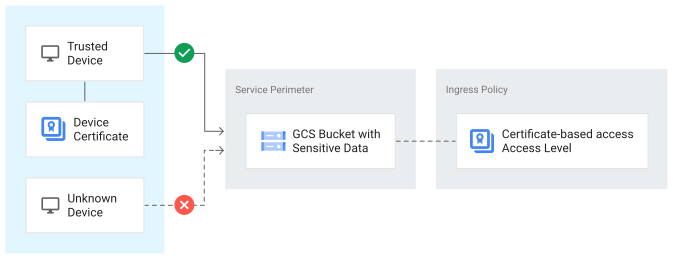
To apply a CBA ingress policy to a service perimeter, complete the following steps:
-
In the Google Cloud console navigation menu, click Security, and then click VPC Service Controls.
-
On the VPC Service Controlspage, in the table, click the name of the service perimeter that you want to modify.
-
On the Edit VPC Service Perimeterpage, click Access Levels.
-
For the Choose Access Level, select the CBA access level.
-
Click Save.
