Stay organized with collectionsSave and categorize content based on your preferences.
Control access to resources with IAM
This document describes how to view, grant, and revoke access controls for
BigQuery datasets and for the resources within datasets:
tables, views, and routines. Although models are also dataset-level resources,
you cannot grant access to individual models using IAM roles.
You can grant access to Google Cloud resources by usingallow policies, also known asIdentity and Access Management (IAM) policies, which are
attached to resources. You can attach only one allow policy to each resource.
The allow policy controls access to the resource itself, as well as any
descendants of that resource thatinherit the allow policy.
For more information on allow policies, seePolicy structurein the IAM documentation.
Data Catalog doesn't support routine access controls. If a user has
conditionally granted routine-level access, they won't see their routines in
the BigQuery side panel. As a workaround, grant dataset-level
access instead.
This predefined role contains
the permissions required to modify IAM policies for resources. To see the exact permissions that are
required, expand theRequired permissionssection:
Required permissions
The following permissions are required to modify IAM policies for resources:
To get a dataset's access policy:bigquery.datasets.get
To set a dataset's access policy:bigquery.datasets.update
To get a dataset's access policy (Google Cloud console only):bigquery.datasets.getIamPolicy
To set a dataset's access policy (console only):bigquery.datasets.setIamPolicy
To get a table or view's policy:bigquery.tables.getIamPolicy
To set a table or view's policy:bigquery.tables.setIamPolicy
To get a routine's access policy:bigquery.routines.getIamPolicy
To set a routine's access policy:bigquery.routines.setIamPolicy
To create bq tool orSQL BigQuery jobs(optional):bigquery.jobs.create
You can provide access to a dataset by granting anIAM principala predefined or custom role that determines what the principal can do with the
dataset. This is also known as attaching anallow policyto a resource. After granting access, you can view the dataset's access
controls, and you can revoke access to the dataset.
Grant access to a dataset
You can't grant access to a dataset when you create it using the BigQuery web UI or
the bq command-line tool. You must create the dataset first and then grant access to it.
The API lets you grant access during dataset creation by calling thedatasets.insertmethodwith a defineddataset resource.
A project is the parent resource for a dataset, and a dataset is the parent
resource for tables and views, routines, and models. When you grant a role at
the project level, the role and its permissions are inherited by the dataset and
by the dataset's resources. Similarly, when you grant a role at the dataset
level, the role and its permissions are inherited by the resources within the
dataset.
You can provide access to a dataset by granting an IAM role
permission to access the dataset or by conditionally granting access using
an IAM condition. For more information on granting conditional
access, seeControl access with IAM Conditions.
To grant an IAM role access to a dataset without using
conditions, select one of the following options:
importcom.google.cloud.bigquery.Acl;importcom.google.cloud.bigquery.Acl.Entity;importcom.google.cloud.bigquery.Acl.Group;importcom.google.cloud.bigquery.Acl.Role;importcom.google.cloud.bigquery.BigQuery;importcom.google.cloud.bigquery.BigQueryException;importcom.google.cloud.bigquery.BigQueryOptions;importcom.google.cloud.bigquery.Dataset;importcom.google.cloud.bigquery.DatasetId;importjava.util.ArrayList;importjava.util.List;publicclassGrantAccessToDataset{publicstaticvoidmain(String[]args){// TODO(developer): Replace these variables before running the sample.// Project and dataset from which to get the access policyStringprojectId="MY_PROJECT_ID";StringdatasetName="MY_DATASET_NAME";// Group to add to the ACLStringentityEmail="group-to-add@example.com";grantAccessToDataset(projectId,datasetName,entityEmail);}publicstaticvoidgrantAccessToDataset(StringprojectId,StringdatasetName,StringentityEmail){try{// Initialize client that will be used to send requests. This client only needs to be created// once, and can be reused for multiple requests.BigQuerybigquery=BigQueryOptions.getDefaultInstance().getService();// Create datasetId with the projectId and the datasetName.DatasetIddatasetId=DatasetId.of(projectId,datasetName);Datasetdataset=bigquery.getDataset(datasetId);// Create a new Entity with the corresponding type and email// "user-or-group-to-add@example.com"// For more information on the types of Entities available see:// https://cloud.google.com/java/docs/reference/google-cloud-bigquery/latest/com.google.cloud.bigquery.Acl.Entity// and// https://cloud.google.com/java/docs/reference/google-cloud-bigquery/latest/com.google.cloud.bigquery.Acl.Entity.TypeEntityentity=newGroup(entityEmail);// Create a new ACL granting the READER role to the group with the entity email// "user-or-group-to-add@example.com"// For more information on the types of ACLs available see:// https://cloud.google.com/storage/docs/access-control/listsAclnewEntry=Acl.of(entity,Role.READER);// Get a copy of the ACLs list from the dataset and append the new entry.List<Acl>acls=newArrayList<>(dataset.getAcl());acls.add(newEntry);// Update the ACLs by setting the new list.DatasetupdatedDataset=bigquery.update(dataset.toBuilder().setAcl(acls).build());System.out.println("ACLs of dataset \""+updatedDataset.getDatasetId().getDataset()+"\" updated successfully");}catch(BigQueryExceptione){System.out.println("ACLs were not updated \n"+e.toString());}}}
Set the new access list by appending the new entry to the existing list using theDataset#metadatamethod.
Then call theDataset#setMetadata()function to update the property.
/*** TODO(developer): Update and un-comment below lines.*/// const datasetId = "my_project_id.my_dataset_name";// ID of the user or group from whom you are adding access.// const entityId = "user-or-group-to-add@example.com";// One of the "Basic roles for datasets" described here:// https://cloud.google.com/bigquery/docs/access-control-basic-roles#dataset-basic-roles// const role = "READER";const{BigQuery}=require('@google-cloud/bigquery');// Instantiate a client.constclient=newBigQuery();// Type of entity you are granting access to.// Find allowed allowed entity type names here:// https://cloud.google.com/bigquery/docs/reference/rest/v2/datasets#resource:-datasetconstentityType='groupByEmail';asyncfunctiongrantAccessToDataset(){const[dataset]=awaitclient.dataset(datasetId).get();// The 'access entries' array is immutable. Create a copy for modifications.constentries=[...dataset.metadata.access];// Append an AccessEntry to grant the role to a dataset.// Find more details about the AccessEntry object in the BigQuery documentation:// https://cloud.google.com/python/docs/reference/bigquery/latest/google.cloud.bigquery.dataset.AccessEntryentries.push({role,[entityType]:entityId,});// Assign the array of AccessEntries back to the dataset.constmetadata={access:entries,};// Update will only succeed if the dataset// has not been modified externally since retrieval.//// See the BigQuery client library documentation for more details on metadata updates:// https://cloud.google.com/nodejs/docs/reference/bigquery/latest// Update just the 'access entries' property of the dataset.awaitclient.dataset(datasetId).setMetadata(metadata);console.log(`Role '${role}' granted for entity '${entityId}' in '${datasetId}'.`);}
fromgoogle.api_core.exceptionsimportPreconditionFailedfromgoogle.cloudimportbigqueryfromgoogle.cloud.bigquery.enumsimportEntityTypes# TODO(developer): Update and uncomment the lines below.# ID of the dataset to grant access to.# dataset_id = "my_project_id.my_dataset"# ID of the user or group receiving access to the dataset.# Alternatively, the JSON REST API representation of the entity,# such as the view's table reference.# entity_id = "user-or-group-to-add@example.com"# One of the "Basic roles for datasets" described here:# https://cloud.google.com/bigquery/docs/access-control-basic-roles#dataset-basic-roles# role = "READER"# Type of entity you are granting access to.# Find allowed allowed entity type names here:# https://cloud.google.com/python/docs/reference/bigquery/latest/enums#class-googlecloudbigqueryenumsentitytypesvalueentity_type=EntityTypes.GROUP_BY_EMAIL# Instantiate a client.client=bigquery.Client()# Get a reference to the dataset.dataset=client.get_dataset(dataset_id)# The `access_entries` list is immutable. Create a copy for modifications.entries=list(dataset.access_entries)# Append an AccessEntry to grant the role to a dataset.# Find more details about the AccessEntry object here:# https://cloud.google.com/python/docs/reference/bigquery/latest/google.cloud.bigquery.dataset.AccessEntryentries.append(bigquery.AccessEntry(role=role,entity_type=entity_type,entity_id=entity_id,))# Assign the list of AccessEntries back to the dataset.dataset.access_entries=entries# Update will only succeed if the dataset# has not been modified externally since retrieval.## See the BigQuery client library documentation for more details on `update_dataset`:# https://cloud.google.com/python/docs/reference/bigquery/latest/google.cloud.bigquery.client.Client#google_cloud_bigquery_client_Client_update_datasettry:# Update just the `access_entries` property of the dataset.dataset=client.update_dataset(dataset,["access_entries"],)# Show a success message.full_dataset_id=f"{dataset.project}.{dataset.dataset_id}"print(f"Role '{role}' granted for entity '{entity_id}'"f" in dataset '{full_dataset_id}'.")exceptPreconditionFailed:# A read-modify-write errorprint(f"Dataset '{dataset.dataset_id}' was modified remotely before this update. ""Fetch the latest version and retry.")
Predefined roles that grant access to datasets
You can grant the following IAM predefined roles access to a
dataset.
When granted on a dataset, this role grants these permissions:
Get metadata and access controls for the dataset.
Get metadata and access controls for tables and views.
Get metadata from the dataset's models and routines.
List tables, views, models, and routines in the dataset.
Dataset permissions
Most permissions that begin withbigquery.datasetsapply at the dataset level.bigquery.datasets.createdoesn't. In order to create datasets,bigquery.datasets.createpermission must be granted to a role on the parent
container–the project.
The following table lists all permissions for datasets and the lowest-level
resource the permission can be applied to.
Permission
Resource
Action
bigquery.datasets.create
Project
Create new datasets in the project.
bigquery.datasets.get
Dataset
Get metadata and access controls for the dataset. Viewing permissions in
the console also requires thebigquery.datasets.getIamPolicypermission.
bigquery.datasets.getIamPolicy
Dataset
Required by the console to grant the user permission to get a dataset's
access controls. Fails open. The console also requires thebigquery.datasets.getpermission to view the dataset.
bigquery.datasets.update
Dataset
Update metadata and access controls for the dataset. Updating access
controls in the console also requires thebigquery.datasets.setIamPolicypermission.
bigquery.datasets.setIamPolicy
Dataset
Required by the console to grant the user permission to set a dataset's
access controls. Fails open. The console also requires thebigquery.datasets.updatepermission to update the dataset.
bigquery.datasets.delete
Dataset
Delete a dataset.
bigquery.datasets.createTagBinding
Dataset
Attach tags to the dataset.
bigquery.datasets.deleteTagBinding
Dataset
Detach tags from the dataset.
bigquery.datasets.listTagBindings
Dataset
List tags for the dataset.
bigquery.datasets.listEffectiveTags
Dataset
List effective tags (applied and inherited) for the dataset.
List shared dataset usage statistics for datasets that you have access
to in the project. This permission is required to query theINFORMATION_SCHEMA.SHARED_DATASET_USAGEview.
View access controls for a dataset
You can view the explicitly set access controls for a dataset by choosing one of
the following options. Toview inherited roles, for a
dataset, use the BigQuery web UI.
Views are treated as table resources in BigQuery. You can provide
access to a table or view by granting anIAM principala predefined or custom role that determines what the principal can do with the
table or view. This is also known as attaching anallow policyto a resource. After granting access, you can view the access controls for the
table or view, and you can revoke access to the table or view.
Grant access to a table or view
For fine-grained access control, you can grant a predefined or custom
IAM role on a specific table or view. The table or view also
inherits access controls specified at the dataset level and higher. For example,
if you grant a principal the BigQuery Data Owner role on a dataset, that
principal also has BigQuery Data Owner permissions on the tables and views in
the dataset.
To grant access to a table or view, select one of the following options:
Predefined roles that grant access to tables and views
Views are treated as table resources in BigQuery. For
fine-grained access control, you can grant a predefined or custom
IAM role on a specific table or view. The table or view also
inherits access controls specified at the dataset level and higher. For example,
if you grant a principal the BigQuery Data Owner role on a dataset, that
principal also has Data Owner permissions on the tables and views in the
dataset.
The following predefined IAM roles have permissions on tables or
views.
When granted on a table or view, this role grants these permissions:
Get metadata and access controls for the table or view.
Permissions for tables and views
Views are treated as table resources in BigQuery. All table-level
permissions apply to views.
Most permissions that begin withbigquery.tablesapply at the table level.bigquery.tables.createandbigquery.tables.listdon't. In order to create
and list tables or views,bigquery.tables.createandbigquery.tables.listpermissions must be granted to a role on a parent container–the dataset or the
project.
The following table lists all permissions for tables and views and the
lowest-level resource they can be granted to.
Permission
Resource
Action
bigquery.tables.create
Dataset
Create new tables in the dataset.
bigquery.tables.createIndex
Table
Create a search index on the table.
bigquery.tables.deleteIndex
Table
Delete a search index on the table.
bigquery.tables.createSnapshot
Table
Create a snapshot of the table. Creating a snapshot requires several
additional permissions at the table and dataset level. For details, seePermissions and rolesfor creating table snapshots.
You can provide access to a routine by granting anIAM
principala predefined or custom role
that determines what the principal can do with the routine. This is also known
as attaching anallow policyto a resource. After
granting access, you can view the access controls for the routine, and you
can revoke access to the routine.
Grant access to a routine
For fine-grained access control, you can grant a predefined or custom
IAM role on a specific routine. The routine also inherits access
controls specified at the dataset level and higher. For example, if you grant a
principal the BigQuery Data Owner role on a dataset, that principal also has
Data Owner permissions on the routines in the dataset.
For fine-grained access control, you can grant a predefined or custom
IAM role on a specific routine. The routine also inherits access
controls specified at the dataset level and higher. For example, if you grant a
principal the Data Owner role on a dataset, that principal also has Data Owner
permissions on the routines in the dataset through inheritance.
The following predefined IAM roles have permissions on routines.
When granted on a routine, this role grants these permissions:
In a query, reference a routine created by someone else.
Permissions for routines
Most permissions that begin withbigquery.routinesapply at the routine level.bigquery.routines.createandbigquery.routines.listdon't. In order to
create and list routines,bigquery.routines.createandbigquery.routines.listpermissions must be granted to a role on the parent
container–the dataset.
The following table lists all permissions for routines and the lowest-level
resource they can be granted to.
Permission
Resource
Description
bigquery.routines.create
Dataset
Create a routine in the dataset. This permission also requiresbigquery.jobs.createto run a query job that contains aCREATE FUNCTIONstatement.
bigquery.routines.delete
Routine
Delete a routine.
bigquery.routines.get
Routine
Reference a routine created by someone else. This permission also
requiresbigquery.jobs.createto run a query job that
references the routine, and you also need permission to access any resources
that the routine references, such as tables or views.
bigquery.routines.list
Dataset
List routines in the dataset and show metadata for routines.
bigquery.routines.update
Routine
Update routine definitions and metadata.
bigquery.routines.getIamPolicy
Routine
Get access controls for the routine.
bigquery.routines.setIamPolicy
Routine
Set access controls for the routine.
View the access controls for a routine
To view the access controls for a routine, choose one of the following options:
You can examine the inherited IAM roles for a resource by using
the BigQuery web UI. You'll need theappropriate permissions to view inheritancein the console. To examine inheritance for a dataset, table, view, or routine:
In the Google Cloud console, go to theBigQuerypage.
In theExplorerpane, expand your project, clickDatasets, and
then select a dataset, or select a table, view, or routine in the dataset.
ClickShare>Manage permissions.
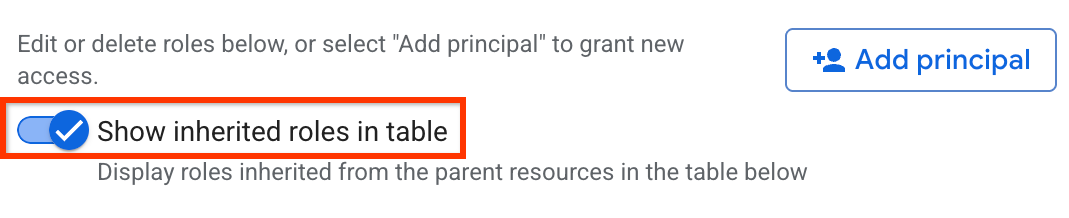
Verify that theShow inherited roles in tableoption is enabled.
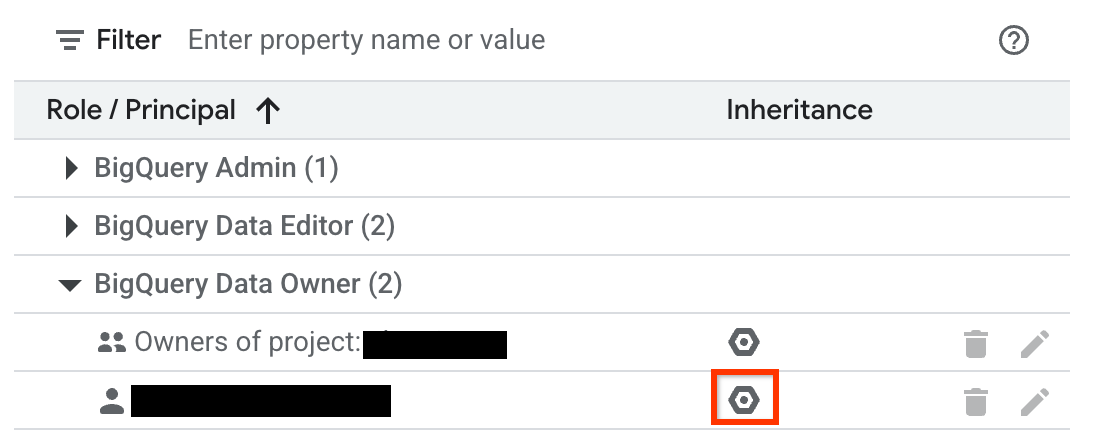
Expand a role in the table.
In theInheritancecolumn, the hexagonal icon indicates whether the role
was inherited from a parent resource.
Deny access to a resource
IAM deny policieslet you set
guardrails on access to BigQuery resources. You can define deny rules
that prevent selected principals from usingcertain permissions, regardless of
the roles they're granted.
For information about how to create, update, and delete deny policies, seeDeny access to resources.
Blocks all BigQuery authorized resources in the
specified project.PROJECT_NUMBERis an automatically generated unique identifier for your project of typeINT64.
View authorization is granted at the dataset level. Therefore, if an
IAM deny policy is applied to a tag on a specific table in
the dataset, a user can still query that table using an authorized view. To
block access, apply the tag at the dataset level, which denies view access
to all tables in the dataset.
To exempt certain principals from the deny policy, specify those
principals in theexceptionPrincipalsfield of your deny policy. For example,exceptionPrincipals: "principalSet://bigquery.googleapis.com/projects/1234/*".
BigQuerycaches query resultsof a job owner for 24 hours, which the job owner can access without needing
thebigquery.tables.getDatapermission on the table containing the
data. Hence, adding an IAM deny policy to thebigquery.tables.getDatapermission doesn't block access to cached results
for the job owner until the cache expires. To block the job owner access to
cached results, create a separate deny policy on thebigquery.jobs.createpermission.
To prevent unintended data access when using deny policies to block data read
operations, we recommend that you also review and revoke any existing
subscriptions on the dataset.
To create aIAM deny policyfor
viewing dataset access controls, deny the following permissions:
bigquery.datasets.get
bigquery.datasets.getIamPolicy
To create aIAM deny policyfor
updating dataset access controls, deny the following permissions:
[[["Easy to understand","easyToUnderstand","thumb-up"],["Solved my problem","solvedMyProblem","thumb-up"],["Other","otherUp","thumb-up"]],[["Hard to understand","hardToUnderstand","thumb-down"],["Incorrect information or sample code","incorrectInformationOrSampleCode","thumb-down"],["Missing the information/samples I need","missingTheInformationSamplesINeed","thumb-down"],["Other","otherDown","thumb-down"]],["Last updated 2026-06-23 UTC."],[],[]]