

This guide is intended for publishers integrating app open ads using GMA Next-Gen SDK .
App open ads are a special ad format intended for publishers wishing to monetize their app load screens. App open ads can be closed at any time, and are designed to be shown when your users bring your app to the foreground.
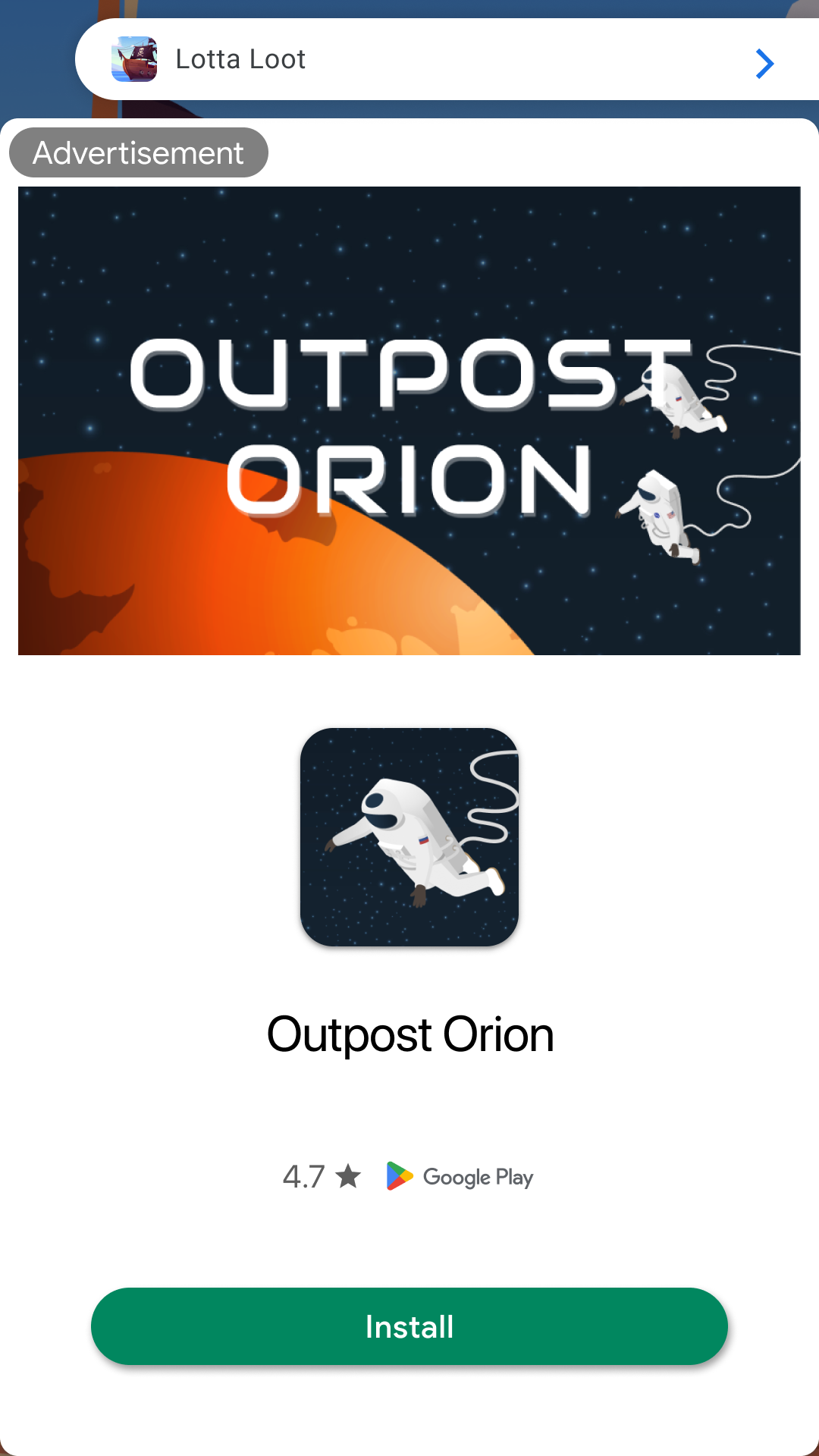
App open ads automatically show a small branding area so users know they're in your app. Here is an example of what an app open ad looks like:
Prerequisites
Before you continue, set up GMA Next-Gen SDK .
Always test with test ads
When building and testing your apps, make sure you use test ads rather than live, production ads. Failure to do so can lead to suspension of your account.
The easiest way to load test ads is to use our dedicated test ad unit ID for app open ads:
ca-app-pub-3940256099942544/9257395921
It's been specially configured to return test ads for every request, and you're free to use it in your own apps while coding, testing, and debugging. Just make sure you replace it with your own ad unit ID before publishing your app.
For more information about how GMA Next-Gen SDK test ads work, see Enable test ads .
Extend the Application class
Create a new class that extends the Application
class. This provides a
lifecycle-aware way to manage ads that are tied to the application's state
rather than a single Activity
:
Kotlin
  /** Application class that initializes, loads and show ads when activities change states. */
 class

 MyApplication

 :

 Application
 ()

 {

 override

 fun

 onCreate
 ()

 {

 super<Application>
 .
 onCreate
 ()

 CoroutineScope
 (
 Dispatchers
 .
 IO
 ).
 launch

 {

 // Initialize the Mobile Ads SDK synchronously on a background thread.

 MobileAds
 .
 initialize
 (
 this
 @MyApplication
 ,

 InitializationConfig
 .
 Builder
 (
 APP_ID
 ).
 build
 ())

 {}

 }

 }

 private

 companion

 object

 {

 // Sample AdMob App ID.

 const

 val

 APP_ID

 =

 "ca-app-pub-3940256099942544~3347511713"

 }
 }
Java
  /** Application class that initializes, loads and show ads when activities change states. */
 public

 class
 MyApplication

 extends

 Application

 {

 // Sample AdMob App ID.

 private

 static

 final

 String

 APP_ID

 =

 "ca-app-pub-3940256099942544~3347511713"
 ;

 @Override

 public

 void

 onCreate
 ()

 {

 super
 .
 onCreate
 ();

 new

 Thread
 (

 ()

 -
>
 {

 // Initialize the SDK on a background thread.

 MobileAds
 .
 initialize
 (

 MyApplication
 .
 this
 ,

 new

 InitializationConfig
 .
 Builder
 (
 APP_ID
 ).
 build
 (),

 initializationStatus

 -
>
 {});

 })

 .
 start
 ();

 }
 }
This provides the skeleton where you'll later register for app foregrounding events.
Next, add the following code to your AndroidManifest.xml
:
 <!--
TODO:
Update
to
reference
your
actual
package
name.
-->
<application
android:name="com.google.android.gms.example.appopendemo.MyApplication"
...>
...
</application>
Implement your utility component
Your ad should show quickly, so it's best to load your ad before you need to display it. That way, you'll have an ad ready to go as soon as your user enters into your app.
Implement a utility component AppOpenAdManager
to encapsulate the work related
to loading and showing App Open ads:
Kotlin
  /**
 * Interface definition for a callback to be invoked when an app open ad is complete (i.e. dismissed
 * or fails to show).
 */
 fun

 interface

 OnShowAdCompleteListener

 {

 fun

 onShowAdComplete
 ()
 }
 /** Singleton object that loads and shows app open ads. */
 object

 AppOpenAdManager

 {

 private

 var

 appOpenAd
 :

 AppOpenAd?
 =

 null

 private

 var

 isLoadingAd

 =

 false

 var

 isShowingAd

 =

 false

 /**
 * Load an ad.
 *
 * @param context a context used to perform UI-related operations (e.g. display Toast messages).
 *   Showing the app open ad itself does not require a context.
 */

 fun

 loadAd
 (
 context
 :

 Context
 )

 {

 // We will implement this later.

 }

 /**
 * Show the ad if one isn't already showing.
 *
 * @param activity the activity that shows the app open ad.
 * @param onShowAdCompleteListener the listener to be notified when an app open ad is complete.
 */

 fun

 showAdIfAvailable
 (
 activity
 :

 Activity
 ,

 onShowAdCompleteListener
 :

 OnShowAdCompleteListener?)

 {

 // We will implement this later.

 }

 /** Check if ad exists and can be shown. */

 private

 fun

 isAdAvailable
 ():

 Boolean

 {

 return

 appOpenAd

 !=

 null

 }
 }
Java
  /** Singleton object that loads and shows app open ads. */
 public

 class
 AppOpenAdManager

 {

 /**
 * Interface definition for a callback to be invoked when an app open ad is complete (i.e.
 * dismissed or fails to show).
 */

 public

 interface
 OnShowAdCompleteListener

 {

 void

 onShowAdComplete
 ();

 }

 private

 static

 AppOpenAdManager

 instance
 ;

 private

 AppOpenAd

 appOpenAd
 ;

 private

 boolean

 isLoadingAd

 =

 false
 ;

 private

 boolean

 isShowingAd

 =

 false
 ;

 /** Keep track of the time an app open ad is loaded to make sure you don't show an expired ad. */

 private

 long

 loadTime

 =

 0
 ;

 public

 static

 synchronized

 AppOpenAdManager

 getInstance
 ()

 {

 if

 (
 instance

 ==

 null
 )

 {

 instance

 =

 new

 AppOpenAdManager
 ();

 }

 return

 instance
 ;

 }

 /**
 * Load an ad.
 *
 * @param context a context used to perform UI-related operations (e.g. display Toast messages).
 *     Loading the app open ad itself does not require a context.
 */

 public

 void

 loadAd
 (
 @NonNull

 Context

 context
 )

 {

 // We will implement this later.

 }

 /**
 * Show the ad if one isn't already showing.
 *
 * @param activity the activity that shows the app open ad.
 * @param onShowAdCompleteListener the listener to be notified when an app open ad is complete.
 */

 public

 void

 showAdIfAvailable
 (

 @NonNull

 Activity

 activity
 ,

 @Nullable

 OnShowAdCompleteListener

 onShowAdCompleteListener
 )

 {

 // We will implement this later.

 }

 /** Check if ad exists and can be shown. */

 private

 boolean

 isAdAvailable
 ()

 {

 return

 appOpenAd

 !=

 null

 }
 }
Now that you have a utility class, you can instantiate it in your MyApplication
class:
Java
  public

 class
 MyApplication

 extends

 Application

 {

  private

 AppOpenAdManager

 appOpenAdManager
 ;

 @Override

 public

 void

 onCreate
 ()

 {

 super
 .
 onCreate
 ();

 new

 Thread
 (

 ()

 -
>
 {

 // Initialize GMA Next-Gen SDK
on a background thread.

 MobileAds
 .
 initialize
 (
 this
 ,

 initializationStatus

 -
>
 {});

 })

 .
 start
 ();

  appOpenAdManager

 =

 new

 AppOpenAdManager
 (
 this
 );

 }
 }
Kotlin
  class

 MyApplication

 :

 Application
 ()

 {

  private

 lateinit

 var

 appOpenAdManager
 :

 AppOpenAdManager

 override

 fun

 onCreate
 ()

 {

 super
 .
 onCreate
 ()

 val

 backgroundScope

 =

 CoroutineScope
 (
 Dispatchers
 .
 IO
 )

 backgroundScope
 .
 launch

 {

 // Initialize GMA Next-Gen SDK
on a background thread.

 MobileAds
 .
 initialize
 (
 this
 @MyApplication
 )

 {}

 }

  appOpenAdManager

 =

 AppOpenAdManager
 ()

 }
 }
To use the AppOpenAdManager
, call the public wrapper methods on the singleton MyApplication
instance. The Application
class interfaces with the rest of
the code, delegating the work of loading and showing the ad to the manager.
Load an ad
The next step is to fill out the loadAd()
method and handle the ad load
callbacks.
Kotlin
/**
* Load an ad.
*
* @param context a context used to perform UI-related operations (e.g. display Toast messages).
* Loading the app open ad itself does not require a context.
*/
fun
loadAd
(
context
:
Context
)
{
// Do not load ad if there is an unused ad or one is already loading.
if
(
isLoadingAd
||
isAdAvailable
())
{
Log
.
d
(
Constant
.
TAG
,
"App open ad is either loading or has already loaded."
)
return
}
isLoadingAd
=
true
AppOpenAd
.
load
(
AdRequest
.
Builder
(
AppOpenFragment
.
AD_UNIT_ID
).
build
(),
object
:
AdLoadCallback<AppOpenAd>
{
/**
* Called when an app open ad has loaded.
*
* @param ad the loaded app open ad.
*/
override
fun
onAdLoaded
(
ad
:
AppOpenAd
)
{
// Called when an ad has loaded.
appOpenAd
=
ad
isLoadingAd
=
false
Log
.
d
(
Constant
.
TAG
,
"App open ad loaded."
)
}
/**
* Called when an app open ad has failed to load.
*
* @param loadAdError the error.
*/
override
fun
onAdFailedToLoad
(
loadAdError
:
LoadAdError
)
{
isLoadingAd
=
false
Log
.
w
(
Constant
.
TAG
,
"App open ad failed to load:
$
loadAdError
"
)
}
},
)
}
Java
/**
* Load an ad.
*
* @param context a context used to perform UI-related operations (e.g. display Toast messages).
* Loading the app open ad itself does not require a context.
*/
public
void
loadAd
(
@NonNull
Context
context
)
{
// Do not load ad if there is an unused ad or one is already loading.
if
(
isLoadingAd
||
isAdAvailable
())
{
Log
.
d
(
Constant
.
TAG
,
"App open ad is either loading or has already loaded."
);
return
;
}
isLoadingAd
=
true
;
AppOpenAd
.
load
(
new
AdRequest
.
Builder
(
AppOpenFragment
.
AD_UNIT_ID
).
build
(),
new
AdLoadCallback<AppOpenAd>
()
{
@Override
public
void
onAdLoaded
(
@NonNull
AppOpenAd
ad
)
{
appOpenAd
=
ad
;
isLoadingAd
=
false
;
Log
.
d
(
Constant
.
TAG
,
"App open ad loaded."
);
}
@Override
public
void
onAdFailedToLoad
(
@NonNull
LoadAdError
loadAdError
)
{
isLoadingAd
=
false
;
Log
.
w
(
Constant
.
TAG
,
"App open ad failed to load: "
+
loadAdError
);
}
});
}
Replace AD_UNIT_ID with your own ad unit ID.
Show the ad
The most common app open implementation is to attempt to show an app open ad near app launch, start app content if the ad isn't ready, and preload another ad for the next app open opportunity. See App open ad guidance for implementation examples.
The following code shows and subsequently reloads an ad:
Kotlin
/**
* Show the ad if one isn't already showing.
*
* @param activity the activity that shows the app open ad.
* @param onShowAdCompleteListener the listener to be notified when an app open ad is complete.
*/
fun
showAdIfAvailable
(
activity
:
Activity
,
onShowAdCompleteListener
:
OnShowAdCompleteListener?)
{
// If the app open ad is already showing, do not show the ad again.
if
(
isShowingAd
)
{
Log
.
d
(
Constant
.
TAG
,
"App open ad is already showing."
)
onShowAdCompleteListener
?.
onShowAdComplete
()
return
}
// If the app open ad is not available yet, invoke the callback.
if
(
!
isAdAvailable
())
{
Log
.
d
(
Constant
.
TAG
,
"App open ad is not ready yet."
)
onShowAdCompleteListener
?.
onShowAdComplete
()
return
}
appOpenAd
?.
adEventCallback
=
object
:
AppOpenAdEventCallback
{
override
fun
onAdShowedFullScreenContent
()
{
Log
.
d
(
Constant
.
TAG
,
"App open ad showed."
)
}
override
fun
onAdDismissedFullScreenContent
()
{
Log
.
d
(
Constant
.
TAG
,
"App open ad dismissed."
)
appOpenAd
=
null
isShowingAd
=
false
onShowAdCompleteListener
?.
onShowAdComplete
()
loadAd
(
activity
)
}
override
fun
onAdFailedToShowFullScreenContent
(
fullScreenContentError
:
FullScreenContentError
)
{
appOpenAd
=
null
isShowingAd
=
false
Log
.
w
(
Constant
.
TAG
,
"App open ad failed to show:
$
fullScreenContentError
"
)
onShowAdCompleteListener
?.
onShowAdComplete
()
loadAd
(
activity
)
}
override
fun
onAdImpression
()
{
Log
.
d
(
Constant
.
TAG
,
"App open ad recorded an impression."
)
}
override
fun
onAdClicked
()
{
Log
.
d
(
Constant
.
TAG
,
"App open ad recorded a click."
)
}
}
isShowingAd
=
true
appOpenAd
?.
show
(
activity
)
}
Java
/**
* Show the ad if one isn't already showing.
*
* @param activity the activity that shows the app open ad.
* @param onShowAdCompleteListener the listener to be notified when an app open ad is complete.
*/
public
void
showAdIfAvailable
(
@NonNull
Activity
activity
,
@Nullable
OnShowAdCompleteListener
onShowAdCompleteListener
)
{
// If the app open ad is already showing, do not show the ad again.
if
(
isShowingAd
)
{
Log
.
d
(
Constant
.
TAG
,
"App open ad is already showing."
);
if
(
onShowAdCompleteListener
!=
null
)
{
onShowAdCompleteListener
.
onShowAdComplete
();
}
return
;
}
// If the app open ad is not available yet, invoke the callback.
if
(
!
isAdAvailable
())
{
Log
.
d
(
Constant
.
TAG
,
"App open ad is not ready yet."
);
if
(
onShowAdCompleteListener
!=
null
)
{
onShowAdCompleteListener
.
onShowAdComplete
();
}
return
;
}
appOpenAd
.
setAdEventCallback
(
new
AppOpenAdEventCallback
()
{
@Override
public
void
onAdShowedFullScreenContent
()
{
Log
.
d
(
Constant
.
TAG
,
"App open ad shown."
);
}
@Override
public
void
onAdDismissedFullScreenContent
()
{
Log
.
d
(
Constant
.
TAG
,
"App open ad dismissed."
);
appOpenAd
=
null
;
isShowingAd
=
false
;
if
(
onShowAdCompleteListener
!=
null
)
{
onShowAdCompleteListener
.
onShowAdComplete
();
}
loadAd
(
activity
);
}
@Override
public
void
onAdFailedToShowFullScreenContent
(
@NonNull
FullScreenContentError
fullScreenContentError
)
{
appOpenAd
=
null
;
isShowingAd
=
false
;
Log
.
w
(
Constant
.
TAG
,
"App open ad failed to show: "
+
fullScreenContentError
);
if
(
onShowAdCompleteListener
!=
null
)
{
onShowAdCompleteListener
.
onShowAdComplete
();
}
loadAd
(
activity
);
}
@Override
public
void
onAdImpression
()
{
Log
.
d
(
Constant
.
TAG
,
"App open ad recorded an impression."
);
}
@Override
public
void
onAdClicked
()
{
Log
.
d
(
Constant
.
TAG
,
"App open ad recorded a click."
);
}
});
isShowingAd
=
true
;
appOpenAd
.
show
(
activity
);
}
The AppOpenAdEventCallback
handles events such as when the ad is presented,
fails to present, or when it is dismissed.
Consider ad expiration
To make sure you don't show an expired ad, add a method to the AppOpenAdManager
that checks how long it has been since your ad reference loaded. Then, use that
method to check if the ad is still valid.
Kotlin
  object

 AppOpenAdManager

 {

 // ...

  /** Keep track of the time an app open ad is loaded to make sure you don't show an expired ad. */

 private

 var

 loadTime
 :

 Long

 =

 0
 ;


 /**
 * Load an ad.
 *
 * @param context a context used to perform UI-related operations (e.g. display Toast messages).
 *   Loading the app open ad itself does not require a context.
 */

 fun

 loadAd
 (
 context
 :

 Context
 )

 {

 // Do not load ad if there is an unused ad or one is already loading.

 if

 (
 isLoadingAd

 ||

 isAdAvailable
 ())

 {

 Log
 .
 d
 (
 Constant
 .
 TAG
 ,

 "App open ad is either loading or has already loaded."
 )

 return

 }

 isLoadingAd

 =

 true

 AppOpenAd
 .
 load
 (

 AdRequest
 .
 Builder
 (
 AppOpenFragment
 .
 AD_UNIT_ID
 ).
 build
 (),

 object

 :

 AdLoadCallback<AppOpenAd>

 {

 /**
 * Called when an app open ad has loaded.
 *
 * @param ad the loaded app open ad.
 */

 override

 fun

 onAdLoaded
 (
 ad
 :

 AppOpenAd
 )

 {

 // Called when an ad has loaded.

 appOpenAd

 =

 ad

 isLoadingAd

 =

 false

 loadTime

 =

 Date
 ().
 time

 Log
 .
 d
 (
 Constant
 .
 TAG
 ,

 "App open ad loaded."
 )

 }

 /**
 * Called when an app open ad has failed to load.
 *
 * @param loadAdError the error.
 */

 override

 fun

 onAdFailedToLoad
 (
 loadAdError
 :

 LoadAdError
 )

 {

 isLoadingAd

 =

 false

 Log
 .
 w
 (
 Constant
 .
 TAG
 ,

 "App open ad failed to load:
 $
 loadAdError
 "
 )

 }

 },

 )

 }

 // ...

  /** Check if ad was loaded more than n hours ago. */

 private

 fun

 wasLoadTimeLessThanNHoursAgo
 (
 numHours
 :

 Long
 ):

 Boolean

 {

 val

 dateDifference
 :

 Long

 =

 Date
 ().
 time

 -

 loadTime

 val

 numMilliSecondsPerHour
 :

 Long

 =

 3600000

 return

 dateDifference
 <
 numMilliSecondsPerHour

 *

 numHours

 }

 /** Check if ad exists and can be shown. */

 private

 fun

 isAdAvailable
 ():

 Boolean

 {

 // App open ads expire after four hours. Ads rendered more than four hours after request time

 // are no longer valid and may not earn revenue.

 return

 appOpenAd

 !=

 null
  &&
 wasLoadTimeLessThanNHoursAgo
 (
 4
 )

 }
 }
Java
  public

 class
 AppOpenAdManager

 {

 // ...

  /** Keep track of the time an app open ad is loaded to make sure you don't show an expired ad. */

 private

 long

 loadTime

 =

 0
 ;


 /**
 * Load an ad.
 *
 * @param context a context used to perform UI-related operations (e.g. display Toast messages).
 *     Loading the app open ad itself does not require a context.
 */

 public

 void

 loadAd
 (
 @NonNull

 Context

 context
 )

 {

 // Do not load ad if there is an unused ad or one is already loading.

 if

 (
 isLoadingAd

 ||

 isAdAvailable
 ())

 {

 Log
 .
 d
 (
 Constant
 .
 TAG
 ,

 "App open ad is either loading or has already loaded."
 );

 return
 ;

 }

 isLoadingAd

 =

 true
 ;

 AppOpenAd
 .
 load
 (

 new

 AdRequest
 .
 Builder
 (
 AppOpenFragment
 .
 AD_UNIT_ID
 ).
 build
 (),

 new

 AdLoadCallback<AppOpenAd>
 ()

 {

 @Override

 public

 void

 onAdLoaded
 (
 @NonNull

 AppOpenAd

 ad
 )

 {

 appOpenAd

 =

 ad
 ;

 isLoadingAd

 =

 false
 ;

 loadTime

 =

 new

 Date
 ().
 getTime
 ();

 Log
 .
 d
 (
 Constant
 .
 TAG
 ,

 "App open ad loaded."
 );

 }

 @Override

 public

 void

 onAdFailedToLoad
 (
 @NonNull

 LoadAdError

 loadAdError
 )

 {

 isLoadingAd

 =

 false
 ;

 Log
 .
 w
 (
 Constant
 .
 TAG
 ,

 "App open ad failed to load: "

 +

 loadAdError
 );

 }

 });

 }

 // ...

  /** Check if ad was loaded more than n hours ago. */

 private

 boolean

 wasLoadTimeLessThanNHoursAgo
 (
 long

 numHours
 )

 {

 long

 dateDifference

 =

 new

 Date
 ().
 getTime
 ()

 -

 loadTime
 ;

 long

 numMilliSecondsPerHour

 =

 3600000L
 ;

 return

 dateDifference
 <
 numMilliSecondsPerHour

 *

 numHours
 ;

 }

 /** Check if ad exists and can be shown. */

 private

 boolean

 isAdAvailable
 ()

 {

 // App open ads expire after four hours. Ads rendered more than four hours after request time

 // are no longer valid and may not earn revenue.

 return

 appOpenAd

 !=

 null
  &&
 wasLoadTimeLessThanNHoursAgo
 (
 4
 );

 }
 }
Keep track of current activity
To show the ad, you'll need an Activity
context. To keep track of the most
current activity being used, register for and implement the Application.ActivityLifecycleCallbacks
.
Kotlin
  class

 MyApplication

 :

 Application
 (),

 Application
 .
 ActivityLifecycleCallbacks

 {

 private

 var

 currentActivity
 :

 Activity?
 =

 null

 override

 fun

 onCreate
 ()

 {

 super<Application>
 .
 onCreate
 ()

 registerActivityLifecycleCallbacks
 (
 this
 )

 }

 /** ActivityLifecycleCallback methods. */

 override

 fun

 onActivityCreated
 (
 activity
 :

 Activity
 ,

 savedInstanceState
 :

 Bundle?)

 {}

 override

 fun

 onActivityStarted
 (
 activity
 :

 Activity
 )

 {

  currentActivity

 =

 activity

 }

 override

 fun

 onActivityResumed
 (
 activity
 :

 Activity
 )

 {}

 override

 fun

 onActivityPaused
 (
 activity
 :

 Activity
 )

 {}

 override

 fun

 onActivityStopped
 (
 activity
 :

 Activity
 )

 {}

 override

 fun

 onActivitySaveInstanceState
 (
 activity
 :

 Activity
 ,

 outState
 :

 Bundle
 )

 {}

 override

 fun

 onActivityDestroyed
 (
 activity
 :

 Activity
 )

 {}

 // ...
 }
Java
  public

 class
 MyApplication

 extends

 Application

 implements

 Application
 .
 ActivityLifecycleCallbacks

 {

 private

 Activity

 currentActivity
 ;

 @Override

 public

 void

 onCreate
 ()

 {

 super
 .
 onCreate
 ();

 registerActivityLifecycleCallbacks
 (
 this
 );

 }

 /** ActivityLifecycleCallback methods. */

 @Override

 public

 void

 onActivityCreated
 (
 @NonNull

 Activity

 activity
 ,

 @Nullable

 Bundle

 bundle
 )

 {}

 @Override

 public

 void

 onActivityStarted
 (
 @NonNull

 Activity

 activity
 )

 {

  currentActivity

 =

 activity
 ;

 }

 @Override

 public

 void

 onActivityResumed
 (
 @NonNull

 Activity

 activity
 )

 {}

 @Override

 public

 void

 onActivityPaused
 (
 @NonNull

 Activity

 activity
 )

 {}

 @Override

 public

 void

 onActivityStopped
 (
 @NonNull

 Activity

 activity
 )

 {}

 @Override

 public

 void

 onActivitySaveInstanceState
 (
 @NonNull

 Activity

 activity
 ,

 @NonNull

 Bundle

 bundle
 )

 {}

 @Override

 public

 void

 onActivityDestroyed
 (
 @NonNull

 Activity

 activity
 )

 {}

 // ...
 }
registerActivityLifecycleCallbacks
lets you listen for all Activity
events. By listening for when activities
are started and destroyed, you can keep track of a reference to the current Activity
, which you then will use in presenting your app open ad.
Listen for app foregrounding events
To listen for app foreground events, do the following steps:
Add the libraries to your gradle file
To be notified of app foregrounding events, you need to register a DefaultLifecycleObserver
. Add its dependency to your app-level build file:
Kotlin
 dependencies

 {

 implementation
 (
 "com.google.android.libraries.ads.mobile.sdk:ads-mobile-sdk:1.2.0"
 )

  implementation
 (
 "androidx.lifecycle:lifecycle-process:2.8.3"
 )

 }
Groovy
 dependencies

 {

 implementation

 'com.google.android.libraries.ads.mobile.sdk:ads-mobile-sdk:1.2.0'

  implementation

 'androidx.lifecycle:lifecycle-process:2.8.3'

 }
Implement the lifecycle observer interface
You can listen for foregrounding events by implementing the DefaultLifecycleObserver
interface.
Implement the onStart()
to show the app open ad.
Kotlin
  class

 MyApplication

 :

 Application
 (),

 Application
 .
 ActivityLifecycleCallbacks
  ,

 DefaultLifecycleObserver

 {

 private

 var

 currentActivity
 :

 Activity?
 =

 null

 override

 fun

 onCreate
 ()

 {

 super<Application>
 .
 onCreate
 ()

 registerActivityLifecycleCallbacks
 (
 this
 )

  ProcessLifecycleOwner
 .
 get
 ().
 lifecycle
 .
 addObserver
 (
 this
 )

 }

  /**
 * DefaultLifecycleObserver method that shows the app open ad when the app moves to foreground.
 */

 override

 fun

 onStart
 (
 owner
 :

 LifecycleOwner
 )

 {

 currentActivity
 ?.
 let

 {

 activity

 -
>
 AppOpenAdManager
 .
 showAdIfAvailable
 (
 activity
 ,

 null
 )

 }

 }

 // ...
 }
Java
  public

 class
 MyApplication

 extends

 Application

 implements

 Application
 .
 ActivityLifecycleCallbacks
  ,

 DefaultLifecycleObserver

 {

 private

 Activity

 currentActivity
 ;

 @Override

 public

 void

 onCreate
 ()

 {

 super
 .
 onCreate
 ();

 registerActivityLifecycleCallbacks
 (
 this
 );

  ProcessLifecycleOwner
 .
 get
 ().
 getLifecycle
 ().
 addObserver
 (
 this
 );

 }

  /**
 * DefaultLifecycleObserver method that shows the app open ad when the app moves to foreground.
 */

 @Override

 public

 void

 onStart
 (
 @NonNull

 LifecycleOwner

 owner
 )

 {

 if

 (
 currentActivity

 ==

 null
 )

 {

 return
 ;

 }

 AppOpenAdManager
 .
 getInstance
 ().
 showAdIfAvailable
 (
 currentActivity
 ,

 null
 );

 }

 // ...
 }
Cold starts and loading screens
The documentation thus far assumes that you only show app open ads when users foreground your app when it is suspended in memory. "Cold starts" occur when your app is launched but was not previously suspended in memory.
An example of a cold start is when a user opens your app for the first time. With cold starts, you won't have a previously loaded app open ad that's ready to be shown right away. The delay between when you request an ad and receive an ad back can create a situation where users are able to briefly use your app before being surprised by an out of context ad. This should be avoided because it is a bad user experience.
The preferred way to use app open ads on cold starts is to use a loading screen to load your game or app assets, and to only show the ad from the loading screen. If your app has completed loading and has sent the user to the main content of your app, don't show the ad.
Best practices
App open ads help you monetize your app's loading screen, when the app first launches and during app switches, but it's important to keep best practices in mind so that your users enjoy using your app. It's best to:
- Show your first app open ad after your users have used your app a few times.
- Show app open ads during times when your users would otherwise be waiting for your app to load.
- If you have a loading screen under the app open ad, and your loading screen
completes loading before the ad is dismissed, you may want to dismiss your
loading screen in the
onAdDismissedFullScreenContent()method.
Example
Download and run the example app that demonstrates the use of the GMA Next-Gen SDK .
