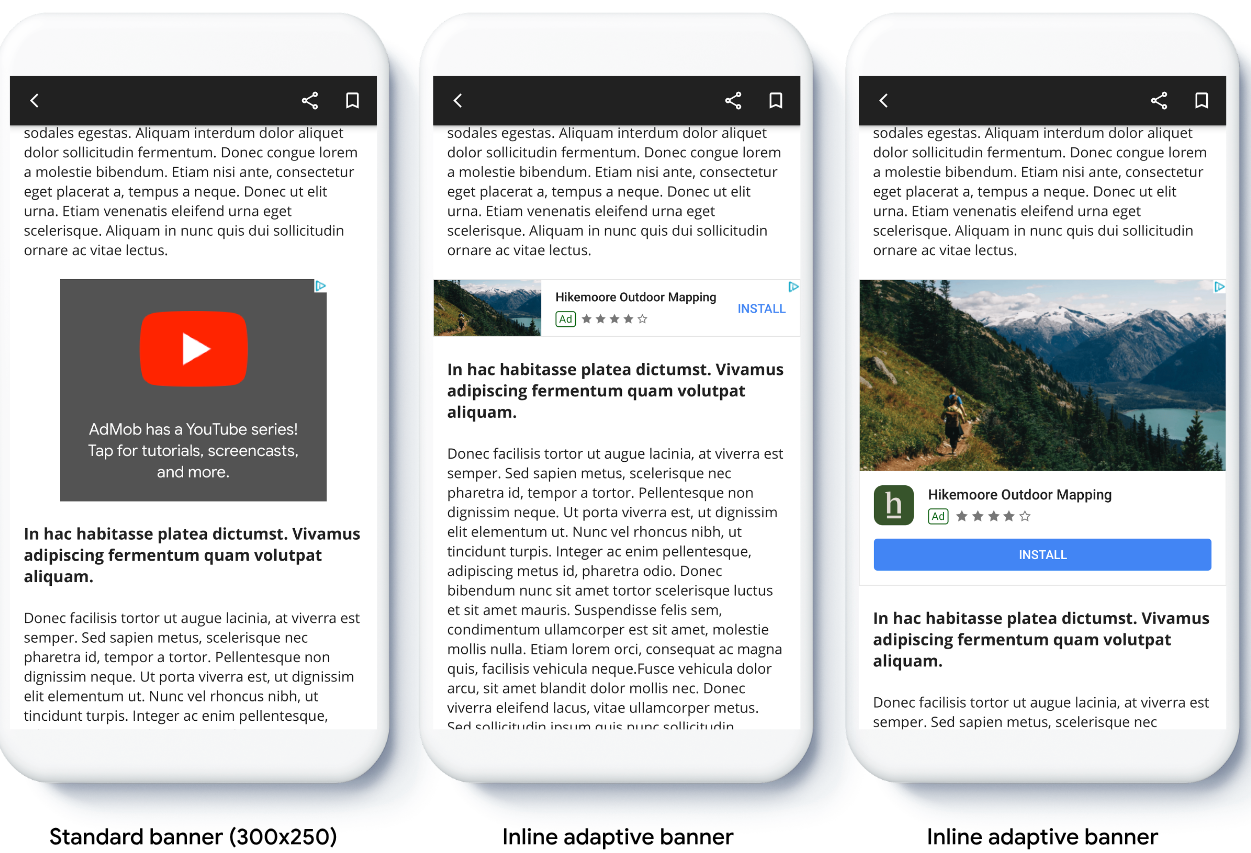
Adaptive banners let you specify the width of an ad to determine the optimal
ad size. Adaptive banners also maximize performance by optimizing the ad size
for each device. This approach results in opportunities for
improved performance.
Compared to anchored adaptive banners, inline adaptive banners are larger,
taller, and use variable instead of fixed heights. Inline adaptive banners are
of variable height, and might encompass the entire screen or a maximum height
that you specify.
You place inline adaptive banners in scrolling content, for example:
Before you begin
Before continuing, make sure you have the following:
Unlike anchored adaptive banners, inline adapter banners load using an inline
adaptive banner size. To create an inline adaptive ad size, complete the
following:
Get the width of the device in use, or set your own width if you don't want
to use the full width of the screen.
Swift
lettotalWidth=view.bounds.width// Make sure the ad fits inside the readable area.letinsets=view.safeAreaInsetsletadWidth=totalWidth-insets.left-insets.right
CGFloattotalWidth=CGRectGetWidth(view.bounds);// Make sure the ad fits inside the readable area.UIEdgeInsetsinsets=view.safeAreaInsets;CGFloatadWidth=totalWidth-insets.left-insets.right;
When implementing adaptive banners in your app, note these points:
The inline adaptive banner sizes work best when using the full available
width. In most cases, this size is the full width of the device screen in
use, or the full width of the banner's parent content. You must know the width
of the view to place in the ad, the device width, the parent content width,
and applicable safe areas.
Orient inline adaptive banner size
To preload an inline adaptive banner ad for a specific orientation, use the
following methods:
[[["Easy to understand","easyToUnderstand","thumb-up"],["Solved my problem","solvedMyProblem","thumb-up"],["Other","otherUp","thumb-up"]],[["Missing the information I need","missingTheInformationINeed","thumb-down"],["Too complicated / too many steps","tooComplicatedTooManySteps","thumb-down"],["Out of date","outOfDate","thumb-down"],["Samples / code issue","samplesCodeIssue","thumb-down"],["Other","otherDown","thumb-down"]],["Last updated 2025-12-17 UTC."],[],["Inline adaptive banners, which are larger and use variable heights, optimize ad size for each device and are placed in scrolling content. Implementation involves determining the ad's width and using methods like `GADCurrentOrientationInlineBannerAdSizeWithWidth` or `GADInlineAdaptiveBannerAdSizeWithWidthAndMaxHeight`. To use you must first create a size object, then the banner with the size object and ad id. Lastly, load the ad. These banners can be preloaded for specific or current orientations and may have a max height.\n"]]