


Page Summary
-
This solution is a beginner-level automation project that creates an end-to-end offsite activity sign-up system using Google Sheets, Google Forms, and Apps Script.
-
The script uses the Spreadsheet service to manage activity schedules and responses, the Forms service to create and collect preferences, and the Utilities service for formatting data.
-
Users need a Google Account and internet access to set up and run the script by making a copy of the sample spreadsheet.
-
The script can create a form, generate test data, and assign activities based on employee preferences and activity capacity, with results presented in new sheets.
Coding level: Beginner
Duration: 5 minutes
Project type: Automation with a custom menu
Objectives
- Understand what the solution does.
- Understand what the Apps Script services do within the solution.
- Set up the script.
- Run the script.
About this solution
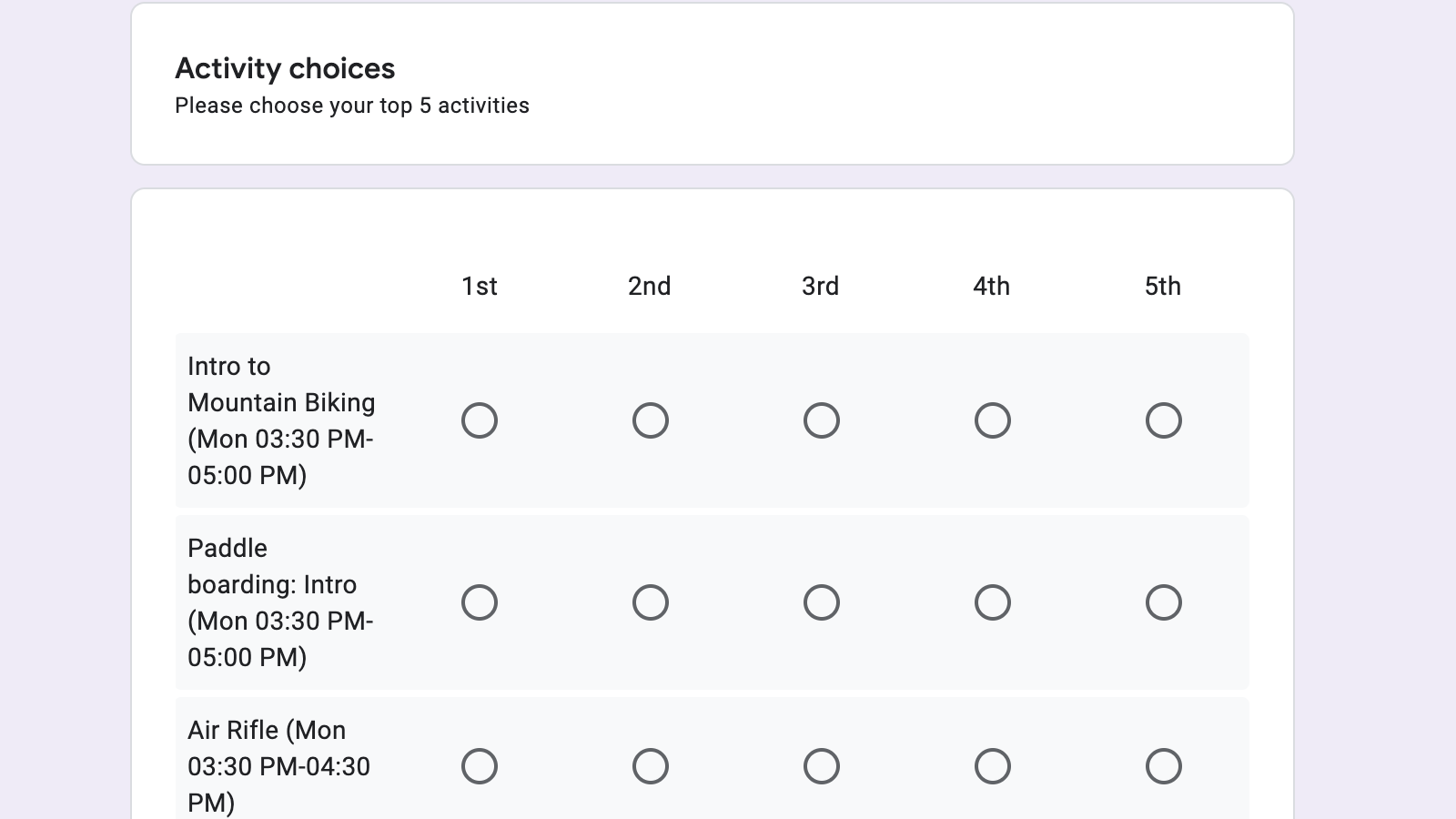
Create an end-to-end offsite activity sign-up system. The solution creates a form for employees to express their activity preferences, and matches employee preferences to the activity schedule.
How it works
Using an activity schedule in Google Sheets, the script creates a Google Form for employees to select their activity preferences. Once the responses are in, the script matches employee preferences with the schedule and capacity of each activity. The matches are provided in two new sheets, one organized by employee and the other by activity.
Apps Script services
This solution uses the following services:
- Spreadsheet service –Holds the activity schedule and form responses, and assigns activities to the employees.
- Forms service –Creates a form for employees to enter their activity preferences.
- Utilities service –Formats strings and dates.
Prerequisites
To use this sample, you need the following prerequisites:
- A Google Account (Google Workspace accounts might require administrator approval).
- A web browser with access to the internet.
Set up the script
Click the following button to make a copy of the Offsite Activity Sign-upsample spreadsheet. The Apps Script project for this
solution is attached to the spreadsheet.
Make a copy
Run the script
- In your copied spreadsheet, click Activities > Create form. You might need to refresh the page for this custom menu to appear.
-
When prompted, authorize the script. If the OAuth consent screen displays the warning, This app isn't verified, continue by selecting Advanced > Go to {Project Name} (unsafe).
-
Click Activities > Create formagain.
-
To generate test responses, click Activities > Generate test data.
-
To test the form yourself, click Tools > Manage form > Go to live form.
-
Fill out the form and submit it.
-
In the spreadsheet, click Activities > Assign activities.
-
Review the 2 new sheets, Activities by personand Activity rosters.
Review the code
To review the Apps Script code for this solution, click View source codebelow:
View source code
Code.gs
 // To learn how to use this script, refer to the documentation:
 // https://developers.google.com/apps-script/samples/automations/offsite-activity-signup
 /*
 Copyright 2022 Google LLC
 Licensed under the Apache License, Version 2.0 (the "License");
 you may not use this file except in compliance with the License.
 You may obtain a copy of the License at
 https://www.apache.org/licenses/LICENSE-2.0
 Unless required by applicable law or agreed to in writing, software
 distributed under the License is distributed on an "AS IS" BASIS,
 WITHOUT WARRANTIES OR CONDITIONS OF ANY KIND, either express or implied.
 See the License for the specific language governing permissions and
 limitations under the License.
 */
 const

 NUM_ITEMS_TO_RANK

 =

 5
 ;
 const

 ACTIVITIES_PER_PERSON

 =

 2
 ;
 const

 NUM_TEST_USERS

 =

 150
 ;
 /**
 * Adds custom menu items when opening the sheet.
 */
 function

 onOpen
 ()

 {

 const

 menu

 =

 SpreadsheetApp
 .
 getUi
 ()

 .
 createMenu
 (
 "Activities"
 )

 .
 addItem
 (
 "Create form"
 ,

 "buildForm_"
 )

 .
 addItem
 (
 "Generate test data"
 ,

 "generateTestData_"
 )

 .
 addItem
 (
 "Assign activities"
 ,

 "assignActivities_"
 )

 .
 addToUi
 ();
 }
 /**
 * Builds a form based on the "Activity Schedule" sheet. The form asks attendees to rank their top
 * N choices of activities, where N is defined by NUM_ITEMS_TO_RANK.
 */
 function

 buildForm_
 ()

 {

 const

 ss

 =

 SpreadsheetApp
 .
 getActiveSpreadsheet
 ();

 if

 (
 ss
 .
 getFormUrl
 ())

 {

 const

 msg

 =

 "Form already exists. Unlink the form and try again."
 ;

 SpreadsheetApp
 .
 getUi
 ().
 alert
 (
 msg
 );

 return
 ;

 }

 const

 form

 =

 FormApp
 .
 create
 (
 "Activity Signup"
 )

 .
 setDestination
 (
 FormApp
 .
 DestinationType
 .
 SPREADSHEET
 ,

 ss
 .
 getId
 ())

 .
 setAllowResponseEdits
 (
 true
 )

 .
 setLimitOneResponsePerUser
 (
 true
 )

 .
 setCollectEmail
 (
 true
 );

 const

 sectionHelpText

 =

 Utilities
 .
 formatString
 (

 "Please choose your top %d activities"
 ,

 NUM_ITEMS_TO_RANK
 ,

 );

 form

 .
 addSectionHeaderItem
 ()

 .
 setTitle
 (
 "Activity choices"
 )

 .
 setHelpText
 (
 sectionHelpText
 );

 // Presents activity ranking as a form grid with each activity as a row and rank as a column.

 const

 rows

 =

 loadActivitySchedule_
 (
 ss
 ).
 map
 (

 (
 activity
 )

 =
>
 activity
 .
 description
 ,

 );

 const

 columns

 =

 range_
 (
 1
 ,

 NUM_ITEMS_TO_RANK
 ).
 map
 ((
 value
 )

 =
>
 Utilities
 .
 formatString
 (
 "%s"
 ,

 toOrdinal_
 (
 value
 )),

 );

 const

 gridValidation

 =

 FormApp
 .
 createGridValidation
 ()

 .
 setHelpText
 (
 "Select one item per column."
 )

 .
 requireLimitOneResponsePerColumn
 ()

 .
 build
 ();

 form

 .
 addGridItem
 ()

 .
 setColumns
 (
 columns
 )

 .
 setRows
 (
 rows
 )

 .
 setValidation
 (
 gridValidation
 );

 form

 .
 addListItem
 ()

 .
 setTitle
 (
 "Assign other activities if choices are not available?"
 )

 .
 setChoiceValues
 ([
 "Yes"
 ,

 "No"
 ]);
 }
 /**
 * Assigns activities using a random priority/random serial dictatorship approach. The results
 * are then populated into two new sheets, one listing activities per person, the other listing
 * the rosters for each activity.
 *
 * See https://en.wikipedia.org/wiki/Random_serial_dictatorship for additional information.
 */
 function

 assignActivities_
 ()

 {

 const

 ss

 =

 SpreadsheetApp
 .
 getActiveSpreadsheet
 ();

 const

 activities

 =

 loadActivitySchedule_
 (
 ss
 );

 const

 activityIds

 =

 activities
 .
 map
 ((
 activity
 )

 =
>
 activity
 .
 id
 );

 const

 attendees

 =

 loadAttendeeResponses_
 (
 ss
 ,

 activityIds
 );

 assignWithRandomPriority_
 (
 attendees
 ,

 activities
 ,

 2
 );

 writeAttendeeAssignments_
 (
 ss
 ,

 attendees
 );

 writeActivityRosters_
 (
 ss
 ,

 activities
 );
 }
 /**
 * Selects activities via random priority.
 *
 * @param {object[]} attendees - Array of attendees to assign activities to
 * @param {object[]} activities - Array of all available activities
 * @param {number} numActivitiesPerPerson - Maximum number of activities to assign
 */
 function

 assignWithRandomPriority_
 (

 attendees
 ,

 activities
 ,

 numActivitiesPerPerson
 ,
 )

 {

 const

 activitiesById

 =

 activities
 .
 reduce
 ((
 obj
 ,

 activity
 )

 =
>
 {

 obj
 [
 activity
 .
 id
 ]

 =

 activity
 ;

 return

 obj
 ;

 },

 {});

 for

 (
 let

 i

 =

 0
 ;

 i
 <
 numActivitiesPerPerson
 ;

 ++
 i
 )

 {

 const

 randomizedAttendees

 =

 shuffleArray_
 (
 attendees
 );

 for

 (
 const

 attendee

 of

 randomizedAttendees
 )

 {

 makeChoice_
 (
 attendee
 ,

 activitiesById
 );

 }

 }
 }
 /**
 * Attempts to assign an activity for an attendee based on their preferences and current schedule.
 *
 * @param {object} attendee - Attendee looking to join an activity
 * @param {object} activitiesById - Map of all available activities
 */
 function

 makeChoice_
 (
 attendee
 ,

 activitiesById
 )

 {

 for

 (
 let

 i

 =

 0
 ;

 i
 <
 attendee
 .
 preferences
 .
 length
 ;

 ++
 i
 )

 {

 const

 activity

 =

 activitiesById
 [
 attendee
 .
 preferences
 [
 i
 ]];

 if

 (
 !
 activity
 )

 {

 continue
 ;

 }

 const

 canJoin

 =

 checkAvailability_
 (
 attendee
 ,

 activity
 );

 if

 (
 canJoin
 )

 {

 attendee
 .
 assigned
 .
 push
 (
 activity
 );

 activity
 .
 roster
 .
 push
 (
 attendee
 );

 break
 ;

 }

 }
 }
 /**
 * Checks that an activity has capacity and doesn't conflict with previously assigned
 * activities.
 *
 * @param {object} attendee - Attendee looking to join the activity
 * @param {object} activity - Proposed activity
 * @return {boolean} - True if attendee can join the activity
 */
 function

 checkAvailability_
 (
 attendee
 ,

 activity
 )

 {

 if

 (
 activity
 .
 capacity

< =

 activity
 .
 roster
 .
 length
 )

 {

 return

 false
 ;

 }

 const

 timesConflict

 =

 attendee
 .
 assigned
 .
 some
 (

 (
 assignedActivity
 )

 =
>
 !
 (

 assignedActivity
 .
 startAt
 .
 getTime
 ()
 >
 activity
 .
 endAt
 .
 getTime
 ()

 ||

 activity
 .
 startAt
 .
 getTime
 ()
 >
 assignedActivity
 .
 endAt
 .
 getTime
 ()

 ),

 );

 return

 !
 timesConflict
 ;
 }
 /**
 * Populates a sheet with the assigned activities for each attendee.
 *
 * @param {Spreadsheet} ss - Spreadsheet to write to.
 * @param {object[]} attendees - Array of attendees with their activity assignments
 */
 function

 writeAttendeeAssignments_
 (
 ss
 ,

 attendees
 )

 {

 const

 sheet

 =

 findOrCreateSheetByName_
 (
 ss
 ,

 "Activities by person"
 );

 sheet
 .
 clear
 ();

 sheet
 .
 appendRow
 ([
 "Email address"
 ,

 "Activities"
 ]);

 sheet
 .
 getRange
 (
 "B1:1"
 ).
 merge
 ();

 const

 rows

 =

 attendees
 .
 map
 ((
 attendee
 )

 =
>
 {

 // Prefill row to ensure consistent length otherwise

 // can't bulk update the sheet with range.setValues()

 const

 row

 =

 fillArray_
 ([],

 ACTIVITIES_PER_PERSON

 +

 1
 ,

 ""
 );

 row
 [
 0
 ]

 =

 attendee
 .
 email
 ;

 attendee
 .
 assigned
 .
 forEach
 ((
 activity
 ,

 index
 )

 =
>
 {

 row
 [
 index

 +

 1
 ]

 =

 activity
 .
 description
 ;

 });

 return

 row
 ;

 });

 bulkAppendRows_
 (
 sheet
 ,

 rows
 );

 sheet
 .
 setFrozenRows
 (
 1
 );

 sheet
 .
 getRange
 (
 "1:1"
 ).
 setFontWeight
 (
 "bold"
 );

 sheet
 .
 autoResizeColumns
 (
 1
 ,

 sheet
 .
 getLastColumn
 ());
 }
 /**
 * Populates a sheet with the rosters for each activity.
 *
 * @param {Spreadsheet} ss - Spreadsheet to write to.
 * @param {object[]} activities - Array of activities with their rosters
 */
 function

 writeActivityRosters_
 (
 ss
 ,

 activities
 )

 {

 const

 sheet

 =

 findOrCreateSheetByName_
 (
 ss
 ,

 "Activity rosters"
 );

 sheet
 .
 clear
 ();

 let

 rows

 =

 activities
 .
 map
 ((
 activity
 )

 =
>
 {

 const

 roster

 =

 activity
 .
 roster
 .
 map
 ((
 attendee
 )

 =
>
 attendee
 .
 email
 );

 return

 [
 activity
 .
 description
 ].
 concat
 (
 roster
 );

 });

 // Transpose the data so each activity is a column

 rows

 =

 transpose_
 (
 rows
 ,

 ""
 );

 bulkAppendRows_
 (
 sheet
 ,

 rows
 );

 sheet
 .
 setFrozenRows
 (
 1
 );

 sheet
 .
 getRange
 (
 "1:1"
 ).
 setFontWeight
 (
 "bold"
 );

 sheet
 .
 autoResizeColumns
 (
 1
 ,

 sheet
 .
 getLastColumn
 ());
 }
 /**
 * Loads the activity schedule.
 *
 * @param {Spreadsheet} ss - Spreadsheet to load from
 * @return {object[]} Array of available activities.
 */
 function

 loadActivitySchedule_
 (
 ss
 )

 {

 const

 timeZone

 =

 ss
 .
 getSpreadsheetTimeZone
 ();

 const

 sheet

 =

 ss
 .
 getSheetByName
 (
 "Activity Schedule"
 );

 const

 rows

 =

 sheet
 .
 getSheetValues
 (

 sheet
 .
 getFrozenRows
 ()

 +

 1
 ,

 1
 ,

 sheet
 .
 getLastRow
 ()

 -

 1
 ,

 sheet
 .
 getLastRow
 (),

 );

 const

 activities

 =

 rows
 .
 map
 ((
 row
 ,

 index
 )

 =
>
 {

 const

 name

 =

 row
 [
 0
 ];

 const

 startAt

 =

 new

 Date
 (
 row
 [
 1
 ]);

 const

 endAt

 =

 new

 Date
 (
 row
 [
 2
 ]);

 const

 capacity

 =

 Number
 .
 parseInt
 (
 row
 [
 3
 ]);

 const

 formattedStartAt

 =

 Utilities
 .
 formatDate
 (

 startAt
 ,

 timeZone
 ,

 "EEE hh:mm a"
 ,

 );

 const

 formattedEndAt

 =

 Utilities
 .
 formatDate
 (
 endAt
 ,

 timeZone
 ,

 "hh:mm a"
 );

 const

 description

 =

 Utilities
 .
 formatString
 (

 "%s (%s-%s)"
 ,

 name
 ,

 formattedStartAt
 ,

 formattedEndAt
 ,

 );

 return

 {

 id
 :

 index
 ,

 name
 :

 name
 ,

 description
 :

 description
 ,

 capacity
 :

 capacity
 ,

 startAt
 :

 startAt
 ,

 endAt
 :

 endAt
 ,

 roster
 :

 [],

 };

 });

 return

 activities
 ;
 }
 /**
 * Loads the attendeee response data.
 *
 * @param {Spreadsheet} ss - Spreadsheet to load from
 * @param {number[]} allActivityIds - Full set of available activity IDs
 * @return {object[]} Array of parsed attendee respones.
 */
 function

 loadAttendeeResponses_
 (
 ss
 ,

 allActivityIds
 )

 {

 const

 sheet

 =

 findResponseSheetForForm_
 (
 ss
 );

 if

 (
 !
 sheet

 ||

 sheet
 .
 getLastRow
 ()

 ===

 1
 )

 {

 return

 undefined
 ;

 }

 const

 rows

 =

 sheet
 .
 getSheetValues
 (

 sheet
 .
 getFrozenRows
 ()

 +

 1
 ,

 1
 ,

 sheet
 .
 getLastRow
 ()

 -

 1
 ,

 sheet
 .
 getLastRow
 (),

 );

 const

 attendees

 =

 rows
 .
 map
 ((
 row
 )

 =
>
 {

 const

 _

 =

 row
 .
 shift
 ();

 // Ignore timestamp

 const

 email

 =

 row
 .
 shift
 ();

 const

 autoAssign

 =

 row
 .
 pop
 ();

 // Find ranked items in the response data.

 let

 preferences

 =

 row
 .
 reduce
 ((
 prefs
 ,

 value
 ,

 index
 )

 =
>
 {

 const

 match

 =

 value
 .
 match
 (
 /(\d+).*/
 );

 if

 (
 !
 match
 )

 {

 return

 prefs
 ;

 }

 const

 rank

 =

 Number
 .
 parseInt
 (
 match
 [
 1
 ])

 -

 1
 ;

 // Convert ordinal to array index

 prefs
 [
 rank
 ]

 =

 index
 ;

 return

 prefs
 ;

 },

 []);

 if

 (
 autoAssign

 ===

 "Yes"
 )

 {

 // If auto assigning additional activites, append a randomized list of all the activities.

 // These will then be considered as if the attendee ranked them.

 const

 additionalChoices

 =

 shuffleArray_
 (
 allActivityIds
 );

 preferences

 =

 preferences
 .
 concat
 (
 additionalChoices
 );

 }

 return

 {

 email
 :

 email
 ,

 preferences
 :

 preferences
 ,

 assigned
 :

 [],

 };

 });

 return

 attendees
 ;
 }
 /**
 * Simulates a large number of users responding to the form. This enables users to quickly
 * experience the full solution without having to collect sufficient form responses
 * through other means.
 */
 function

 generateTestData_
 ()

 {

 const

 ss

 =

 SpreadsheetApp
 .
 getActiveSpreadsheet
 ();

 const

 sheet

 =

 findResponseSheetForForm_
 (
 ss
 );

 if

 (
 !
 sheet
 )

 {

 const

 msg

 =

 "No response sheet found. Create the form and try again."
 ;

 SpreadsheetApp
 .
 getUi
 ().
 alert
 (
 msg
 );

 }

 if

 (
 sheet
 .
 getLastRow
 ()
 >
 1
 )

 {

 const

 msg

 =

 "Response sheet is not empty, can not generate test data. "

 +

 "Remove responses and try again."
 ;

 SpreadsheetApp
 .
 getUi
 ().
 alert
 (
 msg
 );

 return
 ;

 }

 const

 activities

 =

 loadActivitySchedule_
 (
 ss
 );

 const

 choices

 =

 fillArray_
 ([],

 activities
 .
 length
 ,

 ""
 );

 for

 (
 const

 value

 of

 range_
 (
 1
 ,

 5
 ))

 {

 choices
 [
 value
 ]

 =

 toOrdinal_
 (
 value
 );

 }

 const

 rows

 =

 range_
 (
 1
 ,

 NUM_TEST_USERS
 ).
 map
 ((
 value
 )

 =
>
 {

 const

 randomizedChoices

 =

 shuffleArray_
 (
 choices
 );

 const

 email

 =

 Utilities
 .
 formatString
 (
 "person%d@example.com"
 ,

 value
 );

 return

 [
 new

 Date
 (),

 email
 ].
 concat
 (
 randomizedChoices
 ).
 concat
 ([
 "Yes"
 ]);

 });

 bulkAppendRows_
 (
 sheet
 ,

 rows
 );
 }
 /**
 * Retrieves a sheet by name, creating it if it doesn't yet exist.
 *
 * @param {Spreadsheet} ss - Containing spreadsheet
 * @Param {string} name - Name of sheet to return
 * @return {Sheet} Sheet instance
 */
 function

 findOrCreateSheetByName_
 (
 ss
 ,

 name
 )

 {

 const

 sheet

 =

 ss
 .
 getSheetByName
 (
 name
 );

 if

 (
 sheet
 )

 {

 return

 sheet
 ;

 }

 return

 ss
 .
 insertSheet
 (
 name
 );
 }
 /**
 * Faster version of appending multiple rows via ranges. Requires all rows are equal length.
 *
 * @param {Sheet} sheet - Sheet to append to
 * @param {Array<Array<object>>} rows - Rows to append
 */
 function

 bulkAppendRows_
 (
 sheet
 ,

 rows
 )

 {

 const

 startRow

 =

 sheet
 .
 getLastRow
 ()

 +

 1
 ;

 const

 startColumn

 =

 1
 ;

 const

 numRows

 =

 rows
 .
 length
 ;

 const

 numColumns

 =

 rows
 [
 0
 ].
 length
 ;

 sheet
 .
 getRange
 (
 startRow
 ,

 startColumn
 ,

 numRows
 ,

 numColumns
 ).
 setValues
 (
 rows
 );
 }
 /**
 * Copies and randomizes an array.
 *
 * @param {object[]} array - Array to shuffle
 * @return {object[]} randomized copy of the array
 */
 function

 shuffleArray_
 (
 array
 )

 {

 const

 clone

 =

 array
 .
 slice
 (
 0
 );

 for

 (
 let

 i

 =

 clone
 .
 length

 -

 1
 ;

 i
 >
 0
 ;

 i
 --
 )

 {

 const

 j

 =

 Math
 .
 floor
 (
 Math
 .
 random
 ()

 *

 (
 i

 +

 1
 ));

 const

 temp

 =

 clone
 [
 i
 ];

 clone
 [
 i
 ]

 =

 clone
 [
 j
 ];

 clone
 [
 j
 ]

 =

 temp
 ;

 }

 return

 clone
 ;
 }
 /**
 * Formats an number as an ordinal.
 *
 * See: https://stackoverflow.com/questions/13627308/add-st-nd-rd-and-th-ordinal-suffix-to-a-number/13627586
 *
 * @param {number} i - Number to format
 * @return {string} Formatted string
 */
 function

 toOrdinal_
 (
 i
 )

 {

 const

 j

 =

 i

 %

 10
 ;

 const

 k

 =

 i

 %

 100
 ;

 if

 (
 j

 ===

 1
 &&
 k

 !==

 11
 )

 {

 return

 `
 ${
 i
 }
 st`
 ;

 }

 if

 (
 j

 ===

 2
 &&
 k

 !==

 12
 )

 {

 return

 `
 ${
 i
 }
 nd`
 ;

 }

 if

 (
 j

 ===

 3
 &&
 k

 !==

 13
 )

 {

 return

 `
 ${
 i
 }
 rd`
 ;

 }

 return

 `
 ${
 i
 }
 th`
 ;
 }
 /**
 * Locates the sheet containing the form responses.
 *
 * @param {Spreadsheet} ss - Spreadsheet instance to search
 * @return {Sheet} Sheet with form responses, undefined if not found.
 */
 function

 findResponseSheetForForm_
 (
 ss
 )

 {

 const

 formUrl

 =

 ss
 .
 getFormUrl
 ();

 if

 (
 !
 ss

 ||

 !
 formUrl
 )

 {

 return

 undefined
 ;

 }

 const

 sheets

 =

 ss
 .
 getSheets
 ();

 for

 (
 const

 i

 in

 sheets
 )

 {

 if

 (
 sheets
 [
 i
 ].
 getFormUrl
 ()

 ===

 formUrl
 )

 {

 return

 sheets
 [
 i
 ];

 }

 }

 return

 undefined
 ;
 }
 /**
 * Fills an array with a value ([].fill() not supported in Apps Script).
 *
 * @param {object[]} arr - Array to fill
 * @param {number} length - Number of items to fill.
 * @param {object} value - Value to place at each index.
 * @return {object[]} the array, for chaining purposes
 */
 function

 fillArray_
 (
 arr
 ,

 length
 ,

 value
 )

 {

 for

 (
 let

 i

 =

 0
 ;

 i
 <
 length
 ;

 ++
 i
 )

 {

 arr
 [
 i
 ]

 =

 value
 ;

 }

 return

 arr
 ;
 }
 /**
 * Creates and fills an array with numbers in the range [start, end].
 *
 * @param {number} start - First value in the range, inclusive
 * @param {number} end - Last value in the range, inclusive
 * @return {number[]} Array of values representing the range
 */
 function

 range_
 (
 start
 ,

 end
 )

 {

 const

 arr

 =

 [
 start
 ];

 let

 i

 =

 start
 ;

 while

 (
 i
 <
 end
 )

 {

 i

 +=

 1
 ;

 arr
 .
 push
 (
 i
 );

 }

 return

 arr
 ;
 }
 /**
 * Transposes a matrix/2d array. For cases where the rows are not the same length,
 * `fillValue` is used where no other value would otherwise be present.
 *
 * @param {Array<Array<object>>} arr - 2D array to transpose
 * @param {object} fillValue - Placeholder for undefined values created as a result
 *     of the transpose. Only required if rows aren't all of equal length.
 * @return {Array<Array<object>>} New transposed array
 */
 function

 transpose_
 (
 arr
 ,

 fillValue
 )

 {

 const

 transposed

 =

 [];

 for

 (
 const

 [
 rowIndex
 ,

 row
 ]

 of

 arr
 .
 entries
 ())

 {

 for

 (
 const

 [
 colIndex
 ,

 col
 ]

 of

 row
 .
 entries
 ())

 {

 transposed
 [
 colIndex
 ]

 =

 transposed
 [
 colIndex
 ]

 ||

 fillArray_
 ([],

 arr
 .
 length
 ,

 fillValue
 );

 transposed
 [
 colIndex
 ][
 rowIndex
 ]

 =

 row
 [
 colIndex
 ];

 }

 }

 return

 transposed
 ;
 }
Contributors
This sample is maintained by Google with the help of Google Developer Experts.
