

Page Summary
-
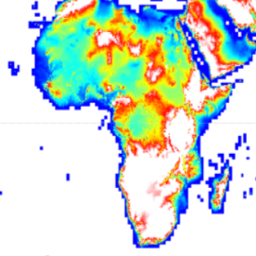
The Copernicus DEM is a Digital Surface Model (DSM) representing the Earth's surface, including buildings, infrastructure, and vegetation.
-
This DEM is derived from an edited DSM called WorldDEM™, incorporating features like flattened water bodies and consistent river flow.
-
The dataset is available from December 2010 to January 2015 with a pixel size of 30 meters.
-
The GLO-30 dataset has a free worldwide license, excluding Armenia and Azerbaijan.
- Dataset Availability
- 2010-12-01T00:00:00Z–2015-01-31T00:00:00Z
- Dataset Producer
- Copernicus
- Tags
Description
The Copernicus DEM is a Digital Surface Model (DSM) which represents the surface of the Earth including buildings, infrastructure and vegetation. This DEM is derived from an edited DSM named WorldDEM™, i.e., flattening of water bodies and consistent flow of rivers has been included. Editing of shore- and coastlines, special features such as airports and implausible terrain structures has also been applied.
The WorldDEM product is based on the radar satellite data acquired during the TanDEM-X Mission, which is funded by a Public Private Partnership between the German State, represented by the German Aerospace Centre (DLR) and Airbus Defence and Space. More details are available in the dataset documentation .
The DSM uses the EGM2008 vertical datum: EPSG:3855 . This means a 0 elevation at a location does not imply the location is at a mean sea level.
Earth Engine asset has been ingested from the DGED files.
Bands
Bands
Pixel size: 30 meters (all bands)
| Name | Min | Max | Pixel Size | Description |
|---|---|---|---|---|
DEM
|
30 meters | Digital Surface Model |
||
EDM
|
0 | 13 | 30 meters | The Edit Data Mask indicates all DEM pixels that were modified during the terrain and hydro editing process. |
FLM
|
0 | 101 | 30 meters | The Filling Mask is created primarily during the terrain editing process. |
HEM
|
30 meters | The Height Error Mask represents the corresponding height error for each DEM pixel in the form of the standard deviation derived from the interferometric coherence and geometrical considerations. |
||
WBM
|
0 | 3 | 30 meters | The Water Body Mask shows all DEM pixels which are classified as water and edited according to the categories Ocean, Lake or River. |
EDM Class Table
| Value | Color | Description |
|---|---|---|
|
0
|
None | Void (no data) |
|
1
|
None | Not edited |
|
2
|
None | Infill of external elevation data |
|
3
|
None | Interpolated pixels |
|
4
|
None | Smoothed pixels |
|
5
|
None | Airport editing |
|
6
|
None | Raised negative elevation pixels |
|
7
|
None | Flattened pixels |
|
8
|
None | Ocean pixels |
|
9
|
None | Lake pixels |
|
10
|
None | River pixels |
|
11
|
None | Shoreline pixels |
|
12
|
None | Morphed pixels (series of pixels manually set) |
|
13
|
None | Shifted pixels |
FLM Class Table
| Value | Color | Description |
|---|---|---|
|
0
|
None | Void (no data) |
|
1
|
None | Edited (except filled pixels) |
|
2
|
None | Not edited / not filled |
|
3
|
None | ASTER |
|
4
|
None | SRTM90 |
|
5
|
None | SRTM30 |
|
6
|
None | GMTED2010 |
|
7
|
None | SRTM30plus |
|
8
|
None | TerraSAR-X Radargrammetric DEM |
|
9
|
None | AW3D30 |
|
100
|
None | Norway DEM |
|
101
|
None | DSM05 Spain |
WBM Class Table
| Value | Color | Description |
|---|---|---|
|
0
|
None | No water |
|
1
|
None | Ocean |
|
2
|
None | Lake |
|
3
|
None | River |
Terms of Use
Terms of Use
The GLO-30 dataset is available worldwide with a free license with the exception of two countries (Armenia and Azerbaijan). License for Copernicus DEM .
© DLR e.V. 2010-2014 and © Airbus Defence and Space GmbH 2014-2018 provided under COPERNICUS by the European Union and ESA; all rights reserved.
Explore with Earth Engine
Code Editor (JavaScript)
 // Use mosaic to hide the tile information.
 var

 dataset

 =

 ee
 .
 ImageCollection
 (
 'COPERNICUS/DEM/GLO30'
 ).
 mosaic
 ();
 Map
 .
 setCenter
 (
 -
 6.746
 ,

 46.529
 ,

 4
 );
 // Relative, vertical accuracy in form of the standard deviation of
 // the interferometric phase error.
 var

 hem

 =

 dataset
 .
 select
 (
 'HEM'
 );
 var

 hemVis

 =

 {

 // Range of the values is 0.09 to 43.4.

 min
 :

 0.0
 ,

 max
 :

 4.0
 ,

 palette
 :

 [
 'blue'
 ,

 'green'
 ,

 'yellow'
 ,

 'orange'
 ,

 'darkorange'
 ,

 'red'
 ],
 };
 Map
 .
 addLayer
 (
 hem
 ,

 hemVis
 ,

 'Height Error Mask (HEM; m)'
 ,

 false
 );
 var

 edm

 =

 dataset
 .
 select
 (
 'EDM'
 );
 var

 edmVis

 =

 {

 min
 :

 0
 ,

 max
 :

 13
 ,

 palette
 :

 [

 'black'
 ,

 // 0: Void (no data)

 'white'
 ,

 // 1: Not edited

 'red'
 ,

 // 2: Infill of external elevation data

 'green'
 ,

 // 3: Interpolated pixels

 'orange'
 ,

 // 4: Smoothed pixels

 'yellow'
 ,

 // 5: Airport editing

 'magenta'
 ,

 // 6: Raised negative elevation pixels

 'cyan'
 ,

 // 7: Flattened pixels

 'blue'
 ,

 // 8: Ocean pixels

 'purple'
 ,

 // 9: Lake pixels

 'brown'
 ,

 // 10: River pixels

 'lightgray'
 ,

 // 11: Shoreline pixels

 'olive'
 ,

 // 12: Morphed pixels

 'steelblue'
 ,

 // 13: Shifted pixels

 ],
 };
 Map
 .
 addLayer
 (
 edm
 ,

 edmVis
 ,

 'Editing and Masking (EDM)'
 ,

 false
 ,

 0.75
 );
 // Source data diagram.
 var

 flm

 =

 dataset
 .
 select
 (
 'FLM'
 );
 var

 originalValues

 =

 [
 0
 ,

 1
 ,

 2
 ,

 3
 ,

 4
 ,

 5
 ,

 6
 ,

 7
 ,

 8
 ,

 9
 ,

 100
 ,

 101
 ];
 var

 remappedValues

 =

 [
 0
 ,

 1
 ,

 2
 ,

 3
 ,

 4
 ,

 5
 ,

 6
 ,

 7
 ,

 8
 ,

 9
 ,

 10
 ,

 11
 ];
 var

 flmRemapped

 =

 flm
 .
 remap
 (
 originalValues
 ,

 remappedValues
 ).
 rename
 (
 'FLM'
 );
 var

 flmVis

 =

 {

 min
 :

 0
 ,

 max
 :

 11
 ,

 palette
 :

 [

 'black'
 ,

 // 0: Void (no data)

 'white'
 ,

 // 1: Edited (except filled pixels)

 'grey'
 ,

 // 2: Not edited / not filled

 'red'
 ,

 // 3: ASTER

 'green'
 ,

 // 4: SRTM90

 'blue'
 ,

 // 5: SRTM30

 'yellow'
 ,

 // 6: GMTED2010

 'cyan'
 ,

 // 7: SRTM30plus

 'magenta'
 ,

 // 8: TerraSAR-X Radargrammetric DEM

 'orange'
 ,

 // 9: AW3D30

 'purple'
 ,

 // 100 -> remapped to 10: Norway DEM

 'brown'
 ,

 // 101 -> remapped to 11: DSM05 Spain

 ],
 };
 Map
 .
 addLayer
 (
 flmRemapped
 ,

 flmVis
 ,

 'Fill and Lineage Mask (FLM)'
 ,

 false
 ,

 0.75
 );
 var

 wbm

 =

 dataset
 .
 select
 (
 'WBM'
 );
 var

 wbmVis

 =

 {

 min
 :

 0
 ,

 max
 :

 3
 ,

 palette
 :

 [

 'lightgray'
 ,

 // 0: No water.

 'cadetblue'
 ,

 // 1: Ocean.

 'darkblue'
 ,

 // 2: Lake.

 'blueviolet'
 ,

 // 3: River.

 ],
 };
 Map
 .
 addLayer
 (
 wbm
 ,

 wbmVis
 ,

 'Water Body Mask (WBM)'
 ,

 false
 ,

 0.75
 );
 var

 dsm

 =

 dataset
 .
 select
 (
 'DEM'
 )

 .
 setDefaultProjection
 (
 'EPSG:3857'
 ,

 null
 ,

 30
 )

 .
 rename
 (
 'DSM'
 );
 var

 dsmVis

 =

 {

 min
 :

 0.0
 ,

 max
 :

 3000.0
 ,

 palette
 :

 [
 '333399'
 ,

 '00a2e5'
 ,

 '55dd77'
 ,

 'ffff99'
 ,

 'aa926b'
 ,

 'aa928d'
 ,

 'ffffff'
 ],
 };
 Map
 .
 addLayer
 (
 dsm
 ,

 dsmVis
 ,

 'Digital Surface Model (DSM; m)'
 ,

 true
 ,

 0.75
 );
 // Multiply by 20 to exaggerate the hillshade for a better visualization.
 Map
 .
 addLayer
 (

 ee
 .
 Terrain
 .
 hillshade
 (
 dsm
 .
 multiply
 (
 20.0
 )),

 null
 ,

 'Digital Surface Model (DSM) Hillshade'
 ,

 true
 ,

 0.75
 );
