
Skip to content
new ogbongeblog logo
  • Advertise
  • Blog
  • Contact

How To Add Blogger Sitemap XML To Google Webmaster Tools and Bing

February 29, 2016

·

digital marketing
jidetheblogger Avatar
jidetheblogger

Earlier, I talked about the Blogger sitemap xml and how it dynamically genertaes sub-sitemaps that contain maximum of 150 links of posts published on a Blogger blog. In this tutorial, I want to share with you. how to submit the Blogger sitemap xml page to Google and Bing webmaster tools.

To get started, I will assume you’ve submitted your Blogger blog to Google Webmaster and Bing Webmaster. If not, kinldy check the tutorials below:

>> How To Submit Blogger Blog To Bing Webmaster
>> How To Submit Blogger Blog To Google Webmaster

If you’ve submitted your Blogger blog to Google and Bing, you can continue with the tutorials below.


How To Add Blogger Sitemap XML To Google Webmaster Tools

>> Sign in to www.google.com/webmaster
>> Click on the blog you want to work with
>> Go to “Crawl” > ‘Sitemaps”
>> Click on “Add/test Sitemap”
>> Enter “sitemap.xml” in the space provided

add blogger sitemap to google webmaster tools

>> Click “Submit”

It might take over 24 hours for Google to index all your pages. So, chill. If not indexed, lets say after a month, you can resubmit the sitemap.

If you click on the submitted Blogger sitemap link, you will see all the sub-sitemaps that Blogger dynamically generated for your blog.

How To Add Blogger XML Sitemap To Bing Webmaster Tools

>> Sign in to Bing Webmaster
>> Click on the blog you want to work with
>> Go to “Configure My Sites” > “Sitemaps”

submit blogger sitemap to bing

>> Enter your blogger sitemap and click “Submit”

Your blogger sitemap is :

http://www.yourblog.com/sitemap.xml
or
http://www.yourblog.blogspot.com/sitemap.xml

You can check back after 24 hours to check the progress of your submission.

Below is an example of a processed Blogger sitemap submitted to Bing, showing the sub-sitemaps:
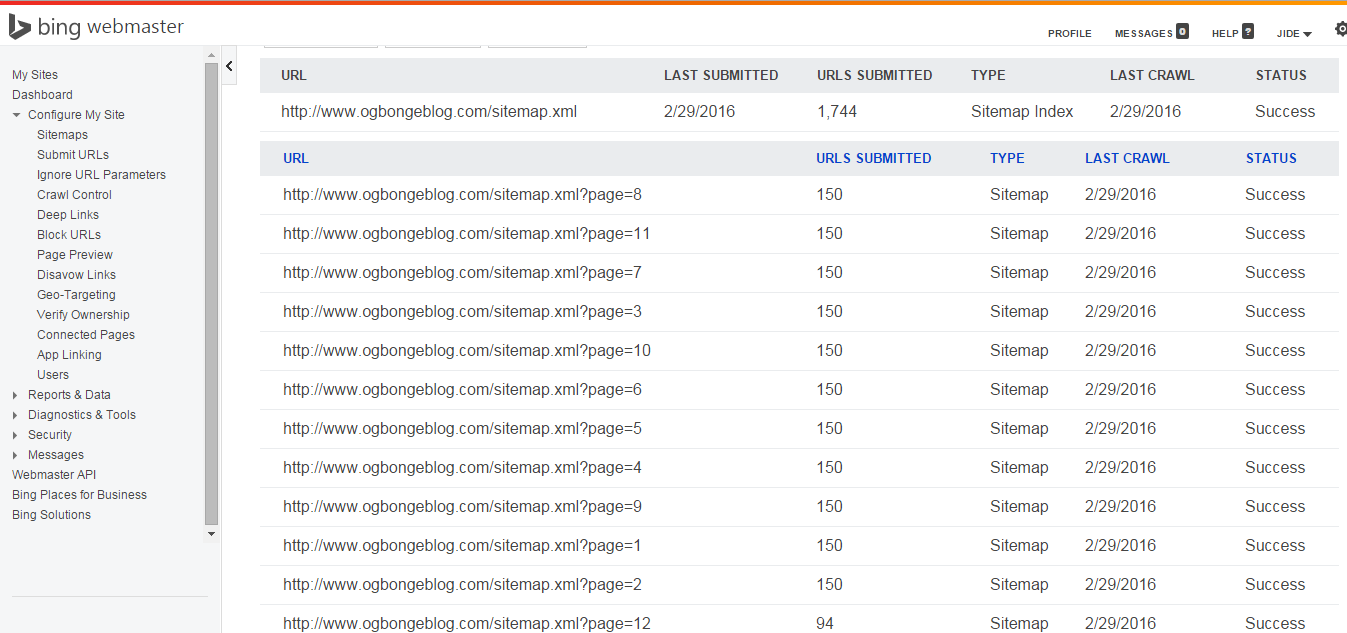
blogger sub-sitemaps

That’s all.

NB : If after publishing 3000 posts and you notice that extra sub-sitemaps are not been generated dynamically, you can add them manually in addition to the parent sitemap. i.e add the following sitemaps below to accommodate the extra posts:

http://www.yourblog.com/sitemap.xml?page=21http://www.yourblog.com/sitemap.xml?page=22

Please Share :
blogger tips seo webmaster tools

Like What You Read?

Sign Up to get similar articles delivered to your email inbox.

Leave a Reply Cancel reply

Your email address will not be published. Required fields are marked *

30 responses to “How To Add Blogger Sitemap XML To Google Webmaster Tools and Bing”

  1. Obinna Onyenali Avatar
    Obinna Onyenali
    February 29, 2016

    Is this a coincidence? I just added mine now before seeing your post. Our thoughts are on the same wavelength 🙂 View my site, ObinnaOnyenali.com , and let me know what you think about it. Thanks.

    Loading…
    Reply
  2. Victor Kachi Avatar
    Victor Kachi
    February 29, 2016

    Thanks for this, though i have already added mine to google and bing last year, and av started recieving search visits from yahoo, bing, google and yandex…

    Entclass.com

    Loading…
    Reply
  3. Akpene Jacob Avatar
    Akpene Jacob
    February 29, 2016

    I will add mine to Bing as I found this hard earlier, this is mid night work.

    Thank Mr Ogbonge… http://Www.lasgidionline.com.ng

    Loading…
    Reply
    1. Jide Oguns Avatar
      Jide Oguns
      March 3, 2016

      You're welcome bro

      Loading…
      Reply
  4. Gist pluz Avatar
    Gist pluz
    March 1, 2016

    Nice one
    i blog @ Gistpluz.com.ng

    Loading…
    Reply
  5. Cyracks Zenda Avatar
    Cyracks Zenda
    March 2, 2016

    Have added my sitemap to Google and Yahoo but not this type you shared here. The Atom sitemap or something are they different? Is one more effective than the other? Haven't start seeing results from Yahoo anyway.

    Loading…
    Reply
    1. Jide Oguns Avatar
      Jide Oguns
      March 3, 2016

      The atom method is an old way of doing it…

      Loading…
      Reply
  6. Cyracks Zenda Avatar
    Cyracks Zenda
    March 2, 2016

    I got this message after adding the sitemap format you shared above. Message from Google Webmaster Tool. "We encountered an error while trying to access your Sitemap. Please ensure your Sitemap follows our guidelines and can be accessed at the location you provided and then resubmit". I discovered the sitemap format myblog.com/sitemap.xml doesn't work on my blog why?

    Loading…
    Reply
    1. Jide Oguns Avatar
      Jide Oguns
      March 3, 2016

      Paste the full url of your sitemap here.

      Loading…
      Reply
    2. Cyracks Zenda Avatar
      Cyracks Zenda
      March 3, 2016

      Here is the full url of my sitemap http://www.cyracksinternetbiz.com/sitemap.xml

      Loading…
      Reply
    3. Jide Oguns Avatar
      Jide Oguns
      March 4, 2016

      Your sitemap.xml file is Oh K but I discovered that your blog feed is still been referenced as the sitemap in your robots.txt file instead of the sitemap.xml. Did you make changes to the default robots.txt file?

      Loading…
      Reply
  7. Chidera Henry Avatar
    Chidera Henry
    March 4, 2016

    thanks bro @ jide here is my blog http://www.cartersgist.blogspot.com

    Loading…
    Reply
  8. toneplace.blogspot.com Avatar
    toneplace.blogspot.com
    May 1, 2016

    wooow. thanks brother. I didn't know that how could I submit my blogger blog TonePlace sitemap to bing. But I have learned from this article. Its just easy.

    Loading…
    Reply
  9. Ifiokobong Akpan Avatar
    Ifiokobong Akpan
    October 13, 2016

    I just submitted mine now, today, still waiting to be reviewed. http://www.myunnnews.info

    Loading…
    Reply
  10. ese Emmanuel Avatar
    ese Emmanuel
    November 5, 2016

    What about a blogger blog

    Loading…
    Reply
  11. Yusha'U Uba Avatar
    Yusha’U Uba
    November 16, 2016

    I Submitted My Blogger Sinces Last 2 Months, But Still Not Start Receiving Traffics From Google … Any Solution Pls

    Loading…
    Reply
  12. Achugo Liberty Avatar
    Achugo Liberty
    December 9, 2016

    Pls what is the importance of submitting a blog to webmaster?

    Loading…
    Reply
    1. Tech Villz Avatar
      Tech Villz
      December 15, 2016

      So that your blog will be known and seen by google bots, when a user makes a google search that is related to a post in your blog, the user will be directed to your blog

      Loading…
      Reply
  13. THOR Micheal Avatar
    THOR Micheal
    July 4, 2017

    Thanks Boss, Your Article Was Helpful
    I Blog http://www.epicgist.com/

    Loading…
    Reply
  14. Mark Adams Avatar
    Mark Adams
    July 12, 2017

    A very detailed overview of the process. Thanks for your help!

    Regards, Seven Atoms

    Loading…
    Reply
  15. Stephen Avatar
    Stephen
    July 20, 2017

    Thanks for this post sir. Is it advisable to add the site map on my robot.txt file??Please sir I need your help

    Loading…
    Reply
  16. Siyabonga Avatar
    Siyabonga
    August 23, 2017

    Please sir jide, how can i generate a google news xml sitemap?

    Loading…
    Reply
  17. toyin Avatar
    toyin
    January 15, 2018

    can i use this for my blogger blog?

    Loading…
    Reply
    1. jidetheblogger Avatar
      jidetheblogger
      January 15, 2018

      Yes

      Loading…
      Reply
  18. Smart Avatar
    Smart
    March 2, 2018

    Thank you for this great tips! However, I just opted for Jetpack sitemap functionality and turned of Yoast sitemap functionality for my website https://www.searchngr.com please tell me if I am on the right track.

    Loading…
    Reply
  19. Monichannel Avatar
    Monichannel
    December 3, 2018

    Still very much up to date, worked for me on http://monichannel.com
    Nice job Jide

    Loading…
    Reply
  20. ilori Avatar
    ilori
    December 30, 2018

    i make an amendment but still the same.site map could not be fetch

    http://netblob.blogspot.com

    Loading…
    Reply
  21. Khris Avatar
    Khris
    January 30, 2019

    What is wrong with my website is not even indexing http://www.042tvseries.com

    Loading…
    Reply
  22. Precious okoro Avatar
    Precious okoro
    February 6, 2019

    Good post… Done on my blog @ https://www.findschoolnews.com.ng . Really appreciate

    Loading…
    Reply
  23. Mungurul Alam Avatar
    Mungurul Alam
    February 4, 2020

    This post is very informative about how to create sitemap for blogger and submit this sitemap to google webmaster. Thanks for sharing this article.

    Loading…
    Reply

WANT TO ADVERTISE?

Chat on WhatsApp

RELATED POSTS

  • How to Submit Blogger Sitemap to Bing Webmaster Tools
  • How To Submit Blog To Bing and Yahoo Search Engine
  • Google Webmasters: How To Add your blog/site to Google Search Listings

FEATURED


  • CREDICORP launches C.L.I.C.K.D. Scheme with FG’s 3MTT Programme, expanding affordable consumer credit for locally-assembled laptops and devices for digital workers

    CREDICORP launches C.L.I.C.K.D. Scheme with FG’s 3MTT Programme, expanding affordable consumer credit for locally-assembled laptops and devices for digital workers

  • What Happens to Your Online Accounts When You Die?

    What Happens to Your Online Accounts When You Die?

JOIN AI WEB DESIGN GROUP


  • AI Website Design Training Whatsapp Group by Jidetheblogger

    AI Website Design Training Whatsapp Group by Jidetheblogger

← Blogger Sitemap XML URL You Should Add To Bing and Google Webmaster Tools
Root Silverbird Galleria To Host Ladies Evening Specials On 06/03/2016 →

Join 25,000+ subscribers

Receive our latest blog posts in your inbox.

Search

Social

Facebook

Instagram

Twitter

new ogbongeblog logo

Copyright © 2026 | About | Advertise | Featured | Sitemap | Privacy Policy | Powered by WordPress

Your cart (items: 0)

Products in cart

Product
Details
Total
Subtotal ₦0.00
Shipping and discounts calculated at checkout.
View my cart
Go to checkout

Your cart is currently empty!

Start shopping

Notifications

%d

    LIKE My Fan Page

    Privacy Policy | Copyright © 2012,OgbongeBlog.All Rights Reserved. Powered by Blogger .
    Create a Mobile Site
    View Site in Mobile | Classic
    Share by:


