


Would you like to add bluetooth printer to Android phone? In this blog post, I’ll show you a simple mobile app you can use to get it done quickly and easily.
If you are running a mobile business, managing a pop-up shop, or just need to use a portable thermal printer on the go, finding a reliable way to print from your smartphone is essential.
If you want to seamlessly use bluetooth printer with android and print, there is one app that stands out from the crowd: RawBT app.
What Is RawBT App?
RawBT (Raw Bluetooth Printer)is a mobile app designed specifically to help Android users print directly to Bluetooth thermal printers .
Unlike the default Android print system, which often doesn’t support many small Bluetooth printers, RawBT bridges that gap by giving you full control over your printer.
Key Features of RawBT:
- Supports most 58mm and 80mm thermal printers
- Prints text, images, PDFs, and receipts
- Allows custom formatting (font size, alignment, etc.)
- Works offline (no internet required)
- Ideal for business use (POS, recharge cards, invoices)
If you run a small business in Nigeria, this app is a game changer.
Why RawBT Printing Service App is a Game Changer
RawBT print service app isn’t just a standard printing app; it is a dedicated print service plugin designed specifically for Android. It acts as the perfect bridge between your smartphone and your bluetooth printer.
Here is why it deserves a spot on your device:
- Thermal Printer Friendly:It is highly optimized for ESC/POS thermal printers (those handy, inkless receipt printers used in retail and logistics).
- Versatile Connections:While it shines with Bluetooth, it also supports USB and Wi-Fi connections.
- Seamless Integration:Once installed, it integrates directly into your phone’s native sharing and printing menus.
- Lightweight:It doesn’t bog down your phone with unnecessary background processes or heavy ads.
How to Add Bluetooth Printer To Android With RawBT App
Adding your bluetooth printer to android with RawBT is incredibly straightforward. Just follow these steps below :
Step 1: Download and Install RawBT App
- Go to Google Play Store
- Search for RawBT
- Install the app
Step 2: Turn On Your Bluetooth Printer
- Power on your thermal bluetooth printer
- Load it with printing paper
Step 3: Pair Printer With Your Phone
- Go to Phone Settings → Bluetooth
- Scan for devices
- Select your printer (e.g., “MTP-II”, “XP-58”)
- Tap to pair. (You might need a standard PIN, usually
0000or1234, depending on your printer model).
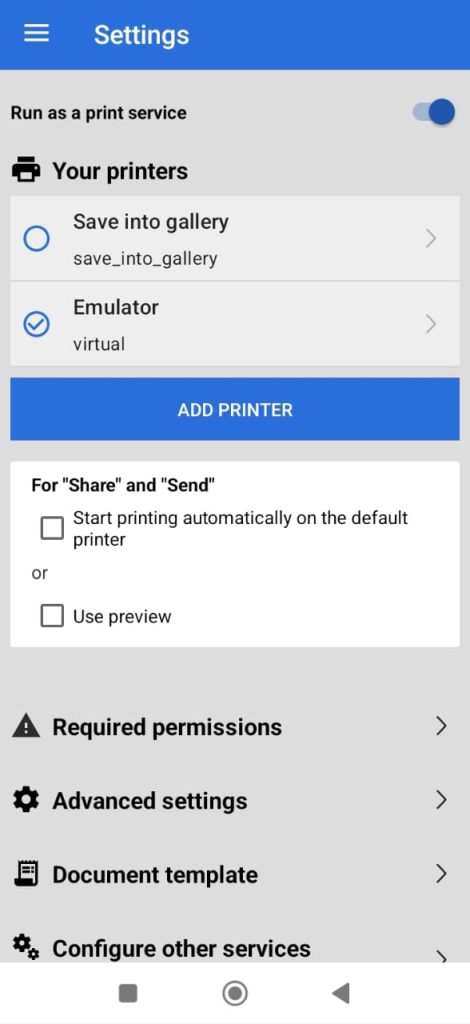
Step 4: Open RawBT App
- Launch the RawBT app
- Tap on Settings
- Tap on Add Printer
- Select Bluetoothas your preferred connection method
- Tap the printer you paired earlier
- Tap on Test Print. If your printer spits out a test receipt, you are successfully connected!
- Tap Add Printerto finally add the printer to your Android.
You are now ready to print. Open a document, a web page, or an image on your phone. You can either tap the Shareicon and select RawBT, or use the standard Android Printmenu and choose RawBT from the drop-down list of available printers.
Recommended






Leave a Reply