
Skip to content
new ogbongeblog logo
  • Advertise
  • Blog
  • Contact

How I Add Sticky Ad To The Top Of Blogger Mobile View

  1. Home
  2. Blog
  3. Uncategorized
  4. How I Add Sticky Ad To The Top Of Blogger Mobile View
August 9, 2017

Written by

jidetheblogger Avatar
jidetheblogger

Last Modified :

October 8, 2017

As at the time of publishing this post, if you view Ogbongeblog on mobile devices, you will likely notice an ad that sticks to the top of the blog.
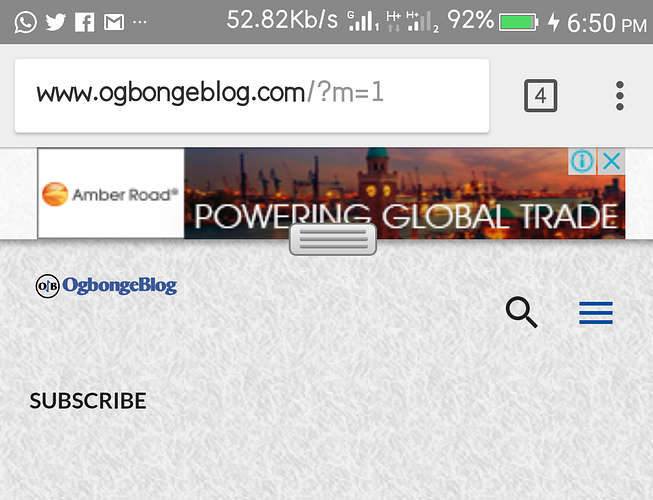
sticky ad for mobile

Well, that ad is not an adsense ad unit. It is an ad unit I generated from my Sulvo account. Sulvo offers Sticky mobile ad units that show on mobile devices, either at the top or bottom.

So, if you want to add such ad to the top of your Blogger blog, you should sign up at sulvo.com.

If approved, sign in to your Sulvo publisher account and click on the “Inventory” tab. Thereafter, click “New Ad Unit” button, select, sticky mobile option, select “top” as placement, click “create” and add the Sulvo ad codes into your blog html. The ad should display at the top of your blog after some few minutes. Not instantly though.
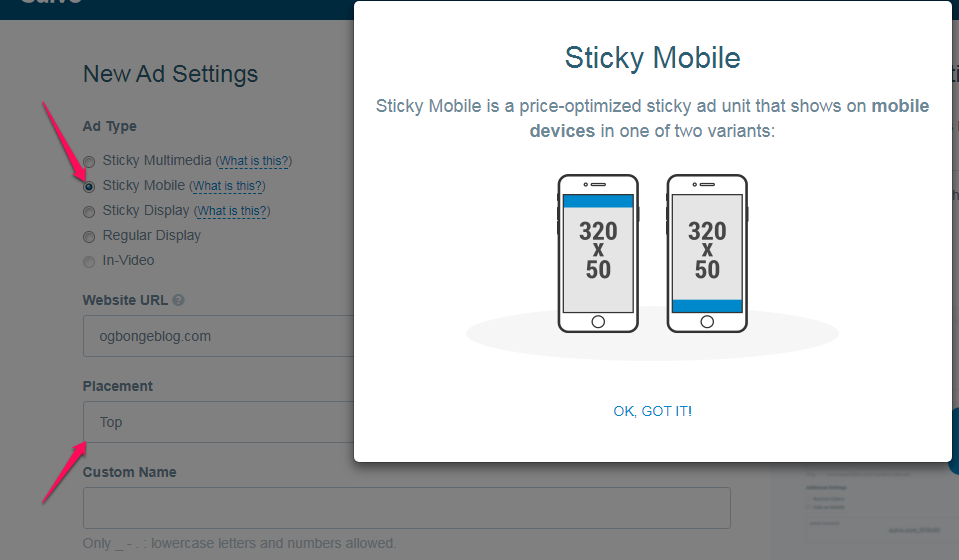
add sticky ad at the top of blogger blog mobile view

Kindly note that Sulvo ads are not pay per click ads. You get paid per thousand impression. And so far, what I earn from Sulvo sticky mobile ad units is far higher than what I earn from Adsense anchor/overlay ads which also stick to the edge of the screen.

Please Share :
blogger tips sulvo

Like What You Read?

Sign Up to get similar articles delivered to your email inbox.

Leave a Reply Cancel reply

Your email address will not be published. Required fields are marked *

9 responses to “How I Add Sticky Ad To The Top Of Blogger Mobile View”

  1. Resh Precious Avatar
    Resh Precious
    August 10, 2017

    Nice Update Sir
    From http://www.techreminder.com

    Loading…
    Reply
  2. Prince Vee Avatar
    Prince Vee
    August 12, 2017

    This is really cool bro, thanks for sharing

    Loading…
    Reply
    1. Jide Oguns Avatar
      Jide Oguns
      August 29, 2017

      You're welcome bro

      Loading…
      Reply
  3. Peter James Avatar
    Peter James
    August 12, 2017

    Good one Boss

    Loading…
    Reply
    1. Jide Oguns Avatar
      Jide Oguns
      August 29, 2017

      thanks

      Loading…
      Reply
  4. Alexyz John Avatar
    Alexyz John
    August 15, 2017

    Wow, more than AdSense…I'll get right to it. Thanks for sharing. Really useful content right here.

    Loading…
    Reply
  5. Prosperity Kenneth Avatar
    Prosperity Kenneth
    August 29, 2017

    Sulvo seems to be a little strict in approving

    Loading…
    Reply
    1. Jide Oguns Avatar
      Jide Oguns
      August 29, 2017

      Yes bro. You can send them your google analytics data though..

      Loading…
      Reply
  6. Ahmad Farhan Avatar
    Ahmad Farhan
    September 2, 2017

    Hai, Thanks for sharing this! very helpful 🙂

    Loading…
    Reply

WANT TO ADVERTISE?

Chat on WhatsApp

RELATED POSTS

  • Sulvo Ad Network Lets You Monetize Your Blog With Sticky Ads
  • How I Receive Sulvo Ad Network Payment In Nigeria
  • How I Place Sulvo Ads Codes On WordPress Sites

FEATURED


  • How to Pay Chinese Suppliers in RMB (Alipay & WeChat Pay) or Swap Naira, Kenyan Shillings, Ghana Cedis & USDT in Minutes

    How to Pay Chinese Suppliers in RMB (Alipay & WeChat Pay) or Swap Naira, Kenyan Shillings, Ghana Cedis & USDT in Minutes

JOIN AI WEB DESIGN GROUP


  • AI Website Design Training Whatsapp Group by Jidetheblogger

    AI Website Design Training Whatsapp Group by Jidetheblogger

RANDOM POSTS


    I Got One Free Month of Meta Verified After I Tried to Cancel My Subscription


    How To Make Money On Bamboo App: 5 Proven Ways


    How To Use Vibe Coding To Make Money


    How I Earn $100 Per Referral from Affiliate Marketing


    Bluetooth Printer That Connects To Phone


    Can I Use OPay Card for Facebook Ads?


    Why I Moved My Websites From Namecheap To Interserver.net


    How I Earn $50 Per Sale


MORE RANDOM POSTS
← How To Add Spaces Between Widgets On Blogger Emporio Theme Sidebar
Recharge Glo Airtime With *323* Instead of *123* and Get x4 Bonus Instantly! →

Join 25,000+ subscribers

Receive our latest blog posts in your inbox.

Search

Social

Facebook

Instagram

Twitter

new ogbongeblog logo

Copyright © 2026 | About | Advertise | Featured | Sitemap | Privacy Policy | Powered by WordPress

Your cart (items: 0)

Products in cart

Product
Details
Total
Subtotal ₦0.00
Shipping and discounts calculated at checkout.
View cart
Go to checkout

Your shopping cart is empty

Return to shop

Notifications

%d

    LIKE My Fan Page

    Privacy Policy | Copyright © 2012,OgbongeBlog.All Rights Reserved. Powered by Blogger .
    Create a Mobile Site
    View Site in Mobile | Classic
    Share by: