
Skip to content
new ogbongeblog logo
  • Advertise
  • Blog
  • Contact

How I Place Sulvo Ads Codes On WordPress Sites

  1. Home
  2. Blog
  3. Uncategorized
  4. How I Place Sulvo Ads Codes On WordPress Sites
July 2, 2017

Written by

jidetheblogger Avatar
jidetheblogger

Last Modified :

March 6, 2026

For you to monetize your blog with Sulvo powered ads , you will be required to place a code after the opening <head> tag of your blog and another code directly in your page within the <body> tag. If you are to implement this on WordPress, you will have to edit some of your theme files or make us of a WordPress plugin.

I tried using the “ Insert Headers and Footer ” WordPress plugin to add the Sulvo javascript after the opening head tag but discovered that it didn’t work after five days of implementing the codes. Sulvo rep even contacted me to alert me that the sulvo codes I placed on my site are not working. I was able to make it work by making use of the “ Header and Footer Scripts ” WordPress plugin, even though it was last updated a year ago.

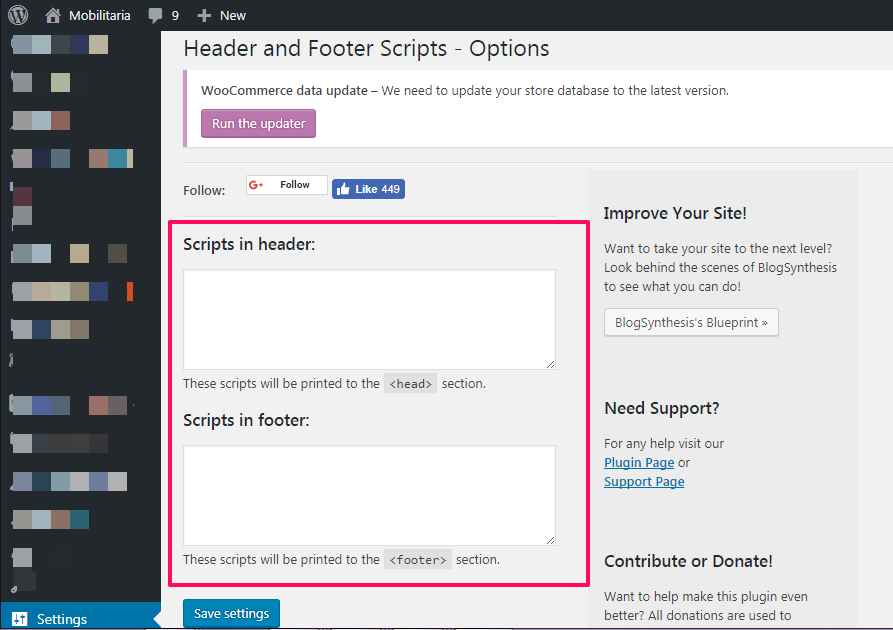
After activating the plugin, go to “ Settings ” > “ Header and Footer Scripts “.

In “ Scripts in Header ” box, paste the sulvo javascript that is required to be placed after the opening <head> tag.
sulvo ad network place javascript in wordpress header

In “ Scripts in Footer ” box, paste the sulvo code that is required to be placed within the <body> tag especially for Sulvo sticky ads.  For Sulvo regular display ad type, you can place the ad code in your WordPress sidebar (using the Text widget) or anywhere you want it to display on your WordPress site.

I hope this helps.

About Sulvo Ad Network

Sulvo simply lets you monetize your blog with sticky and regular display ads – and get paid per thousand impression of ads served on your blog. Sulvo lets you get the best possible CPM by letting more ad networks bid for the ad impressions on your blog – and Adsense is one of the bidders competing for the impressions through Sulvo.


Please Share :
monetization sulvo wordpress

Like What You Read?

Sign Up to get similar articles delivered to your email inbox.

Leave a Reply Cancel reply

Your email address will not be published. Required fields are marked *

4 responses to “How I Place Sulvo Ads Codes On WordPress Sites”

  1. Stephen Mgbemena Avatar
    Stephen Mgbemena
    July 15, 2017

    Hello Mr Jide, I'm adsense publisher, can I use Sulvo with adsense on the same site?

    Loading…
    Reply
  2. Trevor Avatar
    Trevor
    July 17, 2017

    I can recommend the free plugin Advanced Ads ( https://wordpress.org/plugins/advanced-ads ) for the integration of Sulvo. The plugin provides much more possibilities than "Header and Footer Scripts".

    Loading…
    Reply
  3. Edozie Richard Avatar
    Edozie Richard
    September 6, 2017

    Please i just registerd for sulvo ads, and i don't know where to place the code for domain verification.

    Loading…
    Reply
  4. Edozie Richard Avatar
    Edozie Richard
    September 6, 2017

    please i don't know where to place the verification code on my blogger website.

    Loading…
    Reply

WANT TO ADVERTISE?

Chat on WhatsApp

RELATED POSTS

  • Sulvo Ad Network Lets You Monetize Your Blog With Sticky Ads
  • How I Add Sticky Ad To The Top Of Blogger Mobile View
  • How I Receive Sulvo Ad Network Payment In Nigeria

FEATURED


  • How to Pay Chinese Suppliers in RMB (Alipay & WeChat Pay) or Swap Naira, Kenyan Shillings, Ghana Cedis & USDT in Minutes

    How to Pay Chinese Suppliers in RMB (Alipay & WeChat Pay) or Swap Naira, Kenyan Shillings, Ghana Cedis & USDT in Minutes

JOIN AI WEB DESIGN GROUP


  • AI Website Design Training Whatsapp Group by Jidetheblogger

    AI Website Design Training Whatsapp Group by Jidetheblogger

RANDOM POSTS


    I Got One Free Month of Meta Verified After I Tried to Cancel My Subscription


    How To Make Money On Bamboo App: 5 Proven Ways


    How To Use Vibe Coding To Make Money


    How I Earn $100 Per Referral from Affiliate Marketing


    Bluetooth Printer That Connects To Phone


    Can I Use OPay Card for Facebook Ads?


    Why I Moved My Websites From Namecheap To Interserver.net


    How I Earn $50 Per Sale


MORE RANDOM POSTS
← How To Use Universal Extractor To Extract Files
Check If Facebook Ads Account Currency Is Naira Or Dollar →

Join 25,000+ subscribers

Receive our latest blog posts in your inbox.

Search

Social

Facebook

Instagram

Twitter

new ogbongeblog logo

Copyright © 2026 | About | Advertise | Featured | Sitemap | Privacy Policy | Powered by WordPress

Your cart (items: 0)

Products in cart

Product
Details
Total
Subtotal ₦0.00
Shipping and discounts calculated at checkout.
View cart
Go to checkout

Your shopping cart is empty

Return to shop

Notifications

%d

    LIKE My Fan Page

    Privacy Policy | Copyright © 2012,OgbongeBlog.All Rights Reserved. Powered by Blogger .
    Create a Mobile Site
    View Site in Mobile | Classic
    Share by: