
Skip to content
new ogbongeblog logo
  • Advertise
  • Blog
  • Contact

How To Add Vertical Related Posts Widget To Blogger Blog Sidebar

April 8, 2017

·

Uncategorized
jidetheblogger Avatar
jidetheblogger

You can display related posts on your blog’s sidebar by making use of the AddThis related posts tool. The tool simply figures out what a visitor should be reading next based on what they’re currently reading. Unlike some blogger related posts widget , the tool recommends content not only by what’s similar, but also what’s most relevant, thereby boosting your on-site engagement.

The Recommended Content Layer works based on traffic, shares, and clicks. Which links appear to recommend is determined by AddThis recommendation algorithm. If you integrate AddThis related posts widget with your blog, you will be able to take a closer look at your top performing related posts via the AddThis analytics. You can track which pages are getting the most clicks, and see your top related posts tool type (Slider, Inline, footer).

Adding the AddThis vertical related posts widget to your blog is easy. You only have to create a vertical “inline” type of the related posts tool and add the code to your blog’s sidebar. You must also ensure that you’ve added the AddThis main code to your blog’s html.

How To Get Started

Sign in to your AddThis dashboard
Click the “ Get the Code ” button
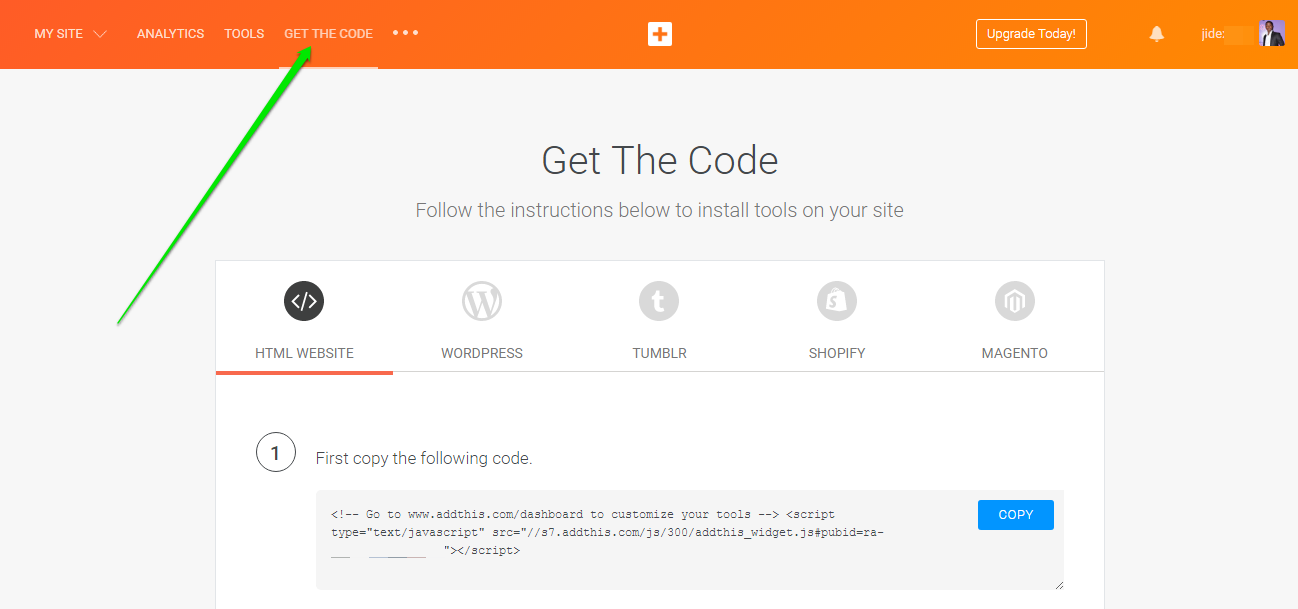
addthis online marketing code

Sign in to your Blogger dashboard .
Navigate to Theme > Edit HTML
Use CTRL F to find </body>
Copy and paste the AddThis code above the </body> tag
Click “Save Theme”

Now, go back to your AddThis dashboard
Click on “ Tools ” > “ Add New Tool “
Click “ Related Posts “

addthis tools for online marketing

Select “Inline” and click “Continue”Select “Vertical” as the “Orientation”
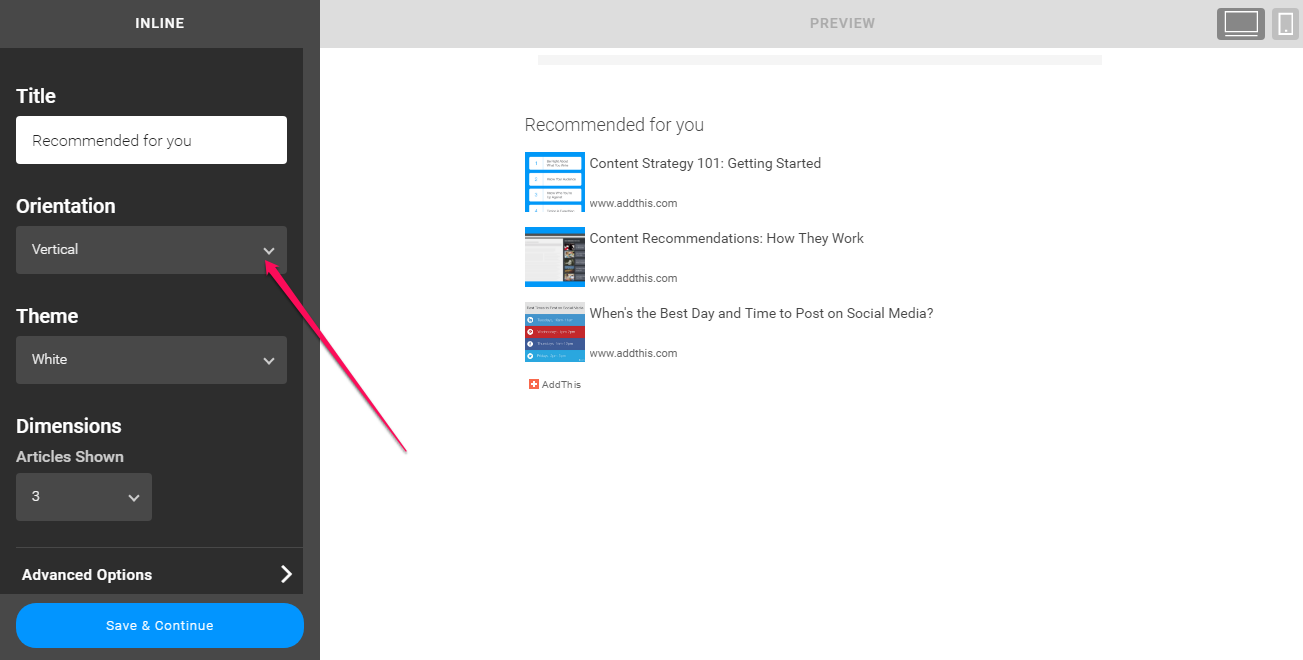
create vertical related posts at addthis

Click “Save and Continue”

You will be redirected to a page where you will see codes you can add to your blog.

Scroll down to the “ Code for Activated Tools ” section.
Copy the code

Navigate to your Blogger dashboard and click on “ Layout “
Click “Add a Gadget” on the sidebar (item page)
Select “HTML/Javascript”
Paste the code in it and Save.

That’s all.

After some minutes, you should see recommended posts been display in a vertical format on your blog sidebar as seen below:

addthis related posts widget for blogger

I hope this helps.

NB: 

If your site doesn’t get enough traffic, AddThis recommend algorithm might take some time to recommend the pages.

If you are using the non-responsive Blogger templates, you will have to add mobile=’yes’ to the widget’s code if you want it to be displayed on the mobile view of your bog.

Please Share :
addthis blogger tips

Like What You Read?

Sign Up to get similar articles delivered to your email inbox.

Leave a Reply Cancel reply

Your email address will not be published. Required fields are marked *

4 responses to “How To Add Vertical Related Posts Widget To Blogger Blog Sidebar”

  1. mp3sleek.com Avatar
    mp3sleek.com
    April 9, 2017

    Thanks for sharing this, its really helpful.. It worked great for me.Thanks once again

    Loading…
    Reply
  2. stanley Avatar
    stanley
    July 30, 2017

    Thanks man, it works so muchnaijatruevoice.blogspot.com

    Loading…
    Reply
  3. Bello Azeez Avatar
    Bello Azeez
    August 22, 2017

    Thanks boss

    coment from Azeez Blog

    Loading…
    Reply
  4. Prashant Srivastava Avatar
    Prashant Srivastava
    January 27, 2019

    Hi, in my website ads are not showing in every post. Can you tell me why it happens?Thankyou

    Loading…
    Reply

WANT TO ADVERTISE?

Chat on WhatsApp

RELATED POSTS

  • 5 Reasons Why I Use AddThis Marketing Tools On My Blogsaddthis marketing tools
  • AddThis Link Promotion PopUp Tool Helps Drive More Visitors To Pages You Want Them To Seeaddthis link promotion tool popup
  • AddThis Plugin for Chrome: All-in-one Plugin for sharing and bookmarking any page

FEATURED


  • CREDICORP launches C.L.I.C.K.D. Scheme with FG’s 3MTT Programme, expanding affordable consumer credit for locally-assembled laptops and devices for digital workers

    CREDICORP launches C.L.I.C.K.D. Scheme with FG’s 3MTT Programme, expanding affordable consumer credit for locally-assembled laptops and devices for digital workers

  • What Happens to Your Online Accounts When You Die?

    What Happens to Your Online Accounts When You Die?

JOIN AI WEB DESIGN GROUP


  • AI Website Design Training Whatsapp Group by Jidetheblogger

    AI Website Design Training Whatsapp Group by Jidetheblogger

← Blog Of The Month : ELSiEiSY Lifestyle Blog
How To Disable GMail Tabs →

Join 25,000+ subscribers

Receive our latest blog posts in your inbox.

Search

Social

Facebook

Instagram

Twitter

new ogbongeblog logo

Copyright © 2026 | About | Advertise | Featured | Sitemap | Privacy Policy | Powered by WordPress

Your cart (items: 0)

Products in cart

Product
Details
Total
Subtotal ₦0.00
Shipping and discounts calculated at checkout.
View my cart
Go to checkout

Your cart is currently empty!

Start shopping

Notifications

%d

    LIKE My Fan Page

    Privacy Policy | Copyright © 2012,OgbongeBlog.All Rights Reserved. Powered by Blogger .
    Create a Mobile Site
    View Site in Mobile | Classic
    Share by:


