
Skip to content
new ogbongeblog logo
  • Advertise
  • Blog
  • Contact

Back Up Blogspot Blog Posts and Comments WIth Google TakeOut

August 8, 2013

·

Uncategorized
jidetheblogger Avatar
jidetheblogger

Backing up your blog posts and comments is highly recommended for many reasons. For instance, if you mistakenly delete your blog or Blogger deletes your blog after violating their terms and conditions , you will be able to get your deleted posts back easily if you have a back up. More so, it will be handy if you want to migrate to wordpress or any other blogging platform.

Although there is an “ export ” option via Blogger settings page but am sharing with you in this post, how to use Google Takeout to back up your blog post (including drafts) and comments . At Google Takeout , you can easily download the blog content of all the blogs in your Blogger dashboard. You can import the processed file into another blog e.g when merging two blogspot blogs together.

How To Get Started

==> Go to www.google.com/takeout and log in with the same Google account which you are using for your blogger blog.

==> Click on “ Choose services ” tab

==> Click on “ Blogger ” tab

==> Click on “ Configure “

==> Select your desired back up option

If you want to back up a single blog, select “ download a single blog ” option. You will see the list of your blogs. Click inside the box and select the blog you want to back up.
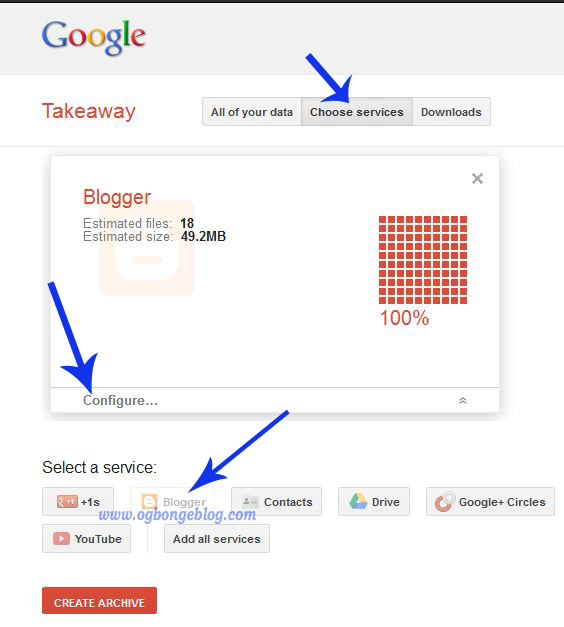
Google takeout blogger

==> Click the “ create archive ” button

==> Watch the progress bar. Once completed, click the “ download ” button

==> Verify your password if prompted to do so

==> Save the zip file to your computer.

That’s all.

Remember, your data is important! Do not download archives on public computers .  If you use a public computer, ensure you attach and send to your mail. Then, delete it completely from the computer, even from the recycle bin.

I hope it works for you.

To back up ONLY the look and design of your blog, read how to download/backup blogspot template .

Please Share :
blogger tips

Like What You Read?

Sign Up to get similar articles delivered to your email inbox.

Leave a Reply Cancel reply

Your email address will not be published. Required fields are marked *

23 responses to “Back Up Blogspot Blog Posts and Comments WIth Google TakeOut”

  1. patrick Avatar
    patrick
    August 4, 2013

    Thanks Jide. I will do it at a cafe since I don't have my own laptop for now but will delete as advised.

    Loading…
    Reply
    1. Jide Oguns Avatar
      Jide Oguns
      August 4, 2013

      Yes, make sure you delete it from the cafe's PC.

      Loading…
      Reply
  2. icecreampaul Avatar
    icecreampaul
    August 4, 2013

    thanks for the info.i will share it to other blogger also

    Loading…
    Reply
    1. Jide Oguns Avatar
      Jide Oguns
      August 4, 2013

      Wow! That will be so cool bro. Thanks a lot. God bless

      Loading…
      Reply
  3. Debarpan Mukherjee Avatar
    Debarpan Mukherjee
    August 4, 2013

    That's surely a great info bro,nice share.Keep it up dude.

    Loading…
    Reply
    1. Jide Oguns Avatar
      Jide Oguns
      August 5, 2013

      Thanks Debarpan. I will..

      Loading…
      Reply
  4. Blevopedia Avatar
    Blevopedia
    August 4, 2013

    Thanks for the prompt orientation. I'm going to give it a try when i visit a cyber cafe. And please, how much can i get a good fellow used laptop? Thanks in anticipation for your favourable reply.

    Loading…
    Reply
    1. Jide Oguns Avatar
      Jide Oguns
      August 4, 2013

      OK bro. No problem. You should be able to get a good one between 40-50k at computer village.

      Loading…
      Reply
  5. Blevopedia Avatar
    Blevopedia
    August 4, 2013

    40k-50k? I was budgeting 30k.

    Loading…
    Reply
    1. Jide Oguns Avatar
      Jide Oguns
      August 5, 2013

      You might. Just go there and see if u can. You can get a used netbook for 30k though

      Loading…
      Reply
  6. Olili Bob Avatar
    Olili Bob
    August 4, 2013

    tnx boss,u are the best

    Loading…
    Reply
  7. Jide Oguns Avatar
    Jide Oguns
    August 5, 2013

    You're welcome bro

    Loading…
    Reply
  8. Olasunkanmi Fakeye Avatar
    Olasunkanmi Fakeye
    August 5, 2013

    it works out but can not be accessed without .atom reader on pc.

    Thanks for saving many bloggers investment into writing and would have seen such disappearing untraceablely…..

    Loading…
    Reply
    1. Jide Oguns Avatar
      Jide Oguns
      August 6, 2013

      To access it, just unzip the zip file to see the content

      Loading…
      Reply
  9. Jimoh Amidu Avatar
    Jimoh Amidu
    August 6, 2013

    Good post here, weldone Boss!

    Loading…
    Reply
    1. Jide Oguns Avatar
      Jide Oguns
      August 6, 2013

      Thanks man

      Loading…
      Reply
  10. Jimoh Amidu Avatar
    Jimoh Amidu
    August 6, 2013

    Please take a look at my blog http://www.ultimatesafety.blogspot.com let me know if it's ok or if there is anything to add in order to look good. Thanks.

    Loading…
    Reply
    1. Jide Oguns Avatar
      Jide Oguns
      August 9, 2013

      Mail me and I will get back to you.

      Loading…
      Reply
  11. SEGUN Avatar
    SEGUN
    August 7, 2013

    WILL TRY THAT SIRE

    Loading…
    Reply
  12. Endy Edeson News Network Avatar
    Endy Edeson News Network
    August 7, 2013

    nice post. i will do just that

    Loading…
    Reply
  13. Andrew Isiomah Avatar
    Andrew Isiomah
    August 8, 2013

    Very helpful, Jide. Thank you.

    Loading…
    Reply
  14. Biz Master Avatar
    Biz Master
    August 11, 2013

    thanks you for sharing this wonderful tips.i really appreciate

    Loading…
    Reply
  15. ucy's blog Avatar
    ucy’s blog
    January 3, 2014

    THanks for the info..

    Loading…
    Reply

WANT TO ADVERTISE?

Chat on WhatsApp

RELATED POSTS

  • How To Add Reply Option To Blogspot Comments Without Javascript
  • How To Activate Anonymous Comments in Blogger Blogs
  • New Facebook Comment form for Blogger/Blogspot Blogs( reply & notifications enabled)

FEATURED


  • CREDICORP launches C.L.I.C.K.D. Scheme with FG’s 3MTT Programme, expanding affordable consumer credit for locally-assembled laptops and devices for digital workers

    CREDICORP launches C.L.I.C.K.D. Scheme with FG’s 3MTT Programme, expanding affordable consumer credit for locally-assembled laptops and devices for digital workers

  • What Happens to Your Online Accounts When You Die?

    What Happens to Your Online Accounts When You Die?

JOIN AI WEB DESIGN GROUP


  • AI Website Design Training Whatsapp Group by Jidetheblogger

    AI Website Design Training Whatsapp Group by Jidetheblogger

← Beware of Eskimi Chat Scams
Download Quickvoice : Free Call Recording Software for PC and Mobile Phones →

Join 25,000+ subscribers

Receive our latest blog posts in your inbox.

Search

Social

Facebook

Instagram

Twitter

new ogbongeblog logo

Copyright © 2026 | About | Advertise | Featured | Sitemap | Privacy Policy | Powered by WordPress

Your cart (items: 0)

Products in cart

Product
Details
Total
Subtotal ₦0.00
Shipping and discounts calculated at checkout.
View my cart
Go to checkout

Your cart is currently empty!

Start shopping

Notifications

%d

    LIKE My Fan Page

    Privacy Policy | Copyright © 2012,OgbongeBlog.All Rights Reserved. Powered by Blogger .
    Create a Mobile Site
    View Site in Mobile | Classic
    Share by:


