
Skip to content
new ogbongeblog logo
  • Advertise
  • Blog
  • Contact

How I BackUp FireFox Bookmarks and Transfer To Another Computer

June 10, 2015

·

how to
jidetheblogger Avatar
jidetheblogger

Mozilla Firefox allows you to store Web pages you visit often as bookmarks. Firefox automatically creates backups of your bookmarks and saves the last ten backups for safekeeping. Nevertheless, you can generate your own bookmark backup file manually and do anything you like with it.

Earlier today, I was able to save Firefox bookmarks on my laptop and restore the bookmarks on my new laptop. So, this makes it very easy for me to access the bookmarks on my old PC on the new PC. So, in this post, I’ve decided to share with you, how I was able to do that.

How To Get Started

==> Launch the Firefox browser on your PC==> Click the Bookmarks icon
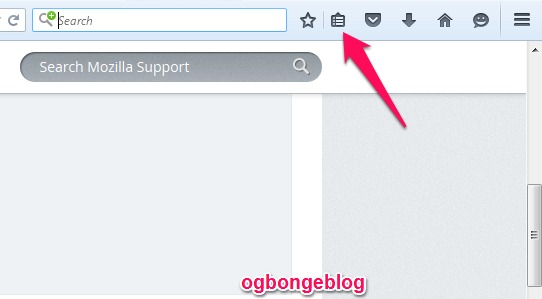
firefox bookmarks icon

==> Scroll down and click “ Show All Bookmarks ” to open the Library window

==> In the Library window, click the “ Import and Backup ” button==> Click “ Export Bookmarks to HTML… “
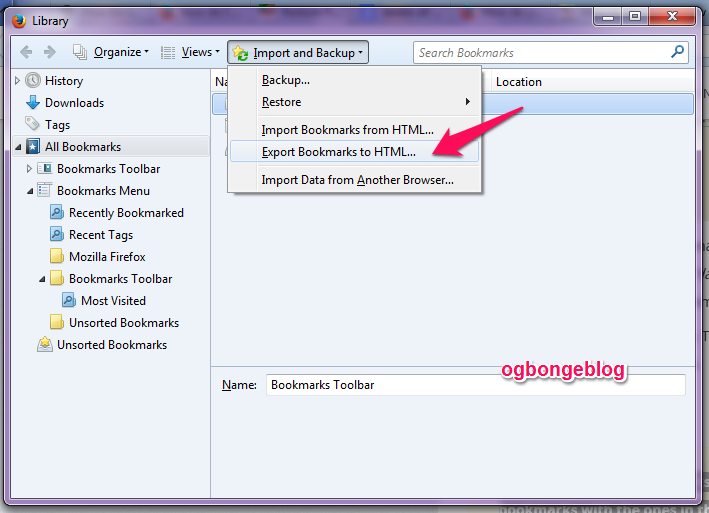
export firefox bookmarks to html

==> Choose a location to save the file, which is named “bookmarks” by default. The desktop is usually a good spot, but any place that is easy to remember will work.

==> Save the file and close the Library window.

How To Transfer Firefox Bookmarks To Another Computer

You can use a bookmark backup file from one computer and restore it on another computer.

So, place the bookmark backup file created earlier on your transfer media (e.g. a Flash drive) and copy it to the desktop (or any location) of the other computer.

Next is to go to Bookmarks > Show All Bookmarks  and click the “Import and Backup” button

Then, click “ Import Bookmarks to HTML…. “

After importing the backup file you created earlier, your bookmarks from that file will be restored. Close the Library window.

That’s all.

NB:

Restoring bookmarks from a backup will overwrite your current set of bookmarks with the ones in the backup file.

If you use the “BackUp” option, it will create a JSON file which might not be detectable by the other PC. So, use the “Export bookmarks to html…” option as recommended in this post.

Recommended: How To Delete All Firefox Bookmarks at Once . 

Please Share :
firefox tips PC tips

Like What You Read?

Sign Up to get similar articles delivered to your email inbox.

Leave a Reply Cancel reply

Your email address will not be published. Required fields are marked *

2 responses to “How I BackUp FireFox Bookmarks and Transfer To Another Computer”

  1. Ann Chetachukwu Ubah MD Avatar
    Ann Chetachukwu Ubah MD
    June 10, 2015

    COOL TIP…I NEVER KNEW BOOKMARKS COULD BE TRANSFERRED TO ANOTHER PC, I WOULD TRY IT OUT .THANKS JIDE

    Loading…
    Reply
  2. Gloria Okaimam Avatar
    Gloria Okaimam
    June 10, 2015

    You are a genius.. Thanks for sharing am gradually learning..

    http://Www.trendwithgloria.blogspot.com

    Loading…
    Reply

WANT TO ADVERTISE?

Chat on WhatsApp

RELATED POSTS

  • How To Download Facebook Videos Using Greasemonkey
  • How I Save Youtube Videos to My Computer
  • Download Mozilla fire fox for Android

FEATURED


  • CREDICORP launches C.L.I.C.K.D. Scheme with FG’s 3MTT Programme, expanding affordable consumer credit for locally-assembled laptops and devices for digital workers

    CREDICORP launches C.L.I.C.K.D. Scheme with FG’s 3MTT Programme, expanding affordable consumer credit for locally-assembled laptops and devices for digital workers

  • What Happens to Your Online Accounts When You Die?

    What Happens to Your Online Accounts When You Die?

JOIN AI WEB DESIGN GROUP


  • AI Website Design Training Whatsapp Group by Jidetheblogger

    AI Website Design Training Whatsapp Group by Jidetheblogger

← How To Delete All Firefox Bookmarks at Once
MozBackup Lets You Backup and Restore Firefox Extensions, Bookmarks and More →

Join 25,000+ subscribers

Receive our latest blog posts in your inbox.

Search

Social

Facebook

Instagram

Twitter

new ogbongeblog logo

Copyright © 2026 | About | Advertise | Featured | Sitemap | Privacy Policy | Powered by WordPress

Your cart (items: 0)

Products in cart

Product
Details
Total
Subtotal ₦0.00
Shipping and discounts calculated at checkout.
View my cart
Go to checkout

Your cart is currently empty!

Start shopping

Notifications

%d

    LIKE My Fan Page

    Privacy Policy | Copyright © 2012,OgbongeBlog.All Rights Reserved. Powered by Blogger .
    Create a Mobile Site
    View Site in Mobile | Classic
    Share by:


