
Skip to content
new ogbongeblog logo
  • Advertise
  • Blog
  • Contact

Blogger Author Profile Widget : How To Edit, Add Links And Make It Appear Below Posts

August 25, 2016

·

Uncategorized
jidetheblogger Avatar
jidetheblogger

The Author Profile widget for Blogger simply allows you to add a short bio to your Blogspot blog, thereby making it easy to tell your blog visitors, a brief about you. You can add the Blogger gadget to the header, sidebar & footer sections of your Blogger blog and you can as well, set it to display below all your blog posts.

If you’ve linked your personal Google+ profile to your Blogger blog, and adds the widget to your Blogger blog sidebar, footer or header, it will display as About Me widget if you are the only author/admin but it will display as “ Contributors List ” widget if your blog has more than one admin/author.

If you set it to show below blog posts, it will only display the profile of the Author that published the post.

Kindly note that linking your Google+ profile to your Blogspot blog will make Blogger to display your Google+ profile picture, name and introduction as the “About Author”.

How To Edit Blogger Profile

Editing the Blogger Author Profile is now very easy. All you just need to do, is to sign in to your Google account and go to : aboutme.google.com

Thereafter, scroll down to the “ Story ” section and click on the “edit” icon. Then, edit accordingly. You can add links to anywhere; your social media profiles, opt-in pages etc

edit google plus profile story introduction

Click OK when you are done.

Can’t find the “ Story ” section?

Just click on the “+” icon to set it up as seen in the screenshot below :
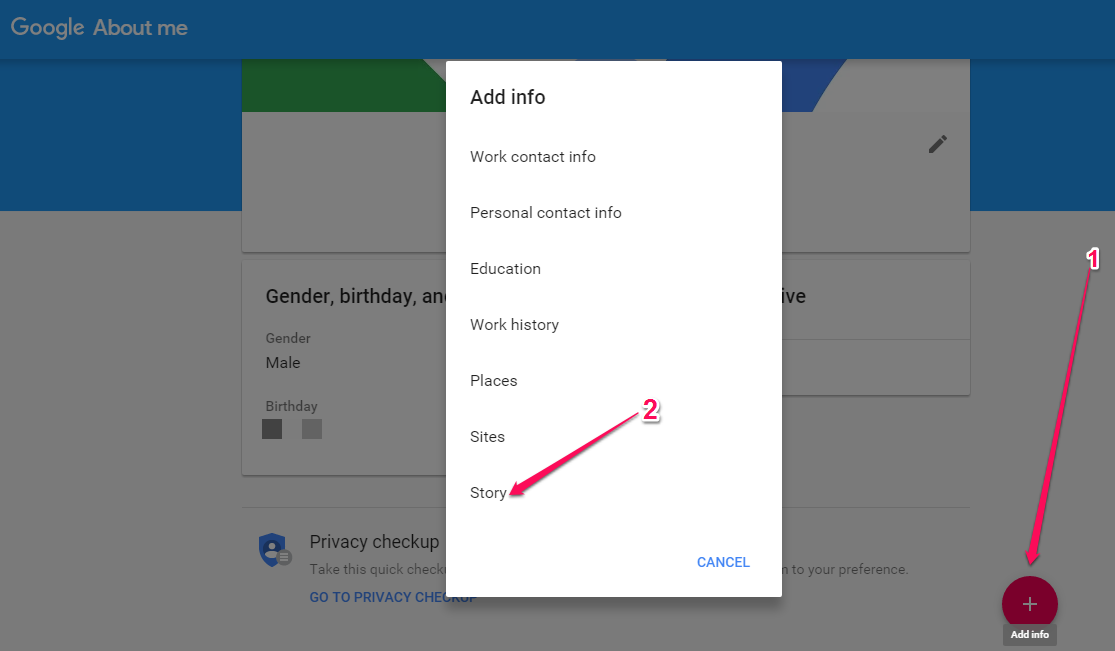
edit blogger profile widget bio

I hope this helps.

Recommended :


>> How To Link Blogger Blog To Google + Profile

>> How To Add Author Profile Widget To Blogger Sidebar or Footer

>> How To Display Blogger Author Profile Below Posts

>> How To Display Author Profile and Picture Below Posts Of Blogger Mobile View

Please Share :
blogger tips blogspot tutorials

Like What You Read?

Sign Up to get similar articles delivered to your email inbox.

Leave a Reply Cancel reply

Your email address will not be published. Required fields are marked *

15 responses to “Blogger Author Profile Widget : How To Edit, Add Links And Make It Appear Below Posts”

  1. Olutunde Femi Avatar
    Olutunde Femi
    August 25, 2016

    Thanks jide for this tutorial. I had problem editing mine in the past but this, it will be easy for me to do again InterC Nigeria 4G LTE Data Plan, Subscription & Price

    Loading…
    Reply
  2. Victor Kachi Avatar
    Victor Kachi
    August 25, 2016

    Thanks Jide. I already coded mine the way i want

    From Entclass.com

    Loading…
    Reply
  3. Precious Ojoka Avatar
    Precious Ojoka
    August 26, 2016

    Yea Man, it was helpful.

    Remarking From Preshtech.com

    Loading…
    Reply
  4. Ero Sennin Avatar
    Ero Sennin
    August 26, 2016

    Thanks a lot for this tutorial jide, it was helpful

    From enochtekng

    Loading…
    Reply
  5. DON AKANIDO Avatar
    DON AKANIDO
    August 27, 2016

    Thanks for the tutor

    from Superbaze.com.ng

    Loading…
    Reply
  6. Uthman Saheed Avatar
    Uthman Saheed
    August 28, 2016

    Thanks for that. Done

    Loading…
    Reply
  7. Tochukwu Amadi Avatar
    Tochukwu Amadi
    August 29, 2016

    Thanks for the tutorial sire…

    proudlygeeks.com

    Loading…
    Reply
  8. oluwatomi Avatar
    oluwatomi
    August 30, 2016

    Thanks .. very insightful… http://www.stephenakintayo.com

    Loading…
    Reply
  9. Wisdom Michael Avatar
    Wisdom Michael
    August 31, 2016

    Enter your comment…God has really used you to help me through your tutorials, freebies and lots… I pray may God enrich & strengthen you.

    From » naijcrackgist.blogspot.com

    Loading…
    Reply
  10. Golden Okey Avatar
    Golden Okey
    September 2, 2016

    Nice post. I'll apply it on http://www.howwrite.blogspot.com

    Loading…
    Reply
  11. Kingsley umeh Avatar
    Kingsley umeh
    September 6, 2016

    You are the bomb sire it was useful for me#thanks

    Loading…
    Reply
  12. www.abodebusiness.com Avatar
    www.abodebusiness.com
    September 21, 2016

    Thanks Jide. Very helpful

    Loading…
    Reply
  13. Wiz Prof Avatar
    Wiz Prof
    October 22, 2016

    Jide thanks a lot, this tutorial is of it kind

    Loading…
    Reply
  14. bebe victor Avatar
    bebe victor
    November 28, 2016

    Sir jide. please how do i put an "advertise here" platform on my blog?

    Loading…
    Reply
  15. Igbaoyinbo Odunayo Isaac Avatar
    Igbaoyinbo Odunayo Isaac
    July 26, 2017

    i know everything like this..i am deaf too.

    Loading…
    Reply

WANT TO ADVERTISE?

Chat on WhatsApp

RELATED POSTS

  • How to add Google Plus Widget to Blogger/Blogspot Blogs
  • How To Add Tabs to Blogger Blogs Header Section
  • How To Add Feedburner Email Subscription Form BELOW Blog Posts of Blogger/Blogspot Blogs

FEATURED


  • CREDICORP launches C.L.I.C.K.D. Scheme with FG’s 3MTT Programme, expanding affordable consumer credit for locally-assembled laptops and devices for digital workers

    CREDICORP launches C.L.I.C.K.D. Scheme with FG’s 3MTT Programme, expanding affordable consumer credit for locally-assembled laptops and devices for digital workers

  • What Happens to Your Online Accounts When You Die?

    What Happens to Your Online Accounts When You Die?

JOIN AI WEB DESIGN GROUP


  • AI Website Design Training Whatsapp Group by Jidetheblogger

    AI Website Design Training Whatsapp Group by Jidetheblogger

← Dlvr.It Stopped Posting To Your Facebook Timeline? Here Is How I Reconnected It
Beauty Lies In the Eye Of The Gionee F103 Pro →

Join 25,000+ subscribers

Receive our latest blog posts in your inbox.

Search

Social

Facebook

Instagram

Twitter

new ogbongeblog logo

Copyright © 2026 | About | Advertise | Featured | Sitemap | Privacy Policy | Powered by WordPress

Your cart (items: 0)

Products in cart

Product
Details
Total
Subtotal ₦0.00
Shipping and discounts calculated at checkout.
View my cart
Go to checkout

Your cart is currently empty!

Start shopping

Notifications

%d

    LIKE My Fan Page

    Privacy Policy | Copyright © 2012,OgbongeBlog.All Rights Reserved. Powered by Blogger .
    Create a Mobile Site
    View Site in Mobile | Classic
    Share by:


