


Update : If you’ve upgraded to the new Google+, you can read how to edit the Blogger Author Profile here .
If you add the Blogger “Profile” widget to your blog, it will display your information to your blog visitors. It displays as “ About Me
” widget on single author blogs but as “ Contributors list
” widget on multi-author blogs.
If you’ve linked your personal Google+ profile to your Blogspot blog , the widget will display your Google+ profile picture, name, some description and a follow button. The name will be linked to your Google+ profile.
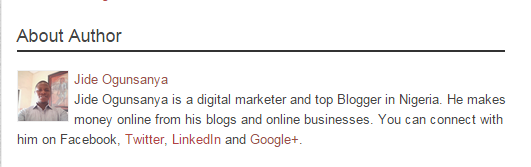
If you tick the “ show about me ” option when adding the Profile widget to your Blogger blog, a little description about yourself, pulled from your Google+ profile will be shown in the gadget when displayed on your blog’s sidebar. This description also shows, if you’ve enabled the author profile to display below posts .
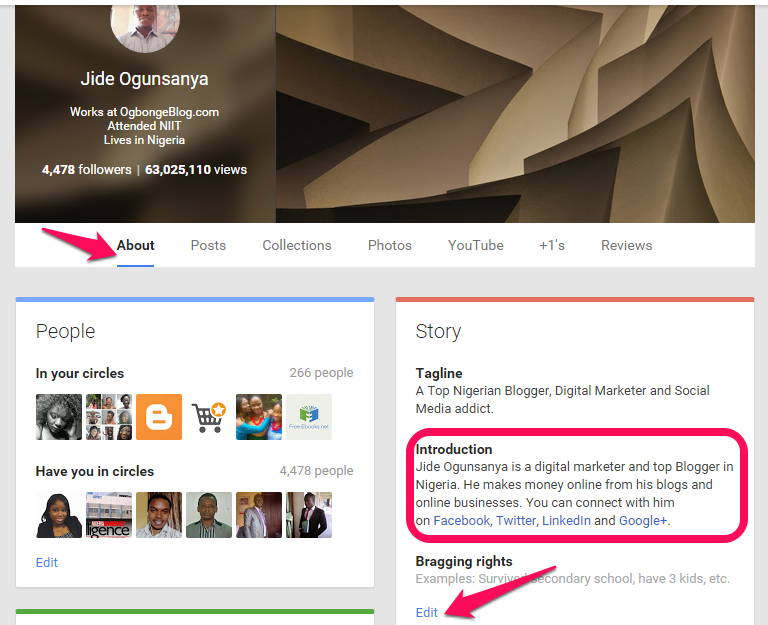
If you would like to edit the description, you will have to do this on your Google+ Profile. Go to the “ About “section of your Google+ profile and edit the “ Introduction ” as seen in the screenshot below:
After editing it, save and the changes will automatically reflect on your blog.
NB : If the “introduction” part of your Google+ “About” page is blank, no description will be displayed on your blog. The widget appears by default on Blogger mobile templates.








Leave a Reply