
Skip to content
new ogbongeblog logo
  • Advertise
  • Blog
  • Contact

How To Change The Currency in Facebook Ads Manager

December 27, 2016

·

Uncategorized
jidetheblogger Avatar
jidetheblogger

If you use Facebook ads to advertise online, you can easily change the currency in your Facebook ads from US dollars to any other currency e.g Naira. You can get this done easily via your Facebook Ads Account Settings.

How?

>> Sign in to Facebook.com

>> Go to your Facebook ads account settings .

>> Under Time Zone, click “Change Currency / Timezone”.
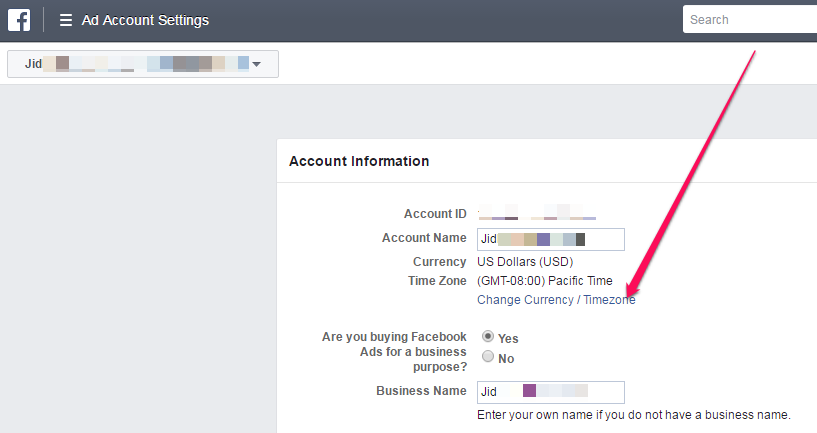
change facebook ads currency from dollars

>> Select your new currency and time zone and then click “Create New Account”.

That’s all.

If the option to change fb ads currency isn’t appearing, below are the reasons :

  • Your account is unsettled
  • You have ads pending review
  • You’ve already changed your currency twice in the past 28 days
  • You’re looking at an account other than your personal ad account

Things to keep in mind about changing your Facebook ads currency:

  • When you choose a new currency and time zone, you’ll create a new ad account. Your old ad account will be visible in the Account dropdown in the top left of your Ads Manager, but it’ll be closed and all ads created with your old account will stop running. Any ads you had running on the old ad account will be billed in the old currency.
  • If your Facebook Business Manager account has several other accounts associated with it, it’s not possible to change your currency. You’ll need to create a new account from Business Manager with the new currency.
  • Your Currency and Business Country must match. For example, if you select Naira as your currency, you should select Nigeria as your country.
  • The payment methods available to you depend on the currency you choose.
If you want to advertise on Facebook in Nigeria, I do not recommend changing Facebook ads currency from dollars to Naira. Just leave it as USD. Reason is that you will not be able to pay for your Facebook ads with most Nigerian debit cards out there as most of them do not support the Facebook Naira billing.

Recommended  

>>  PayU Nigeria Lets You Pay For Facebook Ads In Naira With GTBank MasterCard and Other Nigerian Debit Cards

Please Share :
facebook ads

Like What You Read?

Sign Up to get similar articles delivered to your email inbox.

Leave a Reply Cancel reply

Your email address will not be published. Required fields are marked *

17 responses to “How To Change The Currency in Facebook Ads Manager”

  1. Mazino Oyolo-Kigho Avatar
    Mazino Oyolo-Kigho
    December 27, 2016

    Payment with USD still remain the best. mazinoweb.com

    Loading…
    Reply
  2. Paul Oyegbenga Avatar
    Paul Oyegbenga
    December 28, 2016

    Mine is running on naira, I hope it gets cleared so I can move to the usd payment system, but am having some issues with facebook ads, it's really converting well on facebook but the clicks aren't getting to my website. Please what could be the problem and how do I solve it. Thanks

    Real Opportunities To Study In Any Institution Of Your Choice Free On Scholarship (GET IT NOW)

    Loading…
    Reply
    1. Anonymous Avatar
      Anonymous
      July 12, 2017

      Use a Landing Page to collect information from your subcribers.The landing page should be connected to an autoresponder.This way you can measure your progress

      Loading…
      Reply
  3. Godfrey Okoye Avatar
    Godfrey Okoye
    December 29, 2016

    Thank you for this information, i have been tring to change my own for my entertainment blog site.

    Loading…
    Reply
  4. SMS and Events Avatar
    SMS and Events
    December 29, 2016

    Interesting write up. Very handy.

    Loading…
    Reply
  5. Future Avatar
    Future
    December 30, 2016

    Thanks for this bright info. My group & I have been working on how to do this for a long time without result.

    Loading…
    Reply
  6. Dr. Nelson Obinna Avatar
    Dr. Nelson Obinna
    December 31, 2016

    Nice post. Please is there any complete ebook on how to run Facebook ads in Nigeria using the dollar currency. I need information on how to get the debit card from bank and how to start running the ads on Facebook. A well detailed explanation.Thank you as you respond.

    Loading…
    Reply
    1. Jide Oguns Avatar
      Jide Oguns
      January 18, 2017

      Kindly contact me via email.

      Loading…
      Reply
    2. Dr. Nelson Obinna Avatar
      Dr. Nelson Obinna
      February 16, 2017

      Done.

      Loading…
      Reply
  7. SOMCEPH Avatar
    SOMCEPH
    May 10, 2017

    Thanks Ogbngeblog for your beautiful information .

    please assist me also , my facebook advert payment decline. facebook echo below:

    Please verify that all card information you've provided is accurate and try again. http://www.reportaroundyou.com

    Loading…
    Reply
  8. Jim Avatar
    Jim
    June 5, 2017

    Great one… Educative!

    http://rapportnaija.com

    Loading…
    Reply
  9. Sammixs Avatar
    Sammixs
    July 8, 2017

    God bless you for this write ups. It really help.

    But im still have issues running ads on my page with my firstbank mastercard.

    Please what should i do?

    Loading…
    Reply
  10. Hafsat Avatar
    Hafsat
    October 24, 2017

    Hello I can not see the option of payu on my payment method and am running the account in dollar before pls what can I do.

    Loading…
    Reply
  11. Lucy elly Avatar
    Lucy elly
    February 18, 2019

    Please i am having issues.didnt see timezon on my facebook ad manager.haven’t been able to run an ad

    Loading…
    Reply
  12. Pees Organic Avatar
    Pees Organic
    March 10, 2020

    Pls I am having an issue with my FB after changing it from US Dollar to Naira. Since then I am unable to promote any ads on my FB. How can I resolve this please, email : peesorganicskingcare@yahoo.com

    Loading…
    Reply
  13. Zenoten Avatar
    Zenoten
    May 22, 2020

    Please sir I’m having issues with my payment methods. Please how do I set my manual or automatic payment methods?

    Loading…
    Reply
  14. Martin Avatar
    Martin
    September 11, 2021

    Please, I need someone to help me change the dollar sing on my Facebook shop to naira.
    I have changed my currency on the ad manager but, dollar sign still remain on the shop.Kindly assist.
    Thanks.

    Loading…
    Reply

WANT TO ADVERTISE?

Chat on WhatsApp

RELATED POSTS

  • Does Facebook Accepts Verve Cards As Payment Options for Facebook and Instagram Ads ?use verve cards to pay for facebook ads and instagram ads
  • Can I Use OPay Card for Facebook Ads?can i use opay card for facebook ads in nigeria
  • How I Can Repay My Facebook Ad DebtHow I Can Repay My Facebook Ad Debt in Nigeria

FEATURED


  • CREDICORP launches C.L.I.C.K.D. Scheme with FG’s 3MTT Programme, expanding affordable consumer credit for locally-assembled laptops and devices for digital workers

    CREDICORP launches C.L.I.C.K.D. Scheme with FG’s 3MTT Programme, expanding affordable consumer credit for locally-assembled laptops and devices for digital workers

  • What Happens to Your Online Accounts When You Die?

    What Happens to Your Online Accounts When You Die?

JOIN AI WEB DESIGN GROUP


  • AI Website Design Training Whatsapp Group by Jidetheblogger

    AI Website Design Training Whatsapp Group by Jidetheblogger

← How To View WordPress Users Registration Dates and Time
How To Hide Blog Archive Widget From Showing On Blogger Website →

Join 25,000+ subscribers

Receive our latest blog posts in your inbox.

Search

Social

Facebook

Instagram

Twitter

new ogbongeblog logo

Copyright © 2026 | About | Advertise | Featured | Sitemap | Privacy Policy | Powered by WordPress

Your cart (items: 0)

Products in cart

Product
Details
Total
Subtotal ₦0.00
Shipping and discounts calculated at checkout.
View my cart
Go to checkout

Your cart is currently empty!

Start shopping

Notifications

%d

    LIKE My Fan Page

    Privacy Policy | Copyright © 2012,OgbongeBlog.All Rights Reserved. Powered by Blogger .
    Create a Mobile Site
    View Site in Mobile | Classic
    Share by:


