Skip to content
new ogbongeblog logo
  • Advertise
  • Blog
  • Contact

How To Hide Blog Archive Widget From Showing On Blogger Website

December 28, 2016

·

Uncategorized
jidetheblogger Avatar
jidetheblogger

The Blogger “Blog Archive” widget makes it easy for visitors to navigate Blogspot blogs with links to older posts. It organizes your previously published posts by month week or day, which can be handy for readers who want to browse your older content.

When you create a new blog on Blogspot platform, the blog archive widget displays on all pages of the desktop and mobile views of the blog by default. If you don’t want it to display, you can easily delete it.

How?

Sign in to your Blogger dashboard at blogger.com

Click on “Layout”

Scroll down to the section where you have the “Blog Archive” widget

edit blog archive widget on blogger

Click on “Edit”

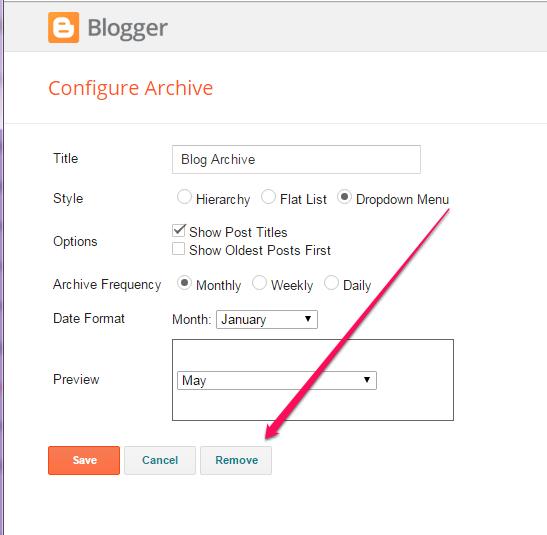
delete blogger blog archive widget

Click “Remove”

Click on “Save Arrangement”

That’s all.

If you prefer to just hide it without deleting it, you can use css to get that done. All you need is the widget ID of the blog archive widget.

For example, if the id of my blog archive widget is BlogArchive1, I will add the css code below to my blog’s html if I want to hide the widget from displaying on my blog without deleting it :

#BlogArchive1 {
display : none;
}

I hope this helps.

NB : It’s highly recommended you have a blog archive widget or page on your blog.

Recommended : How To Get Blogger Widget ID

Please Share :
blogger tips

Like What You Read?

Sign Up to get similar articles delivered to your email inbox.

Leave a Reply Cancel reply

Your email address will not be published. Required fields are marked *

4 responses to “How To Hide Blog Archive Widget From Showing On Blogger Website”

  1. Prosper Noah Avatar
    Prosper Noah
    December 28, 2016

    Great Info shared here: This would be of great help to newbies you can check out the post on Starting self-hosted blog

    Loading…
    Reply
  2. Anonymous Avatar
    Anonymous
    January 2, 2017

    good i nfo

    Loading…
    Reply
  3. Bunmi Are Avatar
    Bunmi Are
    March 8, 2017

    Thank you for the post. I was able to do just that on my blogger blog at https://nairapoints.blogspot.com .

    Loading…
    Reply
  4. Sean Avatar
    Sean
    February 14, 2018

    very helpful, Thx Alot

    Loading…
    Reply

WANT TO ADVERTISE?

Chat on WhatsApp

RELATED POSTS

  • How To Create Pages In Blogger Blogs
  • How to add Google Plus Widget to Blogger/Blogspot Blogs
  • How To add Breadcrumb Navigation to Blogger/Blogspot

FEATURED


  • CREDICORP launches C.L.I.C.K.D. Scheme with FG’s 3MTT Programme, expanding affordable consumer credit for locally-assembled laptops and devices for digital workers

    CREDICORP launches C.L.I.C.K.D. Scheme with FG’s 3MTT Programme, expanding affordable consumer credit for locally-assembled laptops and devices for digital workers

  • What Happens to Your Online Accounts When You Die?

    What Happens to Your Online Accounts When You Die?

JOIN AI WEB DESIGN GROUP


  • AI Website Design Training Whatsapp Group by Jidetheblogger

    AI Website Design Training Whatsapp Group by Jidetheblogger

← How To Change The Currency in Facebook Ads Manager
How To Add Background Colour To Facebook Updates →

Join 25,000+ subscribers

Receive our latest blog posts in your inbox.

Search

Social

Facebook

Instagram

Twitter

new ogbongeblog logo

Copyright © 2026 | About | Advertise | Featured | Sitemap | Privacy Policy | Powered by WordPress

Your cart (items: 0)

Products in cart

Product
Details
Total
Subtotal ₦0.00
Shipping and discounts calculated at checkout.
View my cart
Go to checkout

Your cart is currently empty!

Start shopping

Notifications

%d

    LIKE My Fan Page

    Privacy Policy | Copyright © 2012,OgbongeBlog.All Rights Reserved. Powered by Blogger .
    Create a Mobile Site
    View Site in Mobile | Classic
    Share by: