
Skip to content
new ogbongeblog logo
  • Advertise
  • Blog
  • Contact

How I Control Which Pages Widgets Appear On My WordPress Blogs

September 8, 2015

·

Uncategorized
jidetheblogger Avatar
jidetheblogger

Controlling which pages widgets appear on WordPress blogs is easier compared to when doing same on Blogger blogs. On Blogspot blogs, you will have to add conditional statements to your blog’s HTML but on WordPress, all you need to do is to download and activate the JetPack plugin and enable the “Widget Visibility” feature.

You can download JetPack plugin  for WordPress here .
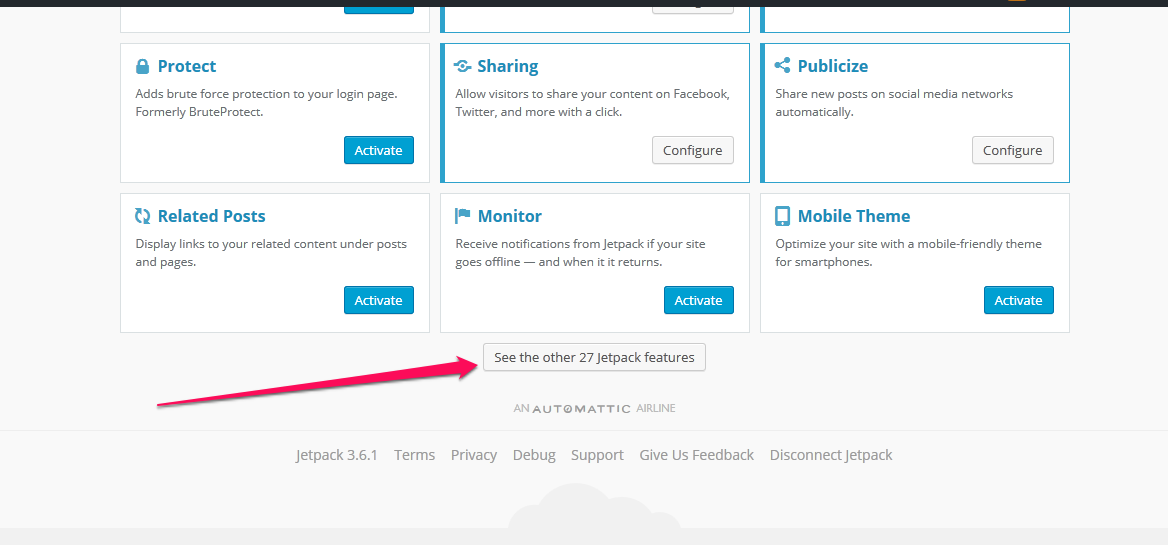
jetpack wordpress plugin features

Once activated, click on JetPack in the admin area of your WordPress blog to see the Jetpack features. Click on “see the other Jetpack features”, scroll down to “Widget visibility”, hover on it and ensure it is activated.

Once activated, you will see the “Visibility” button next to the Save button on widgets in the widgets area of your WordPress blog.

To control visibility, expand the widget and click the Visibility button and then, choose a set of visibility options.

For example, if you wanted the Archives widget to only appear on category archives and error pages, choose “Show” from the first dropdown and then add two rules: “Page is 404 Error Page” and “Category is All Category Pages.”

Wordpress widgets visibility

You can also hide widgets based on the current page. For example, if you don’t want a text widget to appear on the Front page, choose “Hide” and “Page is Front Page.”

That’s all.

Check more WordPress tutorials here .

Have fun!

Please Share :
wordpress

Like What You Read?

Sign Up to get similar articles delivered to your email inbox.

Leave a Reply Cancel reply

Your email address will not be published. Required fields are marked *

2 responses to “How I Control Which Pages Widgets Appear On My WordPress Blogs”

  1. Tunde Avatar
    Tunde
    September 8, 2015

    Nice share boss. I can now control which pages some affiliate banners display on my blog. God bless you

    Loading…
    Reply
  2. Boyantech Avatar
    Boyantech
    September 9, 2015

    using it already…

    Loading…
    Reply

WANT TO ADVERTISE?

Chat on WhatsApp

RELATED POSTS

  • Manage Your Jetpack Sites from a Single Dashboard on WordPress.com
  • JetPack Unable To Connect To WordPress.com? UnPlug It!
  • Upload Image To WordPress Sidebar or Widget Area With This Plugin

FEATURED


  • CREDICORP launches C.L.I.C.K.D. Scheme with FG’s 3MTT Programme, expanding affordable consumer credit for locally-assembled laptops and devices for digital workers

    CREDICORP launches C.L.I.C.K.D. Scheme with FG’s 3MTT Programme, expanding affordable consumer credit for locally-assembled laptops and devices for digital workers

  • What Happens to Your Online Accounts When You Die?

    What Happens to Your Online Accounts When You Die?

JOIN AI WEB DESIGN GROUP


  • AI Website Design Training Whatsapp Group by Jidetheblogger

    AI Website Design Training Whatsapp Group by Jidetheblogger

← Upload Image To WordPress Sidebar or Widget Area With This Plugin
How To Hide YouTube Channel From Public and in Google Search Results →

Join 25,000+ subscribers

Receive our latest blog posts in your inbox.

Search

Social

Facebook

Instagram

Twitter

new ogbongeblog logo

Copyright © 2026 | About | Advertise | Featured | Sitemap | Privacy Policy | Powered by WordPress

Your cart (items: 0)

Products in cart

Product
Details
Total
Subtotal ₦0.00
Shipping and discounts calculated at checkout.
View my cart
Go to checkout

Your cart is currently empty!

Start shopping

Notifications

%d

    LIKE My Fan Page

    Privacy Policy | Copyright © 2012,OgbongeBlog.All Rights Reserved. Powered by Blogger .
    Create a Mobile Site
    View Site in Mobile | Classic
    Share by:


