Skip to content
new ogbongeblog logo
  • Advertise
  • Blog
  • Contact

JetPack Unable To Connect To WordPress.com? UnPlug It!

  1. Home
  2. Blog
  3. Uncategorized
  4. JetPack Unable To Connect To WordPress.com? UnPlug It!
June 14, 2015

Written by

jidetheblogger Avatar
jidetheblogger

Last Modified :

March 6, 2026

I deactivated the JetPack plugin on one of my WordPress sites only to find it difficult to use after reactivating it. It keeps throwing error everytime I click on the “ Connect to WordPress ” button i.e the jetpack plugin cannot connect to wordpress.com.
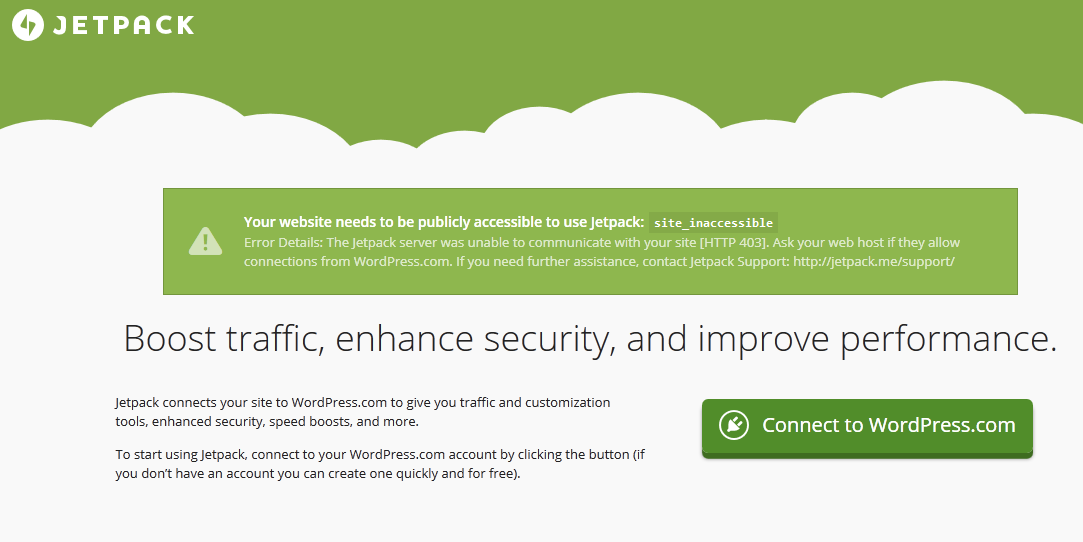
jetpack wordpress

I deactivated all plugins and reactivated ONLY the jetpack plugin. Yet the problem was not resolved. While I await feedback from my host and also from JetPack support, I decided to unplug it and it worked.  Thereafter, I was able to access the JetPack custom css without connecting JetPack to wordpress.com.

So, How do I Unplug JetPack Plugin for WordPress?

Simply install the UnPlug JetPack plugin created by WordPress developer Tanner Moushey.

The Unplug Jetpack plugin essentially puts Jetpack into development mode. With the plugin activated, you won’t be required to connect to WordPress.com unless you need to use Site stats, Publicize, Related Posts, etc.

It allows you to use jetPack features that do not require a connection to WordPress.com servers. So, if you don’t see the module you’re looking for among those listed on the JetPack page in your dashboard, that means that it likely requires a WordPress.com connection in order to use it.

So, try it if JetPack can’t connect to WordPress.
Please Share :
wordpress

Like What You Read?

Sign Up to get similar articles delivered to your email inbox.

Leave a Reply Cancel reply

Your email address will not be published. Required fields are marked *

WANT TO ADVERTISE?

Chat on WhatsApp

RELATED POSTS

  • How To Restore JetPack Custom CSS After Deactivating The Plugin
  • Jetpack Stats Not Displaying On Your WordPress Admin Dashboard? Try This Fix
  • How I Control Which Pages Widgets Appear On My WordPress Blogs

FEATURED


  • How to Pay Chinese Suppliers in RMB (Alipay & WeChat Pay) or Swap Naira, Kenyan Shillings, Ghana Cedis & USDT in Minutes

    How to Pay Chinese Suppliers in RMB (Alipay & WeChat Pay) or Swap Naira, Kenyan Shillings, Ghana Cedis & USDT in Minutes

JOIN AI WEB DESIGN GROUP


  • AI Website Design Training Whatsapp Group by Jidetheblogger

    AI Website Design Training Whatsapp Group by Jidetheblogger

RANDOM POSTS


    I Got One Free Month of Meta Verified After I Tried to Cancel My Subscription


    How To Make Money On Bamboo App: 5 Proven Ways


    How To Use Vibe Coding To Make Money


    How I Earn $100 Per Referral from Affiliate Marketing


    Bluetooth Printer That Connects To Phone


    Can I Use OPay Card for Facebook Ads?


    Why I Moved My Websites From Namecheap To Interserver.net


    How I Earn $50 Per Sale


MORE RANDOM POSTS
← Yudala Sets To Launch Online Shopping and Retail Stores In Nigeria
How To Restore JetPack Custom CSS After Deactivating The Plugin →

Join 25,000+ subscribers

Receive our latest blog posts in your inbox.

Search

Social

Facebook

Instagram

Twitter

new ogbongeblog logo

Copyright © 2026 | About | Advertise | Featured | Sitemap | Privacy Policy | Powered by WordPress

Your cart (items: 0)

Products in cart

Product
Details
Total
Subtotal ₦0.00
Shipping and discounts calculated at checkout.
View cart
Go to checkout

Your shopping cart is empty

Return to shop

Notifications

LIKE My Fan Page

Privacy Policy | Copyright © 2012,OgbongeBlog.All Rights Reserved. Powered by Blogger .
Create a Mobile Site
View Site in Mobile | Classic
Share by: