
Skip to content
new ogbongeblog logo
  • Advertise
  • Blog
  • Contact

GTBank GAPS : How To Login, Transfer Money and Check Account Balance

April 2, 2016

·

Uncategorized
jidetheblogger Avatar
jidetheblogger

If you want to open a gtbank corporate account, you will have to know how to use the GTBank GAPS payment platform.

GTBank Automated Payment System (GAPS) is simply Guaranty Trust Bank platform for corporate Internet Banking. It is a web-based service which facilitates the processing of vendor (and other) payments in batches, using either a dial-up connection to the bank or a secured (https) connection over the Internet. It gives users online real-time access to their account on 24/7 basis.

To get started with GTBank corporate Internet Banking, you will have to fill the GTBank GAPS application form. Once approved and your account is set up, you can start signing in to the platform to carry out your corporate banking transactions. You will be issued a token device, an access code, username and password which will be required for you to sign in to your GAPS account.

How To Login To GTBank GAPS Payment Platform

==> Go to GTBank Internet banking login page
==> Click on the “Business” tab beside the “Personal” tab
==> Click on “ Login ” > “ Continue “

GTBank GAPS login page

==> Enter your gtbank gaps access code, username and password.

==> If the details entered are correct, you will be redirected to a page where you will be promoted to enter your token code. Press the white button on your GTBank token device and enter the displayed digits in the space provided on the web page.

==> Click “Continue”

==> You will see your name, available balance etc if you’re successfully signed in.

How To Transfer Money on GTBank GAPS Dashboard

You can transfer money from your GTBank GAPS to another gtbank account or to other bank accounts.

To Transfer from GTBank GAPS to GTBank account ,

==> Click “ Single Transactions ” > “ Initiate GTB Transfer ”
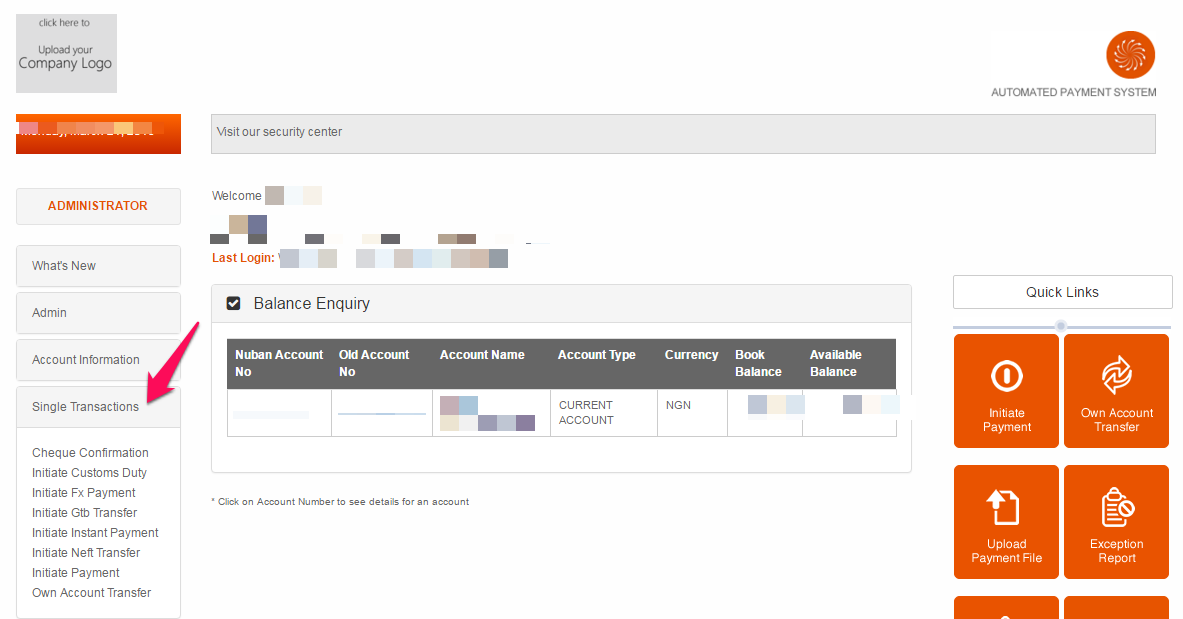
gtbank gaps initiate payment

==> Click “Add New Beneficiary” if the receiver is not yet added to the list of your beneficiaries.
==> Select account to debit and select the beneficiary you want to transfer money to.
==> Select account to debit, enter amount you want to transfer and click “ Add to Batch “
==> Press the white button on your token device and type the transaction code generated in the space provided
==> Click “ Approve Batch “

That’s all

The money will be transferred to the gtbank account as required and your account will be debited appropriately.

To transfer from GTBank GAPS to other non-gtbank accounts ,

==> Log in to your GTBank GAPS dashboard
==> Click “ Single Transactions ” > “ Initiate Instant Payment “, then follow the steps above.

How To Check GTBank GAPS Account Balance

==> Sign in to your GTbank GAPS dashboard
==> Click “ Account Information ” > “ Balance Enquiry “

Thereafter, you can click on your account number to see details for the account.

That’s all.

I hope this helps.

Please Share :
gtbank

Like What You Read?

Sign Up to get similar articles delivered to your email inbox.

Leave a Reply Cancel reply

Your email address will not be published. Required fields are marked *

7 responses to “GTBank GAPS : How To Login, Transfer Money and Check Account Balance”

  1. bezzy izuka Avatar
    bezzy izuka
    March 21, 2016

    Sir, is there anyway i can concert my Airtime to Credit? Instead of money to airtime.
    I blog @ MyWapTutors

    Loading…
    Reply
  2. Ikenna Uchegbu Avatar
    Ikenna Uchegbu
    March 21, 2016

    Nice post, but I'm not really using my gtbank app though, I prefer my diamond. I blog at http://www.oscarleeblog.com Tech and school news Blog in Nigeria

    Loading…
    Reply
  3. Victor Kachi Avatar
    Victor Kachi
    March 22, 2016

    Thanks for this tutorial

    Entclass.com

    Loading…
    Reply
  4. daayur Avatar
    daayur
    April 21, 2016

    thanks for this information, i just tried it and it works

    Loading…
    Reply
  5. Unknown Avatar
    Unknown
    June 4, 2017

    pls emphasis on transferring from gtb to different account

    Loading…
    Reply
  6. mike dunamis Avatar
    mike dunamis
    July 25, 2017

    how do I get my access code and is it the same password I use ?

    Loading…
    Reply
  7. Solomon Peace Avatar
    Solomon Peace
    September 16, 2021

    Hi,This is truly helpful. However, I’d like to learn how to delete already initiated payment. I’d be glad to learn from you.

    Loading…
    Reply

WANT TO ADVERTISE?

Chat on WhatsApp

RELATED POSTS

  • Download GTBank App for Android and iOS (iPhone, iPad)gtbank app download for iphone android ipad
  • How To Sign Up or Register for GTBank Internet Banking Services in Nigeria
  • Steps to GTBank Online Banking On Phones and TABLETS (Nokia, BlackBerry, iPad, Android etc)

FEATURED


  • CREDICORP launches C.L.I.C.K.D. Scheme with FG’s 3MTT Programme, expanding affordable consumer credit for locally-assembled laptops and devices for digital workers

    CREDICORP launches C.L.I.C.K.D. Scheme with FG’s 3MTT Programme, expanding affordable consumer credit for locally-assembled laptops and devices for digital workers

  • What Happens to Your Online Accounts When You Die?

    What Happens to Your Online Accounts When You Die?

JOIN AI WEB DESIGN GROUP


  • AI Website Design Training Whatsapp Group by Jidetheblogger

    AI Website Design Training Whatsapp Group by Jidetheblogger

← Gionee P5 Mini : The Specs of Elegance
You Can Now Make Money Online With Adsense Matched Content Unit →

Join 25,000+ subscribers

Receive our latest blog posts in your inbox.

Search

Social

Facebook

Instagram

Twitter

new ogbongeblog logo

Copyright © 2026 | About | Advertise | Featured | Sitemap | Privacy Policy | Powered by WordPress

Your cart (items: 0)

Products in cart

Product
Details
Total
Subtotal ₦0.00
Shipping and discounts calculated at checkout.
View my cart
Go to checkout

Your cart is currently empty!

Start shopping

Notifications

%d

    LIKE My Fan Page

    Privacy Policy | Copyright © 2012,OgbongeBlog.All Rights Reserved. Powered by Blogger .
    Create a Mobile Site
    View Site in Mobile | Classic
    Share by:


