
Skip to content
new ogbongeblog logo
  • Advertise
  • Blog
  • Contact

How To Reset GTBank GAPS Password Via GTB Website

August 25, 2014

·

Uncategorized
jidetheblogger Avatar
jidetheblogger

While trying to sign in to GTBank Automated Payment System (GAPS) this morning via the Guaranty Trust Bank Internet banking platform, I was alerted that my password has expired. I followed the instruction to reset it and within few minutes, I was able to sign in to complete my online transactions at the site.

If you want to reset your GAPS Password, follow me through the steps below:

==> Go to GTBank Internet banking login  page==> Click on the GAPS tab beside the “Internet Banking” tab
==> Click on Live Login button

GTBank GAPS login page

==> Enter your GAPS access code and username.
==> Click “ Forgot Password “. You will see a new page similar to the screenshot below:
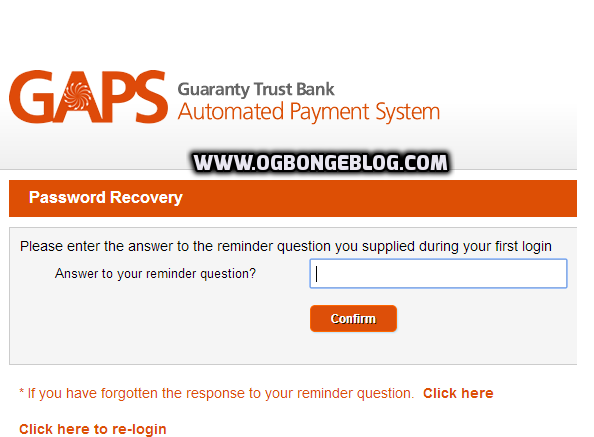
GAPS password reset

==> Enter the answer to the reminder question you entered during your first login to the GAPS platform.

If you’ve forgotten the answer, click on the link provided and the reminder question will be sent to the email address on your GTBank profile. So,once you get the question in your mail, use it to answer the question on the GAPS webpage.

Once you enter the correct answer to the reminder question, GTBank will send your new password to your email. Once you receive it in your email inbox, use it to log in to the GAPS platform.

Immediately you sign in, you should be prompted automatically to change the password. If not prompted, please change the password before carrying out any transaction.

How To Change GTBank GAPS Password

==> If you are signed in to the GAPS platform, go to “ My Profile ” > “ Change Password “.

Your username will be displayed by default. Enter the current password in the space provided. Also enter the new password (twice) and click “Update”. You will see a notification if password change is successful.

That’s all.

Take care NOT to disclose your password to a 3rd party to avoid unauthorized access to your account.

You can check out GTBank GAPS Training videos .

Please Share :
gtbank

Like What You Read?

Sign Up to get similar articles delivered to your email inbox.

Leave a Reply Cancel reply

Your email address will not be published. Required fields are marked *

WANT TO ADVERTISE?

Chat on WhatsApp

RELATED POSTS

  • How To Sign Up or Register for GTBank Internet Banking Services in Nigeria
  • Steps to GTBank Online Banking On Phones and TABLETS (Nokia, BlackBerry, iPad, Android etc)
  • FX Transfer on GTBank GAPS Portal : Step By Step

FEATURED


  • CREDICORP launches C.L.I.C.K.D. Scheme with FG’s 3MTT Programme, expanding affordable consumer credit for locally-assembled laptops and devices for digital workers

    CREDICORP launches C.L.I.C.K.D. Scheme with FG’s 3MTT Programme, expanding affordable consumer credit for locally-assembled laptops and devices for digital workers

  • What Happens to Your Online Accounts When You Die?

    What Happens to Your Online Accounts When You Die?

JOIN AI WEB DESIGN GROUP


  • AI Website Design Training Whatsapp Group by Jidetheblogger

    AI Website Design Training Whatsapp Group by Jidetheblogger

← How To Claim Your Site for Free on Alexa
Write Text On Pictures Online Free At These Sites →

Join 25,000+ subscribers

Receive our latest blog posts in your inbox.

Search

Social

Facebook

Instagram

Twitter

new ogbongeblog logo

Copyright © 2026 | About | Advertise | Featured | Sitemap | Privacy Policy | Powered by WordPress

Your cart (items: 0)

Products in cart

Product
Details
Total
Subtotal ₦0.00
Shipping and discounts calculated at checkout.
View my cart
Go to checkout

Your cart is currently empty!

Start shopping

Notifications

LIKE My Fan Page

Privacy Policy | Copyright © 2012,OgbongeBlog.All Rights Reserved. Powered by Blogger .
Create a Mobile Site
View Site in Mobile | Classic
Share by:

