
Skip to content
new ogbongeblog logo
  • Advertise
  • Blog
  • Contact

How Do I Center Addynamo Ads In My Blog Header?

December 13, 2012

·

Uncategorized
jidetheblogger Avatar
jidetheblogger

You have created your AdDynamo account , copied and added the ad codes to your blog but still not satisfied with the way the ad appears on your blog? Well, you can centralize the ad with some lines of codes. In this post, am sharing with you, how to make your AdDynamo ad appear in the middle of your blog header.

Arranging your blog in a way that makes your Addynamo or Google Adsense ads appear at the center of your blog header will make your blog look neat and professional. So, let’s get started.

STEPS

==> Log in to your AdDynamo account

==> Create an ad channel and copy your ad code

==> Paste the code into a notepad

==> Add  <center>  at the top of your ad code

==> Add  </center>  at the end of your ad code

E.g if your ad code is xxxxxxxxxxx, it should become:

<center>
xxxxxxxxxxxx
</center>

==> Now, log in to your blog dashboard

==> Click on “ Layout “

==> Right in the Header region, click “ Add a gadget “
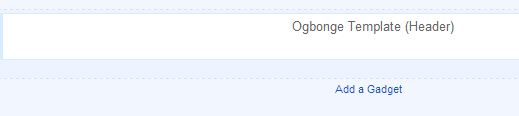
blogspotHeader

==> Choose “ HTML/Javascript ” gadget from the list of gadgets

==> Paste the code of the centralized Addynamo ad into it. Leave the title blank .

==> Click SAVE .

That’s all

View your  blog and you should see the AdDynamo ad appearing at the center of your blog header region.

I hope this helps.

NOTE:

==> If you can’t find the “ Add A Gadget ” link, read : “ How To Add Extra Widgets To Any Section of Blogger Layout “

==> You can also follow the steps above in making your Google Adsense ad appear in the center of your blog header .

Cheers!

Please Share :
addynamo tips

Like What You Read?

Sign Up to get similar articles delivered to your email inbox.

Leave a Reply Cancel reply

Your email address will not be published. Required fields are marked *

10 responses to “How Do I Center Addynamo Ads In My Blog Header?”

  1. Dre Avatar
    Dre
    December 13, 2012

    Thanks for the info bro. I never knew its this simple but please, can I also use this trick to centralize the banners on my blog's sidebar?

    Loading…
    Reply
  2. GistNaija Avatar
    GistNaija
    December 13, 2012

    this was what i was waiting for. Tanx Jide.

    Loading…
    Reply
  3. kelie Agbogidi Avatar
    kelie Agbogidi
    December 14, 2012

    I have no idea how to change d post title colours on my blog. I use the Simple blogger template. Can u help?

    Loading…
    Reply
  4. Adeleke Augustus Avatar
    Adeleke Augustus
    December 14, 2012

    Thanks for sharing this. even though am not currently serving addynamo ads on my blog, but i know that it will be useful in the future. Thanks

    Loading…
    Reply
  5. Engr Abdul Avatar
    Engr Abdul
    December 17, 2012

    Thanks for sharing, i would apply same tweak to adsense on my wordpress blog.

    BTW.. I saw your addynamo text ads on my blog. I like your hardwork.

    Loading…
    Reply
  6. Tolulope Matthew Avatar
    Tolulope Matthew
    March 14, 2014

    Apart from addynamo can i use this trick on other ad programs like openadnation ???

    Loading…
    Reply
    1. Jide Oguns Avatar
      Jide Oguns
      March 19, 2014

      Yes

      Loading…
      Reply
  7. PejuLord Avatar
    PejuLord
    June 25, 2014

    Hi Jide! Kindly ignore my last message, hadn't seen this before sending it, got it from google search after afterwards. God bless you real good.

    Loading…
    Reply
  8. OLUFERRY Avatar
    OLUFERRY
    November 23, 2014

    hi Hide, this really worked for my blog.. thanks so much. please i have been usin addynamo since 2 months now and theres no changes in the earning status. please try and help me out… http://oluferry.blogspot.com

    Loading…
    Reply
  9. abdulahi yusuf Avatar
    abdulahi yusuf
    October 27, 2015

    cool it was realy ogbonge

    Loading…
    Reply

WANT TO ADVERTISE?

Chat on WhatsApp

RELATED POSTS

  • How To Add Adsense Into WordPress Blog Posts
  • How I Place Sulvo Ads Codes On WordPress Sites
  • How To Place Adsense Links Ads below WordPress Posts Titles

FEATURED


  • CREDICORP launches C.L.I.C.K.D. Scheme with FG’s 3MTT Programme, expanding affordable consumer credit for locally-assembled laptops and devices for digital workers

    CREDICORP launches C.L.I.C.K.D. Scheme with FG’s 3MTT Programme, expanding affordable consumer credit for locally-assembled laptops and devices for digital workers

  • What Happens to Your Online Accounts When You Die?

    What Happens to Your Online Accounts When You Die?

JOIN AI WEB DESIGN GROUP


  • AI Website Design Training Whatsapp Group by Jidetheblogger

    AI Website Design Training Whatsapp Group by Jidetheblogger

← TechLaunchPad.Com.Ng: Technology Innovation Programme For Software Entrepreneurs
How to Use VConnect.Com to Find Addresses of Businesses in Nigeria →

Join 25,000+ subscribers

Receive our latest blog posts in your inbox.

Search

Social

Facebook

Instagram

Twitter

new ogbongeblog logo

Copyright © 2026 | About | Advertise | Featured | Sitemap | Privacy Policy | Powered by WordPress

Your cart (items: 0)

Products in cart

Product
Details
Total
Subtotal ₦0.00
Shipping and discounts calculated at checkout.
View my cart
Go to checkout

Your cart is currently empty!

Start shopping

Notifications

%d

    LIKE My Fan Page

    Privacy Policy | Copyright © 2012,OgbongeBlog.All Rights Reserved. Powered by Blogger .
    Create a Mobile Site
    View Site in Mobile | Classic
    Share by:


