
Skip to content
new ogbongeblog logo
  • Advertise
  • Blog
  • Contact

How I Share My Laptop Internet With my iPad 3G Without Using WiFi

November 18, 2012

·

Uncategorized
jidetheblogger Avatar
jidetheblogger

Recently, I shared a post on how to Share Glo internet subscriptions with other Glo SIMs without networking . This new innovation from Globacom Nigeria now makes it possible for me to browse the internet on my iPad using the internet bundle I use to browse on my laptop without having to subscribe to a separate internet bundle on the Apple iPad 3G .
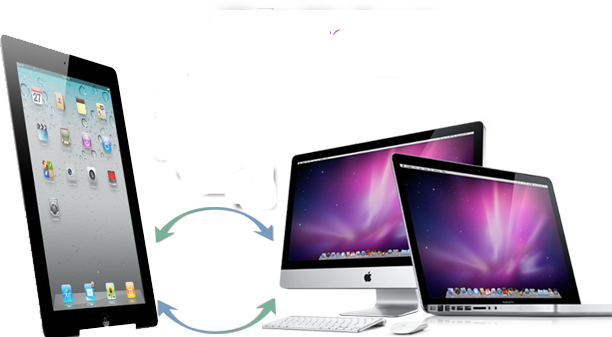
ipad share internet PC

Before Glo introduced the new feature via their Glo HSIPortal , I normally subscribe to at least Always Min ( N5,000 for 3Gigs) on my laptop and Always Macro (N3.000 for 1Gig) on my iPad. This means I pay N8,000 to get 4Gigs on my laptop and iPad .
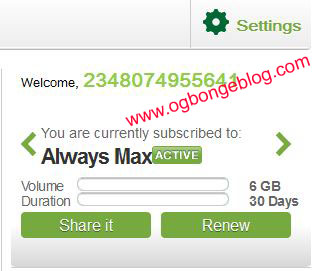
Glo share1edit

Now that Glo allows me to share my internet bundle, I now subscribe to Always Max (N7,500 for 6Gigs) with my Glo NetPro modem and share the bundle with the phone number of the Glo micro SIM card in my Apple iPad. Imagine, saving N500 and getting 2Gigs extra . Makes sense..huh?

This innovation from Glo Mobile is really fantastic because my laptop does not need to be switched on and I don’t need to stay close to the laptop before I can browse on my iPad. I can be at the office and browse on the iPad while the laptop is at home. You know, this will not be possible if you are using WiFi to share the internet connection between your laptop and your Apple iPad.

Want To Share Your Internet This Way?

Get a Glo Micro SIM card for your iPad, get the phone number handy, subscribe to at least Always Min (N5000 for 3Gigs), head over to GloHSIPortal and follow the steps here in sharing your internet connection.

I hope this helps.

If you have contribution or questions to ask, kindly let me hear from you via comments.

Cheers!

Please Share :
ipad tutorials

Like What You Read?

Sign Up to get similar articles delivered to your email inbox.

Leave a Reply Cancel reply

Your email address will not be published. Required fields are marked *

7 responses to “How I Share My Laptop Internet With my iPad 3G Without Using WiFi”

  1. Kolawole Avatar
    Kolawole
    November 18, 2012

    This is really great bro. I am interested in doing this too but my iPad does not use SIM card. what can I do?

    Loading…
    Reply
    1. Jide Oguns Avatar
      Jide Oguns
      November 30, 2012

      That means it's a wiFi iPad and not wifi+3G iPad. You can only connect to the internet with it via WiFi.

      Loading…
      Reply
  2. Naija Sports Feed Avatar
    Naija Sports Feed
    November 19, 2012

    Bro Jide. Please help me on this.My blogger blog is not showing pictures in the homepage of the mobile version, where can I set it so that the pictures will show?

    Loading…
    Reply
    1. Jide Oguns Avatar
      Jide Oguns
      November 30, 2012

      This is off topic bro. Mail me and I will get back to you.

      Loading…
      Reply
  3. Dave Avatar
    Dave
    November 29, 2012

    Hello Jide, I need your urgent help here. I have been trying your line for like the past one year. Actually I am having issues with sharing my subscription between my laptop and my ipad. I got a brand new Ipad and thought being able to share subscription was a fantastic idea but I am kinda being disappointed here.

    I bought the mini sim card and did exactly what you explained above and the safari browser on my ipad did alright, I was fascinated until it stopped after 3 minutes, the 3G disappeared and then nothing.

    That has been my problem for the past three days o

    When I restart the ipad, normally the 3G would show and I could browse alright for up to three minutes and then it disappears for the rest of the day, Is there anything you think I should do?

    Loading…
    Reply
    1. Jide Oguns Avatar
      Jide Oguns
      November 30, 2012

      3G will disappear or it changes to EDGE?

      Loading…
      Reply
  4. idris amina Avatar
    idris amina
    January 3, 2013

    Does it work with an iphone?

    Loading…
    Reply

WANT TO ADVERTISE?

Chat on WhatsApp

RELATED POSTS

  • Glo Micro SIM card for iPad and How To Get it in Nigeria
  • How To Make Phone Calls With Glo 3G Internet Modem
  • Globacom FREE Browsing: How I legally configured it on my Phone, laptop and iPad

FEATURED


  • CREDICORP launches C.L.I.C.K.D. Scheme with FG’s 3MTT Programme, expanding affordable consumer credit for locally-assembled laptops and devices for digital workers

    CREDICORP launches C.L.I.C.K.D. Scheme with FG’s 3MTT Programme, expanding affordable consumer credit for locally-assembled laptops and devices for digital workers

  • What Happens to Your Online Accounts When You Die?

    What Happens to Your Online Accounts When You Die?

JOIN AI WEB DESIGN GROUP


  • AI Website Design Training Whatsapp Group by Jidetheblogger

    AI Website Design Training Whatsapp Group by Jidetheblogger

← Codes For Glo Mobile BIS (Blackberry Internet Subscription)
Top 7 Android Apps You Must Have On Your Android Device →

Join 25,000+ subscribers

Receive our latest blog posts in your inbox.

Search

Social

Facebook

Instagram

Twitter

new ogbongeblog logo

Copyright © 2026 | About | Advertise | Featured | Sitemap | Privacy Policy | Powered by WordPress

Your cart (items: 0)

Products in cart

Product
Details
Total
Subtotal ₦0.00
Shipping and discounts calculated at checkout.
View my cart
Go to checkout

Your cart is currently empty!

Start shopping

Notifications

%d

    LIKE My Fan Page

    Privacy Policy | Copyright © 2012,OgbongeBlog.All Rights Reserved. Powered by Blogger .
    Create a Mobile Site
    View Site in Mobile | Classic
    Share by:


