
Skip to content
new ogbongeblog logo
  • Advertise
  • Blog
  • Contact

How To Add Adsense To Blogger Posts Using New HTML Template Editor

August 12, 2013

·

Uncategorized
jidetheblogger Avatar
jidetheblogger

Adding Google ads inside Blogger posts is highly recommended if you really want to get the maximum clicks on your ads. There is no way someone will read your blog post without seeing the ads, be it under the post title or immediately after the blog post .
The Adsense ad at the top of my blog posts is the best so far; even earns me more money than the 728×90 leatherboard ad unit. So, if you are yet to insert Adsense ads inside your Blogger post, try to do so and see if your Adsense revenue will increase or not.

Placing the Google ads inside your blog post is not possible without having to edit your blog’s HTML template . You cannot insert the ads with Blogger widgets just as you do on the sidebar , header or footer sections of your blog. Even if you place the ad codes in the wrong location in your HTML, the ad will not display when you view your blog. 

Today, I am sharing with you, the correct way of adding Adsense ad codes inside your blog posts using the new Blogger HTML template .

How To Get Started

==> Log in to www.google.com/adsense
==> Click on “ My ads ” tab
==> Click the “ New ad unit ” button
==> Select the 300×250 Medium rectangle ad size
==> Fill other options, save and get your ad code.

Now, we need to parse the ad code.

==> Go to http://www.freehtmlparser.blogspot.com/
==> Copy and paste your ad code inside the box and click the “ Encode ” button
==> Copy and paste the code somewhere eg in a notepad

Now you will add your parsed code in the codes below before using it in your blog’s template.

==> If you want your ad to display at the  center  inside your post

    <b:if cond=’data:blog.pageType == “item”‘> 
    <div style=”text-align:center;”>
Paste your parsed adsense code here
</div>
    </b:if> 

==> If you want your ad to display at the left side inside your post

    <b:if cond=’data:blog.pageType == “item”‘> 
    <div style=”float:left;”>
Paste your parsed adsense code here
</div>
    </b:if> 

==> If you want your ad to display at the right side inside your post

    <b:if cond=’data:blog.pageType == “item”‘> 
    <div style=”float:right;”>
Paste your parsed adsense code here
</div>
    </b:if> 

The codes above are conditional tags that restrict the Ads to post pages ONLY.

==> After adding your parsed codes inside the conditional tags above, copy and paste it somewhere. The customized code is what you will paste in the template.

Now, we need to add it to the new blogger HTML template

==> Log in to www.blogger.com
==> Go to “ Template ” > “Edit HTML”
==> Once the HTML loads successfully, click inside it
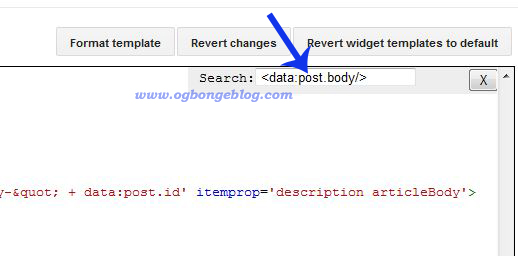
==> Press CTRL F on your keyboard to bring up the “ find ” box as seen below
find

==> Copy and Paste <data:post.body/> in it and hit the ENTER key on your keyboard. This will help you locate the code in the HTML.

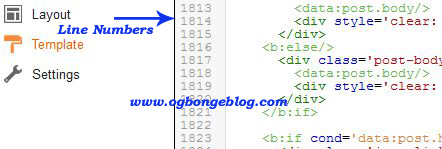
The code might appear more than once in your HTML. So, click inside the find box and hit the ENTER key again. You will know if it appears more than once if you look closely at the corresponding “line number” on the left side of the new Blogger HTML editor as illustrated below.
line number

Now place your Adsense customized code in this way:

If you find <data:post.body/> more than once in your template, paste your Adsense code above the SECOND and THIRD <data:post.body/> if you want your ad to be displayed below the post title / at the top of the post .

If you want it to display after the post, paste the code below the second and third <data:post.body/>. Alternatively, you can find the second <div class=’post-footer’> and place the ad code directly under it. You can also place it under <div class=’post-footer-line post-footer-line-3′>

Save your template and view your blog. The ads should appear in your post.

NOTE : Only three ad units can be displayed per page. So, if you already have three ads units on your page, the ad in your post might not display.

I hope this helps.

Questions? Contributions? Kindly relay them via comments.

Recommended : How To Add Adsense After Blog Post

Please Share :
adsense blogger tips

Like What You Read?

Sign Up to get similar articles delivered to your email inbox.

Leave a Reply Cancel reply

Your email address will not be published. Required fields are marked *

75 responses to “How To Add Adsense To Blogger Posts Using New HTML Template Editor”

  1. Biola Avatar
    Biola
    August 11, 2013

    Thx alot Jide. I will definitely try it when I get to the office 2mao because I don't think I can do all these on my phone.

    Loading…
    Reply
    1. Jide Oguns Avatar
      Jide Oguns
      August 11, 2013

      Yes, get it done on PC. Have fun!

      Loading…
      Reply
  2. Biz Master Avatar
    Biz Master
    August 11, 2013

    i love this post.thanks for this tips.

    Loading…
    Reply
    1. Jide Oguns Avatar
      Jide Oguns
      August 11, 2013

      You are welcome bro.

      Loading…
      Reply
  3. Latest Naija News Avatar
    Latest Naija News
    August 12, 2013

    Mr Jide each time i log on to http://www.google.com/adsense it shows me submit your AdSense application i dont see anything like my ads pls what do i do

    Loading…
    Reply
    1. Jide Oguns Avatar
      Jide Oguns
      August 12, 2013

      I guess you don't have an approved Adsense account. Do you?

      Loading…
      Reply
  4. Godwin Odey Avatar
    Godwin Odey
    August 12, 2013

    My boss, your steps is what I am always following ever since I started blogging, although before now, i HAVE inserted the ads like yours in my blogger blog. This post look nice for audience. u can check my blog http://www.winodeysblog.blogspot.com

    Loading…
    Reply
    1. Jide Oguns Avatar
      Jide Oguns
      August 12, 2013

      Cool. Do you add description to some of your posts? If yes, confirm if ads display on such posts and on posts without description.

      Loading…
      Reply
  5. Latest Naija News Avatar
    Latest Naija News
    August 12, 2013

    Am still working on it

    Loading…
    Reply
    1. Dobby Avatar
      Dobby
      May 23, 2015

      Thanks for the tutorial jide, worked fine for me. You can check it out HERE

      Loading…
      Reply
  6. abujafood Avatar
    abujafood
    August 12, 2013

    Powerful Message here Jide for newbies to blogging with blogger this can be a useful addition to their quest to earn some revenue by hte side!

    Loading…
    Reply
  7. Ameh Sunday Avatar
    Ameh Sunday
    August 12, 2013

    Pls Mr. Jide;I have been finding it very difficult to work on my htmls eversince the new blogger interface was launched….When I strike CTRL F and put the codes in the box, they don't appear…I even took time to look for some of them manually but none worked out..Don't know what's wrong. I know there used to be an expand widget radio button before but it's not on the new interface.Please, I will be very grateful if you can help me out and probably write an article on it for others who have same problem.

    Loading…
    Reply
    1. Olasunkanmi Fakeye Avatar
      Olasunkanmi Fakeye
      August 15, 2013

      @ Ameh Sunday,

      The same happened to me. What I did was that. I make sure I click first inside the EDIT HTML codes box as if i wanted to start editing the code and I then carefully click "Ctrl + F1" and the box comes up with the EDIT HTML code editor and not the one that shows below the browser. I then paste what ever code am search for there and click enter also with care to avoid spacing in the main code in case it couldn't locate the code am searching for.

      Hope that helps!!!well done oga Jide another comment comming next to this also from me as touching this post.

      Loading…
      Reply
  8. Samuel Toby Avatar
    Samuel Toby
    August 14, 2013

    I guess I can do this on my Nokia Lumia 520. Right?

    Loading…
    Reply
    1. Jide Oguns Avatar
      Jide Oguns
      August 15, 2013

      Hmnn..try it

      Loading…
      Reply
  9. Endy Edeson News Network Avatar
    Endy Edeson News Network
    August 14, 2013

    thanks for the info. i will try it

    Loading…
    Reply
  10. dare thomas Avatar
    dare thomas
    August 15, 2013

    Perhaps this might not be the right thread for my question…but am sorry for this.Mr Ogbonge I have heard good remarks about you from friends…you're really doing great works here. Please I need to know how to make my post display in form of snippet. My posts keep displaying all its content in full…please help me.

    Loading…
    Reply
  11. Jide Oguns Avatar
    Jide Oguns
    August 15, 2013

    read: how to insert jump break in blogger posts

    Loading…
    Reply
  12. olarewaju blessing Avatar
    olarewaju blessing
    August 25, 2013

    Nice post. I'm going to search this post when i start using google ads. By the way, can i link this post and are you the one that created that html phraser?

    Loading…
    Reply
  13. Oke Umurhohwo Avatar
    Oke Umurhohwo
    October 2, 2013

    Thanks alot Jide, tried it at http://www.stalyfblog.com and is already making sense. Really grateful

    Loading…
    Reply
  14. Fisheries Maestro Avatar
    Fisheries Maestro
    October 2, 2013

    Please how can i do this using my wordpress site

    Loading…
    Reply
    1. Jide Oguns Avatar
      Jide Oguns
      October 4, 2013

      You mean to add Adsense ads inside posts of your wordpress site?

      Loading…
      Reply
  15. Ayyub Adesegun Avatar
    Ayyub Adesegun
    December 12, 2013

    thanks boss it work… check my blog out.. http://www.gistmelove.com

    Loading…
    Reply
  16. Agboola Isiaq Avatar
    Agboola Isiaq
    January 15, 2014

    Yap….. 10x so much mu Bro. What of if i want it to display at the head of my page

    Loading…
    Reply
  17. Collins Ajah Avatar
    Collins Ajah
    February 22, 2014

    Thank You Bro You are wonderfully made

    Loading…
    Reply
  18. George Emmanuel Avatar
    George Emmanuel
    February 24, 2014

    Your Tutorial works on my blog, check it out http://delsublog.blogspot.com . Thanks a million.

    Loading…
    Reply
  19. Adeleke Augustus Avatar
    Adeleke Augustus
    March 21, 2014

    Thanks, I find this post very useful.

    Loading…
    Reply
  20. Oladosu Olaleye Avatar
    Oladosu Olaleye
    April 27, 2014

    It works perfectly on my blog check it out @ http://www.leystradamus.com

    Loading…
    Reply
  21. Ibrahim Morowa Avatar
    Ibrahim Morowa
    May 28, 2014

    Its not working on my blog,,,tried putting it almost every place but its not showing. My blog has 5

    Loading…
    Reply
    1. Jide Oguns Avatar
      Jide Oguns
      June 6, 2014

      try another template probably a default template.

      Loading…
      Reply
  22. His Fiery Judgment Avatar
    His Fiery Judgment
    August 25, 2014

    Thanks Jide, its working for me.
    ;
    ;
    Check it here: http://www.forwardchristians.com

    Loading…
    Reply
  23. JESUS BOY Avatar
    JESUS BOY
    September 5, 2014

    You are the boss

    Loading…
    Reply
  24. Venika Emy Avatar
    Venika Emy
    November 19, 2014

    thanks

    Loading…
    Reply
  25. Eedris Djsamlegxy Avatar
    Eedris Djsamlegxy
    November 30, 2014

    Oqa Jide i need help oooo, i inserted it the way u explained above, buh its whowing on all the post on my home page and some of them are blank, how do i make it show on the post page only? Thanks

    Loading…
    Reply
  26. davina ibegbu Avatar
    davina ibegbu
    December 9, 2014

    oga jide can i place any other ads apart from adsense

    Loading…
    Reply
  27. Yakubu Binuyaminu Avatar
    Yakubu Binuyaminu
    December 15, 2014

    i like it is really helpful

    Loading…
    Reply
  28. DR. CHARLES OBALEAGBON Avatar
    DR. CHARLES OBALEAGBON
    May 3, 2015

    what command should i used if i want to display at the center of the post

    ==> If you want your ad to display at the right side inside your post==> If you want your ad to display at the left side inside your post

    Loading…
    Reply
  29. Adedimeji Adeyemi Avatar
    Adedimeji Adeyemi
    June 4, 2015

    i have tried this but the ad page is still blank and not displaying any ad both in the adsense widget and the method you share

    Loading…
    Reply
  30. Isaac Godfrey Avatar
    Isaac Godfrey
    December 4, 2015

    Good Morning Mr Jide, wont i loose my blog content (i.e published post) if i revert to default?I have tried to place d ad code but it not displaying ad.

    Loading…
    Reply
  31. Zubi Avatar
    Zubi
    January 8, 2016

    Goodmorning Jide, how are you? Google approved my account and I have added and positioned the add layout but no add is showing on my blog.

    Please what do I do? see the blog: http://computertechlinkers.blogspot.com.ng/

    Loading…
    Reply
  32. Chidera Henry Avatar
    Chidera Henry
    February 2, 2016

    mehn u are the best godi…thanks

    Loading…
    Reply
  33. Eya Ayambem Avatar
    Eya Ayambem
    April 4, 2016

    Bless you a million times Jide.

    Loading…
    Reply
  34. Eya Ayambem Avatar
    Eya Ayambem
    April 4, 2016

    You are a real TEACHER!

    Loading…
    Reply
  35. Muhammed Junior Avatar
    Muhammed Junior
    April 26, 2016

    thank man it really worked for me

    Loading…
    Reply
  36. Giznaija Avatar
    Giznaija
    May 28, 2016

    @ Jide Ogunsanya i put my Adsense In The Middle of Post but it's showing an extra ad at the end of my posts too. Can you help me figure out why this is so? Pls check it out @ http://giznaija.blogspot.com.ng/2016/05/kaduna-refinery-shutdown-because-of.html?m=1

    Loading…
    Reply
  37. Ndidi Kennedy-Ukaga Avatar
    Ndidi Kennedy-Ukaga
    May 30, 2016

    Thanks I just tried it on my blog http://www.heroesreallife.com and it worked….keep up the good job

    Loading…
    Reply
  38. sade Avatar
    sade
    June 25, 2016

    this is really helpful thanks a lot but I followed every dtep you gave and after I pasted my code and saved it said error pls wat do I do

    Loading…
    Reply
  39. Alhaji Malv Jr Avatar
    Alhaji Malv Jr
    October 29, 2016

    thanks boss
    this tips was alot useful to me
    more regards from the epicgist.com team

    Loading…
    Reply
  40. mr dante woods Avatar
    mr dante woods
    December 1, 2016

    pls sir i have over 9000 views still nno adsense

    Loading…
    Reply
  41. chukwudi Avatar
    chukwudi
    December 17, 2016

    Thanks Bro worked

    Loading…
    Reply
  42. OSCO BASE Avatar
    OSCO BASE
    January 24, 2017

    My boss, your steps is what I am always following ever since I started blogging, although before now, i HAVE inserted the ads like yours in my blogger blog. This post look nice for audience. u can check my blog http://www.paulharrisgist.com.ng

    Loading…
    Reply
  43. Mazi Ifeanyi Aniekwe Avatar
    Mazi Ifeanyi Aniekwe
    January 28, 2017

    Its really working on mine, thanks alot bro Jide, my URL is Naija Music Blog

    Loading…
    Reply
  44. MICROSOFT TUTORIALS Avatar
    MICROSOFT TUTORIALS
    February 25, 2017

    Jide you are a blessing to the world of ICT microsofttut.com will always remain grateful

    Loading…
    Reply
  45. Sisca Avatar
    Sisca
    March 2, 2017

    a nice article

    Loading…
    Reply
  46. Techsvilla.com.ng Avatar
    Techsvilla.com.ng
    March 14, 2017

    Its really working

    Loading…
    Reply
  47. Oscar Avatar
    Oscar
    March 22, 2017

    thanks ogbonge the post was helpfull

    Loading…
    Reply
  48. Sourabh Kumar Avatar
    Sourabh Kumar
    April 10, 2017

    Thank You for the post Post is informative but in my case @ http://www.androroot.com the ads only works when i have pasted above 4th

    Loading…
    Reply
  49. Chuks Avatar
    Chuks
    April 21, 2017

    Hello Jide,

    How do I add adsense code to anywhere in my blog posts ? I have tried several option like that of adding annotations.

    Thank you

    Loading…
    Reply
  50. McDonald Avatar
    McDonald
    May 6, 2017

    Thanks Mr. Jude, it really worked for me.

    Loading…
    Reply
  51. ollivia Avatar
    ollivia
    June 8, 2017

    My problem is how to make adsense display after first paragraph in mobile view. I have alredy gotten right it in desktop view. My help a sister here. Mr Jide?, Anyone?

    Loading…
    Reply
  52. olaolu Avatar
    olaolu
    June 19, 2017

    Sir how much it will cost me me for web hosting with html

    Loading…
    Reply
  53. Engr Omeh Collins Ogbonna Avatar
    Engr Omeh Collins Ogbonna
    July 9, 2017

    Thanks alot bro you just saved me from a long time headache

    Loading…
    Reply
  54. christian philip Avatar
    christian philip
    July 27, 2017

    how can i generate this adsense code that is showing text ads under your title

    Loading…
    Reply
    1. Naija Okay Avatar
      Naija Okay
      September 25, 2017

      change responsive option when generating it to link ads

      Loading…
      Reply
  55. ipostcity Avatar
    ipostcity
    August 31, 2017

    this blog is helping me a lotthanks brother

    Loading…
    Reply
  56. Bart Shinyi Avatar
    Bart Shinyi
    September 15, 2017

    pls i have copied and pasted the code in my blog html and is giving error and asking me to edit the code. what do i do here

    Loading…
    Reply
  57. Samuel Aleh Avatar
    Samuel Aleh
    September 27, 2017

    please how can I add adsense code below post title of desktop view in blogger?

    Loading…
    Reply
  58. Naijaschoolnews Admin Avatar
    Naijaschoolnews Admin
    October 4, 2017

    thanks i will try it on naijaschoolnews.com.ng

    Loading…
    Reply
  59. 9jacable video Avatar
    9jacable video
    January 10, 2018

    thanks bro for this message please i try to do this this the error i was getting

    Error parsing XML, line 1515, column 12: Open quote is expected for attribute “cond” associated with an element type “b:if”.

    Loading…
    Reply
  60. onyia chidiebere Avatar
    onyia chidiebere
    January 11, 2018

    thanks bro i also recieve the same message.

    Error parsing XML, line 2255, column 16:
    Open quote is expected for attribute“cond” associated with an element type
    “b:if”.

    Loading…
    Reply
  61. Emmanuel Avatar
    Emmanuel
    January 17, 2018

    i tried it on my blog but it seems not working na

    this my blog address: http://emoxtech.blogspot.com.ng/

    Loading…
    Reply
  62. Afolayan Raphael Oluwaseun Avatar
    Afolayan Raphael Oluwaseun
    January 31, 2018

    Thanks a lot uncle Jide

    Loading…
    Reply
  63. Odot Abraham Avatar
    Odot Abraham
    April 18, 2018

    Mr Jide, I did the application, but the ads is not showing on my blog. But it show on another site… And in that that it’s showing, I got no record in the dash board,.. It’s still 0.00help please

    Loading…
    Reply
  64. emmanuel onyekwere Avatar
    emmanuel onyekwere
    June 20, 2018

    i tried it but it’ s showing me [Error parsing XML, line 1361, column 12: Open quote is expected for attribute “cond” associated with an element type “b:if”.]

    Loading…
    Reply
  65. Ana Avatar
    Ana
    March 10, 2019

    Please, I have done all the process to show ad in body content but it doesn’t please help!

    Loading…
    Reply

WANT TO ADVERTISE?

Chat on WhatsApp

RELATED POSTS

  • Parse Adsense Code for Blogger Template using BlogCrowds HTML Parser
  • How To Place Adsense Links Ads below WordPress Posts Titles
  • How To Add Adsense Into WordPress Blog Posts

FEATURED


  • CREDICORP launches C.L.I.C.K.D. Scheme with FG’s 3MTT Programme, expanding affordable consumer credit for locally-assembled laptops and devices for digital workers

    CREDICORP launches C.L.I.C.K.D. Scheme with FG’s 3MTT Programme, expanding affordable consumer credit for locally-assembled laptops and devices for digital workers

  • What Happens to Your Online Accounts When You Die?

    What Happens to Your Online Accounts When You Die?

JOIN AI WEB DESIGN GROUP


  • AI Website Design Training Whatsapp Group by Jidetheblogger

    AI Website Design Training Whatsapp Group by Jidetheblogger

← How To Join Affiliate CPA Networks and Get Accepted With Ease
MadAdsMedia.com: CPM Ad Network That Pays Bloggers Even If Readers Don’t Click On Ads →

Join 25,000+ subscribers

Receive our latest blog posts in your inbox.

Search

Social

Facebook

Instagram

Twitter

new ogbongeblog logo

Copyright © 2026 | About | Advertise | Featured | Sitemap | Privacy Policy | Powered by WordPress

Your cart (items: 0)

Products in cart

Product
Details
Total
Subtotal ₦0.00
Shipping and discounts calculated at checkout.
View my cart
Go to checkout

Your cart is currently empty!

Start shopping

Notifications

%d

    LIKE My Fan Page

    Privacy Policy | Copyright © 2012,OgbongeBlog.All Rights Reserved. Powered by Blogger .
    Create a Mobile Site
    View Site in Mobile | Classic
    Share by:


