
Skip to content
new ogbongeblog logo
  • Advertise
  • Blog
  • Contact

How To Insert Adsense Ads INSIDE Blogger Posts ( Blogger/Blogspot)

July 20, 2012

·

Uncategorized
jidetheblogger Avatar
jidetheblogger

UPDATE : Read the updated tutorial on how to add adsense inside posts here .

One of the best sections to display your Google Adsense ads is INSIDE your blog post. So far, the Adsense block in my blog posts is one of the most performing on my blog .  In this post, I am sharing with you, how to add Adsense ad INSIDE your blog post.

Before you implement this trick, kindly BACK UP YOUR TEMPLATE first and I hope you already have an approved Adsense account. If you do not have one, Read: How To Register For Adsense Free of Charge .

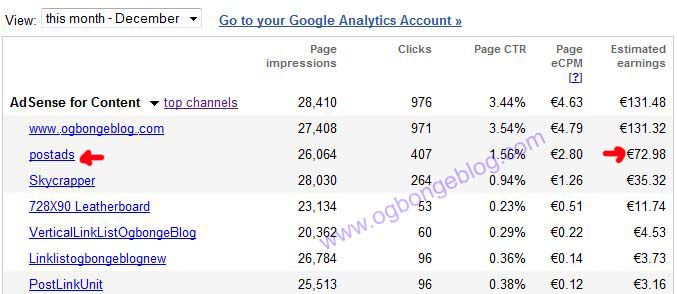
Below is a snapshot from my account, showing my earnings so far within the 15 days in December 2010 . Take a close look at the analysis in the picture and you will see that the “ Postads ” channel is making sense.  I created the “Postads” channel for the 300×280 Adsense ad inside my post. If you don’t know about channels , you still have a lot to learn about Adsense then. I have 3 great ebooks that can help you asap, just for N1000 . You can pay me via Liberty reserve or Paypal too. Contact me if interested .
DecHAlf

So, lets get started.

STEP 1 : Login to your Google Adsense account , and create a new ad.  Choose the 336×280 large Rectangle ad type. Then, copy the code into a Notepad.  Try and create a channel for the ad, if you know how to do it.

STEP 2: Before you can insert the adsense in your blog, you will need to “Parse” the code. Hence, we will need an html parser to do that. So, go to http://www.blogcrowds.com/resources/parse_html.php At the page, you will see a box, paste your Adsense code into the box and click the “Parse” button. Copy the parsed code. You will need this parsed code in Step 3.

STEP 3:   Login to you Blogger dashboard and navigate to Design > Edit HTML and tick the small “Expand Widget Templates” box. Using “ CTRL+F “, search for the code <data:post.body/>   and paste the parsed code above, directly above   <data:post.body/>  and save the template.

That’s all. View any of your blog post and you should now be seeing adsense ads showing in your post.

Remember, you can only see maximum of 3 Ad units on a page at a time. Hence, if you already displaying 3 ad units on your page, the fourth one will not display after adding this new one.

Advanced Customization

If you are as smart as me, then you can implement this advanced trick… lol . This trick will align the ad to the right of your blog post and also ensure that the ad only displays on post pages and not on the homepage.

Copy the code below into a notepad and replace the blue part with YOUR parsed adsense code in step 2 and then paste it in your blog as explained in step 3 above. If you do not replace it with your adsense code, that means you will be making money for me because the code in blue, is mine..

<b:if cond=’data:blog.pageType == &quot;item&quot;’>
 <div style=’float:right;padding:5px;’>
&lt;script type=&quot;text/javascript&quot;&gt;&lt;!–
google_ad_client = &quot;pub-&quot;;
google_ad_host = &quot;pub-&quot;;
google_ad_host_channel=&quot;00000+00013+00012+00299&quot;;
/* 336×280, created 12/26/09 */
google_ad_slot = &quot;5115307496&quot;;
google_ad_width = 336;
google_ad_height = 280;
//–&gt;
&lt;/script&gt;
&lt;script type=&quot;text/javascript&quot;
src=&quot;http://pagead2.googlesyndication.com/pagead/show_ads.js&quot;&gt;
&lt;/script&gt;
 </div>
</b:if>

That’s all.

NOTE: You can change the float setting in the code above to center or left if you do not like been floated to the right.

I hope it works for you.

If it works for you, kindly use the comment form to share the link to your blog, so we can check it out. If you have problems to ask or want to make contributions, kindly use the comment form.

In my future posts,  I will share with you, more Adsense tricks. So, SUBSCRIBE to this blog now if you don’t want to miss them, even if I post them here, when you are not online.

CLICK HERE TO SUBSCRIBE NOW!

CLICK HERE TO DOWNLOAD MY 20 FREE EBOOKS

CLICK HERE TO READ MORE ADSENSE TRICKS.

Cheers!

Please Share :
adsense

Like What You Read?

Sign Up to get similar articles delivered to your email inbox.

Leave a Reply Cancel reply

Your email address will not be published. Required fields are marked *

32 responses to “How To Insert Adsense Ads INSIDE Blogger Posts ( Blogger/Blogspot)”

  1. Get Nigeria Jobs Avatar
    Get Nigeria Jobs
    January 18, 2011

    Hi Jide, nice work ur doing once more. hey but what about people like us who don't need adsence code to create an ad. I use blogger and there is no way to copy codes. we use the adsence widget instead of codes. what do people like us do?

    Loading…
    Reply
  2. MONASTIK Avatar
    MONASTIK
    January 31, 2011

    THANKS TESTED OK
    U ARE TOO MUCH MAN.
    U REALLY NEED DRINK FOR THIS
    WELL I OUGHT TO DO THAT FOR U?
    SOORRY MY IS SHOWING THREE ADS AND URS IS FOUR, WHY?

    Loading…
    Reply
  3. Neeraj Rawat Avatar
    Neeraj Rawat
    April 10, 2011

    Great post,I wish would have found it long time back thanks buddy

    Loading…
    Reply
  4. Ana Nie Avatar
    Ana Nie
    April 30, 2011

    Thank for this post and you have a lot of nice post, my I know how did you found those Writing idea?

    Loading…
    Reply
  5. Jide Ogunsanya Avatar
    Jide Ogunsanya
    April 30, 2011

    @Get Nigerian Jobs.u can copy codes from http://www.google.com/adsense
    @Monastik…u can display 3 ad blocks and 3 link units per page.
    @Neeraj.. am glad it worked for you.
    @Ana… thx for your comment. Well, God bless me with it.. smiles**

    Loading…
    Reply
  6. CHRISTIANITY Avatar
    CHRISTIANITY
    June 11, 2011

    Thanks man, it worked quite well for my blog. Like to take a look lol! http://www.christian-tips.blogspot.com .

    Loading…
    Reply
  7. Jide Ogunsanya Avatar
    Jide Ogunsanya
    June 12, 2011

    Glad to see it working on your blog now. Happy Blogging bro

    Loading…
    Reply
  8. Gondylife Avatar
    Gondylife
    July 5, 2011

    it worked,i did it on my blog.but i need traffic,how do i get that?

    Loading…
    Reply
  9. Cyracks Avatar
    Cyracks
    July 21, 2011

    Good work bro, it worked for me too. but one question, how can ad link be restricted on homepage while ad unit appears on post pages just as you did? that is an ad link 200 X 90 appears under post on homepage, when a page is opened, ad link disappears while ad unit 336 X 280 replaces it. you get it?

    Loading…
    Reply
  10. Jide Ogunsanya Avatar
    Jide Ogunsanya
    July 22, 2011

    @Gondylife…check the FREE TRAFFIC category on the blog

    @Cyracks…I believed have answered this question of yours with the messages I sent to you on facebook yesterday.

    Loading…
    Reply
  11. Peter Emu Avatar
    Peter Emu
    August 3, 2011

    Nice Tuts Jide… Well I just did mine, So I am seeing how well it will look..

    Thanks for this. You are too much Master!!!

    Loading…
    Reply
  12. Jide Ogunsanya Avatar
    Jide Ogunsanya
    August 4, 2011

    You are welcome boss.

    Loading…
    Reply
  13. richestnigerian Avatar
    richestnigerian
    August 14, 2011

    i just did mine,thanks for this trick man

    Loading…
    Reply
  14. damizille Avatar
    damizille
    October 26, 2011

    jide pls mine not working @ http://www.finditusefull.blogspot.com

    Loading…
    Reply
  15. Jide Ogunsanya Avatar
    Jide Ogunsanya
    October 28, 2011

    @RichestNigeria..You are welcome man@Damizille… guess you didn't follow the steps carefully. Pls,try and follow the steps especially with regards to parsing your ad code

    Loading…
    Reply
  16. QUICK HEALTH TIPS Avatar
    QUICK HEALTH TIPS
    January 22, 2012

    Jide,You are indeed a mentor to have. Thanks

    Loading…
    Reply
    1. Jide Oguns Avatar
      Jide Oguns
      February 21, 2012

      Thanks for the comment

      Loading…
      Reply
  17. Netmedia blog Avatar
    Netmedia blog
    February 17, 2012

    Nice post @jide, your blog is awesome…..am proud to know you. Cos you inspire me alot. Hope http://www.netmediablog.com grows like yours someday.

    Loading…
    Reply
    1. Jide Oguns Avatar
      Jide Oguns
      February 21, 2012

      Thanks my man. Your blog will surely keep growing if you keep maintaining it. Stay blessed bro

      Loading…
      Reply
  18. Nife Ibiyemi Avatar
    Nife Ibiyemi
    May 28, 2012

    bless you richly and thanks a lot. i tried it and it worked. you are the best. and you site is awesome. http://asbestosrelated.blogspot.com

    Loading…
    Reply
    1. Jide Oguns Avatar
      Jide Oguns
      June 1, 2012

      Glad it worked for you. thanks man

      Loading…
      Reply
  19. Emmanuel Obarhua Avatar
    Emmanuel Obarhua
    November 27, 2012

    Thanks for the tutor I was able to do it do it right. But the ads are not live yet. Check out: WorldWebSurfers.com

    Loading…
    Reply
  20. Emmanuel Obarhua Avatar
    Emmanuel Obarhua
    November 30, 2012

    Now working with no extra changes, The problem was the adblock I activated on my browser. Thanks and cheers!

    Loading…
    Reply
    1. Jide Oguns Avatar
      Jide Oguns
      November 30, 2012

      Glad the ads are now been displayed on your blog. Happy blogging bro.

      Loading…
      Reply
  21. Engr Abdul Avatar
    Engr Abdul
    December 20, 2012

    I tested and tried several times but it still dont work for my new blog. i can remember it worked for my first blog around july

    Loading…
    Reply
  22. Ayoola Ayobami Avatar
    Ayoola Ayobami
    April 8, 2013

    Nice tutorial Bro, but its not working on my blog – http://www.stevenbergy.com.ng because i have more than one … so what will i do ???

    Loading…
    Reply
  23. unity omonuwa Avatar
    unity omonuwa
    November 29, 2013

    hailings boss, its not working for other ad platform, is it just for adsense, i tried it for promo ad, it didnt work….check it out : flameznews.blogspot.com

    Loading…
    Reply
  24. Uche Francis Avatar
    Uche Francis
    April 30, 2015

    I might just say this is the most insightful post i've read on this blogger adsense code installations. It worked perfectly for me before, and it does did clear my doubts once more.

    Had to do some few experimentations and your post was handy.

    In addition i also learnt a way of making this align either to the left, right or center. Both the link ads and banner.

    Thank you for the postUche Francis!

    Loading…
    Reply
  25. Fadehan Emmanuel Moore Avatar
    Fadehan Emmanuel Moore
    August 22, 2015

    I got an adsense code from a friend with the hope of getting 50/50 percent, is this process applicable too sir?

    Loading…
    Reply
  26. 9jatea.com Avatar
    9jatea.com
    December 8, 2015

    Nice

    Loading…
    Reply
  27. Ayinde Kazeem Avatar
    Ayinde Kazeem
    June 7, 2016

    Pls…I can't find see in my template and am not using any third party template

    Loading…
    Reply
  28. Eniola Avatar
    Eniola
    August 21, 2018

    Hi , this did not work for me

    Loading…
    Reply

WANT TO ADVERTISE?

Chat on WhatsApp

RELATED POSTS

  • How To Add Adsense Into WordPress Blog Posts
  • How I Make €10 (N2,000+) From 1 Click via Google Adsense For Feeds
  • Parse Adsense Code for Blogger Template using BlogCrowds HTML Parser

FEATURED


  • CREDICORP launches C.L.I.C.K.D. Scheme with FG’s 3MTT Programme, expanding affordable consumer credit for locally-assembled laptops and devices for digital workers

    CREDICORP launches C.L.I.C.K.D. Scheme with FG’s 3MTT Programme, expanding affordable consumer credit for locally-assembled laptops and devices for digital workers

  • What Happens to Your Online Accounts When You Die?

    What Happens to Your Online Accounts When You Die?

JOIN AI WEB DESIGN GROUP


  • AI Website Design Training Whatsapp Group by Jidetheblogger

    AI Website Design Training Whatsapp Group by Jidetheblogger

← GMail SMS: Send and Receive Your Emails as Text messages Without Internet Connection
Glo Ramadan offer: Get Daily SMS Alert and Listen to Quranic citations, Duas →

Join 25,000+ subscribers

Receive our latest blog posts in your inbox.

Search

Social

Facebook

Instagram

Twitter

new ogbongeblog logo

Copyright © 2026 | About | Advertise | Featured | Sitemap | Privacy Policy | Powered by WordPress

Your cart (items: 0)

Products in cart

Product
Details
Total
Subtotal ₦0.00
Shipping and discounts calculated at checkout.
View my cart
Go to checkout

Your cart is currently empty!

Start shopping

Notifications

%d

    LIKE My Fan Page

    Privacy Policy | Copyright © 2012,OgbongeBlog.All Rights Reserved. Powered by Blogger .
    Create a Mobile Site
    View Site in Mobile | Classic
    Share by:


