
Skip to content
new ogbongeblog logo
  • Advertise
  • Blog
  • Contact

How To Add Custom Domain To Blogger Settings

May 19, 2012

·

Uncategorized
jidetheblogger Avatar
jidetheblogger

After you might have purchased your domain name here or somewhere else and configured the A and CName records to point to Google, you must add the custom domain to your blog via Blogger publishing settings before the .blosgpot address of your Blogger blog can start redirecting automatically to your new custom domain.

Before you update your Blogger settings with your new custom domain, you must wait for your DNS settings to activate. You know if it has been activated when you see “ Google error ” displayed whenever you visit your new custom domain. If you attempt to change the Blogger publishing settings before the DNS changes activate, your blog will not be accessible but Blogger will let you know with a warning message.

How To Get Started

==> Login to your Blogger dashboard (New Blogger interface)

==> Go to Settings and click on the Basic tab. Find the area for “ Publishing ” as seen in the picture below:

Add a custom domain

==> Click the “ Add a custom domain ” link and you should see something similar to the picture below:
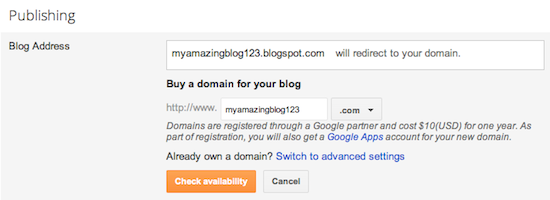
Advanced Settings

==>  Click on the “ Switch to advanced settings ” link and you will see something similar to the picture below:
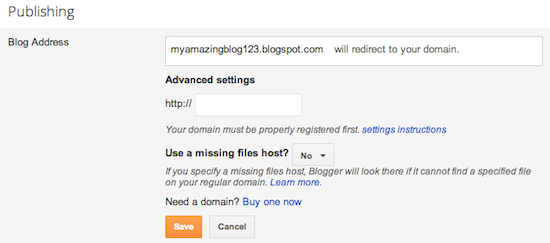
Enter URL and save

==> Enter in the URL for your custom domain in the text box provided, and click Save .

That’s all

Your blogspot.com address will soon redirect to your new custom domain — be patient, as it might take up to 24 hours for the redirect to start working.  Atimes, it works immediately or after few minutes.

Some helpful notes:

  • If your new domain isn’t taking you to your blog, wait another day
    or two to make sure all the DNS servers have been updated. If it still
    isn’t working, contact your registrar to make sure you entered the DNS
    settings correctly or let me do it for you as explained here .
  • Your original Blogspot address will automatically forward to your
    new domain. That way, any existing links or bookmarks to your site will
    still work.

I hope this helps.

Cheers.

Please Share :
blogger tips

Like What You Read?

Sign Up to get similar articles delivered to your email inbox.

Leave a Reply Cancel reply

Your email address will not be published. Required fields are marked *

21 responses to “How To Add Custom Domain To Blogger Settings”

  1. Theodore Avatar
    Theodore
    May 19, 2012

    Great info but what will I choose at the " Use a missing file host" option ??

    Loading…
    Reply
    1. Jide Oguns Avatar
      Jide Oguns
      May 19, 2012

      Leave it as "NO"

      Loading…
      Reply
  2. sunkanmi afolabi Avatar
    sunkanmi afolabi
    May 19, 2012

    GREAT ONE BOSS, I WILL CUSTOMISE MY BLOG TO CUSTOM DOMAIN THIS WEEK

    Loading…
    Reply
    1. Jide Oguns Avatar
      Jide Oguns
      May 19, 2012

      ok bro. The earlier, the better

      Loading…
      Reply
  3. emmanuel charles Avatar
    emmanuel charles
    May 20, 2012

    i love this jide keep it up

    Loading…
    Reply
    1. Jide Oguns Avatar
      Jide Oguns
      June 1, 2012

      Ok man. Will keep trying my best

      Loading…
      Reply
  4. sunkanmi afolabi Avatar
    sunkanmi afolabi
    May 24, 2012

    brother i registered a new domain for my blogspot since tuesday with syskay.com, i followed everything you said, but the domain is yet going all i am seeing is page error cannot server, pls what is the possible solution to this

    Loading…
    Reply
  5. sunkanmi afolabi Avatar
    sunkanmi afolabi
    May 26, 2012

    THANKS JIDE I HAVE DONE IT AT LAST GOD BLESS FOR THE TIPS now http://www.mindtobillion.com

    Loading…
    Reply
    1. Jide Oguns Avatar
      Jide Oguns
      June 1, 2012

      Glad you have fixed it successfully. Happy blogging bro

      Loading…
      Reply
  6. Adedokun Hadi Avatar
    Adedokun Hadi
    September 13, 2012

    what is google dns nameserver

    Loading…
    Reply
  7. Inncoent Avatar
    Inncoent
    January 24, 2013

    Nice tutorial from you. I am really in love with what you are doing

    Thanks

    Loading…
    Reply
  8. Ebuka Nwadike Avatar
    Ebuka Nwadike
    December 1, 2013

    hmm, sounds interesting. I'll look into it sometime this month. I really need a custom domain name for my blog

    Loading…
    Reply
  9. Sarafadeen Tunde Avatar
    Sarafadeen Tunde
    January 26, 2014

    How do I edit DNS in godaddy to point to blogger?

    Loading…
    Reply
    1. Jide Oguns Avatar
      Jide Oguns
      June 6, 2014

      Mail me. Will try and put up a tutorial on that though…

      Loading…
      Reply
  10. Small Business Avatar
    Small Business
    September 26, 2014

    Oga Jide, thanks in advance for your help. I have just moved my blog where I discuss practical business ideas to custom domain but it is showing error whenever I try to access it with without www. What do I do?

    Loading…
    Reply
  11. Jay Avatar
    Jay
    October 13, 2014

    Hi Jide, if you move my blogspot to http://www.myblog.com will i still use blogger settings to upfate posts. My fear is that HTML and CSS tags are technical for me to apply on a website.
    Kindly advise. Thamks.

    Loading…
    Reply
  12. Azeez jimoh Avatar
    Azeez jimoh
    January 17, 2015

    JIDE this is awesome keep making it happen to open Nigerian to Internet opportunities

    Loading…
    Reply
  13. Bali Driver Avatar
    Bali Driver
    January 20, 2015

    Great post and thanks for shared this useful information, you have very good writing skill and I like your blog.

    Loading…
    Reply
  14. nnamdi micheal Avatar
    nnamdi micheal
    October 21, 2015

    good

    Loading…
    Reply
  15. Weezyk Avatar
    Weezyk
    May 14, 2018

    after moving to. com, can someone upload a downloadable audio with album art??

    Loading…
    Reply
  16. mervyn Avatar
    mervyn
    July 3, 2018

    Please how can i add a blogger adsence code to another wordpress website

    Loading…
    Reply

WANT TO ADVERTISE?

Chat on WhatsApp

RELATED POSTS

  • How To Start a .Com Blog at ₦2699 with DomainKing.NGopen domain king account
  • How I Use Mobstac To Create Mobile Custom Domain (m.ogbongeblog.com)
  • Your Blogspot address ends with .in (or any country-specific URL) instead of .com? The Solution.

FEATURED


  • CREDICORP launches C.L.I.C.K.D. Scheme with FG’s 3MTT Programme, expanding affordable consumer credit for locally-assembled laptops and devices for digital workers

    CREDICORP launches C.L.I.C.K.D. Scheme with FG’s 3MTT Programme, expanding affordable consumer credit for locally-assembled laptops and devices for digital workers

  • What Happens to Your Online Accounts When You Die?

    What Happens to Your Online Accounts When You Die?

JOIN AI WEB DESIGN GROUP


  • AI Website Design Training Whatsapp Group by Jidetheblogger

    AI Website Design Training Whatsapp Group by Jidetheblogger

← How To Activate Airtel SIM On iPad Nigeria For Internet Browsing
MyOwnDp.com: Download BBM Display Pictures, Quotes →

Join 25,000+ subscribers

Receive our latest blog posts in your inbox.

Search

Social

Facebook

Instagram

Twitter

new ogbongeblog logo

Copyright © 2026 | About | Advertise | Featured | Sitemap | Privacy Policy | Powered by WordPress

Your cart (items: 0)

Products in cart

Product
Details
Total
Subtotal ₦0.00
Shipping and discounts calculated at checkout.
View my cart
Go to checkout

Your cart is currently empty!

Start shopping

Notifications

%d

    LIKE My Fan Page

    Privacy Policy | Copyright © 2012,OgbongeBlog.All Rights Reserved. Powered by Blogger .
    Create a Mobile Site
    View Site in Mobile | Classic
    Share by:


