
Skip to content
new ogbongeblog logo
  • Advertise
  • Blog
  • Contact

How To Add Follow by Email Gadget to Blogger/Blogspot Blogs

March 26, 2011

·

Uncategorized
jidetheblogger Avatar
jidetheblogger

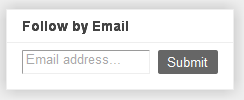
I am delighted to inform you that the Blogger’s Team has introduced a new gadget called “ Follow by Email “. The Follow by Email gadget provides blog authors a simple way for their readers to subscribe to the latest hot-off-the-press updates, which are delivered directly to the reader’s inbox.
When new blog content is published, all subscribed readers will receive a daily email notification of the new published posts, which includes a copy of the new content as well as links back to the actual posts.

To enable Follow by Email, Login to www.blogger.com, click the Add a Gadget link from the Design | Page Elements tab, and then select the Follow by Email gadget which should be at the top of the list. Once you add the gadget, readers visiting your blog can then just enter their email address and click Submit.
eee

Taking advantage of Feedburner technology, Follow by Email will also track your subscription information, such as the number of subscribers and daily views. To view these stats, log into Feedburner.com, and select the appropriate blog feed from your list.

If you already have the Feedburner Subscription box on your blog, you can keep it or replace it with this new “Follow by Email ” gadget. 

I hope this info helps…

Feel Free to share this blog post with your friends using the share/Like buttons on this page .

If you have anything to contribute or ask, Kindly make use of the comment form below.

If you are on Facebook, feel free to connect with fellow bloggers at the BloggersLab

Please, do not forget to SUBSCRIBE to this blog, so that you can be receiving future Blogger tricks/tips , articles, freebies DIRECTLY into your email inbox, even when you are not online.

CLICK HERE TO SUBSCRIBE NOW!

CLICK HERE TO DOWNLOAD MY 20 FREE EBOOKS

NOTE : If you cant view the picture or the LINKS are NOT clickable, it simple means you are not reading this at www.ogbongeblog.com. So, visit WWW.OGBONGEBLOG.COM now to read the original article.

Cheers!

Source

Please Share :
blogger tips

Like What You Read?

Sign Up to get similar articles delivered to your email inbox.

Leave a Reply Cancel reply

Your email address will not be published. Required fields are marked *

5 responses to “How To Add Follow by Email Gadget to Blogger/Blogspot Blogs”

  1. Egbe Avatar
    Egbe
    March 30, 2011

    thank Jide lovely you can see for yourself… nigeriajobdiary.com

    Loading…
    Reply
  2. Jide Ogunsanya Avatar
    Jide Ogunsanya
    March 31, 2011

    Yes, have seen it on your blog, though the size is kinda small. Happy Blogging.

    Loading…
    Reply
  3. Anonymous Avatar
    Anonymous
    April 4, 2011

    my imei is 35713306462388 pls create the unlock codethank for the understanding ……………………omotehinse tosin

    Loading…
    Reply
  4. outbound filtering Avatar
    outbound filtering
    April 27, 2011

    This is a great feature so users can stay updated on your latest activities.

    Loading…
    Reply
  5. seo reseller Avatar
    seo reseller
    May 17, 2011

    This is one way to stay updated on your favorite blogs.

    Loading…
    Reply

WANT TO ADVERTISE?

Chat on WhatsApp

RELATED POSTS

  • Google+Badge and +1 Button Now Available As Blogger GadgetsPicture f people showing in Google search results
  • New Google Translate gadget allows blog visitors translate your blog into different languages
  • How To Add “Follow Me On Twitter” to Blogger Blog

FEATURED


  • CREDICORP launches C.L.I.C.K.D. Scheme with FG’s 3MTT Programme, expanding affordable consumer credit for locally-assembled laptops and devices for digital workers

    CREDICORP launches C.L.I.C.K.D. Scheme with FG’s 3MTT Programme, expanding affordable consumer credit for locally-assembled laptops and devices for digital workers

  • What Happens to Your Online Accounts When You Die?

    What Happens to Your Online Accounts When You Die?

JOIN AI WEB DESIGN GROUP


  • AI Website Design Training Whatsapp Group by Jidetheblogger

    AI Website Design Training Whatsapp Group by Jidetheblogger

← Nigeria Presidential Debate Video( NN24 Debate): Part 1
How To Display Adsense On Mobile Templates of Blogger/Blogspot blogs →

Join 25,000+ subscribers

Receive our latest blog posts in your inbox.

Search

Social

Facebook

Instagram

Twitter

new ogbongeblog logo

Copyright © 2026 | About | Advertise | Featured | Sitemap | Privacy Policy | Powered by WordPress

Your cart (items: 0)

Products in cart

Product
Details
Total
Subtotal ₦0.00
Shipping and discounts calculated at checkout.
View my cart
Go to checkout

Your cart is currently empty!

Start shopping

Notifications

%d

    LIKE My Fan Page

    Privacy Policy | Copyright © 2012,OgbongeBlog.All Rights Reserved. Powered by Blogger .
    Create a Mobile Site
    View Site in Mobile | Classic
    Share by:


