
Skip to content
new ogbongeblog logo
  • Advertise
  • Blog
  • Contact

Blogger About Me Widget With Follow Button

September 15, 2013

·

Uncategorized
jidetheblogger Avatar
jidetheblogger

Linking your personal Google+ profile to your blog will automatically change the old Blogger Profile widget on your blog to the new About Me widget with a follow button. If your blog has more than one author, the widget will appear as the “ Blogger contributors widget ” instead of the “About Me” widget. The widget appears by default on Blogger mobile templates.

Having the widget on your blog makes it easier for others to access your profile and follow you on Google+ by clicking on the profile widget and the “ View my complete profile ” link. This may increase your blog’s discoverability and make it easier to form communities with other bloggers and readers.

How To Add About Me Widget With Follow Button

To display your profile gadget on your blog with a Google+ follow button:

==> Log in to Blogger dashboard
==> Go to the “ Settings ” > “ Posts, Comments and Sharing ” .
==> Scroll down to the Google +  section to link your blog to your G+ profile
==> Once linked successfully, go to Layout and click “ Add a Gadget “
==> Scroll down and select “ Profile “
==> Enter your desired title eg “Author” and SAVE .

If you tick the “ show about me “, option, a little description about yourself, pulled from your Google+ profile will be shown in the gadget as seen below. If the “ introduction ” part of your Google+ “About” page is blank, no description will be displayed.
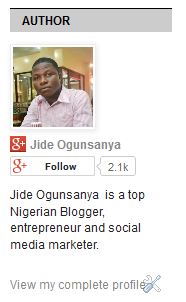
blogger about me widget with description

If you leave the “ show about me ” unticked, the description will not be displayed as seen below.

Blogger about me widget without decription

If you have a team blog (with more than one author), your Blogger Profile gadget will automatically turn into a contributors-list gadget. In this case, you will have to remove the widget and replace it with HTML gadget containing the code of your personal Google+ badge similar to the one below:

Google+ profile badge

The Google+ profile badge will not appear automatically on the mobile view of your blog like the default Blogger Profile widget. You must enable it in your Blogger mobile template if you want it to display on the mobile view.

Nevertheless, you can display the bio of your blog contributors directly under your blog posts if you enable the “ Show Author profile below Posts ” via the “ Blog Posts ” options. Read the full tutorial here .

That’s all.

Hope it works for you.

Do not forget to follow me (  +Jide Ogunsanya  ) on Google+.

Please Share :
blogger tips

Like What You Read?

Sign Up to get similar articles delivered to your email inbox.

Leave a Reply Cancel reply

Your email address will not be published. Required fields are marked *

4 responses to “Blogger About Me Widget With Follow Button”

  1. Samuel Avatar
    Samuel
    September 15, 2013

    Thanks Oga Jide. Guess you are using the Google+ profile badge on your blog instead of the profile widget..right?

    Loading…
    Reply
    1. Jide Oguns Avatar
      Jide Oguns
      September 19, 2013

      Yes bro.

      Loading…
      Reply
  2. ERV PEARLES Avatar
    ERV PEARLES
    September 15, 2013

    Tanx. Have done that.muyiwanayese.blogspot.com

    Loading…
    Reply
    1. Jide Oguns Avatar
      Jide Oguns
      September 19, 2013

      Nice but your blog is not well arranged.

      Loading…
      Reply

WANT TO ADVERTISE?

Chat on WhatsApp

RELATED POSTS

  • How to add Google Plus Widget to Blogger/Blogspot Blogs
  • Instagram Widget For WordPress With A Follow Button
  • How To Add “Follow Me On Twitter” to Blogger Blog

FEATURED


  • CREDICORP launches C.L.I.C.K.D. Scheme with FG’s 3MTT Programme, expanding affordable consumer credit for locally-assembled laptops and devices for digital workers

    CREDICORP launches C.L.I.C.K.D. Scheme with FG’s 3MTT Programme, expanding affordable consumer credit for locally-assembled laptops and devices for digital workers

  • What Happens to Your Online Accounts When You Die?

    What Happens to Your Online Accounts When You Die?

JOIN AI WEB DESIGN GROUP


  • AI Website Design Training Whatsapp Group by Jidetheblogger

    AI Website Design Training Whatsapp Group by Jidetheblogger

← Google Webmaster Tools Preferred Domain Set Up Guide
Show Author Profile Below Posts In Blogger Blog Without Editing HTML →

Join 25,000+ subscribers

Receive our latest blog posts in your inbox.

Search

Social

Facebook

Instagram

Twitter

new ogbongeblog logo

Copyright © 2026 | About | Advertise | Featured | Sitemap | Privacy Policy | Powered by WordPress

Your cart (items: 0)

Products in cart

Product
Details
Total
Subtotal ₦0.00
Shipping and discounts calculated at checkout.
View my cart
Go to checkout

Your cart is currently empty!

Start shopping

Notifications

%d

    LIKE My Fan Page

    Privacy Policy | Copyright © 2012,OgbongeBlog.All Rights Reserved. Powered by Blogger .
    Create a Mobile Site
    View Site in Mobile | Classic
    Share by:


