
Skip to content
new ogbongeblog logo
  • Advertise
  • Blog
  • Contact

How to add Google Ads to Blogger/Blogspot Blog

October 26, 2011

·

Uncategorized
jidetheblogger Avatar
jidetheblogger
Blogger provides a simple way for you to make money with your blog.
AdSense is Google’s content-targeted advertising program. Google’s servers determine what your posts are about and display the
most relevant ads to your readers. So, if you blog about mobile devices, there
might be ads for phones or tablets next to your post.
If you blog about health tips, there might be ads for health-related products.

You must add Google ads to your blog before visitors to your blog can start seeing the Google ads next to your posts. To enable AdSense for your blog, login to your Blogger dashboard and click on the Earningstab from the drop-down menu on your dashboard. ( Click on “ Monetize ” tab if you are still using the old Blogger interface)
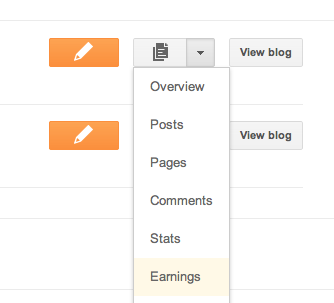
Earnings tab from the drop-down menu

If you haven’t signed up for AdSense yet, click the link to create a new account.
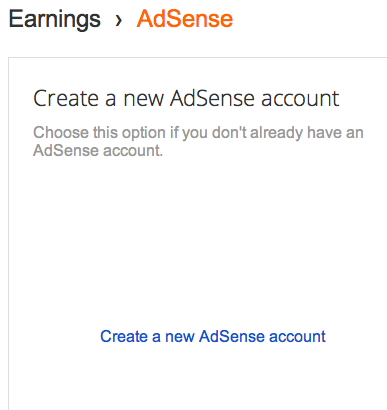
Sign up for AdSense

You’ll then fill out a form with your contact information, review theinformation you’ve provided, and then agree to terms and conditions.
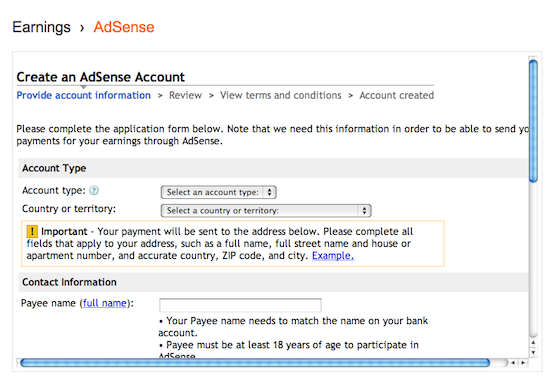
Form for AdSense

Before ads start showing up, you’ll have to wait for your account to
be approved
. You can control the ways the ads show up on your blog
through the settings on the Earningstab at anytime.
You can choose whether or not to show ads, and where on your blog to
display those ads (sidebar and posts, just sidebar, or just posts).
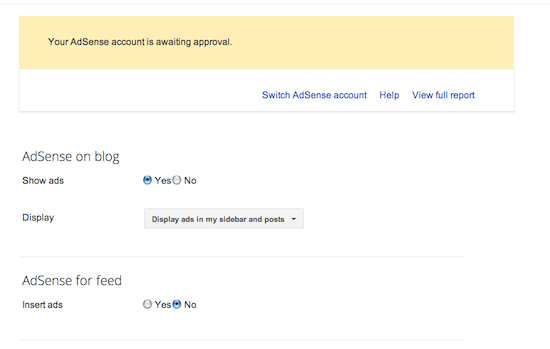
Waiting for approval

To learn more about monetizing your blog with Google Adsense, check out   Adsense Tutorials .

You may also find it helpful to view Google’s  Activation Demo
(English only). This video demo will walk you methods
for using Blogger, to implement the ad code.

Cheers!

Please Share :

Like What You Read?

Sign Up to get similar articles delivered to your email inbox.

Leave a Reply Cancel reply

Your email address will not be published. Required fields are marked *

6 responses to “How to add Google Ads to Blogger/Blogspot Blog”

  1. seo service Avatar
    seo service
    October 27, 2011

    Thank you for sharing this article. I love it. Keep on writing this type of great stuff.

    Loading…
    Reply
  2. Anonymous Avatar
    Anonymous
    October 28, 2011

    Thanks for the tips Jide, may the Lord continue to shower you with His blessings and wisdom.I want to ask if i can use just one AdSense account that i have opened for all my websites and blogs?

    Loading…
    Reply
  3. Jide Ogunsanya Avatar
    Jide Ogunsanya
    October 28, 2011

    A big Amen to your prayer. Yes, you are not allowed to have more than one adsense account. You can use one adsense account for all your blogs and websites in as much as they comply with Adsense TOS

    Loading…
    Reply
  4. www.atibile.com Avatar
    www.atibile.com
    October 29, 2011

    Jide may God's blessings dwell richly and permanently with you for the great pots on this blog.Please i tried opening Adsense account for my blog but it was disabled.Plz can use give me tips on how to get it approved?And in that space in the adsense form that said "primary url only(www.example.com)"what am i supposed to do?

    Loading…
    Reply
  5. Jide Ogunsanya Avatar
    Jide Ogunsanya
    October 30, 2011

    that is where you will have to put your blog or website address. do you have a blog?

    Loading…
    Reply
  6. naijatrendbox Avatar
    naijatrendbox
    October 17, 2012

    hi,i have been trying to apply for adsense,but the phone number area is giving me a challenge. how do i fill that section?

    Loading…
    Reply

WANT TO ADVERTISE?

Chat on WhatsApp

RELATED POSTS

  • How To Display Adsense On Mobile Templates of Blogger/Blogspot blogs
  • Video On How To Monetize Blog With Google Adsense
  • How To Place Adsense Links Ads below WordPress Posts Titles

FEATURED


  • CREDICORP launches C.L.I.C.K.D. Scheme with FG’s 3MTT Programme, expanding affordable consumer credit for locally-assembled laptops and devices for digital workers

    CREDICORP launches C.L.I.C.K.D. Scheme with FG’s 3MTT Programme, expanding affordable consumer credit for locally-assembled laptops and devices for digital workers

  • What Happens to Your Online Accounts When You Die?

    What Happens to Your Online Accounts When You Die?

JOIN AI WEB DESIGN GROUP


  • AI Website Design Training Whatsapp Group by Jidetheblogger

    AI Website Design Training Whatsapp Group by Jidetheblogger

← How to use 2go to chat with Facebook Friends
Fuel Subsidy Explained →

Join 25,000+ subscribers

Receive our latest blog posts in your inbox.

Search

Social

Facebook

Instagram

Twitter

new ogbongeblog logo

Copyright © 2026 | About | Advertise | Featured | Sitemap | Privacy Policy | Powered by WordPress

Your cart (items: 0)

Products in cart

Product
Details
Total
Subtotal ₦0.00
Shipping and discounts calculated at checkout.
View my cart
Go to checkout

Your cart is currently empty!

Start shopping

Notifications

%d

    LIKE My Fan Page

    Privacy Policy | Copyright © 2012,OgbongeBlog.All Rights Reserved. Powered by Blogger .
    Create a Mobile Site
    View Site in Mobile | Classic
    Share by:


