
Skip to content
new ogbongeblog logo
  • Advertise
  • Blog
  • Contact

How To Add Logo to Blogger Blog

February 26, 2012

·

Uncategorized
jidetheblogger Avatar
jidetheblogger

If you have designed your logo and want to use it for your Blogger blog, you can easily get it done by using the Blogger’s Page Header gadget.
The “Page Header” gadget is the gadget that is responsible with the display of your blog’s title and description. The gadget also makes it possible for you to use an image instead of your blog’s title and description. Hence, it is the gadget needed for you to add a logo to your blog.

How To Get Started

Log in to your Blogger dashboard and click on the blog you want to work on.

Go to Layout or Design

Right on the page elements page, you will see the “Header” as seen in the picture below
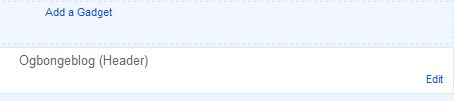
Ogbongeblog 1

Click on the “ edit ” next to it.

This will bring up a new window similar to what you are seeing in the picture below:

Logo blogger 1

Click on the “ choose file ” button to upload the logo you want to use

Once chosen, select the “ instead of title and description ” as seen in the picture below

Do Not tick “shrink to fit”.  (You can tick it if you are uploading a wide banner as your blog header image)

Click Save .

That’s all.

View your blog and you should see your logo been displayed in your blog header.

NOTE : If you are uploading a wide banner, you can tick the “ shrink to fit” so that Blogger can resize the image for you to fit perfectly into the blog header. Nevertheless, it makes more sense if you can make your wide banner not to be more than the size indicated below the “ shrink to fit “.

I hope this helps…

You can use the Pixlr editor to create your logo or your header banner online. I hope to share a video tutorial on how to do this sometime soon. Just subscribe to this blog for you not to miss it.

Cheers.

Please Share :
blogger tips graphic design

Like What You Read?

Sign Up to get similar articles delivered to your email inbox.

Leave a Reply Cancel reply

Your email address will not be published. Required fields are marked *

5 responses to “How To Add Logo to Blogger Blog”

  1. Omolola Adenaya Avatar
    Omolola Adenaya
    February 26, 2012

    Thanks for this info but if I am to use a banner as my header image, can it be any size?

    Loading…
    Reply
    1. Jide Oguns Avatar
      Jide Oguns
      February 26, 2012

      Yes, but I recommend height less than 70px to make the header not too big.

      Loading…
      Reply
  2. livingstone onyeagoro Avatar
    livingstone onyeagoro
    February 10, 2016

    very nice post… as usual

    Loading…
    Reply
  3. BloggingGuru Avatar
    BloggingGuru
    November 28, 2018

    Thanks for sharing this informative and beautiful post.

    Loading…
    Reply
  4. Maertins Avatar
    Maertins
    July 7, 2020

    It helpful to naijaspeedup.com.ng

    Loading…
    Reply

WANT TO ADVERTISE?

Chat on WhatsApp

RELATED POSTS

  • How To Determine Width of Image that will fit into Blog Header and Sidebar
  • How to add Jobberman Latest Jobs gadget to Blogger/Blogspot Blogs
  • How To Add Tabs to Blogger Blogs Header Section

FEATURED


  • CREDICORP launches C.L.I.C.K.D. Scheme with FG’s 3MTT Programme, expanding affordable consumer credit for locally-assembled laptops and devices for digital workers

    CREDICORP launches C.L.I.C.K.D. Scheme with FG’s 3MTT Programme, expanding affordable consumer credit for locally-assembled laptops and devices for digital workers

  • What Happens to Your Online Accounts When You Die?

    What Happens to Your Online Accounts When You Die?

JOIN AI WEB DESIGN GROUP


  • AI Website Design Training Whatsapp Group by Jidetheblogger

    AI Website Design Training Whatsapp Group by Jidetheblogger

← India Web Proxy Servers and Latest IWP Download
What is Dogpile? →

Join 25,000+ subscribers

Receive our latest blog posts in your inbox.

Search

Social

Facebook

Instagram

Twitter

new ogbongeblog logo

Copyright © 2026 | About | Advertise | Featured | Sitemap | Privacy Policy | Powered by WordPress

Your cart (items: 0)

Products in cart

Product
Details
Total
Subtotal ₦0.00
Shipping and discounts calculated at checkout.
View my cart
Go to checkout

Your cart is currently empty!

Start shopping

Notifications

%d

    LIKE My Fan Page

    Privacy Policy | Copyright © 2012,OgbongeBlog.All Rights Reserved. Powered by Blogger .
    Create a Mobile Site
    View Site in Mobile | Classic
    Share by:


