
Skip to content
new ogbongeblog logo
  • Advertise
  • Blog
  • Contact

How To Get the ID of Any Blogger Widget

February 28, 2014

·

Uncategorized
jidetheblogger Avatar
jidetheblogger

Identifying the id of a Blogger gadget will make it very easy for you to customize the gadget using CSS. eg if it is a Link List gadget, you can easily use css to add scrolling effect, change the font text, add dotted border etc provided you know the id of the gadget. More so, if you want a gadget to show on your Blogger mobile template, you will need its ID in order to add the mobile=’yes’ to it’s code in your Blog’s html.

If you use the “ Add a Gadget ” link in Blogger Layout to add a widget to your Blogspot blog, Blogger will automatically generate an id for the widget. Although, you can get the id of any widget added to a Blogger blog inside the template HTML code but there is a simpler way you can get it without the need to search your Blog’s HTML.

The simpler method is what I’ve decided to share with you in this tutorial.

As an example, I’m going to check the id of an Adsense widget I added to my blog using the Adsense Gadget. Follow me through the steps:

==> Log in to your blogger dashboard
==> Go to “Layout” and locate the widget
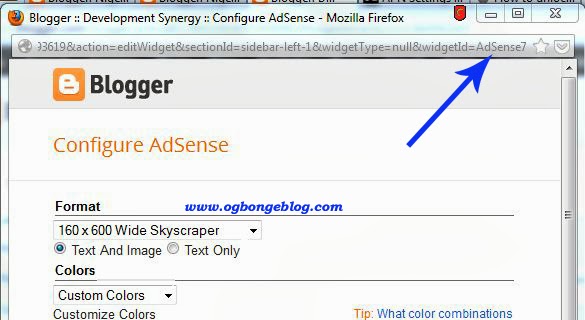
==>  Click the “edit” link of the widget. Widget configuration window like the one below will pop up
adsense-widget

==> Look closely at the window and you will notice that the widget id is in the URL of the widget as highlighted in the screenshot above.

From the screenshot above, you will notice there is &widgetId=AdSense7 in the URL. This means the id of the Adsense widget is  AdSense7 . (Capital letter “S”).

That’s all.

Now, you can use the id as a selector in stylesheet when styling the widget. To do this, you will need to add the pound sign “#”as a prefix eg #WidgetID{ }

For example, if I want to centralize the Adsense widget, I can add the code below to the css section of my blog’s html.

#AdSense7 {
text-align:center;
}

I hope this helps.

You might be interested in:
How To Centralize Title and Description of Blogger Blog .
How To Centralize Ads Added Using Adsense Gadget
How To Center AdDynamo Ads

Cheers!

Please Share :
blogger tips blogspot tutorials

Like What You Read?

Sign Up to get similar articles delivered to your email inbox.

Leave a Reply Cancel reply

Your email address will not be published. Required fields are marked *

8 responses to “How To Get the ID of Any Blogger Widget”

  1. David Avatar
    David
    February 28, 2014

    wow! Nice share there Jide. With this, I think I can now style any widget anyhow I want eg, can add different background color to all my sidebar widgets etc using css. right?

    Loading…
    Reply
    1. Jide Oguns Avatar
      Jide Oguns
      February 28, 2014

      Yes. You can style it anyhow you want.

      Loading…
      Reply
  2. Adelowo Lanre Avatar
    Adelowo Lanre
    February 28, 2014

    Nice one sir

    BTW i sent u a mail concerning the template at ogbongetemplates.blogspot.com ….waiting for your reply sir

    Loading…
    Reply
    1. Jide Oguns Avatar
      Jide Oguns
      February 28, 2014

      OK. Will check my mail and send you the free template.

      Loading…
      Reply
  3. ogili kingsley Avatar
    ogili kingsley
    February 28, 2014

    pls,ogajide how do i make my pages and label appear as top bar,now that pages dashboard has been changed…. And pls,how do i make my adiquity and buzzcity ads appear at mobile view

    Loading…
    Reply
    1. Jide Oguns Avatar
      Jide Oguns
      February 28, 2014

      Yes, the Pages dashboard has changed. Read this tutorial to learn more about the changes. As regards the ads, try the trick in : this tutorial

      Loading…
      Reply
  4. ogili kingsley Avatar
    ogili kingsley
    March 1, 2014

    Ogajide,tanks for ur reply…pls send the free template to me ogilikingsley96@gmail.com

    Loading…
    Reply
  5. Agboro Moses Avatar
    Agboro Moses
    November 28, 2016

    Good mrng Mr Jide pls i've not been able to show widget on mobile view of blog template, it works for me some time ago but i dnt seems to undrstnd the changes in blogger dashboard.Pls put ms through.

    Loading…
    Reply

WANT TO ADVERTISE?

Chat on WhatsApp

RELATED POSTS

  • How to add Google Plus Widget to Blogger/Blogspot Blogs
  • How To Change Template of Blogger/Blogspot Blog via the New Blogger Dashboard
  • How to add Facebook Share & Like buttons, Digg and Tweet Button to the side of blogger/blogspot blogs

FEATURED


  • CREDICORP launches C.L.I.C.K.D. Scheme with FG’s 3MTT Programme, expanding affordable consumer credit for locally-assembled laptops and devices for digital workers

    CREDICORP launches C.L.I.C.K.D. Scheme with FG’s 3MTT Programme, expanding affordable consumer credit for locally-assembled laptops and devices for digital workers

  • What Happens to Your Online Accounts When You Die?

    What Happens to Your Online Accounts When You Die?

JOIN AI WEB DESIGN GROUP


  • AI Website Design Training Whatsapp Group by Jidetheblogger

    AI Website Design Training Whatsapp Group by Jidetheblogger

← How Facebook Tagging Can Drive More Traffic To Your Blog
Web Address Option of Blogger Pages Replaced With Add Link Page →

Join 25,000+ subscribers

Receive our latest blog posts in your inbox.

Search

Social

Facebook

Instagram

Twitter

new ogbongeblog logo

Copyright © 2026 | About | Advertise | Featured | Sitemap | Privacy Policy | Powered by WordPress

Your cart (items: 0)

Products in cart

Product
Details
Total
Subtotal ₦0.00
Shipping and discounts calculated at checkout.
View my cart
Go to checkout

Your cart is currently empty!

Start shopping

Notifications

%d

    LIKE My Fan Page

    Privacy Policy | Copyright © 2012,OgbongeBlog.All Rights Reserved. Powered by Blogger .
    Create a Mobile Site
    View Site in Mobile | Classic
    Share by:


