
Skip to content
new ogbongeblog logo
  • Advertise
  • Blog
  • Contact

How To Create Pages In Blogger Blogs

December 30, 2010

·

Uncategorized
jidetheblogger Avatar
jidetheblogger

Would you like to have Linked Pages on your blogger blog with Navigation tabs on your home page that will be pointing to these pages? If Yes, then I am using this opportunity to tell you that Blogger now makes it easy to create pages linked from your blog.

This is a feature a lot of Blogspot users have been requesting for and I am very glad that Blogger has finally incorporated it into the Blogger Dashboard.

This feature lets you easily publish static information on stand-alone pages. For example, you can create an About This Blog page that discusses the evolution of your blog, or a Contact Me page that provides directions, a phone number, and a map to your location.
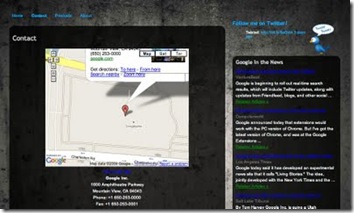
contactpage

So, How Do I Create  A Page ?

You create a page similar to how you write a blog post. From Blogger click the Posting | Edit Pages tab , then click New Page . (Note: you can create up to 10 pages.)
Once your page is published, you can link to it from the new Pages widget . The Pages widget lets you add links to your pages as tabs at the top of your blog, or as links in your blog’s sidebar.

tabs

The Pages Widget is now available in the options you get when you click on ADD NEW WIDGET in your layout control panel.

In the Pages widget, you can decide which pages will be linked and in what order they will appear. You can also choose whether you want new pages to appear automatically in the Pages widget by checking or unchecking the box to the left of Add new Pages by default.

pageswidget

That’s All!I believe this feature will add more glamour to your blog.

If you have anything to ask,or having problem with your blog, kindly use the comment form, below this post, ON MY BLOG.

Cheers !!!.

Source: Blogger Buzz

Please Share :
blogging tips

Like What You Read?

Sign Up to get similar articles delivered to your email inbox.

Leave a Reply Cancel reply

Your email address will not be published. Required fields are marked *

6 responses to “How To Create Pages In Blogger Blogs”

  1. Prem Sabarwal Avatar
    Prem Sabarwal
    April 27, 2010

    useful info..i should try it on my blog..thanks..

    Loading…
    Reply
  2. Jide Ogunsanya Avatar
    Jide Ogunsanya
    April 29, 2010

    I will also visit your blog. Thanks for stopping by.

    Loading…
    Reply
  3. Olusola Sunday Avatar
    Olusola Sunday
    October 9, 2013

    aw can I make my post show up in there respective pages, I mean I have a lot of posts and I want to make them show up in different [ages.

    Loading…
    Reply
    1. Jide Oguns Avatar
      Jide Oguns
      October 9, 2013

      Guess you are talking of adding categories to your blog posts. Add the 3 labels to the posts while editing the posts.

      Loading…
      Reply
  4. Joshua Okechukwu Avatar
    Joshua Okechukwu
    January 23, 2014

    useful info, but mine problem is just that i am a novice to blogging and wish you can help me out. i have search the pages widget but can't find it, the one i saw (pages) is telling me that is already added. i need to have something like, home, soccer, etc. but i can't do it. ( the blog name. http://www.9jahom.blogspot.com )

    Loading…
    Reply
    1. Jide Oguns Avatar
      Jide Oguns
      January 26, 2014

      If it's showing "already added" but cant find it on your blog, go to your dashboard, click on "Pages". click the "show pages as" dopdown box and select top tabs or side links instead of "don't show" option.

      Loading…
      Reply

WANT TO ADVERTISE?

Chat on WhatsApp

RELATED POSTS

  • How To Add Tabs to Blogger Blogs Header Section
  • How To Add Description To Individual Posts of Blogger Blogs
  • How To Create Mobile Edition of Blogger Blog with BloggerTouch App

FEATURED


  • CREDICORP launches C.L.I.C.K.D. Scheme with FG’s 3MTT Programme, expanding affordable consumer credit for locally-assembled laptops and devices for digital workers

    CREDICORP launches C.L.I.C.K.D. Scheme with FG’s 3MTT Programme, expanding affordable consumer credit for locally-assembled laptops and devices for digital workers

  • What Happens to Your Online Accounts When You Die?

    What Happens to Your Online Accounts When You Die?

JOIN AI WEB DESIGN GROUP


  • AI Website Design Training Whatsapp Group by Jidetheblogger

    AI Website Design Training Whatsapp Group by Jidetheblogger

← How To Create Banner For Blogs/Websites Without Adobe Photoshop
How To Retrieve Email Addresses Of Feedburner Email Subscriptions →

Join 25,000+ subscribers

Receive our latest blog posts in your inbox.

Search

Social

Facebook

Instagram

Twitter

new ogbongeblog logo

Copyright © 2026 | About | Advertise | Featured | Sitemap | Privacy Policy | Powered by WordPress

Your cart (items: 0)

Products in cart

Product
Details
Total
Subtotal ₦0.00
Shipping and discounts calculated at checkout.
View my cart
Go to checkout

Your cart is currently empty!

Start shopping

Notifications

%d

    LIKE My Fan Page

    Privacy Policy | Copyright © 2012,OgbongeBlog.All Rights Reserved. Powered by Blogger .
    Create a Mobile Site
    View Site in Mobile | Classic
    Share by:


