
Skip to content
new ogbongeblog logo
  • Advertise
  • Blog
  • Contact

How To Add Tabs to Blogger Blogs Header Section

January 15, 2012

·

Uncategorized
jidetheblogger Avatar
jidetheblogger

Creating Blogger menu is now very easy via the new Blogspot Interface. You can now create menu on Blogspot blogs without using html and you can make the tabs to link to a post/page on your blog , a label or any external link . In this tutorial, I will show you how to create navigation tabs for your blogger blog without html coding.

You can make the tabs to appear horizontally under your blog header or on your sidebar as seen in the picture below:

tabs

If you create your navigation menu the way I am going to explain in this tutorial, the menu will also display on your blogger mobile template as seen on my own blogger mobile template below:
blogger mobile template 1
How To Get Started


== > If you are still using the old blogger , you can log in to your blogger dashboard and switch to the new blogger dashboard so you can easily follow this tutorial.
Log in to  www.blogger.com  or  www.blogspot.com

Once logged into your dashboard, click on your blog and look by the left menu. Click on  Pages  . You should see something similar to the picture below:

Blogger Pages1

You can use the  “ New Page ” tab to create a new Blogger Page and a tab that links to any web address ( This might be a link to a web page a blog post or a download link)

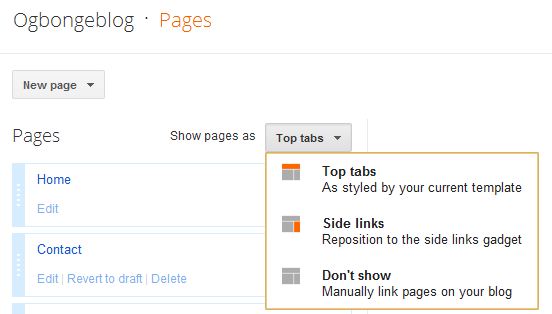
The “ Show Pages as ” tab is what you will use to control where you want your navigation tabs to appear on your blog. You can set it to appear under your header (Top tabs) or on the sidebar (Side links).

Example

Now, let me assume you want to create a tab that links to an external link ( eg www.ogbongesms.com ).

Click on the “ New Page ” tab and click on “ Web Address ” as seen in the picture below:

Blogger Pages2

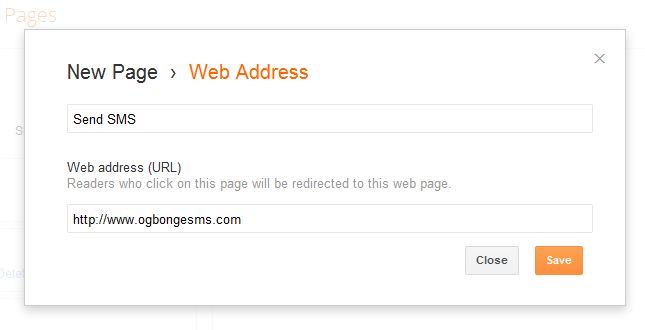
You will see a new window like the one below :
Blogger Pages3

==> Enter what you want to be displayed on the tab in the first text area. In this example, I entered “ Send SMS “==> Enter the web address you want to link to in the second text area. In this example, I entered “ www.ogbongesms.com “

Click “ Save “.

What Next?

The next thing to do is to make the tabs appear on your blog.

So, click on the “ Show pages as ” tab and set it to “ Top tabs “
Blogger Pages4

Then, click on “ Save Arrangement ” by the top right hand corner of your dashboard.

View your blog and you should see the tabs appear under your blog header.

UPDATE : The Web Address option has been replaced with “ Add link page “. Read more here . 

Want Your Tab to Point to a Label(Category)?


Remember, if you visit a LABEL’s link, it will display the POSTS that has be categorized under the LABEL.

If you want to point your tab to a label (category), get the link of the label(category) handy and enter it in the space for “ Web address ” as explained when creating a tab pointing to external url above.

Below is what the structure of a Label/category link looks like:

‘ https://www.ogbongeblog.com/search/label/making%20money ‘

Don’t know how to get your LABEL link? Well,provided you have already added the LABELS gadget to your blog, view your blog,  right-click  on one of the labels(categories) and choose “ Copy Link Location “. Paste it in a Notepad and use it accordingly.

That’s all.

NOTE

If you click “ Blank Page ” after clicking the “ New page ” tab, you will see a page editor which you can use to create a Blogger page like Contact Me , About Me  pages.  Whatever you enter as the title of the page is what will display on the tab on your blog.

You can re-arrange your tabs or hide some PAGES you don’t want to appear as tabs . To do this, go to “ Layout ” and click on the “ edit ” next to the “ PAGES ” gadget.

You should see a new window similar to the one below:

pageswidget

You can untick PAGES you want to hide. To re-arrange your tabs, just drag and drop (under Page order ) to change the order of your tabs.

I hope this helps…

If you have questions to ask or have contributions to make, kindly make use of the comment from below.

In my future posts, I will be sharing more Blogger tips. So,  subscribe  to my blog if you want to be receiving the tutorials in your email inbox even if you are not online when I post the tutorials.  Make sure you verify your subscription  by clicking on the link that will be in the mail that will be sent to you once you subscribe.

If you are on Facebook, you can join the  Bloggerslab Group  so you can connect with other bloggers.

Cheers!

Please Share :
blogger tips

Like What You Read?

Sign Up to get similar articles delivered to your email inbox.

Leave a Reply Cancel reply

Your email address will not be published. Required fields are marked *

23 responses to “How To Add Tabs to Blogger Blogs Header Section”

  1. Danejo02 Avatar
    Danejo02
    January 16, 2012

    Hi, Thanks for the info
    pls help me check this blog http://coolmoviezone.blogspot.com/ can i used it to aplly for google AdSense? if not why
    thanks.

    Loading…
    Reply
    1. Jide Oguns Avatar
      Jide Oguns
      January 25, 2012

      yes, you can just hoping Google won't complain of copyright issues.

      Loading…
      Reply
  2. Mayur Parmar Avatar
    Mayur Parmar
    March 22, 2012

    bro i want ur help…
    is the tab & page r different things?
    i want to do like this so hw can i do it :-
    i wana do that if we move cursor on tab it drops down & than we move cursor on that tab's subtab it moves side tab .
    hw can we do like that???

    Loading…
    Reply
    1. Jide Oguns Avatar
      Jide Oguns
      March 22, 2012

      A tab is that button you click. The tab (button) can be linked to a page, post or an external link. You can create a drop down menu using Javascript. Though I don't have the tutorial handy but you can get it from Google. Just search for "How to add drop down menu to Blogger blog"

      Loading…
      Reply
  3. Mayur Parmar Avatar
    Mayur Parmar
    March 22, 2012

    ok thanx bro but can you tell me how to add tabs & in that tab how to add content.
    because i tried to add pages it looks like tabs bt time of adding page there is only we can add content after that how to add content.pls help .
    thank you.

    Loading…
    Reply
    1. Jide Oguns Avatar
      Jide Oguns
      March 22, 2012

      If you carefully read this post, you will be able to create a page and a tab. When you click on create A NEW PAGE, choose the "blank Page" option. Type in your content and whatever title you give the page is what will appear on the tab.

      Loading…
      Reply
  4. Mayur Parmar Avatar
    Mayur Parmar
    March 23, 2012

    ya thank you but what i mean to say is that i wana do my blog like ur blog tabs …i want that some content only visible in those section of tabs or pages so i mean to say that how to add content to different pages becoz i tried but when we post content it displays in only home page…

    Loading…
    Reply
  5. Mayur Parmar Avatar
    Mayur Parmar
    March 23, 2012

    this is my blog check it …mayurtech.blogspot.com

    Loading…
    Reply
  6. Mayur Parmar Avatar
    Mayur Parmar
    March 24, 2012

    i want to add multiple post in single page when we create page we can only add 1 post at that time.
    how to add multiple post…
    here in ur bog in blogger tips tab u added multiple post that i want to do…

    Loading…
    Reply
    1. Jide Oguns Avatar
      Jide Oguns
      March 24, 2012

      I guess you are talking about tabs on my blog like the "Adsense Tips", "Blogger Tips" right? I checked your blog and I saw something similar on the "PC Tricks & Tips" tab. Is that not what you want?

      Loading…
      Reply
  7. Mayur Parmar Avatar
    Mayur Parmar
    March 24, 2012

    ya ya m saying abt that only i created label for that PC tips & tricks than only i can post multiple update in that tab becoz when we create page then editor opens so at that time only we can add 1 post ..so nw u help me???/

    Loading…
    Reply
  8. THE GLOBE Avatar
    THE GLOBE
    May 13, 2012

    well done Jide you have being a good coach since

    Loading…
    Reply
  9. Anodebe Anthony Avatar
    Anodebe Anthony
    January 26, 2013

    Nice Article

    Loading…
    Reply
  10. holar Avatar
    holar
    March 20, 2013

    i have over 140 posts on my blog.if i want to classify them under things like sports,entertainment news,politics. do i have to start uploading the links allover again or how do i go about it.

    Loading…
    Reply
    1. Jide Oguns Avatar
      Jide Oguns
      September 26, 2013

      Read: https://www.ogbongeblog.com/2012/01/how-to-group-blog-posts-into-labels.html

      Loading…
      Reply
  11. Patty Avatar
    Patty
    April 1, 2013

    Thank you for these wonderful directions. I googled wanting to connect my categories to my tabs and your post came up and answered my question immediately!

    Loading…
    Reply
    1. Jide Oguns Avatar
      Jide Oguns
      September 26, 2013

      Glad it worked for you.

      Loading…
      Reply
  12. George Emmanuel Avatar
    George Emmanuel
    June 21, 2013

    Hello Jide,

    Pls how can i hide a particular page from showing in my navigation menu in New Blogger interface

    Loading…
    Reply
    1. Jide Oguns Avatar
      Jide Oguns
      September 26, 2013

      Read: https://www.ogbongeblog.com/2013/06/how-to-hide-page-from-showing-in.html

      Loading…
      Reply
  13. Anonymous Avatar
    Anonymous
    September 25, 2013

    Nice one

    Loading…
    Reply
  14. Oluwagbenga Caleb Avatar
    Oluwagbenga Caleb
    September 26, 2013

    Nice work

    Loading…
    Reply
  15. Anonymous Avatar
    Anonymous
    December 6, 2013

    Jide, why dont it show in my mobile version ? I mean why does it show in only web version ?

    Loading…
    Reply
  16. Ossai John Avatar
    Ossai John
    May 29, 2017

    Jide God bless you for that awesome tips.. But I still get confused. Please check this my blog at https://ossaijohn.blogspot.com.ng

    Loading…
    Reply

WANT TO ADVERTISE?

Chat on WhatsApp

RELATED POSTS

  • How I created Navigation Bar with tabs linking to Labels, External Links, Pages and Post Pages
  • How To Create Pages In Blogger Blogs
  • How To Centralize Title and Description of Blogger Blog ( +Video tutorial)

FEATURED


  • CREDICORP launches C.L.I.C.K.D. Scheme with FG’s 3MTT Programme, expanding affordable consumer credit for locally-assembled laptops and devices for digital workers

    CREDICORP launches C.L.I.C.K.D. Scheme with FG’s 3MTT Programme, expanding affordable consumer credit for locally-assembled laptops and devices for digital workers

  • What Happens to Your Online Accounts When You Die?

    What Happens to Your Online Accounts When You Die?

JOIN AI WEB DESIGN GROUP


  • AI Website Design Training Whatsapp Group by Jidetheblogger

    AI Website Design Training Whatsapp Group by Jidetheblogger

← Download Mozilla fire fox for Android
Mozat Access Code NOT Sent To Your Phone?..The Solution →

Join 25,000+ subscribers

Receive our latest blog posts in your inbox.

Search

Social

Facebook

Instagram

Twitter

new ogbongeblog logo

Copyright © 2026 | About | Advertise | Featured | Sitemap | Privacy Policy | Powered by WordPress

Your cart (items: 0)

Products in cart

Product
Details
Total
Subtotal ₦0.00
Shipping and discounts calculated at checkout.
View my cart
Go to checkout

Your cart is currently empty!

Start shopping

Notifications

%d

    LIKE My Fan Page

    Privacy Policy | Copyright © 2012,OgbongeBlog.All Rights Reserved. Powered by Blogger .
    Create a Mobile Site
    View Site in Mobile | Classic
    Share by:


