
Skip to content
new ogbongeblog logo
  • Advertise
  • Blog
  • Contact

How To Hide a Page from Showing In Blogger Navigation Menu

June 26, 2013

·

Uncategorized
jidetheblogger Avatar
jidetheblogger

If you’ve added the Blogger Pages widget to your blog, anytime you create a new page (NOT post), a new tab automatically appears in the navigation menu by default. The title of the page automatically displays on the tab.

Sometimes, you might want to create a Page but won’t want it to appear as a tab in the navigation menu. Well, it is possible and that’s exactly what I want to explain in this tutorial.

My guest post submission , post sponsorship and custom domain set-up pages were all created using Pages and NOT posts; and if you look closely at the Ogbongeblog’s navigation menu on PC, you will hardly find the tabs linking to those pages there.

STEPS

Let me assume you’ve already added the PAGES gadget to your blog’s header section to generate navigation tabs for your blog.

To hide a PAGE already existing as a tab in your navigation bar,

==> Log in to your Blogger dashboard at blogspot.com

==> Go to “ Layout ” and click the “ edit ” link next to the “ Pages ” gadget
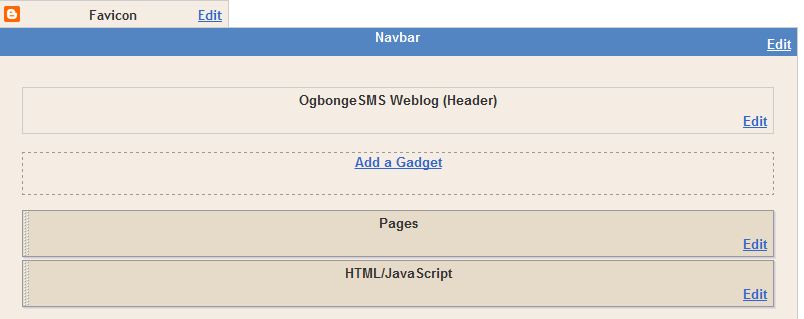
NavLink

==> After clicking “ edit “, you should see something similar to the picture below:

pageswidget

==> UNTICK the Page you want to hide

==> Click SAVE .

That’s all.

If you check your Navigation menu, the tab for the hidden Page will no longer be there.

NOTE

==> If you want to hide a new page, create the page and hide it as explained above.

==> You can UNTICK the “Automatically add new pages when they are published” to change the default setting.

I hope this helps.

Feel free to check out how to create Blogger Pages and how to add navigation tabs to Blogger blogs .


Please Share :
blogger tips

Like What You Read?

Sign Up to get similar articles delivered to your email inbox.

Leave a Reply Cancel reply

Your email address will not be published. Required fields are marked *

3 responses to “How To Hide a Page from Showing In Blogger Navigation Menu”

  1. olatunji awe Avatar
    olatunji awe
    June 27, 2013

    LAPO, Is one of the best Micro finance institute in Africa, no doubt about that, but how can it be of benefit to the less privilege Student.

    Loading…
    Reply
  2. John Avatar
    John
    June 28, 2013

    Great tutorial, it really help…Thanks

    Loading…
    Reply
  3. Ayi Peter Avatar
    Ayi Peter
    July 13, 2015

    Dose your description on how to post into different categories work also for word press

    Loading…
    Reply

WANT TO ADVERTISE?

Chat on WhatsApp

RELATED POSTS

  • How To Add Tabs to Blogger Blogs Header Section
  • How To Create Pages In Blogger Blogs
  • How I created Navigation Bar with tabs linking to Labels, External Links, Pages and Post Pages

FEATURED


  • CREDICORP launches C.L.I.C.K.D. Scheme with FG’s 3MTT Programme, expanding affordable consumer credit for locally-assembled laptops and devices for digital workers

    CREDICORP launches C.L.I.C.K.D. Scheme with FG’s 3MTT Programme, expanding affordable consumer credit for locally-assembled laptops and devices for digital workers

  • What Happens to Your Online Accounts When You Die?

    What Happens to Your Online Accounts When You Die?

JOIN AI WEB DESIGN GROUP


  • AI Website Design Training Whatsapp Group by Jidetheblogger

    AI Website Design Training Whatsapp Group by Jidetheblogger

← NIIT Nigeria Scholarship 2013: How To Apply
Glo Ptunes Lets You Customize Your CallerTune With Your Name →

Join 25,000+ subscribers

Receive our latest blog posts in your inbox.

Search

Social

Facebook

Instagram

Twitter

new ogbongeblog logo

Copyright © 2026 | About | Advertise | Featured | Sitemap | Privacy Policy | Powered by WordPress

Your cart (items: 0)

Products in cart

Product
Details
Total
Subtotal ₦0.00
Shipping and discounts calculated at checkout.
View my cart
Go to checkout

Your cart is currently empty!

Start shopping

Notifications

%d

    LIKE My Fan Page

    Privacy Policy | Copyright © 2012,OgbongeBlog.All Rights Reserved. Powered by Blogger .
    Create a Mobile Site
    View Site in Mobile | Classic
    Share by:

