
Skip to content
new ogbongeblog logo
  • Advertise
  • Blog
  • Contact

How To Insert Google Webmaster Tools Verification Code into Blogger/Blogspot Blogs

August 7, 2012

·

Uncategorized
jidetheblogger Avatar
jidetheblogger

Because privacy is important to Google, the search engine needs to know you own a site before it show you certain information about it or enable you to use it’s tools. Verification doesn’t affect PageRank or affect your site’s performance in Google’s search results though it is a very important step to take after creating a blog .

Blogs hosted on Blogger (that haven’t yet been verified) will have to use the meta tag verification method to verify their blogs. Below are the steps required to verify a Blogger/Blogspot blog in Google Webmaster Tools.

In Webmaster Tools  ==>   https://www.google.com/webmasters/

1. Click the “ Add a site ” button on the Webmaster Tools Home page
2. Enter your blog’s URL (for example, ogbongeblog.blogspot .com) and click the “ Continue ” button to go to the Manage verification page
3. Select the “ Meta tag ” verification method and copy the meta tag provided

In Blogger


4. Go to your blog and sign in
5. From the new Blogger dashboard click the “ Template ” link for the blog you’re verifying
6. Click the “ Edit HTML ”  which will allow you to edit the HTML of your blog’s template
7. Click “ Proceed “
8. Paste the meta tag (copied in step 3) immediately after the <head> element within the template HTML and click the “ SAVE TEMPLATE ” button
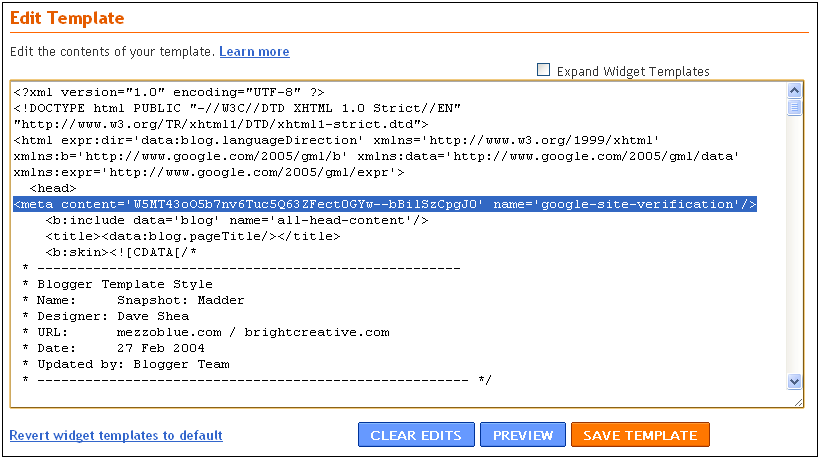
verify webmaster tools

In Webmaster Tools

9. On the Manage Verification page, confirm that “Meta tag” is selected as the verification method and click the “ Verify ” button.

Webmaster Tools will check to see that the specified tag is present. If it is, you will be considered as the blog owner and you’re ready to start using Webmaster Tools!

Thereafter, you can go ahead to submit your blog sitemap to Google Webmaster Tools and also to Bing Webmaster Tools .

In my future posts, I will share with you reasons why you must verify your blog using Google Webmaster tools and how you can use the different webmaster tools . Just make sure you are subscribed to this blog for you not to miss the tutorials.

Source: Google Webmaster Central Blog

Please Share :
blogger tips

Like What You Read?

Sign Up to get similar articles delivered to your email inbox.

Leave a Reply Cancel reply

Your email address will not be published. Required fields are marked *

WANT TO ADVERTISE?

Chat on WhatsApp

RELATED POSTS

  • Submit Blogger/Blogspot sitemaps via Google Webmaster Tools: 2 Easy Methods
  • How To Add Header Codes To Blogger and WordPress Blogsadd header codes to wordpress websites
  • How To Submit Blog To Bing and Yahoo Search Engine

FEATURED


  • CREDICORP launches C.L.I.C.K.D. Scheme with FG’s 3MTT Programme, expanding affordable consumer credit for locally-assembled laptops and devices for digital workers

    CREDICORP launches C.L.I.C.K.D. Scheme with FG’s 3MTT Programme, expanding affordable consumer credit for locally-assembled laptops and devices for digital workers

  • What Happens to Your Online Accounts When You Die?

    What Happens to Your Online Accounts When You Die?

JOIN AI WEB DESIGN GROUP


  • AI Website Design Training Whatsapp Group by Jidetheblogger

    AI Website Design Training Whatsapp Group by Jidetheblogger

← How To Activate Airtel Quick Talk Package
Promo: Buy Nokia 808 Pureview for just N41,000 instead of N100,000 Actual Price in Nigeria →

Join 25,000+ subscribers

Receive our latest blog posts in your inbox.

Search

Social

Facebook

Instagram

Twitter

new ogbongeblog logo

Copyright © 2026 | About | Advertise | Featured | Sitemap | Privacy Policy | Powered by WordPress

Your cart (items: 0)

Products in cart

Product
Details
Total
Subtotal ₦0.00
Shipping and discounts calculated at checkout.
View my cart
Go to checkout

Your cart is currently empty!

Start shopping

Notifications

LIKE My Fan Page

Privacy Policy | Copyright © 2012,OgbongeBlog.All Rights Reserved. Powered by Blogger .
Create a Mobile Site
View Site in Mobile | Classic
Share by:

