
Skip to content
new ogbongeblog logo
  • Advertise
  • Blog
  • Contact

How To Make Phone Calls With Glo 3G Internet Modem

January 18, 2011

·

Uncategorized
jidetheblogger Avatar
jidetheblogger

If you have a Globacom 3G High Speed Internet Modem, you can call use it to call your loved ones with just a click of a button.
This is just one of the reasons I decided to go for the Glo Modem when I was shopping for a 3G Modem. Apart from this feature, you can also load vouchers directly on your Glo Modem and buy your internet bundles without having to send codes i.e you click on the button of the bundle you want and it gets activated for you asap.

More so, once you unlock your Glo 3G Modem , you can use it with MTN , Etisalat and Airtel unlike some other modems which will still fail to accept some SIMS after been unlocked.

Whenever I load my Glo SIM, I use to get some free airtime along with it ( per N500, N1000 recharge). With the “Call” feature of the Glo modem, I find it easy using this free airtime in calling my loved ones.

How Do I Make The Calls?

Launch Your Glo 3G modem Interface
You should see the Call button as indicated in the picture below. Click on it.

Callbutton

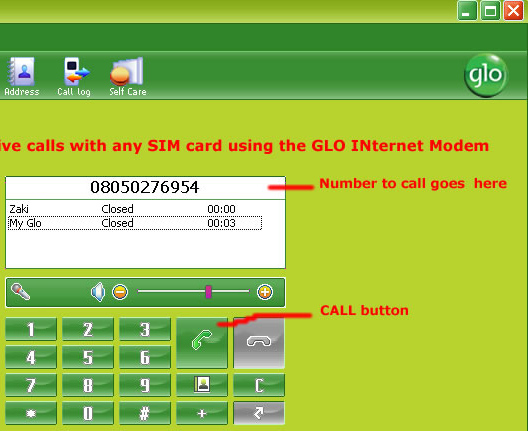
Thereafter, you will see something similar to the picture below:
GloModemCalls2

Enter the phone number you want to call and click the Call button as indicated in the picture above.

That’s all.

Note: You do not necessarily need to use external mic before you can make the calls. This depends on your laptop though. My own laptop has in-built microphone, hence I make and receive calls with my modem without any external mic.

Do not forget to check out other 3G Modem tips, including subscription codes of all networks at : https://www.ogbongeblog.com/search/label/3G%20Modem%20Tips

Cheers!

Please Share :
3G Modem Tips

Like What You Read?

Sign Up to get similar articles delivered to your email inbox.

Leave a Reply Cancel reply

Your email address will not be published. Required fields are marked *

One response to “How To Make Phone Calls With Glo 3G Internet Modem”

  1. Anonymous Avatar
    Anonymous
    January 19, 2011

    You are right… It works. I have been using it to make phone calls for a while now.

    Loading…
    Reply

WANT TO ADVERTISE?

Chat on WhatsApp

RELATED POSTS

  • Unlock ZTE Modems: Change to Universal Modem
  • Steps To Take After Unlocking Fastlink Modem, Glo Modem,Zain Modem,Etisalat Modem With IMEI Number
  • List of Globacom Outlets In Nigeria, Buy Glo Modem for N5000

FEATURED


  • CREDICORP launches C.L.I.C.K.D. Scheme with FG’s 3MTT Programme, expanding affordable consumer credit for locally-assembled laptops and devices for digital workers

    CREDICORP launches C.L.I.C.K.D. Scheme with FG’s 3MTT Programme, expanding affordable consumer credit for locally-assembled laptops and devices for digital workers

  • What Happens to Your Online Accounts When You Die?

    What Happens to Your Online Accounts When You Die?

JOIN AI WEB DESIGN GROUP


  • AI Website Design Training Whatsapp Group by Jidetheblogger

    AI Website Design Training Whatsapp Group by Jidetheblogger

← Download Snaptu : Facebook, Twitter, Sudoku, News, Dictionary all On your Phone
MTN Free browsing on Nokia C3 Promo Facts →

Join 25,000+ subscribers

Receive our latest blog posts in your inbox.

Search

Social

Facebook

Instagram

Twitter

new ogbongeblog logo

Copyright © 2026 | About | Advertise | Featured | Sitemap | Privacy Policy | Powered by WordPress

Your cart (items: 0)

Products in cart

Product
Details
Total
Subtotal ₦0.00
Shipping and discounts calculated at checkout.
View my cart
Go to checkout

Your cart is currently empty!

Start shopping

Notifications

%d

    LIKE My Fan Page

    Privacy Policy | Copyright © 2012,OgbongeBlog.All Rights Reserved. Powered by Blogger .
    Create a Mobile Site
    View Site in Mobile | Classic
    Share by:


