
Skip to content
new ogbongeblog logo
  • Advertise
  • Blog
  • Contact

How To Place Personal Advert Banners on Blogger Mobile View

September 1, 2013

·

Uncategorized
jidetheblogger Avatar
jidetheblogger

In continuation of the series of tutorials on the customization of Blogger custom mobile view, I have decided to share with you today, how to place advertisement on the mobile view of your blogspot blog.

Placing advert banners of sites, events, businesses etc on the mobile view of your blog can be generating extra income for you online especially if you are able to get advertisers that will be willing to market their product and services to mobile users.

Some advertisers will even be more willing to buy advert spaces on your blog if you let them know that their adverts will display both on the mobile and desktop view of your blog.

How To Get Started

==> Learn how to generate banners online here if you don’t have your ad banner handy. Just make sure the width of your ad banner is not more than 300px. 300×50 and 300×250 ad banners are recommended for mobile sites.

Now, let me assume you’ve saved your ad banner on your PC. You can add it to your Blogger blog using the “ Image ” gadget or the “ HTML/Javascript ” gadget.

==> Log in to your Blogger dashboard, go to “ Layout ” and click on “ Add a gadget “

*** If you want it to appear at the top of your mobile view, add the gadget to the header section. If you want it down the mobile view, add it to the sidebar or footer section.

Using HTML/Javascript Gadget

If you want to use the “ HTML/Javascript ” gadget (recommended), upload your banner somewhere, copy the image code and paste it in the gadget. The code for your banner should be similar to the one below:

<a href=”https://www.ogbongeblog.com/p/advertise.html” target=”_blank”><img border=”0″  src=”http://1.bp.blogspot.com/-LFxbDIlMZ7k/UaxOzno7x8I/AAAAAAAAH1Q/ptqvSSTkQek/s1600/advertise+here.png” width=”300px” height=”250px”/></a>

You can read how to use Blogger.com to host your banners here .

Using “Image” Gadget

If you want to use the “ Image ” gadget, browse your computer for the banner, upload it, then add the URL of where it will link to in the space provided.

Ensure the banner fits in perfectly into the section you are adding it to. i.e do not add 300×50 ad banner to your sidebar which is just 120px in width.

What Next?

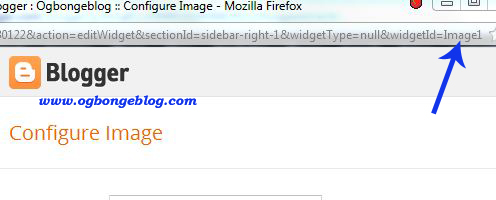
==> After adding the banner to your blog, click the “ edit ” link under “ HTML ” or “ Image ” gadget. Get the widget ID (eg HTML10 or Image1) from the URL bar as seen in the screenshot below and take note of it.
widgetIDimage

==> Go to “ Template “. Under “ Mobile “, select “ Yes. Show mobile template on mobile devices ” and choose “ Custom ” from the “ choose mobile template ” dropdown box.

==> Save your settings.

Now, we need to activate the Banner to be displayed on the Blogger mobile view.

==> Go to “ Template ” > “ Edit HTML “

==> Click on the “ Jump to Widget ” tab and click on the widgetID of the banner you added to your blog earlier. This will take you to the code of the widget in your HTML.

==> Add mobile=’yes’ to the line of code as seen in the screenshot below:

blogger mobile

==> SAVE your template.

View the mobile view of your blog by adding ?m=1 to your blog address eg www.ogbongeblog.com?m=1 and you should see the Banner been displayed on the mobile view.

NOTE

If you want it to display ONLY on the mobile view and not on the desktop view, use mobile=’only’ but if you do this, you will keep seeing an error message anytime you want to re-arrange the widgets on your blog layout.

Please, relay your comments, contribution etc via the comment form below.

Don’t forget to share this with your friends.

You might be interested in “ how to place Advertise Here banners on Blogspot blogs ” and you can read more Blogger tips here .

Please Share :
blogger mobile template tips blogger tips

Like What You Read?

Sign Up to get similar articles delivered to your email inbox.

Leave a Reply Cancel reply

Your email address will not be published. Required fields are marked *

23 responses to “How To Place Personal Advert Banners on Blogger Mobile View”

  1. Chidi Avatar
    Chidi
    September 1, 2013

    Thanks Jide. Will try it when on PC. Guess I can't do this on my phone. God bless you.

    Loading…
    Reply
    1. Jide Oguns Avatar
      Jide Oguns
      September 2, 2013

      Easier when done on PC

      Loading…
      Reply
  2. Osasboy Omoregie Avatar
    Osasboy Omoregie
    September 1, 2013

    Happy sunday bro….. Can I use my blackberry to Do it…. My system has fault

    Loading…
    Reply
    1. Jide Oguns Avatar
      Jide Oguns
      September 2, 2013

      Well, you can try it but I doubt if you can with a BB

      Loading…
      Reply
  3. don vick Avatar
    don vick
    September 1, 2013

    please how can i scout for advetisers to advertise in my blog

    Loading…
    Reply
    1. Jide Oguns Avatar
      Jide Oguns
      September 2, 2013

      On popular blog and websites. You can also try buysellads.com. You should also be posting about it on social networks

      Loading…
      Reply
  4. Trendy Rammy Avatar
    Trendy Rammy
    September 1, 2013

    Yipeeee, so informative. I followed the steps n ive done it right but pls how can I iremove it from my web version cos I now ve 2 same banners on the web version. http://www.trendyrammy.com

    Loading…
    Reply
    1. Jide Oguns Avatar
      Jide Oguns
      September 2, 2013

      if you don't want it to appear on the web version, use mobile='only'

      Loading…
      Reply
  5. Osakwe Jindu Avatar
    Osakwe Jindu
    September 2, 2013

    I have a problem, my blog doesn't change to Mobile view when i choose
    "Yes. Show mobile template on mobile devices" and choose "Custom" from the "choose mobile template" dropdown box, could my template be the problem? the only way it can change to mobile view is if i choose one of bloggers default mobile view. what can i do
    http://www.JinduBlog.com

    Loading…
    Reply
    1. Jide Oguns Avatar
      Jide Oguns
      September 2, 2013

      Problem probably with your template. Might be using an old third party template. I can fix it for you though..

      Loading…
      Reply
  6. Agwu Iyke samson Avatar
    Agwu Iyke samson
    September 2, 2013

    Hi jide, I'm having problm wit my Edit html section of my blog template. Whenever I edit wit new script, d new script won't just work on my blog though I've tried to use another template maybe that will help bt yet it just won't work.

    Loading…
    Reply
    1. Jide Oguns Avatar
      Jide Oguns
      September 2, 2013

      I don't understand what you mean by editing with new script. If you want to add any script to the body of your blog in your HTML, you must parse it before pasting it in your HTML. You can use http://www.freehtmlparser.blogspot.com

      Loading…
      Reply
  7. Agwu Iyke samson Avatar
    Agwu Iyke samson
    September 2, 2013

    I mean html codes nt ad codes [like the one u explained in this post]. Thanks for ur response

    Loading…
    Reply
  8. Oga Kingsley Avatar
    Oga Kingsley
    September 3, 2013

    Jide please drop a tutorial of how to make "like us on facebook" and "follow us on twitter" appear on mobile view.

    Loading…
    Reply
  9. GODWIN OGIDAN Avatar
    GODWIN OGIDAN
    November 22, 2013

    Jide how do i add the image gadget to the header section. You didnt indicate that. Though the footer section is working.

    Loading…
    Reply
  10. Nwagboo Emmanuel Avatar
    Nwagboo Emmanuel
    December 4, 2013

    thats really great, will help me to get going,checkout platinumdaily.blogspot.com for all the breaking and interesting news around you. At platinumdaily.blogspot.com, we explore into the most trusted and certified news casters world wide to gather all the informations you need in just one place.

    Loading…
    Reply
  11. onyinyechukwu joseph Avatar
    onyinyechukwu joseph
    January 23, 2014

    Pls i want u to reply…Can i use an i pad for blogging?

    Loading…
    Reply
  12. great minds Avatar
    great minds
    August 20, 2015

    Pls I dont understand how to put dis mtn advert on my blog and d advert should just be random… mimdrive.blogspot.com dts my blog…tnx

    Loading…
    Reply
  13. Major, Gen. victor eke Avatar
    Major, Gen. victor eke
    October 14, 2015

    It work for me. Tnx mentor, buh pls how can can i centralized my advert on Web view?

    Victoreke.blogspot.com.ng

    Loading…
    Reply
    1. NAIRALOADIT Avatar
      NAIRALOADIT
      April 30, 2016

      Victor ekes, visit my blog and learn how to centralized advert on web view http://www.nairaloadit.blogspot.com click on the category select blogging tips and see how to do so keep enjoying trick from nairaloadit.blogspot.com.ng

      Loading…
      Reply
  14. Chitexland Blog tv Avatar
    Chitexland Blog tv
    July 3, 2017

    Pls am a new blogger how can I make banner ad show on my blogger

    Loading…
    Reply
  15. galvin Avatar
    galvin
    December 11, 2017

    best hackers ever..

    Loading…
    Reply
  16. MUHAJER SEMAN SURAFEL Avatar
    MUHAJER SEMAN SURAFEL
    January 23, 2021

    thanks

    Loading…
    Reply

WANT TO ADVERTISE?

Chat on WhatsApp

RELATED POSTS

  • How To Place Adsense Links Ads below WordPress Posts Titles
  • dfp Tutorial : How I Use Google DFP To Rotate Ads In One Ad Unithow to use dfp ad server for online ad network advertising
  • How To Display Adsense On Mobile Templates of Blogger/Blogspot blogs

FEATURED


  • CREDICORP launches C.L.I.C.K.D. Scheme with FG’s 3MTT Programme, expanding affordable consumer credit for locally-assembled laptops and devices for digital workers

    CREDICORP launches C.L.I.C.K.D. Scheme with FG’s 3MTT Programme, expanding affordable consumer credit for locally-assembled laptops and devices for digital workers

  • What Happens to Your Online Accounts When You Die?

    What Happens to Your Online Accounts When You Die?

JOIN AI WEB DESIGN GROUP


  • AI Website Design Training Whatsapp Group by Jidetheblogger

    AI Website Design Training Whatsapp Group by Jidetheblogger

← Download Jumia App for Online Shopping
WayBack Machine Lets You View Snapshots of What A Site Looked Like In The Past →

Join 25,000+ subscribers

Receive our latest blog posts in your inbox.

Search

Social

Facebook

Instagram

Twitter

new ogbongeblog logo

Copyright © 2026 | About | Advertise | Featured | Sitemap | Privacy Policy | Powered by WordPress

Your cart (items: 0)

Products in cart

Product
Details
Total
Subtotal ₦0.00
Shipping and discounts calculated at checkout.
View my cart
Go to checkout

Your cart is currently empty!

Start shopping

Notifications

%d

    LIKE My Fan Page

    Privacy Policy | Copyright © 2012,OgbongeBlog.All Rights Reserved. Powered by Blogger .
    Create a Mobile Site
    View Site in Mobile | Classic
    Share by:


