
Skip to content
new ogbongeblog logo
  • Advertise
  • Blog
  • Contact

How To Set GeoGraphic Target With Google Webmaster Tools

digital marketing

\

Written by

jidetheblogger Avatar
jidetheblogger

Published :

September 8, 2013

Last Modified :

January 18, 2025

Google Webmaster Tools features “ Geo-targeting ” tool which handles geographic data, (not language data) and allows site owners to set targets. It allows them to connect their sites to a country, as an intended audience for their websites.

If your site has a neutral top-level domain, such as .com or .org, geotargeting helps Google determine how your site appears in search results for geographic queries.

According to Google, setting a geographic target won’t impact your appearance in search results unless a user limits the scope of the search to a certain country.

A good example of where setting a geographic target would be useful is for a restaurant website : if the restaurant is in Nigeria, it’s probably not of interest to folks in France. But if your content is in French and is of interest to people in multiple countries/regions, it’s probably better NOT TO restrict it.

So, if you’re targeting users in different locations—for example, if you have a site in French that you want users in France, Canada, and Nigeria to read—Google doesn’t recommend that you use this tool to set France as a geographic target.

How To Set A GeoGraphic Target

==> Log in to Google WebMaster Tools page .
==> On the Webmaster Tools Home page, click the site you want.
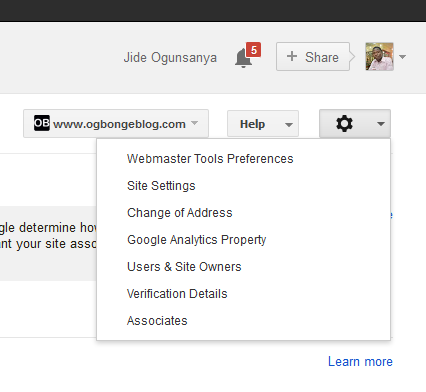
==> Click the gear icon , and then click Site Settings .
Geotargeting

==> In the Geographic target section, select the option you want and click SAVE.

If you want to ensure that your site is not associated with any country or region, select Unlisted in the drop-down list.

NOTE :

Sites with country-coded top-level domains (such as .ng) are already associated with a geographic region, in this case -Nigeria. In this case, you won’t be able to specify a geographic location.

That’s all.

Source: Google Webmaster Tools Help

Please Share :
seo

Like What You Read?

Sign Up to get similar articles delivered to your email inbox.

Leave a Reply Cancel reply

Your email address will not be published. Required fields are marked *

8 responses to “How To Set GeoGraphic Target With Google Webmaster Tools”

  1. David Avatar
    David
    September 8, 2013

    I have been looking for this all these while because I need to set my site to Nigeria. Thx Jide.

    Loading…
    Reply
    1. Jide Oguns Avatar
      Jide Oguns
      September 8, 2013

      You're welcome. Remember, do not restrict your site to Nigeria if your site will be of interest to folks in other countries.

      Loading…
      Reply
  2. olarewaju blessing Avatar
    olarewaju blessing
    September 8, 2013

    Thanks for the info

    Loading…
    Reply
    1. Jide Oguns Avatar
      Jide Oguns
      September 10, 2013

      You're welcome bro

      Loading…
      Reply
  3. Ugochukwu Nneji Avatar
    Ugochukwu Nneji
    September 10, 2013

    If you set it to a particular country, would it completely stop traffic from other countries?

    Loading…
    Reply
    1. Jide Oguns Avatar
      Jide Oguns
      September 10, 2013

      NO. I used to get traffic from other countries when I restricted mine to Nigeria. I've removed the restriction though..

      Loading…
      Reply
    2. Louis Avatar
      Louis
      May 6, 2017

      When you removed the restriction did your ranking in Nigeria reduce? If it reduced, how long did it take before the rankings reduced? Days? Weeks? Months? And if it did. How long before you regained your Normal ranking + worldwide Ranking? I'm asking this because I just removed the restriction on my site because I'm ranking no 1 in my target keyword but I'm not found in the UK for that same keyword. Thanks!

      Loading…
      Reply
  4. Kemi Salahu Avatar
    Kemi Salahu
    March 2, 2017

    Thanks for this. I guess I shouldn't choose a target country for my blog http://www.kemtechie.com

    Loading…
    Reply

WANT TO ADVERTISE?

Chat on WhatsApp

RELATED POSTS

  • How To Submit Blog To Bing and Yahoo Search Engine
  • Google Webmasters: How To Add your blog/site to Google Search Listings
  • Submit Blogger/Blogspot sitemaps via Google Webmaster Tools: 2 Easy Methods

FEATURED


  • CREDICORP launches C.L.I.C.K.D. Scheme with FG’s 3MTT Programme, expanding affordable consumer credit for locally-assembled laptops and devices for digital workers

    CREDICORP launches C.L.I.C.K.D. Scheme with FG’s 3MTT Programme, expanding affordable consumer credit for locally-assembled laptops and devices for digital workers

  • What Happens to Your Online Accounts When You Die?

    What Happens to Your Online Accounts When You Die?

JOIN AI WEB DESIGN GROUP


  • AI Website Design Training Whatsapp Group by Jidetheblogger

    AI Website Design Training Whatsapp Group by Jidetheblogger

← Make Money Online With Blog Posts Photos at GumGum.com
Download WeChat for Nokia, Android, Blackberry and iPhone →

Join 25,000+ subscribers

Receive our latest blog posts in your inbox.

Search

Social

Facebook

Instagram

Twitter

new ogbongeblog logo

Copyright © 2026 | About | Advertise | Featured | Sitemap | Privacy Policy | Powered by WordPress

Your cart (items: 0)

Products in cart

Product
Details
Total
Subtotal ₦0.00
Shipping and discounts calculated at checkout.
View my cart
Go to checkout

Your cart is currently empty!

Start shopping

Notifications

%d

    LIKE My Fan Page

    Privacy Policy | Copyright © 2012,OgbongeBlog.All Rights Reserved. Powered by Blogger .
    Create a Mobile Site
    View Site in Mobile | Classic
    Share by:


