
Skip to content
new ogbongeblog logo
  • Advertise
  • Blog
  • Contact

How To Use an Alternate Name (eg nickname) in Facebook Profile Name

January 2, 2012

·

Uncategorized
jidetheblogger Avatar
jidetheblogger

If you are interested in listing your second name on your Facebook account (eg nickname, professional name or maiden name), you will have to add an alternate name to your Facebook account.
How To Get Started

  1. Click the account menu207097142662705 1348602426at the top right of your Facebook page.
  2. Choose Account Settings .
  3. Find the Name field and click Edit .
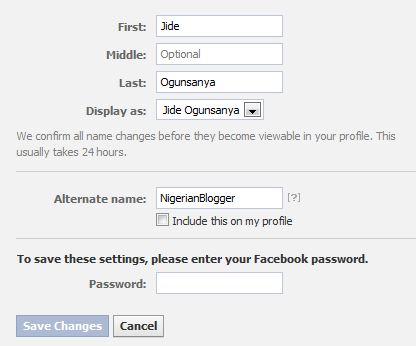
  4. Enter your alternate name in the provided box as seen in the picture below:
FbName2
5. Check Include this on my profile (timeline) to have your alternate name listed on your profile (timeline). Otherwise, it will only help people find you in search. Save your changes.


Note:
If you checked the box to have your alternate name listed on your
profile (timeline), it will appear next to your name at the top of your
personal profile (timeline) page as seen in the picture below:

FbName3

The “ NigerianBlogger ” enclosed in bracket in the picture above is the alternate name I used for this Facebook profile of mine.  The alternate name will also show up next to your
name in search results and any friend requests you send.

I hope this helps…

Cheers!

Please Share :
facebook

Like What You Read?

Sign Up to get similar articles delivered to your email inbox.

Leave a Reply Cancel reply

Your email address will not be published. Required fields are marked *

4 responses to “How To Use an Alternate Name (eg nickname) in Facebook Profile Name”

  1. Abdul Avatar
    Abdul
    January 3, 2012

    Thanks for the info

    Loading…
    Reply
  2. Anonymous Avatar
    Anonymous
    January 3, 2012

    This is a wonderful tip a lot are not aware of, thanks

    http://www.trends.com.ng

    Loading…
    Reply
  3. Ruby Claire Avatar
    Ruby Claire
    January 4, 2012

    Wow! thats a unique and new tip for Facebook users. I have shared it on my Facebook wall. Thanks for sharing.

    Cv Template

    –

    Loading…
    Reply
  4. greatjay Avatar
    greatjay
    February 4, 2012

    Good one, I will try it. Thank you

    Loading…
    Reply

WANT TO ADVERTISE?

Chat on WhatsApp

RELATED POSTS

  • How to change Facebook Profile Name
  • How to Open 2go Account Free
  • Does Facebook Accepts Verve Cards As Payment Options for Facebook and Instagram Ads ?use verve cards to pay for facebook ads and instagram ads

FEATURED


  • CREDICORP launches C.L.I.C.K.D. Scheme with FG’s 3MTT Programme, expanding affordable consumer credit for locally-assembled laptops and devices for digital workers

    CREDICORP launches C.L.I.C.K.D. Scheme with FG’s 3MTT Programme, expanding affordable consumer credit for locally-assembled laptops and devices for digital workers

  • What Happens to Your Online Accounts When You Die?

    What Happens to Your Online Accounts When You Die?

JOIN AI WEB DESIGN GROUP


  • AI Website Design Training Whatsapp Group by Jidetheblogger

    AI Website Design Training Whatsapp Group by Jidetheblogger

← Download OPERA MINI CASTS REBIRTH HANDLER
Top web hosting companies in Nigeria →

Join 25,000+ subscribers

Receive our latest blog posts in your inbox.

Search

Social

Facebook

Instagram

Twitter

new ogbongeblog logo

Copyright © 2026 | About | Advertise | Featured | Sitemap | Privacy Policy | Powered by WordPress

Your cart (items: 0)

Products in cart

Product
Details
Total
Subtotal ₦0.00
Shipping and discounts calculated at checkout.
View my cart
Go to checkout

Your cart is currently empty!

Start shopping

Notifications

%d

    LIKE My Fan Page

    Privacy Policy | Copyright © 2012,OgbongeBlog.All Rights Reserved. Powered by Blogger .
    Create a Mobile Site
    View Site in Mobile | Classic
    Share by:


