
Skip to content
new ogbongeblog logo
  • Advertise
  • Blog
  • Contact

How to use Payment Number to trace location of Google Adsense Check

October 5, 2011

·

Uncategorized
jidetheblogger Avatar
jidetheblogger

I just discovered a method by which you can trace the location of your Google Adsense check using your check “ Payment Number ” instead of the “DHL tracking number”. This will enable you to easily track your check once you see the “Payment issued” link on your Google Adsense Payment History Page.
If you always observe your Payment details carefully, you will agree with me that the “Payment Number” is always there once the payment has been issued, compared to the “DHL Tracking Number” which might take up to the 4th of the following month before you can notice it in your Payment details.

Henceforth, if you opt in for “Secure delivery” as your mode of payment, you no longer have to be waiting for your “DHL Tracking Number” before you can trace the current location of your check. Irrespective of which part of the world you are, in as much as DHL is the courier that handles your Adsense check, you can track your check on DHL website using your check “Payment Number”.

How?

Login to your Adsense account and click on “ Payment “. If you are using the “o ld interface “, Login, click on “My Account”, then “Payment History”.

Then, click on the details link for the latest “payment issued”.  Take note of the “ Payment Number ” and paste it in DHL’s website below:
http://track.dhl-usa.com/TrackByRef.asp?nav=TrackByRef
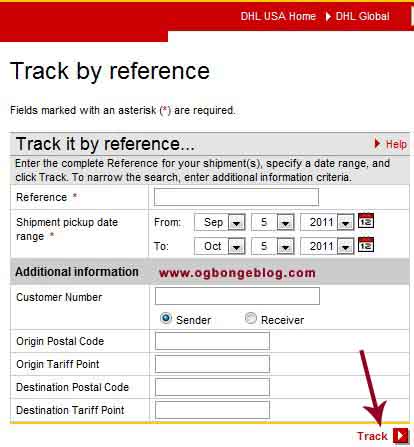
On the left menu at the page above, click ” Track by Shipper’s reference “ and you should see a page similar to the one in the picture below:
DHLTrackingbyPaymentNumber

For the shipment pickup date range, enter the payment date in your Adsense payment details for “ FROM ” and today’s date for “ TO “. Leave the rest blank and click “ Track “.

You will see a new page with detailed information about your check.

That’s all.

I hope this helps….

If you have questions to ask or contributions to make, feel free to use the comment form.

In my future posts, I will explain how to use DHL Tracking number to track your Adsense checks. Subscribe to my blog if you do not want to miss it.

Cheers!

Please Share :
adsense

Like What You Read?

Sign Up to get similar articles delivered to your email inbox.

Leave a Reply Cancel reply

Your email address will not be published. Required fields are marked *

2 responses to “How to use Payment Number to trace location of Google Adsense Check”

  1. kaydee Avatar
    kaydee
    December 4, 2013

    Hello Jide,

    thanks for this Tips but i will like to Add/Correct something in your post concerning the payment number.

    Removing the first Zero (0) from the payment number works without stress and you won't be given 'No result found' whenever you try to check your shipment details.

    Hope to hear from you because i might be wrong but hey, i have tried this severally and it was your tutorial i read before noticing.

    Cheers!

    Loading…
    Reply
  2. Bolaji Avatar
    Bolaji
    February 28, 2014

    Yeah @KAydee, it just worked for me as you said, initiallty it was saying error no result found but when I removed the zero like u said, it showed the result

    Loading…
    Reply

WANT TO ADVERTISE?

Chat on WhatsApp

RELATED POSTS

  • How To Use Adsense Payment Number To Get DHL Tracking Number of Your Adsense Cheque
  • How to receive Google Adsense checks via DHL in Nigeria
  • Google Adsense PIN: Reasons Why You Might Have Not Received Yours

FEATURED


  • CREDICORP launches C.L.I.C.K.D. Scheme with FG’s 3MTT Programme, expanding affordable consumer credit for locally-assembled laptops and devices for digital workers

    CREDICORP launches C.L.I.C.K.D. Scheme with FG’s 3MTT Programme, expanding affordable consumer credit for locally-assembled laptops and devices for digital workers

  • What Happens to Your Online Accounts When You Die?

    What Happens to Your Online Accounts When You Die?

JOIN AI WEB DESIGN GROUP


  • AI Website Design Training Whatsapp Group by Jidetheblogger

    AI Website Design Training Whatsapp Group by Jidetheblogger

← How to create a Group Chat on Facebook
How to transfer credit on Etisalat Nigeria SIM Card →

Join 25,000+ subscribers

Receive our latest blog posts in your inbox.

Search

Social

Facebook

Instagram

Twitter

new ogbongeblog logo

Copyright © 2026 | About | Advertise | Featured | Sitemap | Privacy Policy | Powered by WordPress

Your cart (items: 0)

Products in cart

Product
Details
Total
Subtotal ₦0.00
Shipping and discounts calculated at checkout.
View my cart
Go to checkout

Your cart is currently empty!

Start shopping

Notifications

%d

    LIKE My Fan Page

    Privacy Policy | Copyright © 2012,OgbongeBlog.All Rights Reserved. Powered by Blogger .
    Create a Mobile Site
    View Site in Mobile | Classic
    Share by:


