
Skip to content
new ogbongeblog logo
  • Advertise
  • Blog
  • Contact

How URL Channel Lets Me Track Adsense Performance of My Sites, Blog Posts and Categories

November 26, 2012

·

Uncategorized
jidetheblogger Avatar
jidetheblogger

A URL channel is a customized Google Adsense reporting option that lets you track the performance of a specific page or domain . If you want to know the the Cost per Click , the number of clicks generated from a particular blog post on a particular date, you can achieve this by using URL channel instead of Google Adsense custom channel .

I now use URL channels to track the Adsense revenues from all my blogs , my popular blog posts and some labels . If you have many websites or you have different topics discussed on different sections of your website, you will find Google Adsense URL channels so useful.

So, How Do I Create Adsense URL Channels?
.
==> Sign in to your Google Adsense account
==> Visit the “ My ads” tab.
==> From the sidebar, choose your product (eg Content, Mobile Content), then URL channels .
Note that not all products support URL channels. You’ll see existing URL channels here.
==> To add a new URL channel, click the “ New URL channel ” button. You will see a box similar to the one below:
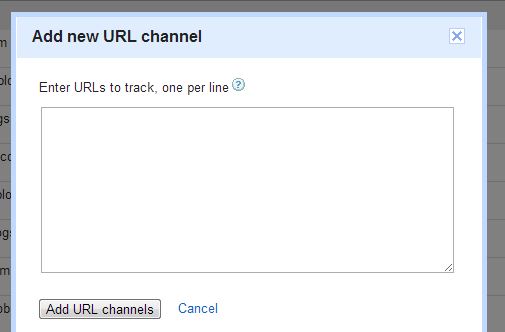
==> Enter URLs you’d like to track, one per line.
==> Click “ Add URLs ” to save.

Below are the URL formats I use to track narrowly or broadly

==> track all pages across another blog of mine ogbongesms.blogspot.com


==> track only pages across the mobile version of my blog m.ogbongeblog.com


==> track all pages across the blogger mobile template of my blog   ogbongeblog.com?m=1


==> track a specific blog post https://www.ogbongeblog.com/2012/09/download-ogbonges-blogger-guide-learn.html


==> track a specific label (category)   https://www.ogbongeblog.com/search/label/adsense


After you might have created your URL channels, you might have to wait for some hours before you will be able to track the performance of the channels.

How Do I Track Performance Using URL Channels?

==> Sign in to your Google Adsense account
==> Click the “ Performance reports ” tab
==> Click the “ URL Channels ” link on the sidebar
==> You can change the date range in the upper right corner of the page to whatever date you want to track.

You should now see the performance details of your URL channels.

That’s all.

Do you also use URL channels to track performance of your blog posts and labels? Please, let me hear from you.

Please Share :
adsense

Like What You Read?

Sign Up to get similar articles delivered to your email inbox.

Leave a Reply Cancel reply

Your email address will not be published. Required fields are marked *

10 responses to “How URL Channel Lets Me Track Adsense Performance of My Sites, Blog Posts and Categories”

  1. Simon Avatar
    Simon
    November 26, 2012

    I use it to track all my blogs but never know I can also use it to track individual posts. Thanks for the tips but can advertisers also target URL channels?

    Loading…
    Reply
    1. Jide Oguns Avatar
      Jide Oguns
      November 28, 2012

      No. They can only target Custom channels

      Loading…
      Reply
  2. Emmanuel Obarhua Avatar
    Emmanuel Obarhua
    November 27, 2012

    I don't but I will. Thanks for the info.

    Loading…
    Reply
    1. Jide Oguns Avatar
      Jide Oguns
      November 28, 2012

      You welcome bro

      Loading…
      Reply
  3. Abdul Tech Avatar
    Abdul Tech
    November 27, 2012

    Thanks for this awesome post. Heading to my Adsense Dashboard

    Loading…
    Reply
    1. Jide Oguns Avatar
      Jide Oguns
      November 28, 2012

      OK bro.

      Loading…
      Reply
  4. Adedokun Festus Avatar
    Adedokun Festus
    November 29, 2012

    i need ur help jide, my google adsense request was disapproved cuz the content wasnt enough, hw do i change the website so dat i can resend the application.

    thanks

    Loading…
    Reply
    1. Jide Oguns Avatar
      Jide Oguns
      November 30, 2012

      You need to add more rich, unique contents to the blog before reapplying. Keep adding quality content and reapply after a month.

      Loading…
      Reply
  5. Okaztle Avatar
    Okaztle
    December 2, 2012

    Thanks. I'v been wondering how to use this! But what of custom channels bro?

    Loading…
    Reply
  6. Godwin Odey Avatar
    Godwin Odey
    December 2, 2012

    I love that, its such an eye opener blog post there, THUMB Up to Ogbonge, Mentor Mi

    Loading…
    Reply

WANT TO ADVERTISE?

Chat on WhatsApp

RELATED POSTS

  • Custom Adsense Channels: Track ads performance etc
  • How I track my top Adsense-performing blog posts
  • How To Add Adsense Into WordPress Blog Posts

FEATURED


  • CREDICORP launches C.L.I.C.K.D. Scheme with FG’s 3MTT Programme, expanding affordable consumer credit for locally-assembled laptops and devices for digital workers

    CREDICORP launches C.L.I.C.K.D. Scheme with FG’s 3MTT Programme, expanding affordable consumer credit for locally-assembled laptops and devices for digital workers

  • What Happens to Your Online Accounts When You Die?

    What Happens to Your Online Accounts When You Die?

JOIN AI WEB DESIGN GROUP


  • AI Website Design Training Whatsapp Group by Jidetheblogger

    AI Website Design Training Whatsapp Group by Jidetheblogger

← Glo Bolt: Modem Price, New Data Volume and Features
Copyright Facts Bloggers Must Know →

Join 25,000+ subscribers

Receive our latest blog posts in your inbox.

Search

Social

Facebook

Instagram

Twitter

new ogbongeblog logo

Copyright © 2026 | About | Advertise | Featured | Sitemap | Privacy Policy | Powered by WordPress

Your cart (items: 0)

Products in cart

Product
Details
Total
Subtotal ₦0.00
Shipping and discounts calculated at checkout.
View my cart
Go to checkout

Your cart is currently empty!

Start shopping

Notifications

%d

    LIKE My Fan Page

    Privacy Policy | Copyright © 2012,OgbongeBlog.All Rights Reserved. Powered by Blogger .
    Create a Mobile Site
    View Site in Mobile | Classic
    Share by:


