
Skip to content
new ogbongeblog logo
  • Advertise
  • Blog
  • Contact

HTTPS Secure Connection Now Available For Blogspot Blogs

October 12, 2015

·

Uncategorized
jidetheblogger Avatar
jidetheblogger

Since 2008, Google has been working to make sure all Google services use strong HTTPS encryption by default. That means people using products like Search, Gmail, YouTube, and Drive will automatically have an encrypted connection to Google.

In this same vein, Google is expanding on the HTTPS Everywhere mission and beginning an initial rollout of HTTPS support for Blogspot. Hence, Blogger users can now opt in to use it .

Google argues that using HTTPS will help ensure that bad actors can’t track the activities of blog authors and visitors on a site, check that visitors open the correct website and aren’t being redirected to a malicious location”

How To Enable HTTPS in Blogger

==> Sign in to Blogger.
==> Select the blog to update.
==> On the left menu, click Settings > Basic > HTTPS Settings .
==> In HTTPS Availability, select “ Yes” .
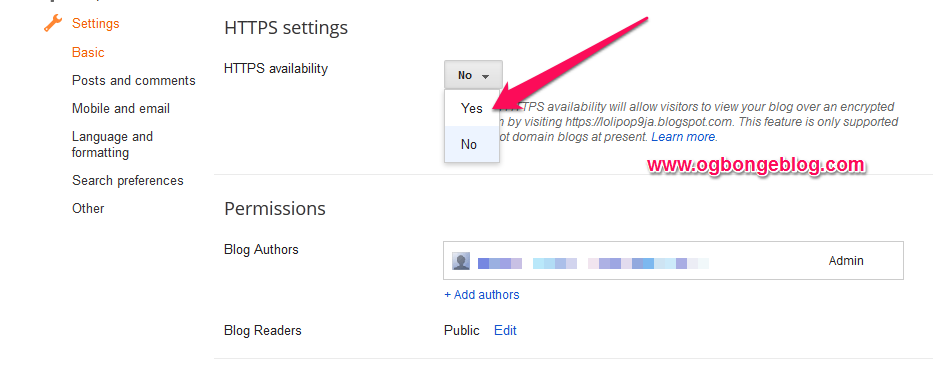
https blogger

Once enabled, your blog will become accessible over both HTTP and HTTPS connections. 
Unfortunately, blogs with custom domains are not supported in this first version. Also, if you choose to encrypt at this time, some of the current functionality of your blog may not work over HTTPS especially those that were not written for sites on secure connections. This is often caused by  mixed content errors , some of which may be fixable by you . 

How To Disable HTTPS in Blogger

To disable HTTPS, follow the steps above and select “ No ” for HTTPS Availability.

If you disable HTTPS, visitors will be redirected to the unencrypted HTTP version of your blog. All bookmarks to your blog will continue to work.

Kindly note that Google is now using HTTPS support as a ranking signal in its search results .

If your website is already serving on HTTPS, you can test its security level and configuration with the Qualys Lab tool .

Please Share :
blogger tips

Like What You Read?

Sign Up to get similar articles delivered to your email inbox.

Leave a Reply Cancel reply

Your email address will not be published. Required fields are marked *

9 responses to “HTTPS Secure Connection Now Available For Blogspot Blogs”

  1. Tunde Sanusi Avatar
    Tunde Sanusi
    October 12, 2015

    I wonder why Google didn't enable it for custom domain

    Loading…
    Reply
    1. Charlie Avatar
      Charlie
      October 12, 2015

      They will… with time.

      Loading…
      Reply
    2. Jide Oguns Avatar
      Jide Oguns
      October 12, 2015

      Let's hope they do so in the long run….

      Loading…
      Reply
  2. My Top Fans Avatar
    My Top Fans
    October 12, 2015

    I am constantly impressed with the high value content of this blog. Well done!

    Loading…
    Reply
    1. Jide Oguns Avatar
      Jide Oguns
      October 12, 2015

      Thanks

      Loading…
      Reply
  3. Revathi M Avatar
    Revathi M
    October 13, 2015

    Reverse Hair Loss Program Review

    http://binarymetabot.com/reverse-hair-loss-program-ebook-review/

    In as far as beauty is concerned, hair is the only part of the body that will keep growing at all ages, even when other parts of the body slow down or stop growing. The beauty of the head, perhaps and the face relies heavily on how best you take care of your hair.

    Loading…
    Reply
  4. Ourbaze Avatar
    Ourbaze
    October 13, 2015

    This option is good but I will encourage new bloggers to read well about HTTPS connection before going in. Nevertheless, Google has given the chance to option out. GOODLUCK. BLOGGERS. Waiting For WordPress to give the option as default and a thing of chance too

    Loading…
    Reply
  5. roland da silva Avatar
    roland da silva
    October 13, 2015

    really loves oga jide…….keep it up you have inspire me….rep rolandsilva.blogspot.com

    Loading…
    Reply
  6. kamoru Avatar
    kamoru
    January 7, 2016

    This is very great .

    Loading…
    Reply

WANT TO ADVERTISE?

Chat on WhatsApp

RELATED POSTS

  • Change Blogspot Address To Dot Com
  • Your Blogspot address ends with .in (or any country-specific URL) instead of .com? The Solution.
  • Submit Blogger/Blogspot sitemaps via Google Webmaster Tools: 2 Easy Methods

FEATURED


  • CREDICORP launches C.L.I.C.K.D. Scheme with FG’s 3MTT Programme, expanding affordable consumer credit for locally-assembled laptops and devices for digital workers

    CREDICORP launches C.L.I.C.K.D. Scheme with FG’s 3MTT Programme, expanding affordable consumer credit for locally-assembled laptops and devices for digital workers

  • What Happens to Your Online Accounts When You Die?

    What Happens to Your Online Accounts When You Die?

JOIN AI WEB DESIGN GROUP


  • AI Website Design Training Whatsapp Group by Jidetheblogger

    AI Website Design Training Whatsapp Group by Jidetheblogger

← How To Make Google Adsense Ad To Display Above The Fold On Opera Mini
AdQuet Wants To Rival Google Adsense For Publishers and Adwords for Brands →

Join 25,000+ subscribers

Receive our latest blog posts in your inbox.

Search

Social

Facebook

Instagram

Twitter

new ogbongeblog logo

Copyright © 2026 | About | Advertise | Featured | Sitemap | Privacy Policy | Powered by WordPress

Your cart (items: 0)

Products in cart

Product
Details
Total
Subtotal ₦0.00
Shipping and discounts calculated at checkout.
View my cart
Go to checkout

Your cart is currently empty!

Start shopping

Notifications

%d

    LIKE My Fan Page

    Privacy Policy | Copyright © 2012,OgbongeBlog.All Rights Reserved. Powered by Blogger .
    Create a Mobile Site
    View Site in Mobile | Classic
    Share by:


