
Skip to content
new ogbongeblog logo
  • Advertise
  • Blog
  • Contact

How To Install SSL Certificate and Private Key Via cPanel

  1. Home
  2. Blog
  3. Uncategorized
  4. How To Install SSL Certificate and Private Key Via cPanel
June 18, 2017

Written by

jidetheblogger Avatar
jidetheblogger

Last Modified :

October 8, 2017

Once you’ve acquired or generated ssl certificate for your site, the next thing to do, is to install it on your server. Most web hosting companies do offer ssl manager via cPanel, which makes it easy to upload & install ssl certificates.

Here is how to install ssl certificates via cPanel :

==> Sign in to your site cPanel via www.example.com/cpanel

==> Scroll to the ‘Security” section and click on “SSL/TLS” as seen in the screenshot below
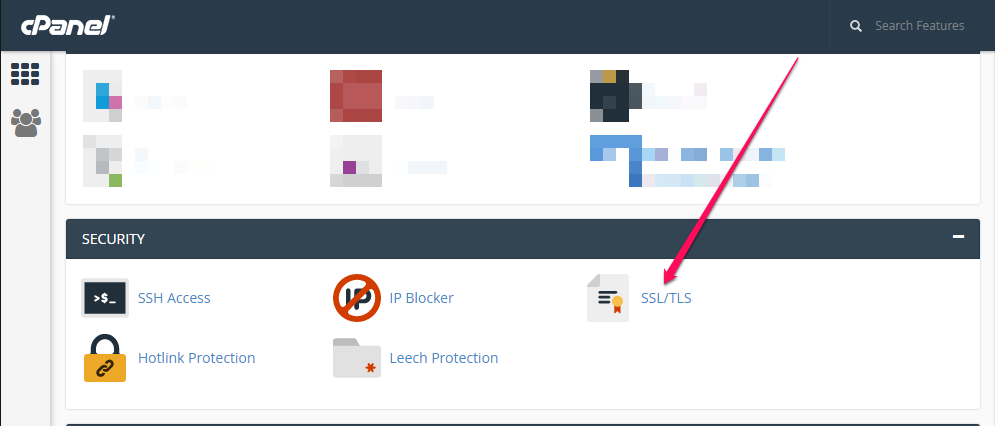
cpanel tls ssl manager

==> Click on ‘Manage SSL Sites’ under “Install and Manage SSL for your website (HTTPS)”
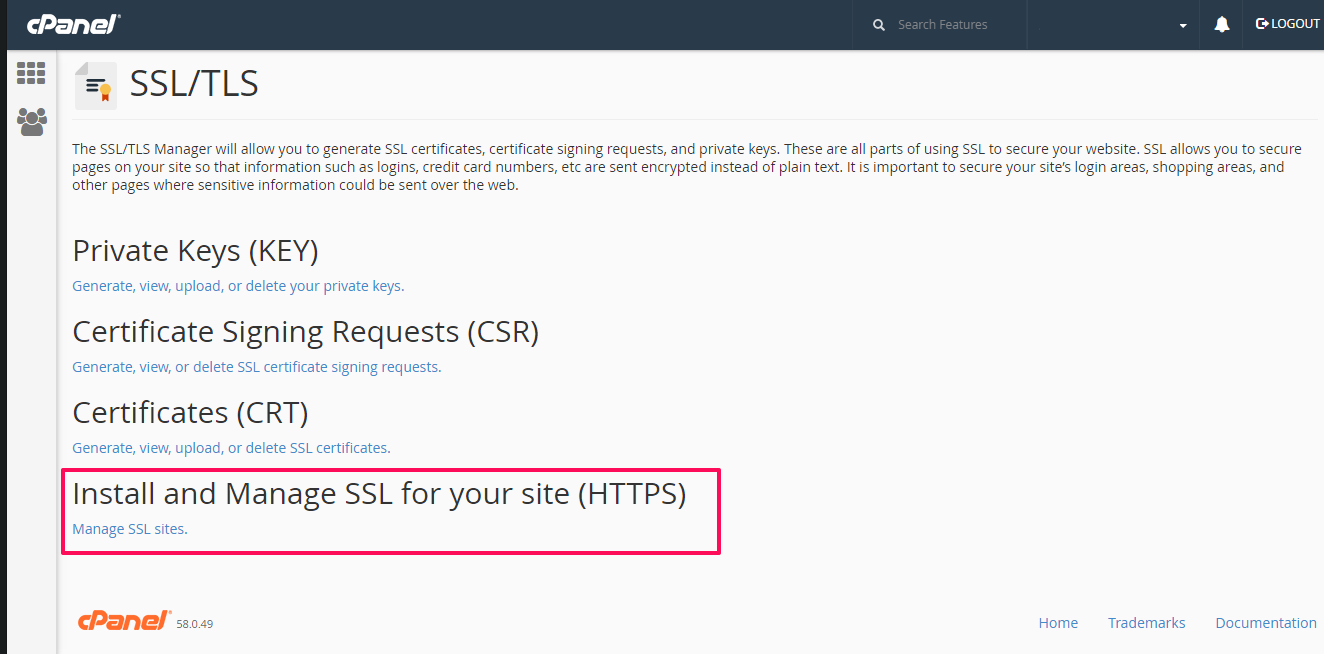
install ssl in cpanel

==> Select the domain name you want to enable https for, from the drop down menu
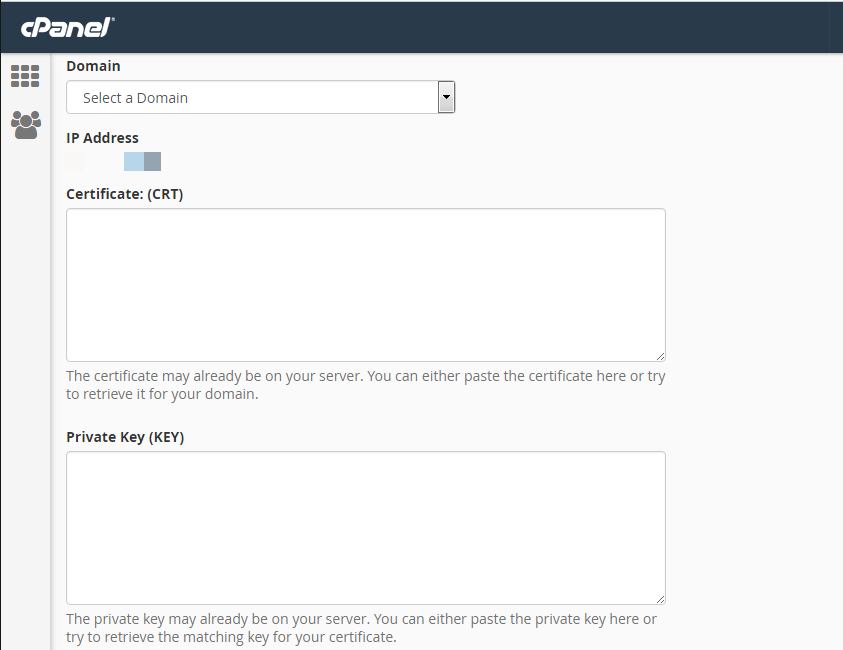
install ssl certificate and private key

==> Copy the ssl certificate code including —–BEGIN CERTIFICATE—– and —–END CERTIFICATE—– and paste it into the ‘Certificate: (CRT)’ field. Details of the ssl certificate will be displayed.

==> Copy the content of the private key file and paste it into the ‘Private Key (KEY)’ field.

==> Copy the CA Bundle file into the box under Certificate Authority Bundle (CABUNDLE) box. If you want to use the certificate for Mail Services, tick the checkbox ‘Enable SNI for Mail Services’.
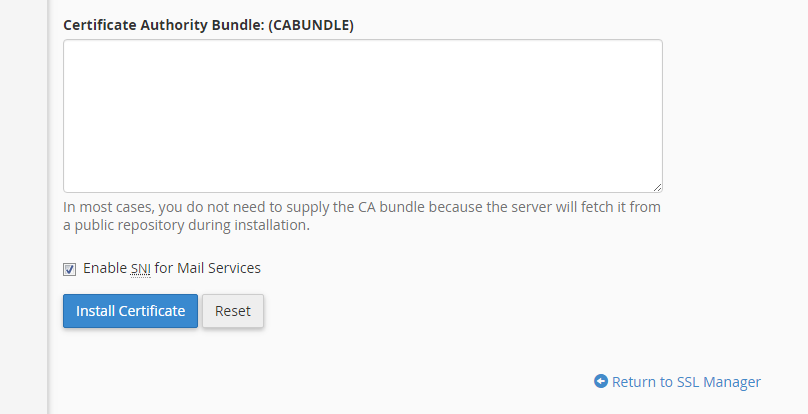
install ssl certificate ca bundle

==> Click on the ‘Install Certificate‘ button.

If the ssl certificate is installed, a success message will be displayed.
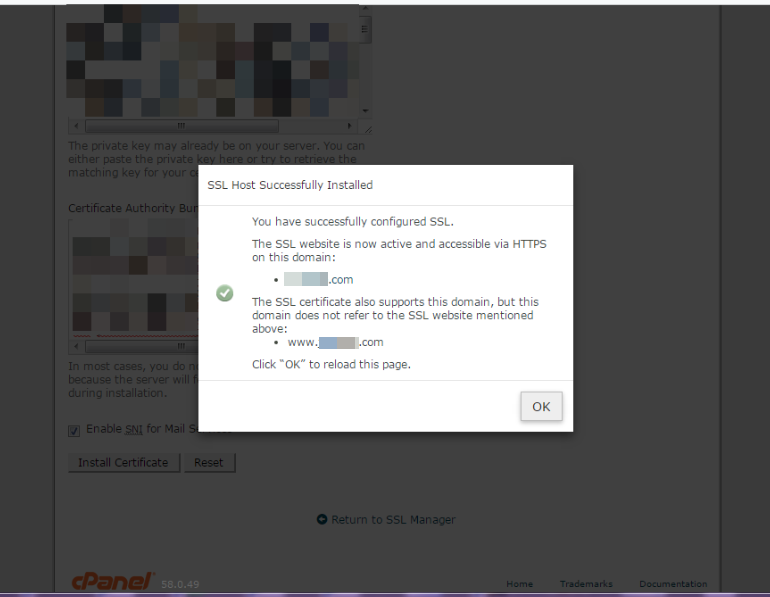
ssl certificate installed successfuly

Thereafter, you should be able to access your site via https://

Test your ssl certificate and do the needful things required after migrating from http to https.

NB : This tutorial also work for installing ssl certificates if Namecheap is your web hosting company.

Please Share :
ssl

Like What You Read?

Sign Up to get similar articles delivered to your email inbox.

Leave a Reply Cancel reply

Your email address will not be published. Required fields are marked *

WANT TO ADVERTISE?

Chat on WhatsApp

RELATED POSTS

  • SSLForFree.com : Get Free SSL Certificates For HTTPS Without Ssh Access
  • How I Renew Letsencrypt SSL Certificateexpired letsencrypt ssl certificate
  • Wp Encrypt : WordPress Plugin That Generates Free LetsEncrypt SSL Certificate For HTTPS

FEATURED


  • How to Pay Chinese Suppliers in RMB (Alipay & WeChat Pay) or Swap Naira, Kenyan Shillings, Ghana Cedis & USDT in Minutes

    How to Pay Chinese Suppliers in RMB (Alipay & WeChat Pay) or Swap Naira, Kenyan Shillings, Ghana Cedis & USDT in Minutes

JOIN AI WEB DESIGN GROUP


  • AI Website Design Training Whatsapp Group by Jidetheblogger

    AI Website Design Training Whatsapp Group by Jidetheblogger

RANDOM POSTS


    I Got One Free Month of Meta Verified After I Tried to Cancel My Subscription


    How To Make Money On Bamboo App: 5 Proven Ways


    How To Use Vibe Coding To Make Money


    How I Earn $100 Per Referral from Affiliate Marketing


    Bluetooth Printer That Connects To Phone


    Can I Use OPay Card for Facebook Ads?


    Why I Moved My Websites From Namecheap To Interserver.net


    How I Earn $50 Per Sale


MORE RANDOM POSTS
← SSLForFree.com : Get Free SSL Certificates For HTTPS Without Ssh Access
Wp Encrypt : WordPress Plugin That Generates Free LetsEncrypt SSL Certificate For HTTPS →

Join 25,000+ subscribers

Receive our latest blog posts in your inbox.

Search

Social

Facebook

Instagram

Twitter

new ogbongeblog logo

Copyright © 2026 | About | Advertise | Featured | Sitemap | Privacy Policy | Powered by WordPress

Your cart (items: 0)

Products in cart

Product
Details
Total
Subtotal ₦0.00
Shipping and discounts calculated at checkout.
View cart
Go to checkout

Your shopping cart is empty

Return to shop

Notifications

LIKE My Fan Page

Privacy Policy | Copyright © 2012,OgbongeBlog.All Rights Reserved. Powered by Blogger .
Create a Mobile Site
View Site in Mobile | Classic
Share by:
